Windows 7 64 bit Second Monitor not Showing Anything

Bob1234567890

New member
Local time
6:13 PM
Messages
28

I have two monitors. Both worked fine with this pc. The video card fried and I haven’t been able to get both working with my pc since. One is a Dell 1901FP (monitor #1). The other is a Viewsonic GS790 (Monitor #2).

In Windows 7 (64 bit) Monitor #1 works fine. Monitor #2 shows up in the Windows screenresolution screen but nothing shows up on it.

I have tried two different video cards both EVGA. Neither worked, both had the same issue. One was a GeForce GT 730 2GB while the otherwas a GeForce 8400 GS.

The Viewsonic monitor works fine with other PC’s including onewith Windows 7 enterprise.

The motherboard is a Gigayte 970A-G46.

I suspect that it is driver related since multiple videocards have the same issue and the monitor works on another pc fine. In addition this monitor worked with this PCin the past.

Any help to get this going would be really appreciated.
 

My Computer My Computer

At a glance

7 Utlimate 64 bit
Computer type
PC/Desktop
OS
7 Utlimate 64 bit
I also have tried an NvidiaGT 620 with the same results.
 

My Computer My Computer

At a glance

7 Utlimate 64 bit
Computer type
PC/Desktop
OS
7 Utlimate 64 bit
How can I move this to the Windows "Drivers" thread since I am fairly sure it is not a video card?
 

My Computer My Computer

At a glance

7 Utlimate 64 bit
Computer type
PC/Desktop
OS
7 Utlimate 64 bit
Hi,
Could of damaged the pci-e slot ?
 

My Computer My Computer

At a glance

Win-7-Pro64bit 7-H-Prem-64biti7-5930K 2nd i9-9940x both water blocked VRM'...Trident-z 3200C14 2nd Trident-z 3600C16EVGA 1080ti ftw3 2nd Titan Xp both water blocked
Computer type
PC/Desktop
Computer Manufacturer/Model Number
Custom assembled by me :}
OS
Win-7-Pro64bit 7-H-Prem-64bit
CPU
i7-5930K 2nd i9-9940x both water blocked VRM's too
Motherboard
ASUS SABERTOOTH X99 2nd ASUS x299 Apex
Memory
Trident-z 3200C14 2nd Trident-z 3600C16
Graphics Card(s)
EVGA 1080ti ftw3 2nd Titan Xp both water blocked
Sound Card
Built-in Realtek
Monitor(s) Displays
1-AOC G2460PG 24"G-Sync 144Hz/ 2nd 1-ASUS VG248QE 24" 144Hz
Screen Resolution
1920 x 1080 144Hz
Hard Drives
2-Samsung M.2 Evo & Evo Plus
2-Samsung 850 EVO 500GB SSD's/ 3-2.5 W.D. Black 1tb-&3-1tb/3-3.5 WD Black 1tb hdd's
PSU
EVGA SuperNOVA 1000-P2 2nd 1200-P2
Case
2-Corsair Obsidian Series 450D Black ATX Mid Tower
Cooling
Custom water loops
Keyboard
Logitech G710+/ 2nd Logitech G910
Mouse
2-RedDragon M901 Perdition 16400 dpi Gaming mouse = wired
Internet Speed
Comcast Ping 19ms 89.31mbps download speed 6.12mbps upload
Antivirus
Malwarebytes Pro/ Superantispyware Pro
Browser
FireFox & Pale moon
Other Info
2nd ASUS X299 Apex/Intel i9-9940x with Custom water loop/7H-Prem-x64/Corsair 450D case/Ram Trident-z 3600C16 4x8gb / Samsung970Evo plus 500gb SSD/Dual ssd EZ swap evo/PSU EVGA SuperNova 1200w-P2 80+Platinum/GPU Titan Xp /8-ML-140 on push-pull on 2-280GTX rads
On the Screen Resolution page, what is "Multiple Displays" set to?
 

My Computer My Computer

At a glance

Windows 7 Professional x64, Arch Linux
Computer type
PC/Desktop
OS
Windows 7 Professional x64, Arch Linux
Thanks for the help. It would be nice to get this working again.

Thrashzone how do I test the PCI-E slot?

Alphaniner on the screen resolution page under Multiple displays the options available are 1, 2 or extend. Right now it is set to 1 since I can see what is on my second monitor. I can select extend but my screen is blank when I do that.
 

My Computer My Computer

At a glance

7 Utlimate 64 bit
Computer type
PC/Desktop
OS
7 Utlimate 64 bit
Hi,
I don't know :)
I'd try onboard graphic's and I'm sure you have a separate hdmi port you can use there plus the vga or dvi for the onboard

I believe you will need to remove the gpu again though because onboard graphic's is disabled when a gpu is installed.
I haven't looked up your motherboard so hopefully it has onboard graphic's :o
 

My Computer My Computer

At a glance

Win-7-Pro64bit 7-H-Prem-64biti7-5930K 2nd i9-9940x both water blocked VRM'...Trident-z 3200C14 2nd Trident-z 3600C16EVGA 1080ti ftw3 2nd Titan Xp both water blocked
Computer type
PC/Desktop
Computer Manufacturer/Model Number
Custom assembled by me :}
OS
Win-7-Pro64bit 7-H-Prem-64bit
CPU
i7-5930K 2nd i9-9940x both water blocked VRM's too
Motherboard
ASUS SABERTOOTH X99 2nd ASUS x299 Apex
Memory
Trident-z 3200C14 2nd Trident-z 3600C16
Graphics Card(s)
EVGA 1080ti ftw3 2nd Titan Xp both water blocked
Sound Card
Built-in Realtek
Monitor(s) Displays
1-AOC G2460PG 24"G-Sync 144Hz/ 2nd 1-ASUS VG248QE 24" 144Hz
Screen Resolution
1920 x 1080 144Hz
Hard Drives
2-Samsung M.2 Evo & Evo Plus
2-Samsung 850 EVO 500GB SSD's/ 3-2.5 W.D. Black 1tb-&3-1tb/3-3.5 WD Black 1tb hdd's
PSU
EVGA SuperNOVA 1000-P2 2nd 1200-P2
Case
2-Corsair Obsidian Series 450D Black ATX Mid Tower
Cooling
Custom water loops
Keyboard
Logitech G710+/ 2nd Logitech G910
Mouse
2-RedDragon M901 Perdition 16400 dpi Gaming mouse = wired
Internet Speed
Comcast Ping 19ms 89.31mbps download speed 6.12mbps upload
Antivirus
Malwarebytes Pro/ Superantispyware Pro
Browser
FireFox & Pale moon
Other Info
2nd ASUS X299 Apex/Intel i9-9940x with Custom water loop/7H-Prem-x64/Corsair 450D case/Ram Trident-z 3600C16 4x8gb / Samsung970Evo plus 500gb SSD/Dual ssd EZ swap evo/PSU EVGA SuperNova 1200w-P2 80+Platinum/GPU Titan Xp /8-ML-140 on push-pull on 2-280GTX rads
I just looked at the specs for my motherboard and I don't think it has onboard graphics.
 

My Computer My Computer

At a glance

7 Utlimate 64 bit
Computer type
PC/Desktop
OS
7 Utlimate 64 bit
Hi,
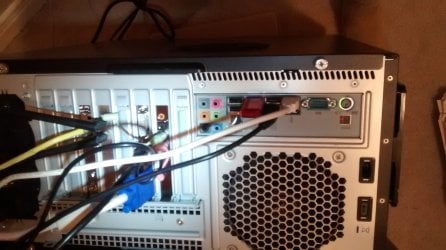
Take a picture of all the connections on it.
 

My Computer My Computer

At a glance

Win-7-Pro64bit 7-H-Prem-64biti7-5930K 2nd i9-9940x both water blocked VRM'...Trident-z 3200C14 2nd Trident-z 3600C16EVGA 1080ti ftw3 2nd Titan Xp both water blocked
Computer type
PC/Desktop
Computer Manufacturer/Model Number
Custom assembled by me :}
OS
Win-7-Pro64bit 7-H-Prem-64bit
CPU
i7-5930K 2nd i9-9940x both water blocked VRM's too
Motherboard
ASUS SABERTOOTH X99 2nd ASUS x299 Apex
Memory
Trident-z 3200C14 2nd Trident-z 3600C16
Graphics Card(s)
EVGA 1080ti ftw3 2nd Titan Xp both water blocked
Sound Card
Built-in Realtek
Monitor(s) Displays
1-AOC G2460PG 24"G-Sync 144Hz/ 2nd 1-ASUS VG248QE 24" 144Hz
Screen Resolution
1920 x 1080 144Hz
Hard Drives
2-Samsung M.2 Evo & Evo Plus
2-Samsung 850 EVO 500GB SSD's/ 3-2.5 W.D. Black 1tb-&3-1tb/3-3.5 WD Black 1tb hdd's
PSU
EVGA SuperNOVA 1000-P2 2nd 1200-P2
Case
2-Corsair Obsidian Series 450D Black ATX Mid Tower
Cooling
Custom water loops
Keyboard
Logitech G710+/ 2nd Logitech G910
Mouse
2-RedDragon M901 Perdition 16400 dpi Gaming mouse = wired
Internet Speed
Comcast Ping 19ms 89.31mbps download speed 6.12mbps upload
Antivirus
Malwarebytes Pro/ Superantispyware Pro
Browser
FireFox & Pale moon
Other Info
2nd ASUS X299 Apex/Intel i9-9940x with Custom water loop/7H-Prem-x64/Corsair 450D case/Ram Trident-z 3600C16 4x8gb / Samsung970Evo plus 500gb SSD/Dual ssd EZ swap evo/PSU EVGA SuperNova 1200w-P2 80+Platinum/GPU Titan Xp /8-ML-140 on push-pull on 2-280GTX rads
After selecting 'Extend these displays', did you click 'Apply' or 'OK'?
 

My Computer My Computer

At a glance

Windows 7 Professional x64, Arch Linux
Computer type
PC/Desktop
OS
Windows 7 Professional x64, Arch Linux
After selecting "Extend these displays " I clicked okay and apply on seperate times. Neither made my second monitor come on.

I can take a picture. do you want a picture of 1) the motherboard 2) the video card 3) the connections on the back of the pc?
 

My Computer My Computer

At a glance

7 Utlimate 64 bit
Computer type
PC/Desktop
OS
7 Utlimate 64 bit
Hi,
Just the back of your machines connection would be fine
The gpu is pretty basic you can just list them
2 dvi and 1 hdmi so sort deal.
 

My Computer My Computer

At a glance

Win-7-Pro64bit 7-H-Prem-64biti7-5930K 2nd i9-9940x both water blocked VRM'...Trident-z 3200C14 2nd Trident-z 3600C16EVGA 1080ti ftw3 2nd Titan Xp both water blocked
Computer type
PC/Desktop
Computer Manufacturer/Model Number
Custom assembled by me :}
OS
Win-7-Pro64bit 7-H-Prem-64bit
CPU
i7-5930K 2nd i9-9940x both water blocked VRM's too
Motherboard
ASUS SABERTOOTH X99 2nd ASUS x299 Apex
Memory
Trident-z 3200C14 2nd Trident-z 3600C16
Graphics Card(s)
EVGA 1080ti ftw3 2nd Titan Xp both water blocked
Sound Card
Built-in Realtek
Monitor(s) Displays
1-AOC G2460PG 24"G-Sync 144Hz/ 2nd 1-ASUS VG248QE 24" 144Hz
Screen Resolution
1920 x 1080 144Hz
Hard Drives
2-Samsung M.2 Evo & Evo Plus
2-Samsung 850 EVO 500GB SSD's/ 3-2.5 W.D. Black 1tb-&3-1tb/3-3.5 WD Black 1tb hdd's
PSU
EVGA SuperNOVA 1000-P2 2nd 1200-P2
Case
2-Corsair Obsidian Series 450D Black ATX Mid Tower
Cooling
Custom water loops
Keyboard
Logitech G710+/ 2nd Logitech G910
Mouse
2-RedDragon M901 Perdition 16400 dpi Gaming mouse = wired
Internet Speed
Comcast Ping 19ms 89.31mbps download speed 6.12mbps upload
Antivirus
Malwarebytes Pro/ Superantispyware Pro
Browser
FireFox & Pale moon
Other Info
2nd ASUS X299 Apex/Intel i9-9940x with Custom water loop/7H-Prem-x64/Corsair 450D case/Ram Trident-z 3600C16 4x8gb / Samsung970Evo plus 500gb SSD/Dual ssd EZ swap evo/PSU EVGA SuperNova 1200w-P2 80+Platinum/GPU Titan Xp /8-ML-140 on push-pull on 2-280GTX rads
Please find attached a picture of the back of the PC.
 

Attachments

  • IMG_20160511_213003278.jpg
    IMG_20160511_213003278.jpg
    304.8 KB · Views: 7

My Computer My Computer

At a glance

7 Utlimate 64 bit
Computer type
PC/Desktop
OS
7 Utlimate 64 bit
So does the picutre shed any insight into how to solve this?

How do I move this thread to the drivers forum since it likely isn't the graphics card?
 

My Computer My Computer

At a glance

7 Utlimate 64 bit
Computer type
PC/Desktop
OS
7 Utlimate 64 bit
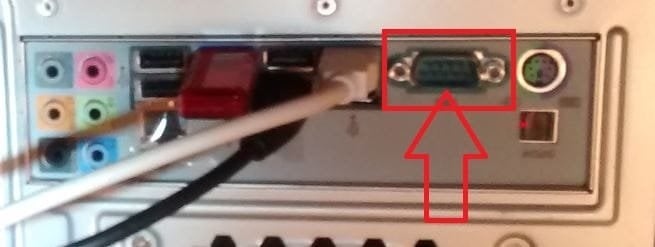
Hi from the picture it looks like you have a VGA port but kinda hard to make out on my phone. But that's not going to help you much since you can't use it with a graphic cardt installed. Could you list make and model of motherboard.
If a mod thinks thread should be moved they will but you are getting help here so no need to have it moved.
 

My Computer My Computer

At a glance

win 10
Computer type
PC/Desktop
Computer Manufacturer/Model Number
dell xps 9000
OS
win 10
The motherboard is a Gigayte 970A-G46.

It doesn't have onboard graphics.
 

My Computer My Computer

At a glance

7 Utlimate 64 bit
Computer type
PC/Desktop
OS
7 Utlimate 64 bit
If motherboard has another slot for graphic card try that slot
 

My Computer My Computer

At a glance

win 10
Computer type
PC/Desktop
Computer Manufacturer/Model Number
dell xps 9000
OS
win 10

My Computer My Computer

At a glance

Win-7-Pro64bit 7-H-Prem-64biti7-5930K 2nd i9-9940x both water blocked VRM'...Trident-z 3200C14 2nd Trident-z 3600C16EVGA 1080ti ftw3 2nd Titan Xp both water blocked
Computer type
PC/Desktop
Computer Manufacturer/Model Number
Custom assembled by me :}
OS
Win-7-Pro64bit 7-H-Prem-64bit
CPU
i7-5930K 2nd i9-9940x both water blocked VRM's too
Motherboard
ASUS SABERTOOTH X99 2nd ASUS x299 Apex
Memory
Trident-z 3200C14 2nd Trident-z 3600C16
Graphics Card(s)
EVGA 1080ti ftw3 2nd Titan Xp both water blocked
Sound Card
Built-in Realtek
Monitor(s) Displays
1-AOC G2460PG 24"G-Sync 144Hz/ 2nd 1-ASUS VG248QE 24" 144Hz
Screen Resolution
1920 x 1080 144Hz
Hard Drives
2-Samsung M.2 Evo & Evo Plus
2-Samsung 850 EVO 500GB SSD's/ 3-2.5 W.D. Black 1tb-&3-1tb/3-3.5 WD Black 1tb hdd's
PSU
EVGA SuperNOVA 1000-P2 2nd 1200-P2
Case
2-Corsair Obsidian Series 450D Black ATX Mid Tower
Cooling
Custom water loops
Keyboard
Logitech G710+/ 2nd Logitech G910
Mouse
2-RedDragon M901 Perdition 16400 dpi Gaming mouse = wired
Internet Speed
Comcast Ping 19ms 89.31mbps download speed 6.12mbps upload
Antivirus
Malwarebytes Pro/ Superantispyware Pro
Browser
FireFox & Pale moon
Other Info
2nd ASUS X299 Apex/Intel i9-9940x with Custom water loop/7H-Prem-x64/Corsair 450D case/Ram Trident-z 3600C16 4x8gb / Samsung970Evo plus 500gb SSD/Dual ssd EZ swap evo/PSU EVGA SuperNova 1200w-P2 80+Platinum/GPU Titan Xp /8-ML-140 on push-pull on 2-280GTX rads
Okay I switched the graphics card from one PCI E slot to another PCI E slot.

I still have the same thing. Windows screen resolution sees both monitors. On the second monitor it is blank.
 
Last edited:

My Computer My Computer

At a glance

7 Utlimate 64 bit
Computer type
PC/Desktop
OS
7 Utlimate 64 bit
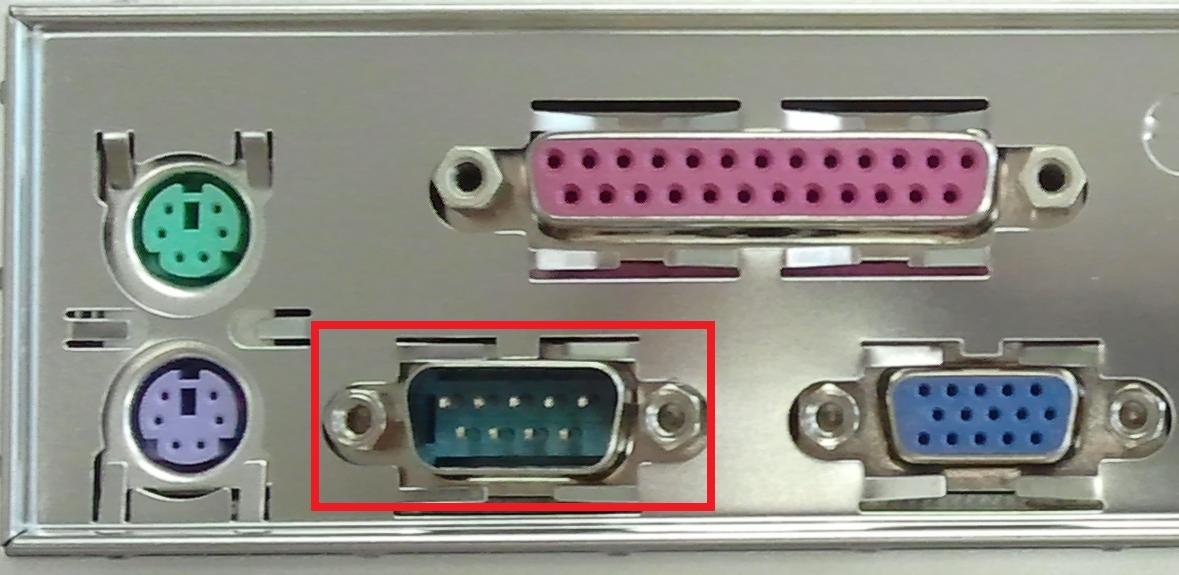
@ThrashZone: That's a serial port. Notice the difference between a serial port and a VGA port:
EOJxM.jpg
 

My Computer My Computer

At a glance

Windows 7 Professional x64, Arch Linux
Computer type
PC/Desktop
OS
Windows 7 Professional x64, Arch Linux
Back
Top