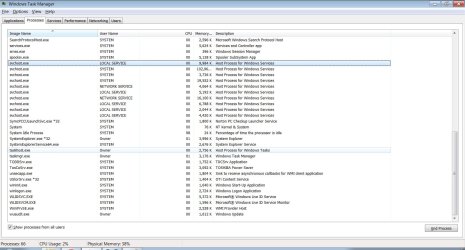
windows 7 64bit duel core 1.3 mhz 450gig hd 4gigs ram Super Slow??!

The steps given here can help improve performance: Clean Up Factory Bloatware - Windows 7 Forums

Most tech enthusiasts clean reinstall to shrug off all of the residue of the factory crapware and useless utilities which have better version built into Win7. Clean Reinstall - Factory OEM Windows 7

In your case I would even consider reinstalling 32 bit Win7, especially if Toshiba provides driver support for it - but the few drivers not provided by Win7 or optional Updates can usually be found even if not.
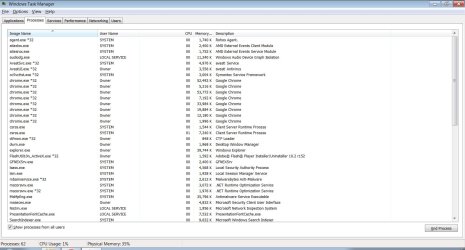
 
tell me what you think. Fresh install of windows or send computer back to get looked at by toshiba?

In safe mode its cool so I dunno. It has a few issues maybe its MB issue and windows issue.

1.jpg
2.jpg
 

My Computer My Computer

At a glance

windows7 64bit
OS
windows7 64bit
i just want a 100percent dependable lab top and I want it be sure its not going screw up any time soon if its all the programs I put on it and uninstalling them doesn't get rid the procces then what do I do? fresh install?

I dunno maybe just not worry about it I mean so long back it up enough I can always reformat later then use back up if worst came worst? right?
 

My Computer My Computer

At a glance

windows7 64bit
OS
windows7 64bit
last time :P no thoughts? normal procces? bogging system down should I try firefox or something instead chrome?
 

My Computer My Computer

At a glance

windows7 64bit
OS
windows7 64bit
Safe mode fast not safe mode slow

OK safe mode lightning fast is this because windows sucks or more graphics? Is there a comprehensive test available might help me figure issue or is it going take looking at one possibility at time. Thing confuses me is moving files around fast in safe mode but slow in normal windows. Is that because anti virus slows down everything. I just am close not caring anymore. Just frustrates me to not have it perfect. Dunno. .. its not to slow but it is lame how it freezes if open two programs or try run something and download. It cant multitask. 1.3MHz duel core. 4gigs ram. Labtop
 

My Computer My Computer

At a glance

windows7 64bit
OS
windows7 64bit

My Computer My Computer

At a glance

64-bit Windows 11 Pro for WorkstationsIntel i7-8700K OC'd to 5 GHz64 GB (4x16GB) G.SKILL TridentZ RGB DDR4 3600...ASUS ROG-STRIX-GTX1080TI-O11G-GAMING
Computer type
PC/Desktop
Computer Manufacturer/Model Number
Self built custom
OS
64-bit Windows 11 Pro for Workstations
CPU
Intel i7-8700K OC'd to 5 GHz
Motherboard
ASUS ROG Maximus XI Formula Z390
Memory
64 GB (4x16GB) G.SKILL TridentZ RGB DDR4 3600 MHz
Graphics Card(s)
ASUS ROG-STRIX-GTX1080TI-O11G-GAMING
Sound Card
Integrated
Monitor(s) Displays
2 x Samsung Odyssey G7 27"
Screen Resolution
2560x1440
Hard Drives
1TB Samsung 990 PRO M.2,
4TB Samsung 990 PRO PRO M.2,
TerraMaster F8 SSD Plus NAS
PSU
Seasonic Prime Titanium 850W
Case
Thermaltake Core P3
Cooling
Corsair Hydro H115i
Keyboard
Logitech wireless K800
Mouse
Logitech MX Master 4
Internet Speed
2 Gb/s Download and 100 Mb/s Upload
Antivirus
Malwarebyte Anti-Malware Premium
Browser
Google Chrome
Other Info
Logitech Z625 speaker system,
Logitech BRIO 4K Pro webcam,
HP Color LaserJet Pro MFP M477fdn,
APC SMART-UPS RT 1000 XL - SURT1000XLI,
Galaxy S23 Plus phone
do mutiple partitions slow your computer

in safe mode np but normal windows slow. thoughts?
 

My Computer My Computer

At a glance

windows7 64bit
OS
windows7 64bit
My partitions don't slow me down and i got 3 runs the same
 

My Computer My Computer

At a glance

Windows 10 64bitAMD Phenom II X4 925 (Deneb)(2.8GHz) OC 3.4GHzCorsair Vengeance DDR3 4GBX2 (8192MB)XFX HD 6870 1GB (OC)- 940MHz core, mem 1150MHz
Computer type
PC/Desktop
Computer Manufacturer/Model Number
custom build
OS
Windows 10 64bit
CPU
AMD Phenom II X4 925 (Deneb)(2.8GHz) OC 3.4GHz
Motherboard
M5A78L-MLX Plus
Memory
Corsair Vengeance DDR3 4GBX2 (8192MB)
Graphics Card(s)
XFX HD 6870 1GB (OC)- 940MHz core, mem 1150MHz
Monitor(s) Displays
Vizio 26' 1920x1080 / Acer 1336x768
Screen Resolution
1920x1080 60Hz /1336x768
Hard Drives
Kingston Digital 60GB SSDNow V300/500gb HDD Western Digital 7200rpm (/WD 160GB HDD 7200rpm
PSU
CORSAIR CX600 600w
Case
AZZA Orion 202 EVO
Cooling
cooler master hyper TX3 cpu cooler
Keyboard
Razer DeathStalker
Mouse
Logitech Optical Gaming Mouse G400
Antivirus
Defualt on win 10
Browser
Firefox
Other Info
cpu is overclocked in bios
i think most slow down is my own fault from installing programs with registry changes and uninstalling. Nothing I can do at this point plus the restarts and freezes are probally a mother board issue. I have a buddy good in computers and he keeps talking me into sending it back to get fixed but I doubt warrenty cover it or they will blame problems on me. However I got it pretty nice right now it still can only really run two programs at once and I still don't get safe mode thing. Why its fast in safe mode slow in regular but I guess less stress in safe mode or some part of mother board not being uses which makes sense *sigh* I have virus protection and everything and I run malware.

However I did run highjackthis and if I post it will that offer help? a lot shows up... like I said im happy enough and quite frankly Im so tired from trying to fix this problem I rather just enjoy the computer lol i mean buy a cheap computer... get what you pay for right?

I Do know something is bogging it down but no one here can rec. a mother board testing utility? And no where to figuer out which start up is doing it because its windows start up and there are 60 running how would I ever find it lol one at a time?

I running windows tweak we see if that helps beside that... oh welll if ever gets worse I can factory install again

anyone know the key you push in toshiba labtop to get into restall? windows?

Would repairing windows do good? btw at this point im giving it a break :P again tired
 

My Computer My Computer

At a glance

windows7 64bit
OS
windows7 64bit
You reveal possible causes of your problem in the last post.

Running any kind of tweaking suite or optimizer will almost always ruin Win7. It needs no tweaking beyond normal system settings, and only its onboard tools with a free lightweight AV and the Win7 Firewall for best performance.

Factory Recovery is larded with preinstalled crapware and useless OEM utilities which have much better versions built into Win7. These throttle the OS and are corruption themselves. Almost no tech enthusiast would run such an install but instead will Clean Reinstall - Factory OEM Windows 7.

Focus on the steps in the blue link to get a perfect install and then don't tweak it beyond normal system settings, and only use the few tools and methods recommended to maintain it. A perfect reinstall will yield only instantaneous performance or else you need to upgrade hardware.
 
gotta throw in that i agree with greg that any tweaking program is 95 percent usless for the standard user (and unless you are a network admin/managing large groups of computers and hell even then you dont need to all that often)

and since it wasn't answered really the reason safe mode is so much quicker is because windows is only booting the files needed for just windows to run. this is so than if you have a virus that is booting with the machine when you go to safe mode to remove it it will be able to be removed with out any hassle of "the process is running and cannot be stopped".

and a few side notes to consider. are you running on battery? i have noticed on some laptops/netbooks that if your cpu will crank down to try save battery life so maybe set it to high performance power plan and see if that would help. it may not be significant improvement but improvement none the less. realistically 60 processes at start is not to bad for personal computer but could be trimmed down depending on your needs. Now you hit the nail on the head when you said you get what you pay for. I had payed 1500 dollars to have a high end i7 laptop with a crap ton ram and man that hurt my wallet but i have to admit im not gonna be buying a new laptop for while so its days are numbered for being high end lol :)

and a side side note :P sickness isee you on xda too lol
 

My Computer My Computer

At a glance

Windows 7 ProfessionalIntel i7-2630QM16GB DDR3Nvidia GTX 570M overclocked
Computer Manufacturer/Model Number
MSI GT683DXR-427US
OS
Windows 7 Professional
CPU
Intel i7-2630QM
Memory
16GB DDR3
Graphics Card(s)
Nvidia GTX 570M overclocked
Monitor(s) Displays
15.6" HD LCD
Screen Resolution
1920X1080
Hard Drives
60GB OCZ Vertez II SSD
500 GB WD 7200RPM
Mouse
Logitech Anywhere MX
+1 to Greg. The only tweaking or cleaning program that I would EVER use is CCleaner and I wouldn't even use that on Windows 7. I would only use CCLeaner on Windows XP and mabe Vista.
 

My Computer My Computer

At a glance

Windows 7 Professional x64 Service Pack 1AMD Athlon X4 6456GB DDR3 1066Sapphire Radeon HD 5670 512MB GDDR5
Computer type
PC/Desktop
Computer Manufacturer/Model Number
HP Pavilion P7-1010
OS
Windows 7 Professional x64 Service Pack 1
CPU
AMD Athlon X4 645
Motherboard
Foxxcon N-Alvorix RS880
Memory
6GB DDR3 1066
Graphics Card(s)
Sapphire Radeon HD 5670 512MB GDDR5
Sound Card
Realtek Integrated Audio
Monitor(s) Displays
HP 2011x
Screen Resolution
1600x900
Hard Drives
1. Crucial M4 128GB SSD
2. 1TB Seagate Barracuda 7200.12 RPM
3. 1TB Western Digital Caviar Green 5400RPM
PSU
Seasonic S12 II Bronze 380 Watt
Case
HP OEM
Cooling
Coolermaster Heatsink, AVC Case Fan
Keyboard
HP OEM- Made by Chicony
Mouse
HP OEM- Made by Logitech
Internet Speed
20MBit Down/4 Up
Antivirus
Microsoft Security Essentials
Browser
Internet Explorer 10
gotta throw in that i agree with greg that any tweaking program is 95 percent usless for the standard user (and unless you are a network admin/managing large groups of computers and hell even then you dont need to all that often)

and since it wasn't answered really the reason safe mode is so much quicker is because windows is only booting the files needed for just windows to run. this is so than if you have a virus that is booting with the machine when you go to safe mode to remove it it will be able to be removed with out any hassle of "the process is running and cannot be stopped".

and a few side notes to consider. are you running on battery? i have noticed on some laptops/netbooks that if your cpu will crank down to try save battery life so maybe set it to high performance power plan and see if that would help. it may not be significant improvement but improvement none the less. realistically 60 processes at start is not to bad for personal computer but could be trimmed down depending on your needs. Now you hit the nail on the head when you said you get what you pay for. I had payed 1500 dollars to have a high end i7 laptop with a crap ton ram and man that hurt my wallet but i have to admit im not gonna be buying a new laptop for while so its days are numbered for being high end lol :)

and a side side note :P sickness isee you on xda too lol


ahh I am being followed.

yes im starting to understand don't fix whats not broken .... or it will break
 

My Computer My Computer

At a glance

windows7 64bit
OS
windows7 64bit
I want to reinstall default services for my specfic labtop configuartion is there a place download this? For my brand and stuff? or a basic windows?

I downloaded one off black vipers but I seem have extra services not on that file because when install it my windows doesn't work
 

My Computer My Computer

At a glance

windows7 64bit
OS
windows7 64bit
What services are you referring to?

You have threads spread out all over the forums here without any focus at all. Now that you've factory Recovered instead of concentrating on the steps we've given you to solidify and maintain your install it appears you have already gone off the rails chasing after more trouble.

Go back to your thread here and focus! about to murder my lab top - Windows 7 Forums
 
What services are you referring to?

You have threads spread out all over the forums here without any focus at all. Now that you've factory Recovered instead of concentrating on the steps we've given you to solidify and maintain your install it appears you have already gone off the rails chasing after more trouble.

Go back to your thread here and focus! about to murder my lab top - Windows 7 Forums
I don't even understand what he wants either. He's got all of these problems, so I helped him do a factory restore. I'm confused on what he wants now. I can hardly understand. To the original poster: can you please clarify what you want, and use better grammar so we can understand. We really want to help:)
 

My Computer My Computer

At a glance

Windows 7 Professional x64 Service Pack 1AMD Athlon X4 6456GB DDR3 1066Sapphire Radeon HD 5670 512MB GDDR5
Computer type
PC/Desktop
Computer Manufacturer/Model Number
HP Pavilion P7-1010
OS
Windows 7 Professional x64 Service Pack 1
CPU
AMD Athlon X4 645
Motherboard
Foxxcon N-Alvorix RS880
Memory
6GB DDR3 1066
Graphics Card(s)
Sapphire Radeon HD 5670 512MB GDDR5
Sound Card
Realtek Integrated Audio
Monitor(s) Displays
HP 2011x
Screen Resolution
1600x900
Hard Drives
1. Crucial M4 128GB SSD
2. 1TB Seagate Barracuda 7200.12 RPM
3. 1TB Western Digital Caviar Green 5400RPM
PSU
Seasonic S12 II Bronze 380 Watt
Case
HP OEM
Cooling
Coolermaster Heatsink, AVC Case Fan
Keyboard
HP OEM- Made by Chicony
Mouse
HP OEM- Made by Logitech
Internet Speed
20MBit Down/4 Up
Antivirus
Microsoft Security Essentials
Browser
Internet Explorer 10
To the poster the only Programs that fit your Machine can only be downloaded by there site

Use-ing other drivers from various places most likly will not work

Your Laptop has a limited Bios by the company that made it to make sure you really can't tweek to much

What you should do like Greg and everyone else has pointed out GET the right drivers from TOSHIBA if that is your make

Get rid of all PROGRAMS you have no use for second of all you are use-ing a 1.3 Ghz dual core that probally get's down clocked because of Power consumption

Also if it is upgradable to more RAM get it

Im sure if you adjust some power savings in the windows the performance will get better you just have to learn what will work and what not

You should take a snip of your cpu speed and usage at the time it is getting slow most likly you have some sort of power saving or basicly a tool that limits the cpu

Most laptops aren't really made for speed anyway unless you have a SSD and good RAM the Cpu might be breaking down as well have you looked at MAX temps and COOLING PADS do help ;)
 

My Computer My Computer

At a glance

Windows 10 Home Premium 64bit sp1Intel I7-6700K @ 4.6 Ghz 1.344 volts everyday OC32GB G-Skill TridentZ 3200mhz 16-18-18-38 DDR4Sli Gigabyte Windforce GTX 980 G1
Computer type
PC/Desktop
Computer Manufacturer/Model Number
CoreI7-6700K MrFingerIII Special Builds
OS
Windows 10 Home Premium 64bit sp1
CPU
Intel I7-6700K @ 4.6 Ghz 1.344 volts everyday OC
Motherboard
Asrock Fatality K6 Z170 Socket 1151
Memory
32GB G-Skill TridentZ 3200mhz 16-18-18-38 DDR4
Graphics Card(s)
Sli Gigabyte Windforce GTX 980 G1
Sound Card
AC97 Creative Rage Tactic 3D Headphones Bluetooth
Monitor(s) Displays
27" Asus ROG Swift PG278Q G-Sync 48" Vizio Smart HD TV
Screen Resolution
2560x1440p 27"- 48" Currently Gaming at 2560x1440p Res 2K
Hard Drives
250GB Samsung Evo840SSD Seagate baracuda 500 GB WD Mybook 500Gb 1TB Seagate Barracuda
PSU
HX1050w Corsair Silver 80plus certified crosfire/sli
Case
Enthod Pro Full Tower
Cooling
Corsair H110i GT 280 mm High Performance WaterBlock
Keyboard
Logitech wireless keyboard
Mouse
Logitech wireless mouse
Internet Speed
Cox Cable 100+ mb
Antivirus
WebRoot Spysweeper with Antivirus
Browser
IE-10, Chrome, Opera
Other Info
My Other Rig is a AMD FX8320E @4.6Ghz 16GB Ballistic Sport Ram
Mobo Asrock Fatality 990FX 120GB OCZ SSD 1TB Seagate Barracuda Corsair H75 Cooling PSU Corsair CX750
GPU GTX Gigabyte 970G1
Everything available for your model Toshiba will be on the Toshiba Support Downloads webpage for your model: Toshiba Support - Homepage

If there is software there that you need I would install it only if you know you need it. For any others, you can ask back.

Do you have any questions? What is it exactly that you're missing? We are here to help you but need you to interact with us more so we can help you best.
 
I should bought a desktop. Sorry lol I try to be more clear it following post. The computer is only a few months old and has had quite a few very odd problems. I have had it looked at a few times, and tried have it repaired, I even had a fresh install put on it and it didn't help. I get random network issues, I get freezes, restarts, and it always seems bogged down.

Now its been years sense I really used a computer but in the past I would of guessed something was running in the backround (there is nothing though at least I can see) safe mode is fast.... I know safe mode and normal mode are a huge difference I also know that anti virus bog it down. Its not a huge deal but I would like to know if I should send it to manufacture or if its simply a software issue or even a virus (which I don't think they would cover)

I dunno. I just don't know enough about computers anymore to be able figure out what the heck is wrong with it.

cursed :P
its running now though lol ... though I feel like if I update it its just going crap out again.
 

My Computer My Computer

At a glance

windows7 64bit
OS
windows7 64bit
Back
Top