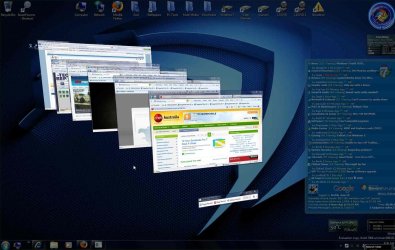
Windows 7 7068 - Task Bar

Does file explorer funtion in the same way for you dirk? I usually have multiple instances of file explorer open. It is a pain to open them in the current (7057) setup.
 

My Computer

OS
Windows 7 Build 7057
CPU
Phenom 9600
Motherboard
EVGA 730a
Memory
8GB Corsair
Graphics Card(s)
Onboard graphics
Monitor(s) Displays
Samsung LN-46a650
Screen Resolution
1080p
Hard Drives
Seagate 1.5TB
explorer is the old way. ie is the only one that works this new way.
 

My Computer

OS
Windows 7 build 7057
Right click on taskbar and go up to toolbars and see if quicklaunch is listed there. I will bet it's there. That's not default. Someone set it up. Let us know.
 

My Computer

Computer Manufacturer/Model Number
Keeps changing - (Custom)
OS
Windows 7 Professional x64
CPU
Intel Core i7 860
Motherboard
Gigabyte GA-P55-UD4P
Memory
4GB DDR3 Mushkin 1600Mhz @ 7-8-7-20
Graphics Card(s)
MSI GTS250 1GB DDR3 Twin Frozr
Sound Card
Onboard realtek
Monitor(s) Displays
Samsung SyncMaster 24" P2450 + Samsung 20" 2033
Screen Resolution
1920 X 1080 and 1600 X 900 (#2 system 1440 X 900)
Hard Drives
Patriot Inferno 120GB SSD + 3 WD Blue 640GB drives
PSU
Corsair 750 HX Modular
Case
Lancool PC-K62
Cooling
Cooler Master TX3 CPU cooler and 4-140mm and 1-120mm case
Keyboard
Gigabyte USB keyboard
Mouse
Microsoft wireless laser mouse 5000
Internet Speed
7 Mb down 1.5 up
Other Info
System #2: AMD Phenom II X6 1055T (Freezer 7 Pro cooler) - Gigabyte 880GMA-UD2H - WD 500GB Black - 9500GT (1GB) 500W OCZ modular PSU - Antec 200 case. System #3 (LapTop) Core 2 Duo T6670 - 320GB 7200RPM HD - 4GB DDR3 RAM.
It has always been like this in all of the different builds, what you're describing is the option "never combine" in the "Taskbar and Start Menu Properties".

There's three different settings for the "Taskbar buttons":
1. "Always combine, hide labels"
2. "Combine when taskbar is full"
3. "Never combine"

But as I said, nothing's new under the sun...
 

My Computer

OS
Windows 7 7100 RC 1, Windows Vista 64, Windows XP, MAC OS X 10.5.5
CPU
Intel E8400
Motherboard
Asus P5Q3 Deluxe P45
Memory
4 GB Corsair DDR3
Graphics Card(s)
ATI 4870x2
Sound Card
Asus Xonar DX
Monitor(s) Displays
Dell 2405 24" widescreen
Screen Resolution
1920 x 1200
Hard Drives
Western Digital VelociRaptor 300 GB, Samsung Spinpoint F1 1 TB
PSU
Zalman ZM-850
Case
Antec p-180
Internet Speed
24 mb/s
Other Info
Laptop: Lenovo ThinkPad T60, T5600, 3 gb RAM, Western Digital Scorpio Blue 160 gb HDD, ATI x1400, 15" 1400x1050 FlexView screen.

Netbook: Lenovo IdeaPad s10e, 2 gb RAM, WD Scorpio 500 gb HDD
That's not what is going on here. Unless you have to restart after you change it. I tested all three options. None of them are doing what he is describing. See the screenshots he posted. His is acting like a true quick launch live XP and Vista.
 

My Computer

Computer Manufacturer/Model Number
Keeps changing - (Custom)
OS
Windows 7 Professional x64
CPU
Intel Core i7 860
Motherboard
Gigabyte GA-P55-UD4P
Memory
4GB DDR3 Mushkin 1600Mhz @ 7-8-7-20
Graphics Card(s)
MSI GTS250 1GB DDR3 Twin Frozr
Sound Card
Onboard realtek
Monitor(s) Displays
Samsung SyncMaster 24" P2450 + Samsung 20" 2033
Screen Resolution
1920 X 1080 and 1600 X 900 (#2 system 1440 X 900)
Hard Drives
Patriot Inferno 120GB SSD + 3 WD Blue 640GB drives
PSU
Corsair 750 HX Modular
Case
Lancool PC-K62
Cooling
Cooler Master TX3 CPU cooler and 4-140mm and 1-120mm case
Keyboard
Gigabyte USB keyboard
Mouse
Microsoft wireless laser mouse 5000
Internet Speed
7 Mb down 1.5 up
Other Info
System #2: AMD Phenom II X6 1055T (Freezer 7 Pro cooler) - Gigabyte 880GMA-UD2H - WD 500GB Black - 9500GT (1GB) 500W OCZ modular PSU - Antec 200 case. System #3 (LapTop) Core 2 Duo T6670 - 320GB 7200RPM HD - 4GB DDR3 RAM.
One easy way to go through all your open windows is to use the win key + Tab or Alt + Tab.

2009-03-30_084015.jpg
 

My Computer

Computer Manufacturer/Model Number
Home Brew
OS
Windows 7 Ultimate Vista Ultimate x64
CPU
Core 2 Duo E8500 3.16Ghz @ 3.8Ghz
Motherboard
eVGA 750i FTW
Memory
2x2Gigs Patriot PC2-6400 LL
Graphics Card(s)
Inno3D GeForce GTX260 216 SP
Monitor(s) Displays
ASUS VW222U 22" 2ms Response time
Screen Resolution
1680x1050
Hard Drives
SATA 150GB
SATA II 250GB
USB IDE 750GB Ext.
PSU
HYTEC 600W & Thermaltake 650W Toughpower Power Exp
Case
Thermaltake Armor LCS (Liquid Cooling System)
Cooling
Liquid Cooling System
Keyboard
Logitech G15 Gaming Keyboard
Mouse
Logitech G9 Gaming Mouse

My Computer

Computer type
PC/Desktop
Computer Manufacturer/Model Number
intel x58 selfmade
OS
Windows 7 Ultimate x64
CPU
[email protected] (non overclocked)
Motherboard
x58
Memory
8gb DDR3
Graphics Card(s)
Asus 6850
Monitor(s) Displays
lg 22"
Hard Drives
1TB
PSU
Corsair 650w
Case
Gigabyte
Cooling
Scytech
Keyboard
noname
Mouse
Logitech wireless xy
Internet Speed
70GB
Antivirus
Windows Defender
Browser
Chrome (default)

My Computer

Computer Manufacturer/Model Number
Keeps changing - (Custom)
OS
Windows 7 Professional x64
CPU
Intel Core i7 860
Motherboard
Gigabyte GA-P55-UD4P
Memory
4GB DDR3 Mushkin 1600Mhz @ 7-8-7-20
Graphics Card(s)
MSI GTS250 1GB DDR3 Twin Frozr
Sound Card
Onboard realtek
Monitor(s) Displays
Samsung SyncMaster 24" P2450 + Samsung 20" 2033
Screen Resolution
1920 X 1080 and 1600 X 900 (#2 system 1440 X 900)
Hard Drives
Patriot Inferno 120GB SSD + 3 WD Blue 640GB drives
PSU
Corsair 750 HX Modular
Case
Lancool PC-K62
Cooling
Cooler Master TX3 CPU cooler and 4-140mm and 1-120mm case
Keyboard
Gigabyte USB keyboard
Mouse
Microsoft wireless laser mouse 5000
Internet Speed
7 Mb down 1.5 up
Other Info
System #2: AMD Phenom II X6 1055T (Freezer 7 Pro cooler) - Gigabyte 880GMA-UD2H - WD 500GB Black - 9500GT (1GB) 500W OCZ modular PSU - Antec 200 case. System #3 (LapTop) Core 2 Duo T6670 - 320GB 7200RPM HD - 4GB DDR3 RAM.
explorer is the old way. ie is the only one that works this new way.

Dirk,

Thats a bug, the reason you have two Internet Explorer icons is because Explorer uses heuristics and an APPID registry value for mapping applications to their associated taskbar icon... Somehow your IE signature changed or its APPID changed hence the second IE icon.

That exact taskbar application behavior was explained during the PDC last year ;)

Windows 7: Integrate with the Windows 7 Desktop | pdc2008 | Channel 9

I was going to say that too but I wish Chrome or Firefox would work like that.

Chrome currently has zero plans about supporting Windows7, Firefox is however making their browser completely integrated with Windows 7`s new Explorer features :)
 
It has always been like this in all of the different builds, what you're describing is the option "never combine" in the "Taskbar and Start Menu Properties".

There's three different settings for the "Taskbar buttons":
1. "Always combine, hide labels"
2. "Combine when taskbar is full"
3. "Never combine"

But as I said, nothing's new under the sun...


If it was this then Labels would appear in the taskbar as only option 1 removes them.
 

My Computer

Computer Manufacturer/Model Number
Home Built / Acer Aspire 7720G Laptop
OS
Windows 7 Build 7600 Laptop and desktop. Also OSX 10.5.7 and 10.6 Snow on Laptop
CPU
AMD Athlon64 Dual core 4200+ / Laptop T5750
Motherboard
Gigabyte / Acer Aspire
Memory
2 x 1Gb = 2 Gb / acer 3GB
Graphics Card(s)
Geforce 8600GT / Geforce 9300M G 256Mb
Sound Card
Terratec DMX 6fire for Music production and X-Fi Xtreme
Monitor(s) Displays
2 x 17" (Dell and Compaq) / 17" WXGA Laptop Screen
Screen Resolution
1280x1024 / 1440x900 (Full HD when conneced to 32" LCD)
Hard Drives
2x Sata 160GB 2x USB 300Gb 1x 160Gb IDE 1x USB 1TB / 250Gb Sata Laptop with Blu-ray drive
PSU
400W + Not 100% sure
Keyboard
Logitech Cordless Keyboard
Mouse
Logitech Mx 700
Internet Speed
20 Meg Down / 1 Meg up Cable
Other Info
Konica Minolta Colour Laser printer, Epson Stylus R360 (Mostly used for printing on CD's/DVD's), Cannon Scanner, Mercury surround system, about 6 external hard drives all 200Gb plus along with the normall home entertainment stuff attached.... DBox 2, XBox 360, etc. etc.
His does look different, meh either way I immediately unpinned it from the taskbar as I never use IE. I used it exactly once. I used it download Chrome. I am a massive webkit fan.
 

My Computer

Computer Manufacturer/Model Number
ASUS G73JH
OS
Windows 7 Ultimate x64
CPU
1.6 GHZ i7-720QM
Memory
12 GB @ 1333 mhz
Graphics Card(s)
AMD Radeon HD 5870M
Screen Resolution
1600x900
Hard Drives
120 GB SATA II SSD
500 GB HDD @ 7200 RPM
Mouse
Razer Death Adder
Internet Speed
15 mb down, 1 mb up
Chrome currently has zero plans about supporting Windows7, Firefox is however making their browser completely integrated with Windows 7`s new Explorer features :)

A lot of us are running Chrome. I have had some problems getting it installed after build 7048 but it's running. I hope they improve it. I have a hard time even using Firefox anymore. I love Chrome.
 

My Computer

Computer Manufacturer/Model Number
Keeps changing - (Custom)
OS
Windows 7 Professional x64
CPU
Intel Core i7 860
Motherboard
Gigabyte GA-P55-UD4P
Memory
4GB DDR3 Mushkin 1600Mhz @ 7-8-7-20
Graphics Card(s)
MSI GTS250 1GB DDR3 Twin Frozr
Sound Card
Onboard realtek
Monitor(s) Displays
Samsung SyncMaster 24" P2450 + Samsung 20" 2033
Screen Resolution
1920 X 1080 and 1600 X 900 (#2 system 1440 X 900)
Hard Drives
Patriot Inferno 120GB SSD + 3 WD Blue 640GB drives
PSU
Corsair 750 HX Modular
Case
Lancool PC-K62
Cooling
Cooler Master TX3 CPU cooler and 4-140mm and 1-120mm case
Keyboard
Gigabyte USB keyboard
Mouse
Microsoft wireless laser mouse 5000
Internet Speed
7 Mb down 1.5 up
Other Info
System #2: AMD Phenom II X6 1055T (Freezer 7 Pro cooler) - Gigabyte 880GMA-UD2H - WD 500GB Black - 9500GT (1GB) 500W OCZ modular PSU - Antec 200 case. System #3 (LapTop) Core 2 Duo T6670 - 320GB 7200RPM HD - 4GB DDR3 RAM.
A lot of us are running Chrome. I have had some problems getting it installed after build 7048 but it's running. I hope they improve it. I have a hard time even using Firefox anymore. I love Chrome.

The beta build of Chrome runs in windows 7 without a hitch, it's only the "stable" (they call it stable, personally I find them both to be stable) build that seems to have issues working in windows 7.
 

My Computer

Computer Manufacturer/Model Number
ASUS G73JH
OS
Windows 7 Ultimate x64
CPU
1.6 GHZ i7-720QM
Memory
12 GB @ 1333 mhz
Graphics Card(s)
AMD Radeon HD 5870M
Screen Resolution
1600x900
Hard Drives
120 GB SATA II SSD
500 GB HDD @ 7200 RPM
Mouse
Razer Death Adder
Internet Speed
15 mb down, 1 mb up
The beta build of Chrome runs in windows 7 without a hitch, it's only the "stable" (they call it stable, personally I find them both to be stable) build that seems to have issues working in windows 7.

Yes; The dev channel build is what I've been using on Windows 7 x64, sicne it's the only one (before they upgraded it to beta channel a few weeks ago) that would run properly without mods on windows x64. I had the same problems on vista as well, so I knew it was nothing to do with windows 7. Or at least, not entirely.

Glad they decided to look into it though, I prefer chrome over any other browser.
 

My Computer

Computer Manufacturer/Model Number
Custom Built
OS
Windows 7 7068 x64 (x2)
CPU
Core 2 Duo E8400 @ 4.2
Motherboard
MSI P45 Platinum
Memory
8gb OCZ Reaper DDR2-800 @ DDR2-940 5-4-4-12
Graphics Card(s)
2x ATi Radeon HD 4850
Sound Card
Asus Xonar D2X
Monitor(s) Displays
Yuraku MB24W 24"
Screen Resolution
1920x1200
Hard Drives
3x160gb Maxtor DiamondMax in Raid0 (system drive)
1x500gb Hitachi Deskstar P7K500 (used to be 3x, needed space)
PSU
OCZ GameXStream 600w
Case
Xclio A380PLUS
Cooling
thermalright Ultra 120 Extreme
Keyboard
Logitech G15 v2 (orange)
Mouse
Razer diamondback (blue)
Internet Speed
ADSL2+ @ ~10mb/1mb
Other Info
Haven't modified it since September, I'm due to buy a new case (Xclio 2000 looking good) and perhaps upgrade to either a C2Q if money is short or all out for i7.

Time will tell :)
The beta build of Chrome runs in windows 7 without a hitch, it's only the "stable" (they call it stable, personally I find them both to be stable) build that seems to have issues working in windows 7.

Yah, finally...

I had been trying to get Chrome working with W7 since 7000, even going so far as to decompile the darn thing and trying to rework it.
This latest beta of Chrome tho works perfectly as far as I can tell.

You know, I just can't believe that the Google Chrome developers would just outright ignore W7 like that. I mean they must see how much talk and press this OS is getting and it's mostly positive to a fault. For them to say they have no intention of working on compatibility for W7 at this point is a huge mistake IMO.
 

My Computer

Computer Manufacturer/Model Number
Personal Build
OS
Vista Ult 64bit - Windows 7 Ult 7264 64bit
CPU
Intel Core 2 Duo E6750
Motherboard
Asus Commando
Memory
4 G's Crucial Ballistix Tracer
Graphics Card(s)
BFG Nvidia 8800 GTS 340
Sound Card
Creative Sound Blaster X-FI Platinum FATAL1TY
Monitor(s) Displays
2-22" HP W2207 LCD
Screen Resolution
1920 x 1080
Hard Drives
3 x 500G WD Caviar SATA II
PSU
Enermax Noise Taker II 600W
Case
NZXT Lexa Classic (dual doored & windowed)
Cooling
Zalman 9700 CPU cooler - 4 x 120mm, 1 x 90mm fans
Keyboard
Logitech MX 5500
Mouse
Logitech MX Revolution
Internet Speed
Blazing...
Yah, finally...

I had been trying to get Chrome working with W7 since 7000, even going so far as to decompile the darn thing and trying to rework it.
This latest beta of Chrome tho works perfectly as far as I can tell.

You know, I just can't believe that the Google Chrome developers would just outright ignore W7 like that. I mean they must see how much talk and press this OS is getting and it's mostly positive to a fault. For them to say they have no intention of working on compatibility for W7 at this point is a huge mistake IMO.

Well, if the beta version works and the current doesn't, I'd say I suspect they aren't ignoring it.
 

My Computer

Computer Manufacturer/Model Number
ASUS G73JH
OS
Windows 7 Ultimate x64
CPU
1.6 GHZ i7-720QM
Memory
12 GB @ 1333 mhz
Graphics Card(s)
AMD Radeon HD 5870M
Screen Resolution
1600x900
Hard Drives
120 GB SATA II SSD
500 GB HDD @ 7200 RPM
Mouse
Razer Death Adder
Internet Speed
15 mb down, 1 mb up
guess what, i installed this on my desktop as an upgrade and that is 64bit and it is doing the same thing, so i dont see how it could get be a bug.
 

My Computer

OS
Windows 7 build 7057
That looks like a bug, and entirely defeats the purpose of the new taskbar. It's essentially having quicklaunch on XP.

It's very possible you have "quicklaunch" or another "toolbar" running with a shortcut to IE.

This would explain why it's not "grouping" the too.

Right click the taskbar and check to see if you have any toolbars running.

If you want a new instance of any program all you have to do is shift+click on the taskbar button, or middle click with your mouse.
 

My Computer

OS
7264x64/7260x86
i dont. This is 2 different builds. I understand what you are saying about quick launch, but on 2 different installs it did this? I am going to install a fresh copy and see if it is like that.
 

My Computer

OS
Windows 7 build 7057
Very strange, cause I have two 7068 builds as well, one 64 bit and one 32 bit and neither do the duplicate task button for ie.

Did you do fresh intalls for both, or upgrades?
 

My Computer

OS
7264x64/7260x86
Back
Top