Windows 7 7100 expiration?

automagp68

Banned
Local time
3:39 PM
Messages
29
Hi guys

I have two machines. one of them was built roughly in august and one was built right when 7100 came out.

machine A the very first and oldest build "evaluation build 7100" has not given me a message saying it is going to expire.

Machine B the newer build has in fact and says it will expire very shortly. EG 3/1/2010

Is there a chance that machine A will be ok? Machine A has alot of important data.

Any recomendations on how to back up Machine A?

I need all data and all programs on it? "for a small business"

Thanks for the help
 

My Computer

OS
Windows 7

My Computer

Computer type
PC/Desktop
Computer Manufacturer/Model Number
Dell XPS 420
OS
Windows 10, Home Clean Install
CPU
Intel Core2 processsor Q8200(2.33Ghz 1333FSB) Quad Core Tech
Motherboard
Dell
Memory
6 gb
Graphics Card(s)
ATI Radeon 256MB HD3650
Sound Card
Intergrated 7.1 Channel Audio
Monitor(s) Displays
Dell SP2009W 20"
Hard Drives
640 GB Serial ATA Hard drive
Cooling
Fan
Keyboard
Dell USB Keyboard
Mouse
Dell Premium Optical USB
Internet Speed
DSL 2.85
Hello automagp68, welcome to Seven Forums.


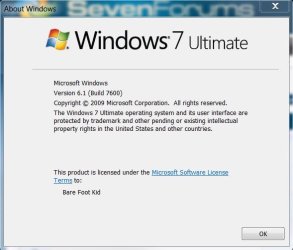
7100 will "time bomb" (if memory serves) around June; in the start/search box type"winver" without the quotes to get the expiry date, you'll get a window like this.

winver.JPG
 

My Computer

Computer Manufacturer/Model Number
* BFK Customs *
OS
W 7 64-bit Ultimate
CPU
Intel Q9550 Yorkfield
Motherboard
ASUS P5Q Pro
Memory
8GB Dominator 8500C5D
Graphics Card(s)
ATI : XFX 5870
Sound Card
Realtek HD Audio 7-1
Monitor(s) Displays
1x 47" LCD HDMI & 3x 26" LCD HDMI
Screen Resolution
1920x1080P & 1920x1200
Hard Drives
1x 80GB Intel X25-M G2 SSD : 1x 500GB & 1x 640GB WD Caviar Black(s)
PSU
Corsair 620HX
Case
Cooler Master RC-690
Cooling
Tuniq Tower 120, 2x 140mm and 3x 120mm case fans
Keyboard
Microsoft 500
Mouse
Razer Diamondback 3G
Internet Speed
14 Mb/s
Other Info
1x Koutech 3Gb/s SATA HDD Hot Swap Rack
Is there a chance that machine A will be ok? Machine A has alot of important data.

Then why in the world did you put a beta operating system on a computer with your important data?! That concept boggles the mind.
 

My Computer

Computer type
PC/Desktop
Computer Manufacturer/Model Number
Alienware Aurora ALX R4
OS
Windows 10 Pro (x64)
CPU
Intel Core i7-3930K (3.2GHz - 4.5GHz)
Motherboard
Alienware Aurora-R4 x79
Memory
4x Samsung 4GB PC3-12800 DDR3 (16GB 1600MHz)
Graphics Card(s)
Nvidia Geforce GTX 690
Sound Card
SteelSeries Siberia Elite
Monitor(s) Displays
Dell UltraSharp U3011
Screen Resolution
2560x1600
Hard Drives
Samsung 850 Pro 256 GB, Seagate 1TB Desktop Hybrid HDD, 2x Western Digital 4TB Green HDD
PSU
875W Some Dell PSU <.<
Case
Alienware Aurora ALX
Cooling
Custom Liquid Cooling (EK CPU & GPU blocks) dual EK 480RAD
Keyboard
Logitech G710+ Mechanical
Mouse
Logitech G700s
Internet Speed
Verizon Fios (50 mbps average)
Other Info
Server: Intel NUC D54250WYK: i5-4250U, 16GB, 256 GB mSATA, Windows Server 2012 R2
RC was thought to be stable enough for use and it has proven to be with out any issue. It was backed up every 24hrs in prep for this.
Go bash someone elses thread.

correct me if im wrong but if i do a system image it will give me an image of RC correct?
 

My Computer

OS
Windows 7
No that's not correct.
 

My Computer

Computer Manufacturer/Model Number
* BFK Customs *
OS
W 7 64-bit Ultimate
CPU
Intel Q9550 Yorkfield
Motherboard
ASUS P5Q Pro
Memory
8GB Dominator 8500C5D
Graphics Card(s)
ATI : XFX 5870
Sound Card
Realtek HD Audio 7-1
Monitor(s) Displays
1x 47" LCD HDMI & 3x 26" LCD HDMI
Screen Resolution
1920x1080P & 1920x1200
Hard Drives
1x 80GB Intel X25-M G2 SSD : 1x 500GB & 1x 640GB WD Caviar Black(s)
PSU
Corsair 620HX
Case
Cooler Master RC-690
Cooling
Tuniq Tower 120, 2x 140mm and 3x 120mm case fans
Keyboard
Microsoft 500
Mouse
Razer Diamondback 3G
Internet Speed
14 Mb/s
Other Info
1x Koutech 3Gb/s SATA HDD Hot Swap Rack

My Computer

Computer Manufacturer/Model Number
Gateway GT5692
OS
Windows 7 Ulti. x64
CPU
AMD Phenom 8450 triple-core 2.10 ghz
Memory
4GB
Graphics Card(s)
ATI Radion HD 3200
Monitor(s) Displays
Gateway FPD1775W
Screen Resolution
1280x720
Hard Drives
465.6613 Gibibytes
Lets bash the guy asking a questiong intead of offering help!
You was asked a reasonable question, as beta software, especially operating systems are for testing purposes, not to install and use for your business, and your posting of this thread highlights why.

Your programs are going to need reinstalling, and your data would be best transferred to an external H.D, until you get a version of Windows 7 that isn't for testing purposes.
March 1, 2010

Task bar expiration notifications continue

The OS will restart every two hours (note that any open documents won’t be saved before the restart)

Between reboot the OS will continue to operate as normal
- Still using Windows 7 Release Candidate (RC)? Read this!
 

My Computer

Computer Manufacturer/Model Number
Sony Vaio FZ21Z
OS
Windows 7 Ultimate x64 ®™
CPU
Intel Core 2 Duo (2.2 GHz)
Motherboard
Sony (Intel Chipset)
Memory
2x 2GB Corsair (667 MHz)
Graphics Card(s)
NVIDIA 8600M GS (256MB)
Sound Card
Sigmatel
Monitor(s) Displays
15.4" TFT X-Black
Screen Resolution
1280x800
Hard Drives
Western Digital 300GB Scorpio Black (7200rpm)
Mouse
Logitech Anywhere MX
Internet Speed
Sky 5MB
Thanks for the easy transfer idea.
That well help me with another machine im working on

So can anyone confirm that a system image taken on RC will work with the actually Windows 7 install?

I was under the impression that using an image from an RC machine on a machine with a clean bran new Store bought copy of 7 would revert the machine back to an RC machine
 

My Computer

OS
Windows 7
If you do a SYSTEM image then yes, it WILL revert to the version you imaged if you attempt to restore that image. You can take an image of the DATA then restore it, that shouldn't revert you to the RC version.

Also, if you do an image, you can then mount the VHD through disk management and use that VHD as another drive to restore the data from as a drag-and-drop operation, regardless of the type of image.

I'll defend the person that 'flamed' you earlier. Like someone else said, a beta or RC OS is for TESTING. The EULA and other documents that are suggested reading prior to installation clearly state that it's not intended for 'production' machines. Yes, I installed it on my 'production' computer and used it almost exclusively until only recently, but I kept it as a dual-boot system just in case there was an issue (there wasn't in my case).
 

My Computer

Computer Manufacturer/Model Number
Home built
OS
Windows 7 Home Premium x64
CPU
Phenom II X4 955 BE
Motherboard
Asus Sabertooth 990FX
Memory
8 GB OCZ BE 1667
Graphics Card(s)
EVGA GeForce GTX470 SC
Monitor(s) Displays
BenQ 19"
Screen Resolution
1280x1024
Hard Drives
256 GB OCZ Vertex 3 SSD
2x WD 1 TB
1x WD 2 TB
PSU
Thermaltake 850W
Case
Coolermaster Cosmos 1000
Cooling
Air
Keyboard
Logitech
Mouse
Cyborg R.A.T 7
Internet Speed
Standard RR
Using a System image will bring back the RC, However if you just do a Windows Backup without the image all of your files will be saved. and then you can restore them on the retail version of Windows 7..

Hope this Helps..
 

My Computer

Computer Manufacturer/Model Number
HP Pavilion dv5 Notebook PC
OS
Windows Seven x64
CPU
2.2 GHz Dual Core
Motherboard
Quanta 3600
Memory
4GB
Graphics Card(s)
ATI Mobility RADEON HD 3470
Sound Card
ATI
Monitor(s) Displays
Laptop
Hard Drives
ATA Hitachi HTS543215 (5400RPM)
Case
Laptop
Cooling
Fan
Internet Speed
Basic DSL 1.5 up and Down

My Computer

Computer Manufacturer/Model Number
Gateway GT5692
OS
Windows 7 Ulti. x64
CPU
AMD Phenom 8450 triple-core 2.10 ghz
Memory
4GB
Graphics Card(s)
ATI Radion HD 3200
Monitor(s) Displays
Gateway FPD1775W
Screen Resolution
1280x720
Hard Drives
465.6613 Gibibytes

My Computer

Computer Manufacturer/Model Number
* BFK Customs *
OS
W 7 64-bit Ultimate
CPU
Intel Q9550 Yorkfield
Motherboard
ASUS P5Q Pro
Memory
8GB Dominator 8500C5D
Graphics Card(s)
ATI : XFX 5870
Sound Card
Realtek HD Audio 7-1
Monitor(s) Displays
1x 47" LCD HDMI & 3x 26" LCD HDMI
Screen Resolution
1920x1080P & 1920x1200
Hard Drives
1x 80GB Intel X25-M G2 SSD : 1x 500GB & 1x 640GB WD Caviar Black(s)
PSU
Corsair 620HX
Case
Cooler Master RC-690
Cooling
Tuniq Tower 120, 2x 140mm and 3x 120mm case fans
Keyboard
Microsoft 500
Mouse
Razer Diamondback 3G
Internet Speed
14 Mb/s
Other Info
1x Koutech 3Gb/s SATA HDD Hot Swap Rack
So when i back up the machine i shouldnt bother making a system image.
 

My Computer

OS
Windows 7
Using a System image will bring back the RC, However if you just do a Windows Backup without the image all of your files will be saved. and then you can restore them on the retail version of Windows 7..

Hope this Helps..


Thanks
So i should not do a system image backup and waste my time
I should do the backup but un tick the system image right?

I also let "windows 7" decide what to back up for me instead of doing it myself when you set up the backup criteria. I have a Microsoft office accounting on this machine and need to make sure those files get backed up with the back up. I assume the backup does all the user files like pictures and stuff as well

Other then that i just need to back up my PST file from outlook which i cant remember how to do. Gota look that up. Other then that the machine can be formatted.
 

My Computer

OS
Windows 7
Generally most of the data/settings for the vast majority of apps etc will be located in:

C:\ProgramData (hidden folder by default)

C:\Users\*

If you at least back up those two folders and contents, you can then 'mine' them for neccesary files after a fresh installation.
 

My Computer

Computer type
PC/Desktop
Computer Manufacturer/Model Number
Systems by SmartEyeball
OS
8 Pro x64
CPU
i7 3770K 4.6GHz
Motherboard
ASUS P8Z77 WS
Memory
16GB G.Skill Trident X 2666mhz
Graphics Card(s)
x2 EVGA 780 Ti Superclocked SLI
Sound Card
SB X-FI Surround 5.1 PRO USB / ATH-AD900 Headphones
Monitor(s) Displays
x3 Dell U2410 / 58" Samsung
Screen Resolution
5760*1200/ 1920*1200
Hard Drives
2x Intel 520 240GB (RAID 0) * 2x WD Caviar Blacks 2TB (RAID 0) * 2TB WD Caviar Black * Sony Optirac DVD
PSU
Silverstone Strider Evolution 1200W
Case
Thermaltake Level 10 GT Snow Edition
Cooling
Noctua NH-D14
Keyboard
Topre Realforce // Ducky Shine MX Black // Filco Ninja TKL
Mouse
Thermaltake Theron (Highly Recommended) + Razer Imperator
Antivirus
MSE
Browser
IE, FF, WaterFox
Other Info
GT Extreme V2 Sim Racing Cockpit + 40" LCD and K/B Mouse stand ▼
Fanatec CSR Elite Wheel + Clubsport V1 Pedals + CSR shifter/7G-H ▼Saitek X52 Pro ▼ TrackIR 5 Pro
Buttkicker v2 Seat Rumbler with Dedicated 5.1 and Sub Woofer attached to frame ▼
=
Bloody Big Grin
The easiest and most compact way to back up files is to drag their folders onto an external drive or DVD. Or you can just drag the active user folder.

As Myzr7 posted above, you can upgrade the RC in-place with good results reported by many. This saves your programs, files and settings in place although you should still back up your files externally as any install can fail.

The goal should still be to do a clean install when you can.

Don't feel badly about using RC for business purposes. My Uncle was an enthusiastic beta tester who ran RC on his condo management office computer in a dual boot where he never returned to XP. It worked so well he had a Win7 Release Party for the condo association focused on his office computer which earned him a signature edition of Win7 Ultimate. Pretty cool old guy, I'd say.
 
Concur with gregrocker about the clean install.

1.) I don't trust migrating data unless I'm in charge of it (as much as I can be.)
2.) Rather not install a new OS on top of an old OS. I know MS tries to make the transition as easy as possible. Still don't trust it because I'm paranoid about data loss or other FUBARs, having suffered through them in the past.

Haven't used that method linked - noticed it said this on the site:

Final thoughts

Remember that Microsoft doesn’t officially support upgrades from the Windows 7 Release Candidate to the RTM. The firm has gently implied that, on rare occasion, it is possible for a system’s stability to be compromised as a result of an upgrade, so be sure to back up any important data before proceeding.

Rare and gentle sounds harmless, but geez - you end up being one of the exceptions and all of a sudden it's a horror show. Before the 7 final, I used many incarnations of the beta and then RC as the prime OS on my laptop and desktop. I understood the risk, never ran into any problems. Every time I went to a new beta, then the RC, then the final, I backed everything up in multiple places, moved data on my own, reinstalled programs and always did a clean install on both machines. It took longer but I never lost anything because I made sure to keep everything highly organized because I knew I was not using the final version.

Didn't read what kind of files you needed to move, automagp68 - are they spread all over your hard drive in a billion pieces, or are they (or can they be) consolidated? At least the RC doesn't flat-out expire for a few months, so you have time to think the best way for you to do this.
 

My Computer

Computer Manufacturer/Model Number
Colonel Travis 5000
OS
Black Label 7 x64
CPU
AMD Phenom II X6 1055t
Motherboard
GA-890FXA-UD5
Memory
8GB Corsair XMS3
Graphics Card(s)
Radeon HD 6790
Sound Card
X-FI Titanium Fatal1ty Pro
Monitor(s) Displays
Acer AJ15
Screen Resolution
1600x900
Hard Drives
OCZ Agility 3 SSD 120GB |
Corsair Force GT SSD 120 GB |
Barracuda 7200 SATA 300GB |
WD Caviar Green SATA 500GB
PSU
OCZ ModXStream 700W
Cooling
50 billion case fans
Internet Speed
35Mbps/35Mbps
So i tried that upgrade link that was shared. My t400 test machine crashed on install go figure. So trying it on the Sony isnt happening obviously. I did a full back up using the back up tool on windows 7.
However can someone confrim what files i should be able to see if i open the back up location. It did create a system image by default. I assume there is a way to not use the system image and just use the back up files it backed up? Or when you do the system image are they one in the same? This concerns me. Also can someone give me a refresher on how to back up a PST file for outlook? Is there anyway to backup the office accounting program im using. It was a free download from MS online that i cant seem to find any more. Thanks for all the help
 

My Computer

OS
Windows 7
Back
Top