JavaScript is disabled. For a better experience, please enable JavaScript in your browser before proceeding.
You are using an out of date browser. It may not display this or other websites correctly.
You should upgrade or use an
alternative browser .
Windows 7 7201 Library bug
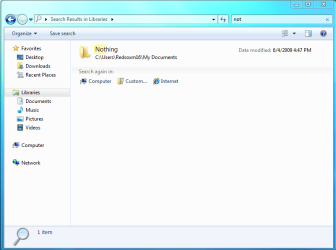
Just did a clean install of 7201 and it seems that anything that is added to the library is not 'searchable' within the library or the referenced folder itself.
Works fine for me.
Computer Manufacturer/Model Number Dell Vostro 1000 OS Windows 7 Ultimate x86 CPU AMD Sempron 3600+ Graphics Card(s) ATI Radeon Xpress 1150 Monitor(s) Displays Generic PnP Monitor Screen Resolution 1200 x 800 Hard Drives WD Scorpio Blue 500 GB (WD5000BEVT) Mouse Logitech V320 Cordless Optical Mouse
Administrator
Staff member
Hello Dan,Windows Search service, then that will also not allow you to seach in a library anymore.
Computer type PC/Desktop Computer Manufacturer/Model Number Self built custom OS 64-bit Windows 11 Pro for Workstations CPU Intel i7-8700K OC'd to 5 GHz Motherboard ASUS ROG Maximus XI Formula Z390 Memory 64 GB (4x16GB) G.SKILL TridentZ RGB DDR4 3600 MHz Graphics Card(s) ASUS ROG-STRIX-GTX1080TI-O11G-GAMING Sound Card Integrated Monitor(s) Displays 2 x Samsung Odyssey G7 27" Screen Resolution 2560x1440 Hard Drives 1TB Samsung 990 PRO M.2, PSU Seasonic Prime Titanium 850W Case Thermaltake Core P3 Cooling Corsair Hydro H115i Keyboard Logitech wireless K800 Mouse Logitech MX Master 4 Internet Speed 2 Gb/s Download and 100 Mb/s Upload Antivirus Malwarebyte Anti-Malware Premium Browser Google Chrome Other Info Logitech Z625 speaker system,
New member
Thread Starter
I realize that Brink, hence why I did not do it.
Hmm... very strange, I'm at a loss then.
Administrator
Staff member
Dan,
Did you change or remove any of the default locations that where included in the index?
Strange, could you post a
screenshot of this with what you searched with to see if it may help more to see what may be wrong?
Computer type PC/Desktop Computer Manufacturer/Model Number Self built custom OS 64-bit Windows 11 Pro for Workstations CPU Intel i7-8700K OC'd to 5 GHz Motherboard ASUS ROG Maximus XI Formula Z390 Memory 64 GB (4x16GB) G.SKILL TridentZ RGB DDR4 3600 MHz Graphics Card(s) ASUS ROG-STRIX-GTX1080TI-O11G-GAMING Sound Card Integrated Monitor(s) Displays 2 x Samsung Odyssey G7 27" Screen Resolution 2560x1440 Hard Drives 1TB Samsung 990 PRO M.2, PSU Seasonic Prime Titanium 850W Case Thermaltake Core P3 Cooling Corsair Hydro H115i Keyboard Logitech wireless K800 Mouse Logitech MX Master 4 Internet Speed 2 Gb/s Download and 100 Mb/s Upload Antivirus Malwarebyte Anti-Malware Premium Browser Google Chrome Other Info Logitech Z625 speaker system,
New member
Thread Starter
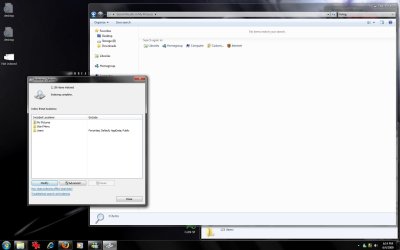
Actually the problem seems to be with indexing rather than libraries. Anything that is indexed on my secondary disk disappears from the search.
Not indexed.jpg
90.1 KB
· Views: 80
Indexed.jpg
80.1 KB
· Views: 83
Administrator
Staff member
Did that get it working again for you?
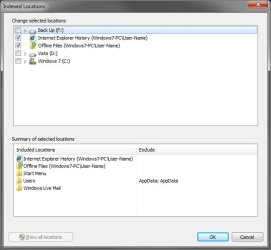
If not here a screenshot of what my defaults are.
Vista ,
Windows Live Mail , and
Back Up are not default though.
Computer type PC/Desktop Computer Manufacturer/Model Number Self built custom OS 64-bit Windows 11 Pro for Workstations CPU Intel i7-8700K OC'd to 5 GHz Motherboard ASUS ROG Maximus XI Formula Z390 Memory 64 GB (4x16GB) G.SKILL TridentZ RGB DDR4 3600 MHz Graphics Card(s) ASUS ROG-STRIX-GTX1080TI-O11G-GAMING Sound Card Integrated Monitor(s) Displays 2 x Samsung Odyssey G7 27" Screen Resolution 2560x1440 Hard Drives 1TB Samsung 990 PRO M.2, PSU Seasonic Prime Titanium 850W Case Thermaltake Core P3 Cooling Corsair Hydro H115i Keyboard Logitech wireless K800 Mouse Logitech MX Master 4 Internet Speed 2 Gb/s Download and 100 Mb/s Upload Antivirus Malwarebyte Anti-Malware Premium Browser Google Chrome Other Info Logitech Z625 speaker system,
New member
Thread Starter
It did not. I've rebooted, rebuilt the index, restarted both the indexing and search services to no avail.
Administrator
Staff member
No problem. I added one of them as a new library, and I was able to search it without a problem in Libraries root.
I know this was from a clean install, but you might see if a
repair install may be able to fix it in case something got corrupted.
Computer type PC/Desktop Computer Manufacturer/Model Number Self built custom OS 64-bit Windows 11 Pro for Workstations CPU Intel i7-8700K OC'd to 5 GHz Motherboard ASUS ROG Maximus XI Formula Z390 Memory 64 GB (4x16GB) G.SKILL TridentZ RGB DDR4 3600 MHz Graphics Card(s) ASUS ROG-STRIX-GTX1080TI-O11G-GAMING Sound Card Integrated Monitor(s) Displays 2 x Samsung Odyssey G7 27" Screen Resolution 2560x1440 Hard Drives 1TB Samsung 990 PRO M.2, PSU Seasonic Prime Titanium 850W Case Thermaltake Core P3 Cooling Corsair Hydro H115i Keyboard Logitech wireless K800 Mouse Logitech MX Master 4 Internet Speed 2 Gb/s Download and 100 Mb/s Upload Antivirus Malwarebyte Anti-Malware Premium Browser Google Chrome Other Info Logitech Z625 speaker system,
New member
Thread Starter
I'd rather figure out the cause than go for the easy fix.
I can still do searches from the root of the drive so it's not really a problem so much as the annoyance of why it's doing. It seems that the folders in the index options are being filtered of all content despite that not being the case.
New member
Thread Starter
Well..... just installed 7264 x64 (clean) and am experiencing the same issue. No indexed folders are searchable, can only search from the root.
Administrator
Staff member
Um, ok. Double check your
Search Options to see if they are set to include those areas in searches.
Computer type PC/Desktop Computer Manufacturer/Model Number Self built custom OS 64-bit Windows 11 Pro for Workstations CPU Intel i7-8700K OC'd to 5 GHz Motherboard ASUS ROG Maximus XI Formula Z390 Memory 64 GB (4x16GB) G.SKILL TridentZ RGB DDR4 3600 MHz Graphics Card(s) ASUS ROG-STRIX-GTX1080TI-O11G-GAMING Sound Card Integrated Monitor(s) Displays 2 x Samsung Odyssey G7 27" Screen Resolution 2560x1440 Hard Drives 1TB Samsung 990 PRO M.2, PSU Seasonic Prime Titanium 850W Case Thermaltake Core P3 Cooling Corsair Hydro H115i Keyboard Logitech wireless K800 Mouse Logitech MX Master 4 Internet Speed 2 Gb/s Download and 100 Mb/s Upload Antivirus Malwarebyte Anti-Malware Premium Browser Google Chrome Other Info Logitech Z625 speaker system,
New member
Thread Starter
Yep, 8 folders with well over a several thousand files. Yet only 296 files are indexed somehow.
Administrator
Staff member
Could be
hidden system files the will need to be unhidden first for them to show up in the search results.
Computer type PC/Desktop Computer Manufacturer/Model Number Self built custom OS 64-bit Windows 11 Pro for Workstations CPU Intel i7-8700K OC'd to 5 GHz Motherboard ASUS ROG Maximus XI Formula Z390 Memory 64 GB (4x16GB) G.SKILL TridentZ RGB DDR4 3600 MHz Graphics Card(s) ASUS ROG-STRIX-GTX1080TI-O11G-GAMING Sound Card Integrated Monitor(s) Displays 2 x Samsung Odyssey G7 27" Screen Resolution 2560x1440 Hard Drives 1TB Samsung 990 PRO M.2, PSU Seasonic Prime Titanium 850W Case Thermaltake Core P3 Cooling Corsair Hydro H115i Keyboard Logitech wireless K800 Mouse Logitech MX Master 4 Internet Speed 2 Gb/s Download and 100 Mb/s Upload Antivirus Malwarebyte Anti-Malware Premium Browser Google Chrome Other Info Logitech Z625 speaker system,
New member
Thread Starter
Don't believe so, the majority of my folders have no hidden content besides the usual (albumart, ini's, etc).
I'm leaning towards something to do with permissions since it's just the other drive that's not indexing properly. Already had ownership of everything, but I've tried changing that to SYSTEM and Administrators and still no go. Rebooted and rebuilt the index and still won't access the files. The folders listed in the index even list their proper size, but still can't search.
Btw, thanks for all your help on this. And Happy (belated) Birthday!