Windows 7 [7260] HELP!

MitchellEve

New member
Member
VIP
Local time
5:33 PM
Messages
117
Hey Guys,

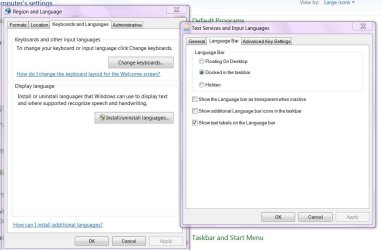
so I've recently upgraded from build 7100, to 7227 and now 7260 (all x86) on the welcome screen the language bar thing still shows. I removed it it 7100 and it was perfect but now when I try to do it the same way before it just stays there, any help?
 

My Computer

OS
Windows 7 Ultimate x64
do a clean install. upgrading unofficial builds before RTM is not recommended
 

My Computer

OS
PTS-Dos
CPU
Q9450
yeah but then I lose all my settings and such.
 

My Computer

OS
Windows 7 Ultimate x64
yeah but then I lose all my settings and such.

You could use Windows Easy Transfer. Using this, you can move files you select, settings for Microsoft Office, Mozilla Firefox, Quicktime, Real Player, and other programs, and desktop background picture and user picture. Strangely, it doesn't include Internet Explorer 8, Microsoft own program!:shock:
 
Last edited:

My Computer

Computer Manufacturer/Model Number
Toshiba Satellite M205-S4806
OS
Windows 7 Home Premium x64
CPU
Intel(R) Core(TM)2 Duo CPU T5450 @ 1.66GHz
Memory
4 GB Texas Instruments PCIxx12 Integrated FlashMedia Control
Graphics Card(s)
Mobile Intel(R) 965 Express Chipset Family
Sound Card
Realtek HD Audio
Monitor(s) Displays
Laptop Monitor
Screen Resolution
1280x800
Hard Drives
200 GB Hitachi HTS542520K9SA00 ATA Device
Keyboard
Laptop Keyboard
Mouse
Synaptics Touchpad
Internet Speed
Broadband, up to 1.2 MB/s
Can you say what you have tried cause I googled your problem and several solutions were mentioned such as.

Click on Start. and Run..
Type msconfig and click OK.
Select the StartUp tab.
Uncheck CTFMON..
Click on Apply. and OK. Restart the computer when prompted
 

My Computer

Computer Manufacturer/Model Number
Gateway GT5692
OS
Windows 7 Ulti. x64
CPU
AMD Phenom 8450 triple-core 2.10 ghz
Memory
4GB
Graphics Card(s)
ATI Radion HD 3200
Monitor(s) Displays
Gateway FPD1775W
Screen Resolution
1280x720
Hard Drives
465.6613 Gibibytes
Can you say what you have tried cause I googled your problem and several solutions were mentioned such as.

Click on Start. and Run..
Type msconfig and click OK.
Select the StartUp tab.
Uncheck CTFMON..
Click on Apply. and OK. Restart the computer when prompted

there isn't a value for that, I went into region and changed the keyboard.
 

My Computer

OS
Windows 7 Ultimate x64
Probably a silly question, i take it you have it set to hidden and not floating.?

Also how many keyboards are listed.?
 

My Computer

OS
Windows 7 7260 X86
Great forum! Been lurking for awhile and watching with amusement. Windows 7 is definately getting some attention. I for one am super stoked! been running must of the builds coming out. Regarding the Build 7260, 7263 etc....there hasn't been much info or links to a clean iso (for install) of the x64 edition. Any leads? Cheers!
 

My Computer

OS
Windows 7 x64 build 7229, Windows XP Pro 32 Bit

My Computer

Computer Manufacturer/Model Number
Gateway GT5692
OS
Windows 7 Ulti. x64
CPU
AMD Phenom 8450 triple-core 2.10 ghz
Memory
4GB
Graphics Card(s)
ATI Radion HD 3200
Monitor(s) Displays
Gateway FPD1775W
Screen Resolution
1280x720
Hard Drives
465.6613 Gibibytes
one keyboard, and set to hidden.
 

My Computer

OS
Windows 7 Ultimate x64
Seen this before, might work add a second keyboard, should give you back control of language bar.
 

My Computer

OS
Windows 7 7260 X86
couldn't I just use a registry edit or something?
 

My Computer

OS
Windows 7 Ultimate x64
Hope that you try what is suggested above about adding a second keyboard to fix your problem. I found this reg edit in this link, not sure what it will do in windows 7? Make a restore point before doing this. good luck to you.
myITforum.com : Get rid of the Annoying Language Bar
 

My Computer

Computer Manufacturer/Model Number
Gateway GT5692
OS
Windows 7 Ulti. x64
CPU
AMD Phenom 8450 triple-core 2.10 ghz
Memory
4GB
Graphics Card(s)
ATI Radion HD 3200
Monitor(s) Displays
Gateway FPD1775W
Screen Resolution
1280x720
Hard Drives
465.6613 Gibibytes
I've tried everything, even that and it didn't work. Maybe I'm stuck with it until I do a clean install.
 

My Computer

OS
Windows 7 Ultimate x64
No 64 bit after 6229 but really soon RTM

I would wait tops 2 weeks

Thanks for the reply. Any word if the keys currently circulating will work with RTM until 03/2010? I'm happy with 7229 thus far, though USB drivers and my Witcher game don't seem to work well. As a side note...the USB drivers(in my case a asus M4A78T-E M/B) should be updated with the Vista 64 bit if you want to use your blackberry. took me a day to track down that solution and the USB is now working fine.

Cheers
 

My Computer

OS
Windows 7 x64 build 7229, Windows XP Pro 32 Bit
Thanks for the reply. Any word if the keys currently circulating will work with RTM until 03/2010? I'm happy with 7229 thus far, though USB drivers and my Witcher game don't seem to work well. As a side note...the USB drivers(in my case a asus M4A78T-E M/B) should be updated with the Vista 64 bit if you want to use your blackberry. took me a day to track down that solution and the USB is now working fine.

Cheers

Hello Welcome to SevenForums, bigrcanada

Hope that you have a good stay here on SF. Word has been no the Beta or RC keys will not work for RTM. However you can re-arm for a total of 120 days I believe, Hope this helps you. lm

http://www.sevenforums.com/tutorials/875-activation-trial-period-extend-up-120-days.html
 

My Computer

Computer Manufacturer/Model Number
Gateway GT5692
OS
Windows 7 Ulti. x64
CPU
AMD Phenom 8450 triple-core 2.10 ghz
Memory
4GB
Graphics Card(s)
ATI Radion HD 3200
Monitor(s) Displays
Gateway FPD1775W
Screen Resolution
1280x720
Hard Drives
465.6613 Gibibytes
If the latest leak. 7260 on 7260 loader RTM release via VHD. currently dated . install.wim 6-21-09 indicates it really is RTM release.
WZOR and Gosugoon state:
FINAL ROADMAP FOR WINDOWS 7 - WZT Say
Process Next-Step : RTM Escrow > RTM RC > Gold code > Final version > RTM-version
06.01 ~ 06.19 BUILDING RTM ESCROW
06.22 ~ 07.10 RTM RECALL
07.10 RTM FINAL BUILD TARGET (Gold)
07.13 RTM SIGN-OFF (Final)

If the 7260.VHD is same as recall RTM. then why do the RC and BETA Keys still activate and Authenticate this version.

Buildlab: 7260.win7_rtm.090612-2110
BuildLabex: 7260.0.x86fre.win7_rtm.090612-2110
plus you have 4x -rearm which indicates that this version is good until:
3-01-2010 plus 4 x 30 = 120 + 1 RESET = 30 for a total of 150 days or 5 months. 8-01-2010.

Why is everbody not upgrading to or at least USING. this version.
7260 - RTM. if you like x86.


Thanks for the reply. Any word if the keys currently circulating will work with RTM until 03/2010? I'm happy with 7229 thus far, though USB drivers and my Witcher game don't seem to work well. As a side note...the USB drivers(in my case a asus M4A78T-E M/B) should be updated with the Vista 64 bit if you want to use your blackberry. took me a day to track down that solution and the USB is now working fine.

Cheers

Hello Welcome to SevenForums, bigrcanada

Hope that you have a good stay here on SF. Word has been no the Beta or RC keys will not work for RTM. However you can re-arm for a total of 120 days I believe, Hope this helps you. lm

http://www.sevenforums.com/tutorials/875-activation-trial-period-extend-up-120-days.html

If the latest leak. 7260 on 7260 loader RTM release via VHD. currently dated . install.wim 6-21-09 indicates it really is RTM release.
WZOR and Gosugoon state:
FINAL ROADMAP FOR WINDOWS 7 - WZT Say
Process Next-Step : RTM Escrow > RTM RC > Gold code > Final version > RTM-version
06.01 ~ 06.19 BUILDING RTM ESCROW
06.22 ~ 07.10 RTM RECALL
07.10 RTM FINAL BUILD TARGET (Gold)
07.13 RTM SIGN-OFF (Final)

If the 7260.VHD is same as recall RTM. then why do the RC and BETA Keys still activate and Authenticate this version.

Buildlab: 7260.win7_rtm.090612-2110
BuildLabex: 7260.0.x86fre.win7_rtm.090612-2110
plus you have 4x -rearm which indicates that this version is good until:
3-01-2010 plus 4 x 30 = 120 + 1 RESET = 30 for a total of 150 days or 5 months. 8-01-2010.

Why is everbody not upgrading to or at least USING. this version.
7260 - RTM. if you like x86.


I don't want to be rude, but you're not even posting towards my topic. bigrcanada please don't come to my thread and start a new topic. Sorry but its not fair to me.
 

My Computer

OS
Windows 7 Ultimate x64
language bar

If you really want it gone so you can't ever see it again:

1. Go to "Start", then "Run"
2. Type "Regsvr32.exe /u msutb.dll" and press enter
3. The Language bar will never bother you again!

see if this works.

sorry about the thread being stole. hope the above helps.
 
yeah that doesn't work...
 

My Computer

OS
Windows 7 Ultimate x64
Back
Top