Windows 7 7264 Build - CD/DVD Drivers Missing?

alvinz95

New member
Local time
5:53 PM
Messages
4
So I built my own computer, and fresh installed Windows XP Professional. Now I want to update to Windows 7 Build 7264. I burned it to a DVD at 2.3x write speed, and loaded the DVD on my computer through BIOS. I got past the name and language part, and right after that, I get an error that says something along the lines of "Missing CD/DVD Drivers... insert drivers" something like that.

I read on here that it is a burning error. Is that true in my case? Maybe thats only for official Win7 builds?

Do I have to install the drivers for my DVD drive (It is a Samsung SD-616)? HDD Sata Drivers missing?

If it is a burn problem what burning program should I use to minimize any burn errors? I used Alcohol 120% to burn the .ISO.

**EDIT**

Trying to run the DVD while on XP doesn't work. I've tried the official 7100 build from Microsoft, but I get the same result. Very frustrated. I will be switching DVD players soon. Please post anything that you can think of that can help me.

EDIT

I got it to work. I used the USB Stick method!
 
Last edited:

My Computer

OS
XP Prof.
It really isn't a driver problem. For some reasons many have had this problem, and have had to do some form of work around to get win 7 loaded. The same problem happened with mine, thus after several attempts I tried loading it from Vista and it worked. Basically you run Windows 7 as if you were loading a regular applications; then just follow the on screne instrustment. One thing you will want to watch for is during the restart the computer will attempt to run the setup disk unless you go into the bios/cmos and set your startup to the disk drive containing Win 7. :)
 

My Computer

Computer Manufacturer/Model Number
HP Pavilion a4302f
OS
Win 7 Pro x64, VM Win XP, Win7 Pro Sandbox, Kubuntu 11
CPU
AMD Athlon(tm) II X4 640 @ 3.0 Gbz
Memory
12GB 1066MHz DDR3 SDRAM - 2x4GB, 2x2GB
Graphics Card(s)
ATI Radeon HD 4350 HD Graphics/Audio with 512MB
Sound Card
Realtek High Definition Audio
Monitor(s) Displays
1. Dell 23" SP2307, 2. Mitsublishi 40" HDTV, Hannspree 25"
Screen Resolution
1. 2048x1152, 2. 1920-1080, 3. 1920x1200
Hard Drives
Int: 1 120 Gig SSD i
1 - 2.5" 500 USB External HDD
1 -1 Tb USB External HDD
Case
Mid Tower
Cooling
Standard Fans - 5 fans (very quiet)
Keyboard
Microsoft Wireless 2000
Mouse
Microsoft Wireless Mouse 5000
Internet Speed
10 Mbit (realistically 500 Kbit - 1.2 Mbit)
Other Info
Speakers - Bose Desktop (Excellent Sound)
1 external CD|DVD\Blue-ray Recorders/Players (Sony)
I have the same problem, with both 32-bit and 64-bit versions. My DVD is a Samsung SH-S183L SATA device. So far, I haven't found a solution.
 

My Computer

Computer Manufacturer/Model Number
home-built
OS
Win 7-32, XP Pro-32
CPU
Xeon 3070 (2.66 GHz)
Motherboard
Asus P5W DH Deluxe, BIOS 2901
Memory
4 GB
Graphics Card(s)
PowerColor ATI Radeon HD 5750 (fanless)
Sound Card
on-board
Monitor(s) Displays
Dell U2711
Screen Resolution
2560x1440
Hard Drives
All SATA:
ICH7R (AHCI): 1 Intel X-25M 80GB SSD, 2 Samsung HD103UJ 1TB, 1 Seagate ST3750330MS 750GB;
JMB363: Samsung SH-S223L DVD;
Promise TX4302: two mobile racks, normally powered off
PSU
Seasonic SS-650HT
Case
Antec P180
Cooling
Sunbeam Tuniq Tower 120, 4 120mm fans (variable rpm)
Keyboard
Lexmark IBM Type "M" - PS/2 connector
Mouse
Wacom Intous4, Logitech Wheel Mouse as backup
Internet Speed
Cable ~ 6 mbps
Other Info
DVD: Samsung SH-S223L (SATA),
SanDisk CompactFlash reader,
Epson R280 printer,
HP Laserjet 4100dtn,
Epson scanner,
NeatReceipts scanner

Laptops: Dell XPS 15 L501x, Dell E5420
Guy, as indicated to alvinz95, attempt to set it help as if you installing an application. "Read my direction in the above post" :) It Works. :D
 

My Computer

Computer Manufacturer/Model Number
HP Pavilion a4302f
OS
Win 7 Pro x64, VM Win XP, Win7 Pro Sandbox, Kubuntu 11
CPU
AMD Athlon(tm) II X4 640 @ 3.0 Gbz
Memory
12GB 1066MHz DDR3 SDRAM - 2x4GB, 2x2GB
Graphics Card(s)
ATI Radeon HD 4350 HD Graphics/Audio with 512MB
Sound Card
Realtek High Definition Audio
Monitor(s) Displays
1. Dell 23" SP2307, 2. Mitsublishi 40" HDTV, Hannspree 25"
Screen Resolution
1. 2048x1152, 2. 1920-1080, 3. 1920x1200
Hard Drives
Int: 1 120 Gig SSD i
1 - 2.5" 500 USB External HDD
1 -1 Tb USB External HDD
Case
Mid Tower
Cooling
Standard Fans - 5 fans (very quiet)
Keyboard
Microsoft Wireless 2000
Mouse
Microsoft Wireless Mouse 5000
Internet Speed
10 Mbit (realistically 500 Kbit - 1.2 Mbit)
Other Info
Speakers - Bose Desktop (Excellent Sound)
1 external CD|DVD\Blue-ray Recorders/Players (Sony)
Hi Alvinz95, welcome to the forums.

There has also been cases where the BIOS settings can sometimes cause this error. It's something to do with SATA & IDE emulation so if you can get into the BIOS & disable IDE emulation (advanced settings) then this may solve the issue.

Hope this helps :)


Jeff
 

My Computer

Computer Manufacturer/Model Number
Compaq Desktop
OS
Windows 7 Ultimate x64
CPU
AMD Sempron Dual Core
Memory
3GB
Graphics Card(s)
NVIDIA GeForce 6150SE nForce 430
Screen Resolution
1024x768
Hard Drives
150GB Sata
It really isn't a driver problem. For some reasons many have had this problem, and have had to do some form of work around to get win 7 loaded. The same problem happened with mine, thus after several attempts I tried loading it from Vista and it worked. Basically you run Windows 7 as if you were loading a regular applications; then just follow the on screne instrustment. One thing you will want to watch for is during the restart the computer will attempt to run the setup disk unless you go into the bios/cmos and set your startup to the disk drive containing Win 7. :)

Wait, so just put the DVD containing Win7 while your on what ever operating system you are on as if you are installing a program? Don't install through BIOS?
 

My Computer

OS
XP Prof.
I had to make a bootable USB-stick, and then boot from it. I had copied ALL files from the 7129-iso to the stick, and then it installed flawless :)
 

My Computer

Computer type
PC/Desktop
Computer Manufacturer/Model Number
homebrewed
OS
Windows 7 Ultimate x64 retail
CPU
Core i5 3570K @ 4,4Ghz
Motherboard
MSI Z77A GD65
Memory
16Gbyte Corsair C9 1866mhz
Graphics Card(s)
MSI Lightning GTX 770
Sound Card
Auzentech
Monitor(s) Displays
BenQ 24"
Screen Resolution
1920x1200
Hard Drives
Samsung 840 EVO SSD, Samsung SSD 830 256Gbyte, Seagate 3Tbyte HDD, WD 4 Tbyte HDD.
PSU
Zahlmann 850HP
Case
Corsair Carbide 500R
Keyboard
G15 logitech
Mouse
Logitech Laser MX1000
Internet Speed
60/60
Antivirus
Bitdefender
Browser
Chrome
MY SOLUTION to this problem. I have an IDE "LiteOn" brand DVD player. I just went to the LiteOn web site, downloaded the latest firmware upgrade for the DVD player, then upgraded the firmware on my DVD player. Tada! No more message from Windows 7 installation asking for a DVD driver. Make sure your DVD player has the lastest firmware upgrade that is available from its manufacturer. Hope this helps.
 

My Computer

OS
Windows 7
I had the same problem but got around it because I had an external CD/DVD that enabled me to install Win 7 Home Premium.

Here is the problem now that Win 7 is up and running. It won't recognize either of my two internal IDE CD/DVD drives that I couldn't install from in the first place:
1. Lite-On LH-18A1P
2. BenQ LS DW1655

Thank goodness for that third drive. Windows 7 just doesn't see the internal drives but they are there, visible in BIOS and totally operational under my old Vista OS still bootable on a separate HD.

What do I do??? :(
 
Last edited:

My Computer

OS
Windows 7
Here is the problem now that Win 7 is up and running. It won't recognize either of my two internal IDE CD/DVD drives that I couldn't install from in the first place:
1. Lite-On LH-18A1P
2. BenQ LS DW1655

Thank goodness for that third drive. Windows 7 just doesn't see the internal drives but they are there, visible in BIOS and totally operational under my old Vista OS still bootable on a separate HD.

What do I do??? :(

Go into device manager. Open each disk in turn. Click on install or update driver ... allow the machine to search the Windows Update website .. if there is a driver it will find and install it.

Crazy B
 

My Computer

Computer type
PC/Desktop
Computer Manufacturer/Model Number
a
OS
Windows 7
CPU
b
Motherboard
c
Memory
d
Graphics Card(s)
e
Sound Card
f
Monitor(s) Displays
g
Hard Drives
h
PSU
i
Case
j
Cooling
k
Keyboard
l
Mouse
m
Internet Speed
n
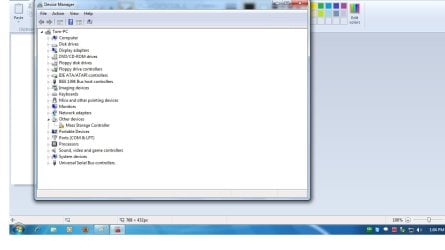
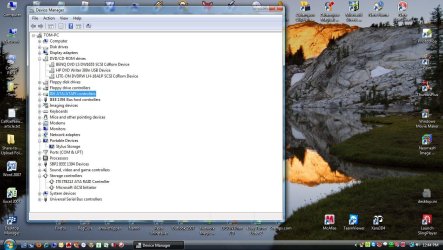
Therein lies the problem, the drives don't show up in the device manager, they don't show up anywhere when running Win 7..
 
Last edited:

My Computer

OS
Windows 7
Are there any unknown devices showing up in Device Manager? Maybe it is the controller that Win 7 isn't recognizing, not the devices.
 

My Computer

Computer Manufacturer/Model Number
home-built
OS
Win 7-32, XP Pro-32
CPU
Xeon 3070 (2.66 GHz)
Motherboard
Asus P5W DH Deluxe, BIOS 2901
Memory
4 GB
Graphics Card(s)
PowerColor ATI Radeon HD 5750 (fanless)
Sound Card
on-board
Monitor(s) Displays
Dell U2711
Screen Resolution
2560x1440
Hard Drives
All SATA:
ICH7R (AHCI): 1 Intel X-25M 80GB SSD, 2 Samsung HD103UJ 1TB, 1 Seagate ST3750330MS 750GB;
JMB363: Samsung SH-S223L DVD;
Promise TX4302: two mobile racks, normally powered off
PSU
Seasonic SS-650HT
Case
Antec P180
Cooling
Sunbeam Tuniq Tower 120, 4 120mm fans (variable rpm)
Keyboard
Lexmark IBM Type "M" - PS/2 connector
Mouse
Wacom Intous4, Logitech Wheel Mouse as backup
Internet Speed
Cable ~ 6 mbps
Other Info
DVD: Samsung SH-S223L (SATA),
SanDisk CompactFlash reader,
Epson R280 printer,
HP Laserjet 4100dtn,
Epson scanner,
NeatReceipts scanner

Laptops: Dell XPS 15 L501x, Dell E5420
Are there any unknown devices showing up in Device Manager? Maybe it is the controller that Win 7 isn't recognizing, not the devices.

Only the Other Devices one identifying a Mass Storage Controller"

I have attached a screen cap of the device manager identified as Win7. the second cap is the same computer device manager when booted under the Vista OS. You can see the three CD/DVD drives.
 

Attachments

  • Win7.jpg
    Win7.jpg
    59.6 KB · Views: 60
  • Vista.jpg
    Vista.jpg
    148.6 KB · Views: 177

My Computer

OS
Windows 7
If Win 7 cannot identify the controller, then neither can it see any devices attached to the controller. I think a missing driver for the controller is your problem.

To help us help you, please update your system specs. Click on "My System Specs" in the lower left corner of a post that you wrote and update the settings. Please be very thorough. For an example of system specs, click on "My System Specs" in this message and you'll see my system described.

To determine exactly what the missing device is, right click on the mass storage controller device in Device Manager, select Properties, Details tab, and find "Hardware IDs" line. You'll see something beginning PCI\VEN\... Right click and copy that string, or one of the other hardware ids, and then do a Google search on the string. That will probably identify the controller very precisely.

The next step will be to find a Windows 7-compatible driver for the device. Depending on the device, motherboard, etc., you might best look at the motherboard manufacturer's web site, or the controller's if you have a separate controller card. Or maybe you need to update your BIOS to a later version. The correct answer is hard to estimate without knowing your system specs.
 

My Computer

Computer Manufacturer/Model Number
home-built
OS
Win 7-32, XP Pro-32
CPU
Xeon 3070 (2.66 GHz)
Motherboard
Asus P5W DH Deluxe, BIOS 2901
Memory
4 GB
Graphics Card(s)
PowerColor ATI Radeon HD 5750 (fanless)
Sound Card
on-board
Monitor(s) Displays
Dell U2711
Screen Resolution
2560x1440
Hard Drives
All SATA:
ICH7R (AHCI): 1 Intel X-25M 80GB SSD, 2 Samsung HD103UJ 1TB, 1 Seagate ST3750330MS 750GB;
JMB363: Samsung SH-S223L DVD;
Promise TX4302: two mobile racks, normally powered off
PSU
Seasonic SS-650HT
Case
Antec P180
Cooling
Sunbeam Tuniq Tower 120, 4 120mm fans (variable rpm)
Keyboard
Lexmark IBM Type "M" - PS/2 connector
Mouse
Wacom Intous4, Logitech Wheel Mouse as backup
Internet Speed
Cable ~ 6 mbps
Other Info
DVD: Samsung SH-S223L (SATA),
SanDisk CompactFlash reader,
Epson R280 printer,
HP Laserjet 4100dtn,
Epson scanner,
NeatReceipts scanner

Laptops: Dell XPS 15 L501x, Dell E5420
Are there any unknown devices showing up in Device Manager? Maybe it is the controller that Win 7 isn't recognizing, not the devices.

Only the Other Devices one identifying a Mass Storage Controller"

Go into properties --> update driver --> let it search windows update

O/wise find the Vista driver and use that.

Crazy B
 

My Computer

Computer type
PC/Desktop
Computer Manufacturer/Model Number
a
OS
Windows 7
CPU
b
Motherboard
c
Memory
d
Graphics Card(s)
e
Sound Card
f
Monitor(s) Displays
g
Hard Drives
h
PSU
i
Case
j
Cooling
k
Keyboard
l
Mouse
m
Internet Speed
n
Back
Top