Windows 7 access to Windows Vista Encrypted Files - How

ozofmanson

New member
Local time
7:51 AM
Messages
3
I had Windows Vista Ultimate installed on my PC. I got Windows 7 Ultimate and decided I needed an upgrade. I formatted my primary partition and got rid of Vista completely. I then installed Windows 7. It is beautiful.

My problem is simple: I had a partition with files on it that were encrypted using the EFS on Vista. How do I now decrypt and access them?

HELP ! ! !
 

My Computer

OS
Windows 7
Hello ozofmanson, welcome to the Seven Forums.

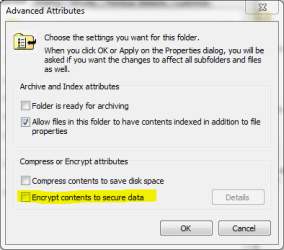
Vista and Win 7 use the same EFS system, so it should work when you right click the encrypted file or folder, click General > Advanced and clear the checkbox in Encrypt contents to secure data.

Kari
 

Attachments

  • EFS.PNG
    EFS.PNG
    11 KB · Views: 824

My Computer

Computer type
Laptop
Computer Manufacturer/Model Number
HP ENVY 17-1150eg
OS
Windows 10 Pro x64 EN-GB
CPU
1.6 GHz Intel Core i7-720QM Processor
Memory
6 GB
Graphics Card(s)
ATI Mobility Radeon HD 5850 Graphics
Sound Card
Beats sound system with integrated subwoofer
Monitor(s) Displays
17" laptop display, 22" LED and 32" Full HD TV through HDMI
Screen Resolution
1600*900 (1), 1920*1080 (2&3)
Hard Drives
Internal: 2 x 500 GB SATA Hard Disk Drive 7200 rpm
External: 2TB for backups, 3TB USB3 network drive for media
Cooling
As Envy runs a bit warm, I have it on a Cooler Master pad
Keyboard
Logitech diNovo Media Desktop Laser (bluetooth)
Mouse
Logitech Performance Mouse MX
Internet Speed
50/10 Mbps VDSL
Antivirus
Windows Defender 4.3.9431.0
Browser
Maxthon 3.5.2., IE11
You will not be able to decrypt your files, not unless you made a backup key even then its a long shot.
 

My Computer

Computer type
PC/Desktop
Computer Manufacturer/Model Number
Alienware Aurora ALX R4
OS
Windows 10 Pro (x64)
CPU
Intel Core i7-3930K (3.2GHz - 4.5GHz)
Motherboard
Alienware Aurora-R4 x79
Memory
4x Samsung 4GB PC3-12800 DDR3 (16GB 1600MHz)
Graphics Card(s)
Nvidia Geforce GTX 690
Sound Card
SteelSeries Siberia Elite
Monitor(s) Displays
Dell UltraSharp U3011
Screen Resolution
2560x1600
Hard Drives
Samsung 850 Pro 256 GB, Seagate 1TB Desktop Hybrid HDD, 2x Western Digital 4TB Green HDD
PSU
875W Some Dell PSU <.<
Case
Alienware Aurora ALX
Cooling
Custom Liquid Cooling (EK CPU & GPU blocks) dual EK 480RAD
Keyboard
Logitech G710+ Mechanical
Mouse
Logitech G700s
Internet Speed
Verizon Fios (50 mbps average)
Other Info
Server: Intel NUC D54250WYK: i5-4250U, 16GB, 256 GB mSATA, Windows Server 2012 R2
Yes, of course you need the key to encrypt the files but I do not believe you have not backed up your key(s).

EFS encrypted files and folders can be opened without a key if using the same computer and user account used to encrypt them. Using the key, they can be opened also in other computers and / or by other users.

Kari
 

My Computer

Computer type
Laptop
Computer Manufacturer/Model Number
HP ENVY 17-1150eg
OS
Windows 10 Pro x64 EN-GB
CPU
1.6 GHz Intel Core i7-720QM Processor
Memory
6 GB
Graphics Card(s)
ATI Mobility Radeon HD 5850 Graphics
Sound Card
Beats sound system with integrated subwoofer
Monitor(s) Displays
17" laptop display, 22" LED and 32" Full HD TV through HDMI
Screen Resolution
1600*900 (1), 1920*1080 (2&3)
Hard Drives
Internal: 2 x 500 GB SATA Hard Disk Drive 7200 rpm
External: 2TB for backups, 3TB USB3 network drive for media
Cooling
As Envy runs a bit warm, I have it on a Cooler Master pad
Keyboard
Logitech diNovo Media Desktop Laser (bluetooth)
Mouse
Logitech Performance Mouse MX
Internet Speed
50/10 Mbps VDSL
Antivirus
Windows Defender 4.3.9431.0
Browser
Maxthon 3.5.2., IE11
:cry::cry:
Sorry but unless you can re-create the original system it's BYE BYE. (As others have said)

I've re-iterated "Ad Nauseam" you should ALWAYS keep backup - especially of User Data - before doing anything major on a computer -- especially like replacing the OS.

Hopefully while not being the answer to your question you will have learned from this experience.

Imagine another time having say over 1 TB of irreplaceable Music files - and your disk gets broken / formatted erased etc etc.

Another scenario -- Pro Photographer doing a Wedding Shoot -- digital files get corrupted without a backup being available -- I'd hate to be the one to tell his Client / Customer.

Not nice.

Cheers
jimbo
 

My Computer

Computer type
PC/Desktop
Computer Manufacturer/Model Number
Custom built, several laptops HP/ASUS
OS
Linux CENTOS 7 / various Windows OS'es and servers
CPU
Intel i7 Intel i5
Memory
8GB, 16GB
Graphics Card(s)
On Motherboard
Sound Card
Realtek HD audio
Monitor(s) Displays
Apple Cinema display, Samsung LCD
Screen Resolution
1920 X 1080
Hard Drives
4 X 1TB SATA
Mouse
Toshiba wireless laser
Internet Speed
> 20MB up
I had Windows Vista Ultimate installed on my PC. I got Windows 7 Ultimate and decided I needed an upgrade. I formatted my primary partition and got rid of Vista completely. I then installed Windows 7. It is beautiful.

My problem is simple: I had a partition with files on it that were encrypted using the EFS on Vista. How do I now decrypt and access them?

HELP ! ! !
Before formatting system you should backup Certificate Key Encrypted File System (EFS) Certificate Backup - Vista Forums

and then import it to new system

Encrypted File System (EFS) Certificate Restore - Vista Forums

Because you haven't it the only solution is this soft:Forgot your password? Download password recovery, forensics, system and security software. Find crack best lost passwords recovery tools and password crackers. Advanced EFS Data Recovery

This tool also can decrypt EFS files:http://www.accessdata.com/forensictoolkit.html
 
Last edited:

My Computer

Computer Manufacturer/Model Number
Custom made
OS
Windows 7 Professional x64 PL
CPU
AMD Athlon 4450e
Motherboard
Giga-Byte GA-MA69G-S3H
Memory
GoodRam DDR2 2x2048MB (FSB 800MHz)
Graphics Card(s)
nVidia GeForce 9600GT (G94-300) 1024 MB
Monitor(s) Displays
SAMSUNG SyncMaster HS2P301688
Hard Drives
Seagate ST3750330AS 750GB
PSU
Corsair 550W
Cooling
AeroCool ExtremeEngine 3T
From all of my research and the feedback I have recieved from other forums as well, I have begun attempting to restore/decrypt the files using a program called Advanced EFS Data Recovery Professional. I have been running SYSKEYS and adding user passwords that I think may remotely be what I used for encryption. Any tips, advice, or specific tutorials out there for how to do this in the program? I keep looking for a good tutorial but can't seam to find one.
 

My Computer

OS
Windows 7
Same problem

I have the exact same problem. Please let me know if you are successful. I am following your lead and have downloaded EFS myself.
Thanks,
Chris
 

My Computer

Computer Manufacturer/Model Number
Homebuilt
OS
Windows 7 pro 64
CPU
Q6600 2.52 GHz
Motherboard
Asus P5N-E SLI
Memory
8 GB
Graphics Card(s)
GeForce GTX 260
Am on the same boat with you guys. IDK how to use EFS apps :(

Any kind members want to do some tutorial to use it?
 

My Computer

OS
windows 7
Misleading Messages

I find it unbelieveable that I can not access my own files after upgrading from Vista to Windows 7, even knowing the password that I used to encrypt the files.

But what really takes the cake is that MS hasn't even bothered to provide a proper error message on what is happening.

"You will need to provide administrator permission to change these attributes."
Um, I AM ADMINISTRATOR!!! @#$@%!~
 

My Computer

OS
Windows 7 32 bit
I find it unbelieveable that I can not access my own files after upgrading from Vista to Windows 7, even knowing the password that I used to encrypt the files.

Then the encryption would be pointless. The whole point of encryption is to prevent private data being access on any system but the original.

It is easy to see why now Microsoft leaves Encrypting File System and BitLocker out of the home version. Users would carelessly use it without thinking of the consequences.
 

My Computer

Computer type
PC/Desktop
Computer Manufacturer/Model Number
Alienware Aurora ALX R4
OS
Windows 10 Pro (x64)
CPU
Intel Core i7-3930K (3.2GHz - 4.5GHz)
Motherboard
Alienware Aurora-R4 x79
Memory
4x Samsung 4GB PC3-12800 DDR3 (16GB 1600MHz)
Graphics Card(s)
Nvidia Geforce GTX 690
Sound Card
SteelSeries Siberia Elite
Monitor(s) Displays
Dell UltraSharp U3011
Screen Resolution
2560x1600
Hard Drives
Samsung 850 Pro 256 GB, Seagate 1TB Desktop Hybrid HDD, 2x Western Digital 4TB Green HDD
PSU
875W Some Dell PSU <.<
Case
Alienware Aurora ALX
Cooling
Custom Liquid Cooling (EK CPU & GPU blocks) dual EK 480RAD
Keyboard
Logitech G710+ Mechanical
Mouse
Logitech G700s
Internet Speed
Verizon Fios (50 mbps average)
Other Info
Server: Intel NUC D54250WYK: i5-4250U, 16GB, 256 GB mSATA, Windows Server 2012 R2
Misleading Messages

No, that is certainly NOT the point of encryption. The point of encryption is to prevent unauthorized access to data. Thus, the password.

Never did I tell windows, "Only allow me to access these files on THIS machine under this version of the OS." Nor was I ever informed by windows that I would only be able to access the files in said manner. Nor was I informed by Windows 7 at the time of upgrade that my old OS included such files, and that I would not be able to access them after the upgrade.

But it's not really that big a deal. It's only my data.
 

My Computer

OS
Windows 7 32 bit
Opening Windows Vista encrypted files on W7 Ultimate

Hello ozofmanson, welcome to the Seven Forums.

Vista and Win 7 use the same EFS system, so it should work when you right click the encrypted file or folder, click General > Advanced and clear the checkbox in Encrypt contents to secure data.

Kari

Hello Kari,
I have the same problem as ozofmanson and have tried your advice, but when I get to Advanced, the checkbox for Encrypt contents to secure data is not checked, so I can't clear it, so what do I do next? What program should I insert to open the folder? I have tried Uniblue Registry Booster but with no effect.
Very grateful for any further advice.
ColinD44
 

My Computer

Computer Manufacturer/Model Number
Toshiba Satellite
OS
Windows 7 Ultimate
CPU
AMD Turion 64 X2 2.1GHz
Memory
1GB
Graphics Card(s)
ATI Radeon X1200
Hard Drives
256GB 7200RPM
Opening Windows Vista encrypted files on W7 Ultimate

:cry::cry:
Sorry but unless you can re-create the original system it's BYE BYE. (As others have said)

I've re-iterated "Ad Nauseam" you should ALWAYS keep backup - especially of User Data - before doing anything major on a computer -- especially like replacing the OS.

Hopefully while not being the answer to your question you will have learned from this experience.

Imagine another time having say over 1 TB of irreplaceable Music files - and your disk gets broken / formatted erased etc etc.

Another scenario -- Pro Photographer doing a Wedding Shoot -- digital files get corrupted without a backup being available -- I'd hate to be the one to tell his Client / Customer.

Not nice.

Cheers
jimbo

Hi Jimbo,
Can I take this issue one stage further? I have backed up my Vista OS and files on Norton 360. Can you please tell me how I can recover the encryption key from the backup without re-loading the Vista OS?
I'd be very grateful,
ColinD44
 

My Computer

Computer Manufacturer/Model Number
Toshiba Satellite
OS
Windows 7 Ultimate
CPU
AMD Turion 64 X2 2.1GHz
Memory
1GB
Graphics Card(s)
ATI Radeon X1200
Hard Drives
256GB 7200RPM
Back
Top