Windows 7 Activates - Valid - Not Genuine

timconstan

New member
Local time
3:59 PM
Messages
10
Hi,

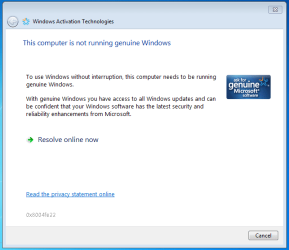
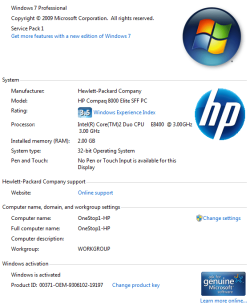
I have Windows 7 Professional & 35 identical computers each with a unique Windows 7 license. I setup PC 1 the way I want it, and am using FOG to clone the image to PC 2. On PC 2, after copying the image from PC 1, I change the windows registration key to match the one that came with that computer (from HP -- I know it's a good key!). Registration process happens with no issues and I get a message saying the key is valid. A couple of days later I get a popup saying that my copy of windows is not genuine. I continue to get these popups on all PC's.

Tried various slmgr.vbs options with no success.

See attached screen shots showing that Windows is activated/valid and the 2nd showing that windows is not genuine.
 

Attachments
  • Valid.PNG
    Valid.PNG
    26.3 KB · Views: 56
  • NotGenuine.PNG
    NotGenuine.PNG
    13.1 KB · Views: 46

My Computer

OS
Windows 7 Professional 64 bit
Hi,

I have Windows 7 Professional & 35 identical computers each with a unique Windows 7 license. I setup PC 1 the way I want it, and am using FOG to clone the image to PC 2. On PC 2, after copying the image from PC 1, I change the windows registration key to match the one that came with that computer (from HP -- I know it's a good key!). Registration process happens with no issues and I get a message saying the key is valid. A couple of days later I get a popup saying that my copy of windows is not genuine. I continue to get these popups on all PC's.

Tried various slmgr.vbs options with no success.

See attached screen shots showing that Windows is activated/valid and the 2nd showing that windows is not genuine.

Different GUID on each. When you clone you you export the GUID of PC-1 and when PC-2.... tries to activate it shows as activated.

You cant do it that way. You might be able to clone before activation then activate with a valid key
 

My Computer

Computer Manufacturer/Model Number
HP Pavillion dv-7 1005 Tx
OS
Win 8 Release candidate 8400
CPU
[email protected]
Memory
4 gigs
Graphics Card(s)
Nvidia 9600M
Sound Card
HD built-in
Monitor(s) Displays
17" Wxga
Screen Resolution
1440x900
Cooling
none
Internet Speed
45Mb down 5Mb up
I'm not sure how far I can get in configuring the PC to look the way I want all PC's to look before I'm forced to activate Windows, but I'll give it a shot.

Shouldn't the "change registration key" option shown at the bottom of screen shot 1 allow me to really change the registration key and have things reported as genuine or is it not that smart?
 

My Computer

OS
Windows 7 Professional 64 bit
I change the windows registration key to match the one that came with that computer

Hi Ken

Would it be not better to leave the factory OEM-SLP activation method Product Key in place?
 

My Computer

OS
ME/XP/Vista/Win7
Would it be not better to leave the factory OEM-SLP activation method Product Key in place?

I'm not sure what you mean...

If you mean that I should just copy PC 1 to PC 2 and then not change the product key in PC 2 to match that computer, I still get the same message on PC 2 -- that the copy of Windows is not Genuine.

If you mean I should do something with PC 2 before I copy PC 1 image over to it (I currently am not -- just copying the PC 1 image to PC 2 out of the box), I'm not sure what that would be...
 

My Computer

OS
Windows 7 Professional 64 bit
On any of the machines thats non-genuine right now, please download and run this tool.

go.microsoft.com/fwlink/?linkid=52012

In the tool, click Continue, then click Copy, paste into notepad, save as a .txt file and upload the file here.
 

My Computer

Computer Manufacturer/Model Number
Too many to describe...
OS
Windows 7 x64 pro/ Windows 7 x86 Pro/ XP SP3 x86
WGA Diagnostic Report

- Attached -
 

Attachments

My Computer

OS
Windows 7 Professional 64 bit
All your PC's have the same factory OEM-SLP activation method Product Key installed.
I see. Please forgive my ignorance, but I don't know what this means in practical terms. Are you suggesting that I should just be able to clone PC 1 to PC 2 and not change anything and PC 2 should show up as Genuine?
 

My Computer

OS
Windows 7 Professional 64 bit
Yes. The machine is licensed but not validated. This is likely the issue:

Tampered File: %systemroot%\system32\sppcommdlg.dll|sppcommdlg.dll.mui

Are you using some vistalizator type of software for language settings? If not, something else seems to have corrupted this file so windows thinks its tampered with. To test, run SFC scan 3 times.

http://www.sevenforums.com/tutorials/1538-sfc-scannow-command-system-file-checker.html

See if its able to clear the corruption. You can run validation again after that. Also run mgadiag then because if the problem is not cleared it'll show up again.
 

My Computer

Computer Manufacturer/Model Number
Too many to describe...
OS
Windows 7 x64 pro/ Windows 7 x86 Pro/ XP SP3 x86
In practical terms, If you make one set of the HP/Compaq Recovery disks using the disk app, as you have 35 identical computers, the disks will reinstall all the PC's to back to first day you had your new PC.

What you will be doing is making your own Recovery Disks.
 

My Computer

OS
ME/XP/Vista/Win7

My Computer

Computer Manufacturer/Model Number
Too many to describe...
OS
Windows 7 x64 pro/ Windows 7 x86 Pro/ XP SP3 x86
Bill2: Took your advice about running sfc /scannow 3 times

---

C:\Users\OneStop1>sfc /scannow
Beginning system scan. This process will take some time.
Beginning verification phase of system scan.
Verification 100% complete.
Windows Resource Protection found corrupt files but was unable to fix some of th
em.
Details are included in the CBS.Log windir\Logs\CBS\CBS.log. For example
C:\Windows\Logs\CBS\CBS.log

---

Re-running MGADiag, no longer says files have been tampered with. (file attached)

---

Going to Genuine Microsoft Software -- still says I need to buy a copy of windows.
 

Attachments

My Computer

OS
Windows 7 Professional 64 bit
SFC scan was not able to repair the tampered file. MGADIAG log still shows the same tampered file, look carefully. Normally when sfc scan fails, we advise a repair install but I dont know whether its possible with your setup. But its possible your cloning process is responsible for the tampered file. I'm afraid I have no idea about that software and process you use but maybe you can consult the chaps who do. Please correct me but I think this issue occurs only in the cloned systems, not in the mother machine?

But please take a look at the oem sysprep page I linked in my earlier post.
 

My Computer

Computer Manufacturer/Model Number
Too many to describe...
OS
Windows 7 x64 pro/ Windows 7 x86 Pro/ XP SP3 x86
In practical terms, If you make one set of the HP/Compaq Recovery disks using the disk app, as you have 35 identical computers, the disks will reinstall all the PC's to back to first day you had your new PC.

What you will be doing is making your own Recovery Disks.

But I don't want to "reinstall all the PC's back to the first day you had your new PC." I want to copy the way I have PC 1 setup to PC 2.
 

My Computer

OS
Windows 7 Professional 64 bit
In practical terms, If you make one set of the HP/Compaq Recovery disks using the disk app, as you have 35 identical computers, the disks will reinstall all the PC's to back to first day you had your new PC.

What you will be doing is making your own Recovery Disks.

But I don't want to "reinstall all the PC's back to the first day you had your new PC." I want to copy the way I have PC 1 setup to PC 2.

The best way is not to use sysprep as all 35 are identical computers,
& leave the factory OEM-SLP activation method Product Key in place.
In practical terms, you will be making one set of your own Recovery Disks for all 35 identical computers .
 

My Computer

OS
ME/XP/Vista/Win7
The OEM-SLP activation method only works if the install media has the $OEM$ folder and that folder has the correct certificate file to match the BIOS SLIC table. It sounds like the OP is using regular install media and inputing the product key on the COA sticker when asked. If so he or she will have to obtain the custom branded OEM install media to go back to SLP activation.
 

My Computer

Computer type
PC/Desktop
Computer Manufacturer/Model Number
Home Built
OS
Windows 10 Education 64 bit
CPU
AMD Phenom II X4 980 Black Edition Deneb 3.7GHz
Motherboard
Asus M4N68T-M V2 µATX Motherboard
Memory
8GB 4GBx2 Kingston PC10600 DDR3 1333 Memory
Graphics Card(s)
Zotac NVIDIA Geforce GT640 2 Gig DDR3 PCIe
Sound Card
VIA VT1708s High Definition Audio 8-channel Onboard
Monitor(s) Displays
22" LG E2242 1080p and 2 19" I-INC AG191D
Screen Resolution
1280x1024 - 1920x1080 - 1280x1024
Hard Drives
Crucial M100 256 GB SSD and 500 GB WD Blue SATA
PSU
Thermaltake TR 620
Case
Power Up Black ATX Mid-Tower Case
Cooling
Stock heatsink and fan
Keyboard
Logitech Wireless K350 Wave
Mouse
Logitech Wireless M570 Trackman Wheel
Internet Speed
80 Mbps Down 30 Mbps Up
Antivirus
Windows Defender
Browser
Internet Explorer 11
Other Info
HP DVD1040e Lightscribe - External USB2
It sounds like the OP is using regular install media and inputing the product key on the COA sticker when asked.

Yes.

If so he or she will have to obtain the custom branded OEM install media to go back to SLP activation.

Does that mean I need to use my install disk and start from scratch or is there something I can do to fix my problem without starting from scratch?
 

My Computer

OS
Windows 7 Professional 64 bit
You could Start a fresh with one of other 35 identical computers
 

My Computer

OS
ME/XP/Vista/Win7
SFC scan was not able to repair the tampered file. MGADIAG log still shows the same tampered file, look carefully.

Sorry about that.

Normally when sfc scan fails, we advise a repair install but I dont know whether its possible with your setup.

I understand this is not possible because I've already applied updates to windows and installed software

But its possible your cloning process is responsible for the tampered file. I'm afraid I have no idea about that software and process you use but maybe you can consult the chaps who do. Please correct me but I think this issue occurs only in the cloned systems, not in the mother machine?
That's correct.

But please take a look at the oem sysprep page I linked in my earlier post.

I looked. It says "You MUST purchase at least one Windows 7 volume license from Microsoft". Maybe the only answer but extraordinarily frustrating! I already bought 35 licenses -- not in the mood to buy something else.
 

My Computer

OS
Windows 7 Professional 64 bit
Back
Top