
LeapingLemur
New member
- Local time
- 10:44 AM
- Messages
- 1
Hello. I've been having a problem in the past few months of Aero not working on my Laptop. I thought it was a theme I had deleted, but I remembered a program that gave me a error and it may have changed my theme back to Basic.
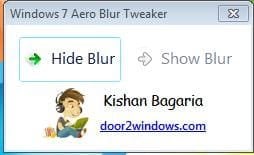
Blur:
Blur Error:
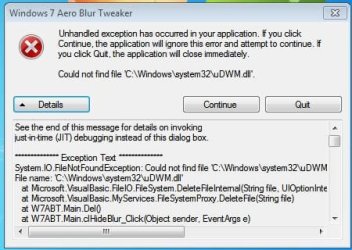
Entire Error Message:
See the end of this message for details on invoking
just-in-time (JIT) debugging instead of this dialog box.
************** Exception Text **************
System.IO.FileNotFoundException: Could not find file 'C:\Windows\system32\uDWM.dll'.
File name: 'C:\Windows\system32\uDWM.dll'
at Microsoft.VisualBasic.FileIO.FileSystem.DeleteFileInternal(String file, UIOptionInternal showUI, RecycleOption recycle, UICancelOption onUserCancel)
at Microsoft.VisualBasic.MyServices.FileSystemProxy.DeleteFile(String file)
at W7ABT.Main.Del()
at W7ABT.Main.clHideBlur_Click(Object sender, EventArgs e)
at System.Windows.Forms.Control.OnClick(EventArgs e)
at System.Windows.Forms.Button.WndProc(Message& m)
at System.Windows.Forms.Control.ControlNativeWindow.WndProc(Message& m)
at System.Windows.Forms.NativeWindow.Callback(IntPtr hWnd, Int32 msg, IntPtr wparam, IntPtr lparam)
************** Loaded Assemblies **************
mscorlib
Assembly Version: 2.0.0.0
Win32 Version: 2.0.50727.5472 (Win7SP1GDR.050727-5400)
CodeBase: file:///C:/Windows/Microsoft.NET/Framework64/v2.0.50727/mscorlib.dll
----------------------------------------
W7ABT
Assembly Version: 1.0.0.0
Win32 Version: 1.0.0.0
CodeBase: file:///C:/Users/SOBERA~1/AppData/Local/Temp/Rar$EXa0.328/Windows%207%20Aero%20Blur%20Tweaker.exe
----------------------------------------
Microsoft.VisualBasic
Assembly Version: 8.0.0.0
Win32 Version: 8.0.50727.5420 (Win7SP1.050727-5400)
CodeBase: file:///C:/Windows/assembly/GAC_MSIL/Microsoft.VisualBasic/8.0.0.0__b03f5f7f11d50a3a/Microsoft.VisualBasic.dll
----------------------------------------
System
Assembly Version: 2.0.0.0
Win32 Version: 2.0.50727.5467 (Win7SP1GDR.050727-5400)
CodeBase: file:///C:/Windows/assembly/GAC_MSIL/System/2.0.0.0__b77a5c561934e089/System.dll
----------------------------------------
System.Windows.Forms
Assembly Version: 2.0.0.0
Win32 Version: 2.0.50727.5468 (Win7SP1GDR.050727-5400)
CodeBase: file:///C:/Windows/assembly/GAC_MSIL/System.Windows.Forms/2.0.0.0__b77a5c561934e089/System.Windows.Forms.dll
----------------------------------------
System.Drawing
Assembly Version: 2.0.0.0
Win32 Version: 2.0.50727.5467 (Win7SP1GDR.050727-5400)
CodeBase: file:///C:/Windows/assembly/GAC_MSIL/System.Drawing/2.0.0.0__b03f5f7f11d50a3a/System.Drawing.dll
----------------------------------------
System.Runtime.Remoting
Assembly Version: 2.0.0.0
Win32 Version: 2.0.50727.5420 (Win7SP1.050727-5400)
CodeBase: file:///C:/Windows/assembly/GAC_MSIL/System.Runtime.Remoting/2.0.0.0__b77a5c561934e089/System.Runtime.Remoting.dll
----------------------------------------
System.Configuration
Assembly Version: 2.0.0.0
Win32 Version: 2.0.50727.5473 (Win7SP1GDR.050727-5400)
CodeBase: file:///C:/Windows/assembly/GAC_MSIL/System.Configuration/2.0.0.0__b03f5f7f11d50a3a/System.Configuration.dll
----------------------------------------
System.Xml
Assembly Version: 2.0.0.0
Win32 Version: 2.0.50727.5473 (Win7SP1GDR.050727-5400)
CodeBase: file:///C:/Windows/assembly/GAC_MSIL/System.Xml/2.0.0.0__b77a5c561934e089/System.Xml.dll
----------------------------------------
************** JIT Debugging **************
To enable just-in-time (JIT) debugging, the .config file for this
application or computer (machine.config) must have the
jitDebugging value set in the system.windows.forms section.
The application must also be compiled with debugging
enabled.
For example:
<configuration>
<system.windows.forms jitDebugging="true" />
</configuration>
When JIT debugging is enabled, any unhandled exception
will be sent to the JIT debugger registered on the computer
rather than be handled by this dialog box.
Blur:
Blur Error:
Entire Error Message:
See the end of this message for details on invoking
just-in-time (JIT) debugging instead of this dialog box.
************** Exception Text **************
System.IO.FileNotFoundException: Could not find file 'C:\Windows\system32\uDWM.dll'.
File name: 'C:\Windows\system32\uDWM.dll'
at Microsoft.VisualBasic.FileIO.FileSystem.DeleteFileInternal(String file, UIOptionInternal showUI, RecycleOption recycle, UICancelOption onUserCancel)
at Microsoft.VisualBasic.MyServices.FileSystemProxy.DeleteFile(String file)
at W7ABT.Main.Del()
at W7ABT.Main.clHideBlur_Click(Object sender, EventArgs e)
at System.Windows.Forms.Control.OnClick(EventArgs e)
at System.Windows.Forms.Button.WndProc(Message& m)
at System.Windows.Forms.Control.ControlNativeWindow.WndProc(Message& m)
at System.Windows.Forms.NativeWindow.Callback(IntPtr hWnd, Int32 msg, IntPtr wparam, IntPtr lparam)
************** Loaded Assemblies **************
mscorlib
Assembly Version: 2.0.0.0
Win32 Version: 2.0.50727.5472 (Win7SP1GDR.050727-5400)
CodeBase: file:///C:/Windows/Microsoft.NET/Framework64/v2.0.50727/mscorlib.dll
----------------------------------------
W7ABT
Assembly Version: 1.0.0.0
Win32 Version: 1.0.0.0
CodeBase: file:///C:/Users/SOBERA~1/AppData/Local/Temp/Rar$EXa0.328/Windows%207%20Aero%20Blur%20Tweaker.exe
----------------------------------------
Microsoft.VisualBasic
Assembly Version: 8.0.0.0
Win32 Version: 8.0.50727.5420 (Win7SP1.050727-5400)
CodeBase: file:///C:/Windows/assembly/GAC_MSIL/Microsoft.VisualBasic/8.0.0.0__b03f5f7f11d50a3a/Microsoft.VisualBasic.dll
----------------------------------------
System
Assembly Version: 2.0.0.0
Win32 Version: 2.0.50727.5467 (Win7SP1GDR.050727-5400)
CodeBase: file:///C:/Windows/assembly/GAC_MSIL/System/2.0.0.0__b77a5c561934e089/System.dll
----------------------------------------
System.Windows.Forms
Assembly Version: 2.0.0.0
Win32 Version: 2.0.50727.5468 (Win7SP1GDR.050727-5400)
CodeBase: file:///C:/Windows/assembly/GAC_MSIL/System.Windows.Forms/2.0.0.0__b77a5c561934e089/System.Windows.Forms.dll
----------------------------------------
System.Drawing
Assembly Version: 2.0.0.0
Win32 Version: 2.0.50727.5467 (Win7SP1GDR.050727-5400)
CodeBase: file:///C:/Windows/assembly/GAC_MSIL/System.Drawing/2.0.0.0__b03f5f7f11d50a3a/System.Drawing.dll
----------------------------------------
System.Runtime.Remoting
Assembly Version: 2.0.0.0
Win32 Version: 2.0.50727.5420 (Win7SP1.050727-5400)
CodeBase: file:///C:/Windows/assembly/GAC_MSIL/System.Runtime.Remoting/2.0.0.0__b77a5c561934e089/System.Runtime.Remoting.dll
----------------------------------------
System.Configuration
Assembly Version: 2.0.0.0
Win32 Version: 2.0.50727.5473 (Win7SP1GDR.050727-5400)
CodeBase: file:///C:/Windows/assembly/GAC_MSIL/System.Configuration/2.0.0.0__b03f5f7f11d50a3a/System.Configuration.dll
----------------------------------------
System.Xml
Assembly Version: 2.0.0.0
Win32 Version: 2.0.50727.5473 (Win7SP1GDR.050727-5400)
CodeBase: file:///C:/Windows/assembly/GAC_MSIL/System.Xml/2.0.0.0__b77a5c561934e089/System.Xml.dll
----------------------------------------
************** JIT Debugging **************
To enable just-in-time (JIT) debugging, the .config file for this
application or computer (machine.config) must have the
jitDebugging value set in the system.windows.forms section.
The application must also be compiled with debugging
enabled.
For example:
<configuration>
<system.windows.forms jitDebugging="true" />
</configuration>
When JIT debugging is enabled, any unhandled exception
will be sent to the JIT debugger registered on the computer
rather than be handled by this dialog box.
My Computer
- Computer type
- Laptop
- Computer Manufacturer/Model Number
- Acer
- OS
- Windows 7 Home Premium 64bit
- CPU
- AMD Phenom(tm) II N970 Quad-Core Processor
- Memory
- 4.00 GB
- Graphics Card(s)
- ATI Mobility Radeon HD 4200 Series
- Hard Drives
- WDC WD5000BEVT-22A0RT0 ATA Device
- Antivirus
- Microsoft Security Essentials
- Browser
- Google Chrome


