Windows 7 Aero can't work

themaker

New member
Local time
2:37 PM
Messages
22
Hello

I have to thanks to pebbly for helping me a lot.

I found a driver and update for my radeon 9600 (128 mb) card and aero can't work , i tried with regedit , with "Fix problems with aero and transparency"

Is there any hack to force aero on windows 7 that 100 % works :) ?

Thanks , sorry for bad english.
 

My Computer

Computer type
PC/Desktop
Computer Manufacturer/Model Number
Acer
OS
Windows 7 Ultimate x86
Is there any hack to force aero on windows 7 that 100 % works :) ?

Well, according to the Windows 7 Compatibility Center, you should not be having a problem with your graphics card.

Windows 7 Compatibility for ATI Radeon 9600 128MB Graphics Card: ATI. Drivers, Updates, Downloads

Where did you get your driver from? Have you tried the manufacturer's support site or your computer manufacturer's support site?

Windows 7 Updates is normally pretty good at finding drivers that work too.
 

My Computer

Computer Manufacturer/Model Number
HP Pavilion Elite 495UK
OS
Windows 7 Ultimate SP1 64-Bit
CPU
Intel Core i7 870 @ 2.93GHz
Motherboard
MSI 2A9C (CPU1)
Memory
8Gb Dual-Channel DDR3 @ 664MHz
Graphics Card(s)
nVidia GeForce GTX 460 1024MB dedicated RAM
Sound Card
Realtek HD Audio
Monitor(s) Displays
HP2310i
Screen Resolution
1920 x 1080
Hard Drives
1x1954GB Hitachi HDS22020ALA 330 (RAID), 1x1954GB Hitachi External for backup and storage
PSU
460W
Case
HP Elite
Cooling
Air cooled
Keyboard
Logitech K750 solar-powered keyboard
Mouse
Logitech Wireless M180 mouse
Internet Speed
2Mb
Other Info
Pure Avanti Flow Internet Radio with iPod Dock, 64Gb iPod, HP USB Speakers, Sony MDR-V500 Headphones, Sony Vaio F-Series Laptop
Is there any hack to force aero on windows 7 that 100 % works :) ?

Well, according to the Windows 7 Compatibility Center, you should not be having a problem with your graphics card.

Windows 7 Compatibility for ATI Radeon 9600 128MB Graphics Card: ATI. Drivers, Updates, Downloads

Where did you get your driver from? Have you tried the manufacturer's support site or your computer manufacturer's support site?

Windows 7 Updates is normally pretty good at finding drivers that work too.
DOWNLOADED FROM OFFICIAL SITE
I downloaded driver for vista and it couldn't work , so i downloaded XP driver and ran in XP compatibility mode...
 

My Computer

Computer type
PC/Desktop
Computer Manufacturer/Model Number
Acer
OS
Windows 7 Ultimate x86
Further investigation reveals that ATI do not offer Windows 7 support for the ATI Radeon 9600 graphics driver , so the Windows Compatibility Center wants updating as it is giving wrong advice.

http://support.amd.com/us/gpudownload/windows/Legacy/Pages/radeonaiw_vista32.aspx

That said, if you can't get the Vista driver to work either, I can only suggest you upgrade to a graphics card that is compatible with Windows 7.

I suspect that the graphics RAM of 128MB is probably the reason why it won't give you Windows Aero.
 

My Computer

Computer Manufacturer/Model Number
HP Pavilion Elite 495UK
OS
Windows 7 Ultimate SP1 64-Bit
CPU
Intel Core i7 870 @ 2.93GHz
Motherboard
MSI 2A9C (CPU1)
Memory
8Gb Dual-Channel DDR3 @ 664MHz
Graphics Card(s)
nVidia GeForce GTX 460 1024MB dedicated RAM
Sound Card
Realtek HD Audio
Monitor(s) Displays
HP2310i
Screen Resolution
1920 x 1080
Hard Drives
1x1954GB Hitachi HDS22020ALA 330 (RAID), 1x1954GB Hitachi External for backup and storage
PSU
460W
Case
HP Elite
Cooling
Air cooled
Keyboard
Logitech K750 solar-powered keyboard
Mouse
Logitech Wireless M180 mouse
Internet Speed
2Mb
Other Info
Pure Avanti Flow Internet Radio with iPod Dock, 64Gb iPod, HP USB Speakers, Sony MDR-V500 Headphones, Sony Vaio F-Series Laptop
Further investigation reveals that ATI do not offer Windows 7 support for the ATI Radeon 9600 graphics driver , so the Windows Compatibility Center wants updating as it is giving wrong advice.

ATI Catalyst

That said, if you can't get the Vista driver to work either, I can only suggest you upgrade to a graphics card that is compatible with Windows 7.

I suspect that the graphics RAM of 128MB is probably the reason why it won't give you Windows Aero.

It says that my graphic card support aero , look this picture , this is what it says :

Ertfc.png
 

My Computer

Computer type
PC/Desktop
Computer Manufacturer/Model Number
Acer
OS
Windows 7 Ultimate x86
Yes, it is suggesting that the card manufacturer may have a compatible driver, but if you took the time to check the link I gave you, you will see that ATI Radeon does not have a Windows-7 compatible driver for the Radeon 9600.

Time to get a better graphics card that IS compatible with Windows 7.
 

My Computer

Computer Manufacturer/Model Number
HP Pavilion Elite 495UK
OS
Windows 7 Ultimate SP1 64-Bit
CPU
Intel Core i7 870 @ 2.93GHz
Motherboard
MSI 2A9C (CPU1)
Memory
8Gb Dual-Channel DDR3 @ 664MHz
Graphics Card(s)
nVidia GeForce GTX 460 1024MB dedicated RAM
Sound Card
Realtek HD Audio
Monitor(s) Displays
HP2310i
Screen Resolution
1920 x 1080
Hard Drives
1x1954GB Hitachi HDS22020ALA 330 (RAID), 1x1954GB Hitachi External for backup and storage
PSU
460W
Case
HP Elite
Cooling
Air cooled
Keyboard
Logitech K750 solar-powered keyboard
Mouse
Logitech Wireless M180 mouse
Internet Speed
2Mb
Other Info
Pure Avanti Flow Internet Radio with iPod Dock, 64Gb iPod, HP USB Speakers, Sony MDR-V500 Headphones, Sony Vaio F-Series Laptop
Is there any hack to force aero on windows 7 that 100 % works :) ?

Well, according to the Windows 7 Compatibility Center, you should not be having a problem with your graphics card.

Windows 7 Compatibility for ATI Radeon 9600 128MB Graphics Card: ATI. Drivers, Updates, Downloads

Where did you get your driver from? Have you tried the manufacturer's support site or your computer manufacturer's support site?

Windows 7 Updates is normally pretty good at finding drivers that work too.
DOWNLOADED FROM OFFICIAL SITE
I downloaded driver for vista and it couldn't work , so i downloaded XP driver and ran in XP compatibility mode...

Dear themaker,
I too am in the same leaky boat called "No real support for AMD Radeon Graphics Driver upgrade for Win.7 OS. We have to make do with a Vista or Worse XP compatible drivers"
I am quoting from ATI Catalyst
"Note: AMD’s DirectX 9 ATI Radeon graphics accelerators are not officially supported under Windows 7. If the user chooses to, they can install the ATI Catalyst Windows Vista graphics driver under Windows 7. Please be aware that none of the new Windows 7 graphics driver (WDDM 1.1) features are supported (as the Windows Vista level graphics driver is limited to WDDM 1.0 level support). Using the ATI Catalyst Windows Vista driver under Windows 7 is not officially supported by AMD, and as such AMD will not provide any form of customer support for users running in this configuration" unquote.

Anyway here's the hack:

1)Open RegEdit.
2)Navigate to HKEY_CURRENT_USER\Software\Microsoft\Windows\DWM
3)If the DWM registry key is not found, right click on Windows and then select New -> Key to create new branch and name it as DWM
4)In the right details panel, create a new DWORD (32 bit value) named UseMachineCheck, and set it's value to 0.
5)In the right details panel, create a new DWORD (32 bit) value named Blur, and set it's value to 0.

6)In the right details panel, create a new DWORD (32 bit) value named Animations, and set it's value to 0
7)Restart the DESKTOP WINDOW MANAGER SESSION MANAGER in Services in CONTROL PANEL( Type-> Services.msc in Start Search), or run the following commands in a COMMAND PROMPT with Administrator privileges:
net stop uxsms
net start uxsms
8)Now attempt to enable and apply Windows Aero in your Win.7 Ultimate 32-bit.
9)Restart.
I am suggesting this hack purely b'cause you asked for it:)! Praise me by crediting me if the hack works and you can curse me too if it does not!:p
PS: Create a Restore point before you try the suggested hack.

 

My Computer

Computer Manufacturer/Model Number
Sony Vaio C series VPCCB35FN laptop
OS
MS Windows 7 Home Premium 64-bit SP1
CPU
IntelCore [email protected]; Sandy Bridge 32nm Tech.
Motherboard
Sony Vaio Version:C609NJYJ
Memory
4096Mb RAM; Single ChannelDDR3@665MHz; DRAM Freq:662MHz
Graphics Card(s)
AMD Radeon HD 6630M; GPU:Whistler;BIOS Core&mem Clock:123.36
Sound Card
REALTEK High Definition Audio Device; INTEL Display Card
Monitor(s) Displays
Generic PnP Intel HD;Resolution:1920*1040 Pixels; BPP:32bits
Screen Resolution
Current Resolution:1920*1080 Pixels; Monitor Frequency:60Hz
Hard Drives
Internal HD:TOSHIBA MK5061GSY; Real Size:488 GB;NTFS; 3 Partitions; SATA; HEADS:16

External HDD: WD Elements 1023 PORTABLE; Estimated Size: 1TB; NTFS; 3 Partitions
Cooling
Lateral Exhaust with a Cooling Pad Placed Beneath.
Keyboard
Logitech Bluetooth+ Generic Integrated K-B
Mouse
Logitech Bluetooth
Internet Speed
2MBPS
Other Info
1)Trend Micro Titanium Maximum Security Suite Version:3
2)SAS-PRO

3)MBAM--PRO


4)WATERFOX+IE9 +WOT+LINKEXTEND+ DRWEBCUREIT LINK CHECKER

5)SPYWAREBLASTER

6) WINPATROL PLUS

7) SANDBOXIE and
8) A BIT OF COMMON SENSE.
Hello, sreedhav.

Thanks for the support on this one, it was something I wasn't aware of.

Let's hope it works and saves the OP a bit of cash.
 

My Computer

Computer Manufacturer/Model Number
HP Pavilion Elite 495UK
OS
Windows 7 Ultimate SP1 64-Bit
CPU
Intel Core i7 870 @ 2.93GHz
Motherboard
MSI 2A9C (CPU1)
Memory
8Gb Dual-Channel DDR3 @ 664MHz
Graphics Card(s)
nVidia GeForce GTX 460 1024MB dedicated RAM
Sound Card
Realtek HD Audio
Monitor(s) Displays
HP2310i
Screen Resolution
1920 x 1080
Hard Drives
1x1954GB Hitachi HDS22020ALA 330 (RAID), 1x1954GB Hitachi External for backup and storage
PSU
460W
Case
HP Elite
Cooling
Air cooled
Keyboard
Logitech K750 solar-powered keyboard
Mouse
Logitech Wireless M180 mouse
Internet Speed
2Mb
Other Info
Pure Avanti Flow Internet Radio with iPod Dock, 64Gb iPod, HP USB Speakers, Sony MDR-V500 Headphones, Sony Vaio F-Series Laptop
Well, according to the Windows 7 Compatibility Center, you should not be having a problem with your graphics card.

Windows 7 Compatibility for ATI Radeon 9600 128MB Graphics Card: ATI. Drivers, Updates, Downloads

Where did you get your driver from? Have you tried the manufacturer's support site or your computer manufacturer's support site?

Windows 7 Updates is normally pretty good at finding drivers that work too.
DOWNLOADED FROM OFFICIAL SITE
I downloaded driver for vista and it couldn't work , so i downloaded XP driver and ran in XP compatibility mode...

Dear themaker,
I too am in the same leaky boat called "No real support for AMD Radeon Graphics Driver upgrade for Win.7 OS. We have to make do with a Vista or Worse XP compatible drivers"
I am quoting from ATI Catalyst
"Note: AMD’s DirectX 9 ATI Radeon graphics accelerators are not officially supported under Windows 7. If the user chooses to, they can install the ATI Catalyst Windows Vista graphics driver under Windows 7. Please be aware that none of the new Windows 7 graphics driver (WDDM 1.1) features are supported (as the Windows Vista level graphics driver is limited to WDDM 1.0 level support). Using the ATI Catalyst Windows Vista driver under Windows 7 is not officially supported by AMD, and as such AMD will not provide any form of customer support for users running in this configuration" unquote.

Anyway here's the hack:

1)Open RegEdit.
2)Navigate to HKEY_CURRENT_USER\Software\Microsoft\Windows\DWM
3)If the DWM registry key is not found, right click on Windows and then select New -> Key to create new branch and name it as DWM
4)In the right details panel, create a new DWORD (32 bit value) named UseMachineCheck, and set it's value to 0.
5)In the right details panel, create a new DWORD (32 bit) value named Blur, and set it's value to 0.

6)In the right details panel, create a new DWORD (32 bit) value named Animations, and set it's value to 0
7)Restart the DESKTOP WINDOW MANAGER SESSION MANAGER in Services in CONTROL PANEL( Type-> Services.msc in Start Search), or run the following commands in a COMMAND PROMPT with Administrator privileges:
net stop uxsms
net start uxsms
8)Now attempt to enable and apply Windows Aero in your Win.7 Ultimate 32-bit.
9)Restart.
I am suggesting this hack purely b'cause you asked for it:)! Praise me by crediting me if the hack works and you can curse me too if it does not!:p
PS: Create a Restore point before you try the suggested hack.


I tried this million times and cannot work :/
 

My Computer

Computer type
PC/Desktop
Computer Manufacturer/Model Number
Acer
OS
Windows 7 Ultimate x86
Quote" i tried this million times and cannot work :/ "unquote.

Have you checked your Windows Experience Index score? It should be above 3 for anything to work! Mine's 5.2,by the way.:)
 

Attachments

  • System_2012-02-20_18-50-38.png
    System_2012-02-20_18-50-38.png
    62.5 KB · Views: 37
Last edited:

My Computer

Computer Manufacturer/Model Number
Sony Vaio C series VPCCB35FN laptop
OS
MS Windows 7 Home Premium 64-bit SP1
CPU
IntelCore [email protected]; Sandy Bridge 32nm Tech.
Motherboard
Sony Vaio Version:C609NJYJ
Memory
4096Mb RAM; Single ChannelDDR3@665MHz; DRAM Freq:662MHz
Graphics Card(s)
AMD Radeon HD 6630M; GPU:Whistler;BIOS Core&mem Clock:123.36
Sound Card
REALTEK High Definition Audio Device; INTEL Display Card
Monitor(s) Displays
Generic PnP Intel HD;Resolution:1920*1040 Pixels; BPP:32bits
Screen Resolution
Current Resolution:1920*1080 Pixels; Monitor Frequency:60Hz
Hard Drives
Internal HD:TOSHIBA MK5061GSY; Real Size:488 GB;NTFS; 3 Partitions; SATA; HEADS:16

External HDD: WD Elements 1023 PORTABLE; Estimated Size: 1TB; NTFS; 3 Partitions
Cooling
Lateral Exhaust with a Cooling Pad Placed Beneath.
Keyboard
Logitech Bluetooth+ Generic Integrated K-B
Mouse
Logitech Bluetooth
Internet Speed
2MBPS
Other Info
1)Trend Micro Titanium Maximum Security Suite Version:3
2)SAS-PRO

3)MBAM--PRO


4)WATERFOX+IE9 +WOT+LINKEXTEND+ DRWEBCUREIT LINK CHECKER

5)SPYWAREBLASTER

6) WINPATROL PLUS

7) SANDBOXIE and
8) A BIT OF COMMON SENSE.
Hello, sreedhav.

Thanks for the support on this one, it was something I wasn't aware of.

Let's hope it works and saves the OP a bit of cash.

Dear seavixen32,
Thanks for the rep.point! Very unlike me to have responded so late,please accept my apologies.:sick:
regards,
sreedhav
 

My Computer

Computer Manufacturer/Model Number
Sony Vaio C series VPCCB35FN laptop
OS
MS Windows 7 Home Premium 64-bit SP1
CPU
IntelCore [email protected]; Sandy Bridge 32nm Tech.
Motherboard
Sony Vaio Version:C609NJYJ
Memory
4096Mb RAM; Single ChannelDDR3@665MHz; DRAM Freq:662MHz
Graphics Card(s)
AMD Radeon HD 6630M; GPU:Whistler;BIOS Core&mem Clock:123.36
Sound Card
REALTEK High Definition Audio Device; INTEL Display Card
Monitor(s) Displays
Generic PnP Intel HD;Resolution:1920*1040 Pixels; BPP:32bits
Screen Resolution
Current Resolution:1920*1080 Pixels; Monitor Frequency:60Hz
Hard Drives
Internal HD:TOSHIBA MK5061GSY; Real Size:488 GB;NTFS; 3 Partitions; SATA; HEADS:16

External HDD: WD Elements 1023 PORTABLE; Estimated Size: 1TB; NTFS; 3 Partitions
Cooling
Lateral Exhaust with a Cooling Pad Placed Beneath.
Keyboard
Logitech Bluetooth+ Generic Integrated K-B
Mouse
Logitech Bluetooth
Internet Speed
2MBPS
Other Info
1)Trend Micro Titanium Maximum Security Suite Version:3
2)SAS-PRO

3)MBAM--PRO


4)WATERFOX+IE9 +WOT+LINKEXTEND+ DRWEBCUREIT LINK CHECKER

5)SPYWAREBLASTER

6) WINPATROL PLUS

7) SANDBOXIE and
8) A BIT OF COMMON SENSE.
Quote" i tried this million times and cannot work :/ "unquote.

Have you checked your Windows Experience Index score? It should be above 3 for anything to work! Mine's 5.2,by the way.:)

It's 1.0 my :P
 

My Computer

Computer type
PC/Desktop
Computer Manufacturer/Model Number
Acer
OS
Windows 7 Ultimate x86

My Computer

Computer type
PC/Desktop
Computer Manufacturer/Model Number
Me
OS
Win 7 Ultimate x64
CPU
FX-8350 @ 4.6 GHz so far
Motherboard
Asus M5A97 EVO
Memory
ADATA XPG V1 Series Black 8GB DDR3 1600
Graphics Card(s)
Sapphire R9 270x Dual-X
Sound Card
Xonar DGX w/ Corsair Vengence 1300
Monitor(s) Displays
Acer S232HL Abid
Screen Resolution
1920x1080
Hard Drives
120 GB OCZ Vertex 3
500 GB Seagate 7200.12
PSU
Antec Earthwatts 650W Green
Case
Antec Three Hundred
Cooling
Cooler Master 212 EVO
Keyboard
Logitech G510
Mouse
Logitech G500s
Internet Speed
35000/3000
Seems my crystal ball is broken, as I don't know what the make and model of your motherboard or computer is. Without that little bit of information we can't tell you which chipset driver you need.

If you're unsure as to what it is, this,

Speccy - System Information - Free Download

should be able to show you.
 

My Computer

Computer type
PC/Desktop
Computer Manufacturer/Model Number
Me
OS
Win 7 Ultimate x64
CPU
FX-8350 @ 4.6 GHz so far
Motherboard
Asus M5A97 EVO
Memory
ADATA XPG V1 Series Black 8GB DDR3 1600
Graphics Card(s)
Sapphire R9 270x Dual-X
Sound Card
Xonar DGX w/ Corsair Vengence 1300
Monitor(s) Displays
Acer S232HL Abid
Screen Resolution
1920x1080
Hard Drives
120 GB OCZ Vertex 3
500 GB Seagate 7200.12
PSU
Antec Earthwatts 650W Green
Case
Antec Three Hundred
Cooling
Cooler Master 212 EVO
Keyboard
Logitech G510
Mouse
Logitech G500s
Internet Speed
35000/3000
Hello, sreedhav.

Thanks for the support on this one, it was something I wasn't aware of.

Let's hope it works and saves the OP a bit of cash.

Dear seavixen32,
Thanks for the rep.point! Very unlike me to have responded so late,please accept my apologies.:sick:
regards,
sreedhav

You're very welcome.
 

My Computer

Computer Manufacturer/Model Number
HP Pavilion Elite 495UK
OS
Windows 7 Ultimate SP1 64-Bit
CPU
Intel Core i7 870 @ 2.93GHz
Motherboard
MSI 2A9C (CPU1)
Memory
8Gb Dual-Channel DDR3 @ 664MHz
Graphics Card(s)
nVidia GeForce GTX 460 1024MB dedicated RAM
Sound Card
Realtek HD Audio
Monitor(s) Displays
HP2310i
Screen Resolution
1920 x 1080
Hard Drives
1x1954GB Hitachi HDS22020ALA 330 (RAID), 1x1954GB Hitachi External for backup and storage
PSU
460W
Case
HP Elite
Cooling
Air cooled
Keyboard
Logitech K750 solar-powered keyboard
Mouse
Logitech Wireless M180 mouse
Internet Speed
2Mb
Other Info
Pure Avanti Flow Internet Radio with iPod Dock, 64Gb iPod, HP USB Speakers, Sony MDR-V500 Headphones, Sony Vaio F-Series Laptop
Seems my crystal ball is broken, as I don't know what the make and model of your motherboard or computer is. Without that little bit of information we can't tell you which chipset driver you need.

If you're unsure as to what it is, this,

Speccy - System Information - Free Download

should be able to show you.

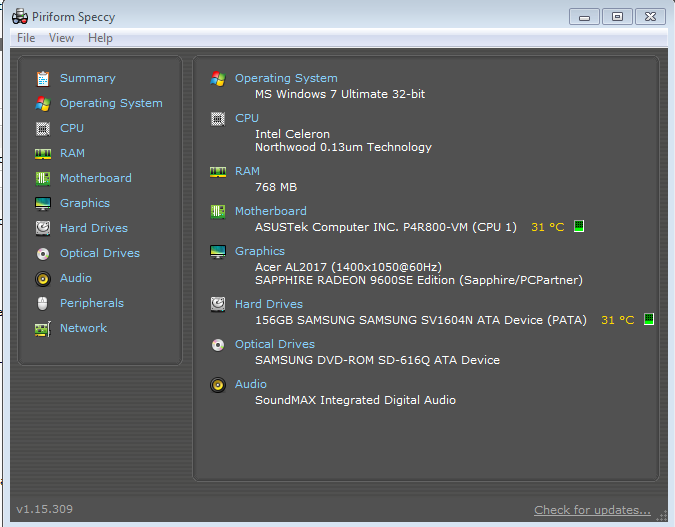
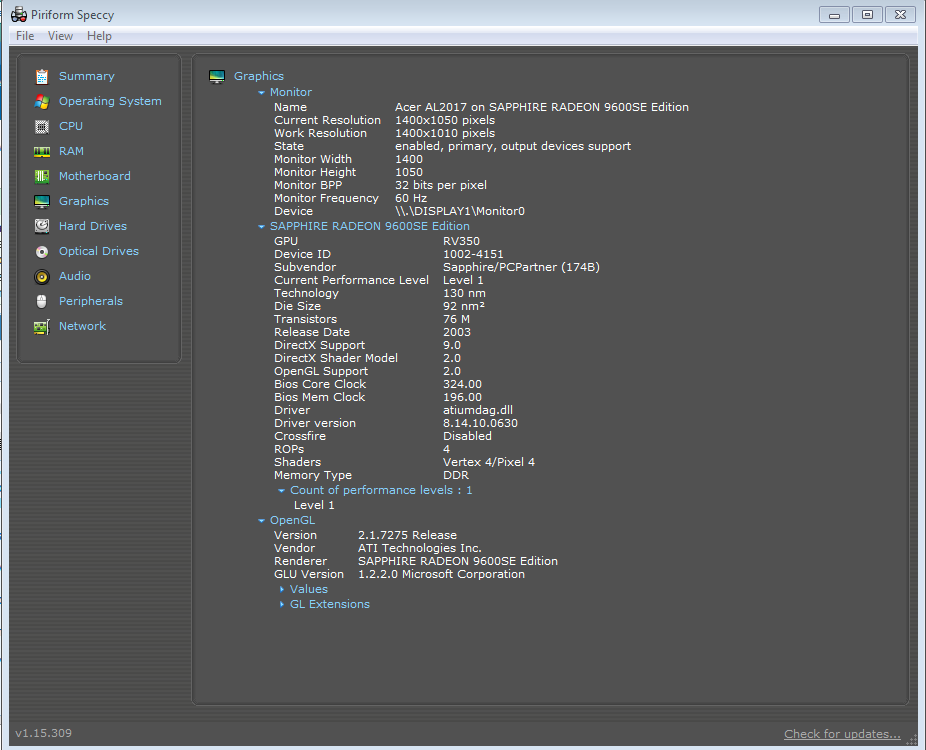
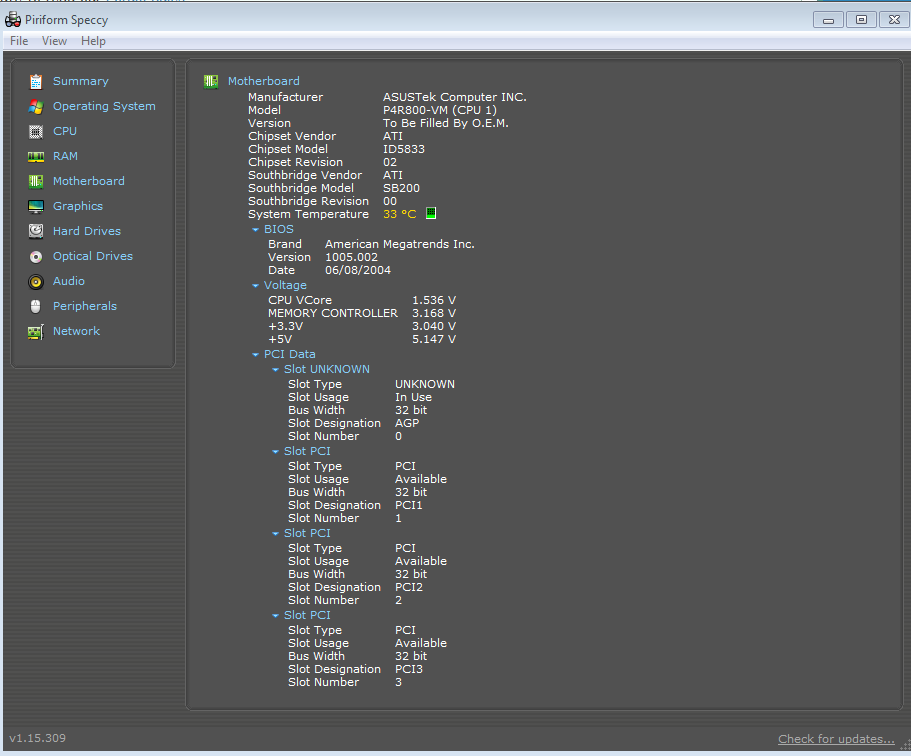
Is this all what you need ?

djiev.png


in4qM.png


rhG0l.png
 

My Computer

Computer type
PC/Desktop
Computer Manufacturer/Model Number
Acer
OS
Windows 7 Ultimate x86
You may be asking a lot from the chipset on that old motherboard. It hasn't seen an update since 2004, and never even had an official XP driver released for it. Based on its age and lack of XP support, it is likely that the native generic Windows 7 AGP driver isn't enough for the video card driver to install and work.

Catalyst

If it will install what you want from there is the GART driver, and is needed for the video card driver to install and work properly. To install do the following,

1. Uninstall the Vista/legacy driver.

2. Install the above GART driver using http://www.sevenforums.com/tutorials/316-compatibility-mode.html

3. Now install the Vista/legacy driver and it should work (no promises).
 

My Computer

Computer type
PC/Desktop
Computer Manufacturer/Model Number
Me
OS
Win 7 Ultimate x64
CPU
FX-8350 @ 4.6 GHz so far
Motherboard
Asus M5A97 EVO
Memory
ADATA XPG V1 Series Black 8GB DDR3 1600
Graphics Card(s)
Sapphire R9 270x Dual-X
Sound Card
Xonar DGX w/ Corsair Vengence 1300
Monitor(s) Displays
Acer S232HL Abid
Screen Resolution
1920x1080
Hard Drives
120 GB OCZ Vertex 3
500 GB Seagate 7200.12
PSU
Antec Earthwatts 650W Green
Case
Antec Three Hundred
Cooling
Cooler Master 212 EVO
Keyboard
Logitech G510
Mouse
Logitech G500s
Internet Speed
35000/3000
Dear themaker,
Since it's the updated driver which has caused the Aero themes not to work,here's another tack!

You may try the "Last known good configuration" and i quote" Starts Windows 7 with the most recent registry and driver configurations that worked successfully. Every time you turn your computer off and Windows 7 shuts down successfully, important system settings are saved in the registry. You can use those settings to start your computer if a problem occurs. For example, if a new driver for your video card is causing problems, or an incorrect registry setting is preventing Windows 7 from starting correctly, you can restart your computer using Last Known Good Configuration." Source: http://www.sevenforums.com/tutorials/2083-system-repair-disc-create.html

Hope it helps!:)
 

My Computer

Computer Manufacturer/Model Number
Sony Vaio C series VPCCB35FN laptop
OS
MS Windows 7 Home Premium 64-bit SP1
CPU
IntelCore [email protected]; Sandy Bridge 32nm Tech.
Motherboard
Sony Vaio Version:C609NJYJ
Memory
4096Mb RAM; Single ChannelDDR3@665MHz; DRAM Freq:662MHz
Graphics Card(s)
AMD Radeon HD 6630M; GPU:Whistler;BIOS Core&mem Clock:123.36
Sound Card
REALTEK High Definition Audio Device; INTEL Display Card
Monitor(s) Displays
Generic PnP Intel HD;Resolution:1920*1040 Pixels; BPP:32bits
Screen Resolution
Current Resolution:1920*1080 Pixels; Monitor Frequency:60Hz
Hard Drives
Internal HD:TOSHIBA MK5061GSY; Real Size:488 GB;NTFS; 3 Partitions; SATA; HEADS:16

External HDD: WD Elements 1023 PORTABLE; Estimated Size: 1TB; NTFS; 3 Partitions
Cooling
Lateral Exhaust with a Cooling Pad Placed Beneath.
Keyboard
Logitech Bluetooth+ Generic Integrated K-B
Mouse
Logitech Bluetooth
Internet Speed
2MBPS
Other Info
1)Trend Micro Titanium Maximum Security Suite Version:3
2)SAS-PRO

3)MBAM--PRO


4)WATERFOX+IE9 +WOT+LINKEXTEND+ DRWEBCUREIT LINK CHECKER

5)SPYWAREBLASTER

6) WINPATROL PLUS

7) SANDBOXIE and
8) A BIT OF COMMON SENSE.
Is there any hack to force aero on windows 7 that 100 % works :) ?

Well, according to the Windows 7 Compatibility Center, you should not be having a problem with your graphics card.

Windows 7 Compatibility for ATI Radeon 9600 128MB Graphics Card: ATI. Drivers, Updates, Downloads
Hmm, it should work. I have a Radeon 9600 with only 64mb of ram and a Windows Experience index of only 1.6 and it works for me. The first boot after installation it didn't work. I was in the process of finding an ATI driver when Windows update popped up with it's ATI driver. I installed it, rebooted and it worked.
 

My Computer

Computer Manufacturer/Model Number
Averatec 6130HS-20
OS
Windows 7 Professional 32-bit (6.1, Build 7600)
CPU
Intel(R) Pentium(R) 4 3.00 GHz HT
Memory
2.0 GB
Graphics Card(s)
ATI Mobility Radeon 9600 64MB
Sound Card
Realtek AC'97 Audio
Screen Resolution
1280 x 800
Hard Drives
Seagate 96023A 60GB 7200RPM -
Seagate FreeAgentDesktop 250GB
Cooling
20 Inch Box Fan
Mouse
Targus PAWM10 Wireless Optical Laptop Mouse
Back
Top