Windows 7 and Dell MediaDirect

osu1357

New member
Local time
8:03 AM
Messages
28
I currently have Vista 32-Bit Home Premium and wish to perform a clean install of Windows 7 32-Bit Home Premium. I have a few questions:
1) Can I perform a clean install from boot-up?
2) What is the recommended install if I'm stuck currently with Dell MediaDirect 3.0 ? I have heard LOTS of issues from some who attempt to delete all of the partitions and then accidentally press the MediaDirect buttom (looks like a house) next to the power button. I've never used MediaDirect so I don't care if it doesn't work in Windows 7. However I have heard if you wipe out all partitions and do a clean install of Windows 7 and accidentally press the MediaDirect button at some later time, MediaDirect on some "hidden" partition will create a new partition on top of the partition Windows 7 was installed to. Anyways what are my options? Should I just leave my partitions as they are (I have four of them -- C: D:RECOVERY and two other partitions which I believe are the MediaDirect partition and a disk utilities partition
3) After I install Windows 7 (clean install) can I just go to Windows Update to get all my drivers? Or should I install them from the CD first?

I currently am running Windows Vista 32-Bit on a Dell E1705 laptop with 2 GB ram.
Thanks !!
:huh:
 

My Computer My Computer

Computer type
PC/Desktop
Computer Manufacturer/Model Number
Dell Inspiron 5721
OS
Windows 7 Home Premium 64-Bit
CPU
Intel Core i7
Memory
8 GB
Hard Drives
1 TB
Internet Speed
20 Mbps
Antivirus
McAfee Internet Security
anyone?
 

My Computer My Computer

Computer type
PC/Desktop
Computer Manufacturer/Model Number
Dell Inspiron 5721
OS
Windows 7 Home Premium 64-Bit
CPU
Intel Core i7
Memory
8 GB
Hard Drives
1 TB
Internet Speed
20 Mbps
Antivirus
McAfee Internet Security
Sorry no one got to you sooner. I've never had an issue with the media direct button, other than i wish I could program it to do SOMETHING. The drivers on the CD will work, but some newer versions may be available on the Dell website. Before you do anything I'm going to research the problem you describe a little, and find some tutorials on here that explain how to make sure everything goes smoothly.
 

My Computer My Computer

Computer type
Laptop
Computer Manufacturer/Model Number
Toshiba P775-S7100
OS
Windows 7 Professional SP1 64-bit
CPU
Intel Core i5-2450M @2.5 GHz
Memory
6 GB DDR3 1333MHz
Graphics Card(s)
Intel HD 3000
Monitor(s) Displays
Built-in 17.3" LED; 22" Insignia NS-L22Q-10A
Screen Resolution
1600x900; 1360x768
Hard Drives
750 GB Hitachi
1TB Seagate FreeAgent External
Internet Speed
Verizon DSL Speed(Down/Up): 3360 Kbps / 800 Kbps
Antivirus
MSE and MBAM Pro
Browser
IE10
Hello,

1) If you dont need the mediadirect partition, you can just delete it. However, as you yourself said,you open yourself up to accidentally pressing the media direct button and causing problems.

What some people do to avoid that kind of accident is to remap the mediadirect button. See these links.

Reassigning the mediadirect button- an adventure...

[GUIDE] How to change your Dell MediaDirect button's functionality

2) Yes, you can boot from the win7 dvd and do a clean install. If you wish, you can delete the mediadirect partition and remap that button. Leave the other partitions as they are, if you are constrained for space at a later time, you can consider deleting them.

Before installing win7, make recovery dvds of your current install. That'll let you go back to vista, if need be.

3) Win7 will install many drivers on its own. You can then update them, in case there are missing or problematic drivers you can use the CD to install them.
 

My Computer My Computer

Computer Manufacturer/Model Number
Too many to describe...
OS
Windows 7 x64 pro/ Windows 7 x86 Pro/ XP SP3 x86
Based on what I'm reading Media Direct and Windows 7 don't always get along. I would recommend deleting all partitions and reformatting the drive completely to insure Media Direct causes no problems. I also found the links I promised

http://www.sevenforums.com/tutorials/1649-clean-install-windows-7-a.html?ltr=C
http://www.sevenforums.com/tutorials/31402-clean-install-upgrade-windows-7-version.html?ltr=C
http://www.sevenforums.com/tutorials/91339-ssd-hdd-optimize-windows-reinstallation.html?filter

If the steps to optimize seem a little too complicated, I've never had a problem doing the regular GUI for the custom install option to clean the hard drive and create a brand new partition.
 

My Computer My Computer

Computer type
Laptop
Computer Manufacturer/Model Number
Toshiba P775-S7100
OS
Windows 7 Professional SP1 64-bit
CPU
Intel Core i5-2450M @2.5 GHz
Memory
6 GB DDR3 1333MHz
Graphics Card(s)
Intel HD 3000
Monitor(s) Displays
Built-in 17.3" LED; 22" Insignia NS-L22Q-10A
Screen Resolution
1600x900; 1360x768
Hard Drives
750 GB Hitachi
1TB Seagate FreeAgent External
Internet Speed
Verizon DSL Speed(Down/Up): 3360 Kbps / 800 Kbps
Antivirus
MSE and MBAM Pro
Browser
IE10
osu... Welcome to sevenforums.
What are your expectations with this install? Do you have all your important data backed up? I would suggest you show us a snip of your disk management so we could advise you how to proceed with your clean install. Should be no problem like you describe if the clean install is done correctly. However I am thinking that will void your warranty if you still have warranty left. :D
 

My Computer My Computer

Computer Manufacturer/Model Number
Gateway GT5692
OS
Windows 7 Ulti. x64
CPU
AMD Phenom 8450 triple-core 2.10 ghz
Memory
4GB
Graphics Card(s)
ATI Radion HD 3200
Monitor(s) Displays
Gateway FPD1775W
Screen Resolution
1280x720
Hard Drives
465.6613 Gibibytes
Bill, thank you so much for those links. I will try it out and write back to tell y'all how it works out.

The AutoHotkey program works but there is no GUI for doing it. Read the instructions given in the blog/furom post to understand how to do it.
 

My Computer My Computer

Computer type
Laptop
Computer Manufacturer/Model Number
Toshiba P775-S7100
OS
Windows 7 Professional SP1 64-bit
CPU
Intel Core i5-2450M @2.5 GHz
Memory
6 GB DDR3 1333MHz
Graphics Card(s)
Intel HD 3000
Monitor(s) Displays
Built-in 17.3" LED; 22" Insignia NS-L22Q-10A
Screen Resolution
1600x900; 1360x768
Hard Drives
750 GB Hitachi
1TB Seagate FreeAgent External
Internet Speed
Verizon DSL Speed(Down/Up): 3360 Kbps / 800 Kbps
Antivirus
MSE and MBAM Pro
Browser
IE10
When I installed Win 7 on my Dell laptop I had no use for MediaDirect so I deleted all the partitions and did a clean install of Win 7. Afterwards, if I press the MediaDirect button with the machine off, it shows the MediaDirect splash screen for a second or two (I believe it must be embedded in the BIOS) but since the MediaDirect partition no longer exists it just proceeds and loads Win 7. The MediaDirect button has no effect when pressed when the laptop is powered up and running.

As long as you completely delete the MediaDirect partition, you shouldn't have any problems.

Until I read this thread, I had completely forgotten about that horrible abomination called MediaDirect! :D
 

My Computer My Computer

Computer type
PC/Desktop
Computer Manufacturer/Model Number
Home Built desktop, Dell G15 5511 Gaming laptop,MS Surface Pro 7 tablet
OS
W10 Pro desktop, W11 laptop, W11 Pro tablet (all 64-bit)
CPU
3.7Ghz 8700K i7, i7-11800H, i7-1065G7
Motherboard
ASUS TUF Z370-Pro Gaming in desktop
Memory
16G desktop, 16G laptop, 4G tablet
Graphics Card(s)
AMD Radeon RX580, RTX 3060, Intel Iris Plus
Sound Card
High Definition Audio (Built-in to mobo)
Monitor(s) Displays
Samsung U32J59 32" (2x), 15.6", 12"
Screen Resolution
3840x2160, 3840x2160, 1920x1080, 2160x1440
Hard Drives
500G SSD for OS; 2T, 10T & 15T HDDs for Data on Desktop, 1TB SSD laptop, 128G SSD tablet.
PSU
Corsair CX 750M
Case
Antec 100
Cooling
CM 212+
Keyboard
IBM Model M - used continuously since 1986
Mouse
Microsoft Pro IntelliMouse
Internet Speed
400M down 8M up
Antivirus
Windows Defender
Browser
FireFox
Other Info
Built my first computer (8Mhz 8088cpu, 640K RAM, 20MB HDD, 2 360K floppy drives) in 1985 and have been building them for myself, relatives and friends ever since.
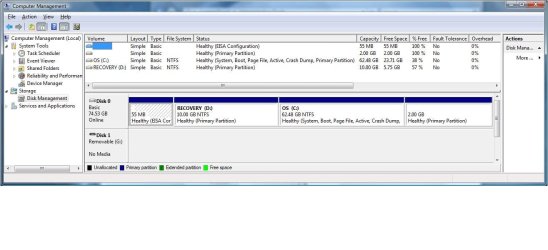
Here is a screen shot of my partitions (80 GB hard drive) currently from Disk Management. What I was wanting to do is format C: and install Windows 7 there, but I'd like to delete ALL of the partitions to get my 80 GB back (remove the D:RECOVERY that has my factory image, etc).

Here is the million dollar question: If I do a clean install essentially these destroys my old registry and creates a new registry (clean). How is it then that pressing the Media Direct button after installing Windows 7 and thus creating a NEW registry calls Media Direct to launch? By the way I did read the post on how to re-assign the Media Direct button .. I now have it launching Windows Media Center (I tested it first while I still have Vista on my computer before I do the clean install) ..

I agree, my thought is to wipe away all partitions and do a clean install onto a single partition .. Just want to understand how the Media Direct button calls the program to launch when you do a clean install. For example by going to this tutorial (as suggested):

[GUIDE] How to change your Dell MediaDirect button's functionality

It talks about editing the registry (changing it so that it loads Windows Media Center instead of Media Direct) .. My only question is once I do a clean install and wipe away the registry, it shouldn't call out Media Direct any more since it's not there ?? So then what is that button going to call ?
 

Attachments

  • disk mgmt.jpg
    disk mgmt.jpg
    81.9 KB · Views: 294

My Computer My Computer

Computer type
PC/Desktop
Computer Manufacturer/Model Number
Dell Inspiron 5721
OS
Windows 7 Home Premium 64-Bit
CPU
Intel Core i7
Memory
8 GB
Hard Drives
1 TB
Internet Speed
20 Mbps
Antivirus
McAfee Internet Security
You can delete all partitions from the 7 installer disc.

I'll try to explain how the key works based on what I have read. The Media Direct key sends a message to the BIOS or something to load a separate operation system, which is what Media Direct acts like. When the computer is off, it will run Media Direct by itself when it is installed. When Media Direct is not present, when the computer is off the key causes the primary OS to run. When the computer has already on and loaded into Windows, the key does nothing, because no other OS is present. When we run a script to make the key do something, it still sends the signal to run the separate OS, but as its not there, nothing like that happens, and it sends the commandl to Windows to open (in my case) my pictures folder. So basically, by default pressing the key does not send the command to Windows but to something else, is my understanding.
 

My Computer My Computer

Computer type
Laptop
Computer Manufacturer/Model Number
Toshiba P775-S7100
OS
Windows 7 Professional SP1 64-bit
CPU
Intel Core i5-2450M @2.5 GHz
Memory
6 GB DDR3 1333MHz
Graphics Card(s)
Intel HD 3000
Monitor(s) Displays
Built-in 17.3" LED; 22" Insignia NS-L22Q-10A
Screen Resolution
1600x900; 1360x768
Hard Drives
750 GB Hitachi
1TB Seagate FreeAgent External
Internet Speed
Verizon DSL Speed(Down/Up): 3360 Kbps / 800 Kbps
Antivirus
MSE and MBAM Pro
Browser
IE10
I have re-assigned the MediaDirect key via the registry to instead open Windows Media Center. I tested this key several times and it works also when computer is in SLEEP mode.

I shut down the computer COMPLETELY and pressed the MediaDirect button and it started to load Dell Media Direct Express. It seems to call up its own program.

So why does it pull from two sources?? It seems when my computer is ON or in SLEEP pressing the MD key opens up Windows Media Center (after I re-assigned it), however when the computer is completely shut down, pressing that same button causes MediaDirect to load.

The reason I ask is that by default in Windows Vista the preferred "shutdown" method seems to be a Sleep mode while in Windows 7 the preferred "shutdown" is to completely shut down the system.

I still am unsure what will happen if I were to wipe out the MediaDirect partition completey.

I noticed that I have a C:\Program Files\Dell\MediaDirect on my C: drive (remember I am still using Vista and haven't performed the clean install of Windows 7 yet) .. What will happen once the clean install removes this directory?

What will pressing the MD button do 1) when the computer is shut down completely and 2) when it is ON or in sleep?
 

My Computer My Computer

Computer type
PC/Desktop
Computer Manufacturer/Model Number
Dell Inspiron 5721
OS
Windows 7 Home Premium 64-Bit
CPU
Intel Core i7
Memory
8 GB
Hard Drives
1 TB
Internet Speed
20 Mbps
Antivirus
McAfee Internet Security
When the machine is powered off, the OS isn't in memory so the registry and it's settings don't exist yet so the registry change you made can't have any effect at that point in time. The Dell hardware responds to the keypress and loads the OS from the MediaDirect partition. Once the machine is booted, then OS monitors keypresses and that's when the change you made in the registry can be in effect.
 

My Computer My Computer

Computer type
PC/Desktop
Computer Manufacturer/Model Number
Home Built desktop, Dell G15 5511 Gaming laptop,MS Surface Pro 7 tablet
OS
W10 Pro desktop, W11 laptop, W11 Pro tablet (all 64-bit)
CPU
3.7Ghz 8700K i7, i7-11800H, i7-1065G7
Motherboard
ASUS TUF Z370-Pro Gaming in desktop
Memory
16G desktop, 16G laptop, 4G tablet
Graphics Card(s)
AMD Radeon RX580, RTX 3060, Intel Iris Plus
Sound Card
High Definition Audio (Built-in to mobo)
Monitor(s) Displays
Samsung U32J59 32" (2x), 15.6", 12"
Screen Resolution
3840x2160, 3840x2160, 1920x1080, 2160x1440
Hard Drives
500G SSD for OS; 2T, 10T & 15T HDDs for Data on Desktop, 1TB SSD laptop, 128G SSD tablet.
PSU
Corsair CX 750M
Case
Antec 100
Cooling
CM 212+
Keyboard
IBM Model M - used continuously since 1986
Mouse
Microsoft Pro IntelliMouse
Internet Speed
400M down 8M up
Antivirus
Windows Defender
Browser
FireFox
Other Info
Built my first computer (8Mhz 8088cpu, 640K RAM, 20MB HDD, 2 360K floppy drives) in 1985 and have been building them for myself, relatives and friends ever since.
... What will pressing the MD button do 1) when the computer is shut down completely and 2) when it is ON or in sleep?

I already answered that in a previous post, here is the excerpt:

... if I press the MediaDirect button with the machine off, it shows the MediaDirect splash screen for a second or two (I believe it must be embedded in the BIOS) but since the MediaDirect partition no longer exists it just proceeds and loads Win 7. The MediaDirect button has no effect when pressed when the laptop is powered up and running.
 

My Computer My Computer

Computer type
PC/Desktop
Computer Manufacturer/Model Number
Home Built desktop, Dell G15 5511 Gaming laptop,MS Surface Pro 7 tablet
OS
W10 Pro desktop, W11 laptop, W11 Pro tablet (all 64-bit)
CPU
3.7Ghz 8700K i7, i7-11800H, i7-1065G7
Motherboard
ASUS TUF Z370-Pro Gaming in desktop
Memory
16G desktop, 16G laptop, 4G tablet
Graphics Card(s)
AMD Radeon RX580, RTX 3060, Intel Iris Plus
Sound Card
High Definition Audio (Built-in to mobo)
Monitor(s) Displays
Samsung U32J59 32" (2x), 15.6", 12"
Screen Resolution
3840x2160, 3840x2160, 1920x1080, 2160x1440
Hard Drives
500G SSD for OS; 2T, 10T & 15T HDDs for Data on Desktop, 1TB SSD laptop, 128G SSD tablet.
PSU
Corsair CX 750M
Case
Antec 100
Cooling
CM 212+
Keyboard
IBM Model M - used continuously since 1986
Mouse
Microsoft Pro IntelliMouse
Internet Speed
400M down 8M up
Antivirus
Windows Defender
Browser
FireFox
Other Info
Built my first computer (8Mhz 8088cpu, 640K RAM, 20MB HDD, 2 360K floppy drives) in 1985 and have been building them for myself, relatives and friends ever since.
So it sounds like MediaDirect is installed in 2 places:

1) On the C: drive
2) Its own partition

Am i close?

with that being said, a clean install of W7 .. how will it affect my system if:

1) Clean install on C: partition (deletes MediaDirect on C: drive), leaving all other partitions as they are (leaves MD on its own partition) .. OR
2) Clean install on C: partition (deletes MediaDirect on C: drive) after deleting all other partitions (including MediaDirect partition)

I understand what you are saying about "... if I press the MediaDirect button with the machine off, it shows the MediaDirect splash screen for a second or two (I believe it must be embedded in the BIOS) but since the MediaDirect partition no longer exists it just proceeds and loads Win 7. The MediaDirect button has no effect when pressed when the laptop is powered up and running."

But how is it then that some people are experiencing issues where they wipe away MediaDirect, accidentally press the MD button (either off or in Windows not sure) and Media Direct creates a new partition on top of the C: drive (basically trying to re-install itself ..
 

My Computer My Computer

Computer type
PC/Desktop
Computer Manufacturer/Model Number
Dell Inspiron 5721
OS
Windows 7 Home Premium 64-Bit
CPU
Intel Core i7
Memory
8 GB
Hard Drives
1 TB
Internet Speed
20 Mbps
Antivirus
McAfee Internet Security
1) the media direct key will work as it did before, but some stuff I read suggest that Media Direct and 7 might not work too well together.
2) the button will work as another power button when off, and it will only do something if you program it to. Otherwise, nothing at all.

It seems that some remnants remain either in BIOS or the HDD on some systems. I have not had the issue. The best thing would probably be to not press the button when the computer is off.
 

My Computer My Computer

Computer type
Laptop
Computer Manufacturer/Model Number
Toshiba P775-S7100
OS
Windows 7 Professional SP1 64-bit
CPU
Intel Core i5-2450M @2.5 GHz
Memory
6 GB DDR3 1333MHz
Graphics Card(s)
Intel HD 3000
Monitor(s) Displays
Built-in 17.3" LED; 22" Insignia NS-L22Q-10A
Screen Resolution
1600x900; 1360x768
Hard Drives
750 GB Hitachi
1TB Seagate FreeAgent External
Internet Speed
Verizon DSL Speed(Down/Up): 3360 Kbps / 800 Kbps
Antivirus
MSE and MBAM Pro
Browser
IE10
You might as well wipe the HD as the utilities partitions become useless once you install another OS which breaks all links to the programs.

See the earlier links to: Clean Install with a Upgrade Windows 7 Version &
SSD / HDD : Optimize for Windows Reinstallation '

If you want to have a path back to factory condition if needed to service warranty or sell the computer but keep retail Win7, then secure Recovery Disks from Dell (later or now) or save externally a Win7 backup image of all partitions.
 
Last edited:
Another option would be to buy a new HDD and install Win 7 on it. That way if you ever wanted to restore back to Vista all you would need to do is replace the new HDD with the original.
 

My Computer My Computer

Computer type
PC/Desktop
Computer Manufacturer/Model Number
Home Built desktop, Dell G15 5511 Gaming laptop,MS Surface Pro 7 tablet
OS
W10 Pro desktop, W11 laptop, W11 Pro tablet (all 64-bit)
CPU
3.7Ghz 8700K i7, i7-11800H, i7-1065G7
Motherboard
ASUS TUF Z370-Pro Gaming in desktop
Memory
16G desktop, 16G laptop, 4G tablet
Graphics Card(s)
AMD Radeon RX580, RTX 3060, Intel Iris Plus
Sound Card
High Definition Audio (Built-in to mobo)
Monitor(s) Displays
Samsung U32J59 32" (2x), 15.6", 12"
Screen Resolution
3840x2160, 3840x2160, 1920x1080, 2160x1440
Hard Drives
500G SSD for OS; 2T, 10T & 15T HDDs for Data on Desktop, 1TB SSD laptop, 128G SSD tablet.
PSU
Corsair CX 750M
Case
Antec 100
Cooling
CM 212+
Keyboard
IBM Model M - used continuously since 1986
Mouse
Microsoft Pro IntelliMouse
Internet Speed
400M down 8M up
Antivirus
Windows Defender
Browser
FireFox
Other Info
Built my first computer (8Mhz 8088cpu, 640K RAM, 20MB HDD, 2 360K floppy drives) in 1985 and have been building them for myself, relatives and friends ever since.
MediaDirect boots directly to Win7

My Dell XPS 1330 has a MediaDirect partition and has Win7-64 installed.
Everything works fine with Windows, but not MediaDirect:

When I press only the MediaDirect button, it briefly (2 seconds) shows me the MediaDirect screen, but then goes into the Win7 boot, as though I had pressed the Power-On button that boots my Win OS.

Hadn't worried about this much, since I didn't really use MediaDirect but lately I'm wishing I COULD use only the MediaDirect, without the full OS (which takes over 4 minutes to boot up.)

Any suggestions?
 

My Computer My Computer

OS
Vista
I have a Dell Inspiron with a MediaDirect button
Given the controversy documented on Wikipedia
Dell MediaDirect - Wikipedia, the free encyclopedia
and known a masters student who lost his work because of the mediadirect button, (had changed installed OS), the correct to set up such systems (prior to version 4) is to
first make a backup you trust
boot from the media direct cd/dvd and let it destroy your drive, and put it's sneaky remapped drive size trick (this is not a partition as you understand it), to reserve an area to put it's winpe files on later.
Take care using partitioning utilities (i.e. Dont!) as they can be confused by the above trick
Install the windows OS (thinks it has the full hard disk) (and that works with your media direct)
Install Mediadirect as though it's an application.
Test whether on starting via the mediadirect button works
Reboot to the OS and update mediadirect.
Install any prerequisite patches for your windows OS of choice
Do an inplace upgrade to your OS of choice. This may take several steps, XP to Vista then Vista to Win7, with SP's in between. Retest mediadirect at each step.
If you need Linux look at Cygwin and/or CoLinux or run it within virtual pc or vmware etc.
If changing to another app to manage your music collection, make sure it leaves your files where MediaPlayer expects to find them.
Basically the mediadirect button turns your system from a general purpose computer into a media player. The guy above is lucky the mediadirect button boots him into win7, as all bets are off when the system bios jumps to an area of the desk set aside for Mediadirect.
Getting mediadirect cd/dvd is a palaver, but this will be your starting point. Otherwise it's a liability to have a button there that can seriously corrupt your system.
Hope this helps someone.
 

My Computer My Computer

OS
Windows 7 Ultimate 32 bit
Back
Top