Windows 7 and NVIDIA SCALING

akira

New member
Local time
11:07 PM
Messages
6
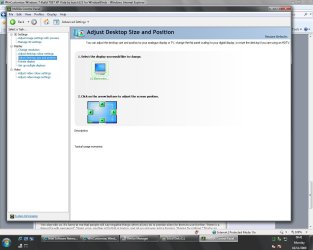
Hi, I had a question regarding Windows 7 and Nvidia Scaling. I just finished installing Windows 7 and I went into my Nvidia Driver Settings under Adjust Desktop Size and Position and by default my monitor is set to Use my display's built-in scaling, but I whenever I try to change it to use NVIDIA Scaling or fixed aspect ratio and press ok to keep the changes, it keeps reverting back to the default. I am using the most recent drivers for video card. What is the problem here?


Thank you
 

My Computer

OS
Windows 7
CPU
E6600
Motherboard
P5B-Deluxe
Memory
1GB
Graphics Card(s)
7600GS
Sound Card
SoundMAX
Monitor(s) Displays
1
Screen Resolution
1440X900
Hard Drives
250GB
PSU
400W
Keyboard
Eclipse
Mouse
MX518
Internet Speed
Cable
i have to same problem! help?
 

My Computer

OS
Windows 7 Ultimate x86
Graphics Card(s)
Nvidia GeForce 8400M GS
hmm worrying, I went to test and the option is not even on my nvidia control panel.

Is this feature not usually available on the 7600GT cards?
 

Attachments

  • nvidiawin7.jpg
    nvidiawin7.jpg
    97.1 KB · Views: 478

My Computer

Computer type
PC/Desktop
Computer Manufacturer/Model Number
home built
OS
windows 8.1 Pro x64
CPU
intel i5 4670k @ 4.3ghz
Motherboard
asus z87-plus
Memory
16 gig ram ddr3 @ 1600 corsair vengeance
Graphics Card(s)
evga 970 GTX 4 GIG FTW ACX 2.0
Sound Card
asus xonar D2X
Monitor(s) Displays
benq gw2765ht
Screen Resolution
2560x1440
Hard Drives
Samsung 850 pro SSD 512gig - boot device wooosh
WD black cavalier 640gig WD6401AALS
Seagate 500gig ST3500630AS
WD 2TB Green WDC20EARS
2 x WD Red 3TB WD30EFRX
Samsung 750gig HD753LG - on asmedia controller
PSU
coolermaster silent pro 600watt modular
Case
fractal define R4
Cooling
artic freezer i30, 3 case fans
Keyboard
microsoft business ps2 keyboard
Mouse
microsoft optical black mouse
Internet Speed
80/20 FTTC SkyBB
Antivirus
Nod32 AV v8, HitmanProAlert, SRP, System Hardening
Browser
Chrome x64
Other Info
Intel controller is in AHCI mode currently using IaSTOR 12.8.0.1016 drivers
Back
Top