Windows 7 and USB 3.0 Problems

MeAgain

New member
Local time
2:11 AM
Messages
25
New to this forum. Not a techie for sure. Just a PC user. I think this site comes as close as anything I've found for helping with my problem. Namely, a Windows 7 64 bit PC with USB 3.0 external devices attached that slows down and then crashes ... then, will not relaunch (even with a boot disc) until I unplug all the 3.0 USB external devices. Then it relaunches fine and I re-plug the USB 3.0 devices and all is well for a while. But, eventually the crash comes again and the process starts all over again. If I read the dialogue right in this sequence, it looks like I need to "install the USB 3.0 (ex. chipset) drivers from the manufacturers site for USB 3.0". My only problem is that this is not a consumer-made PC. It was hand-built by a friend. So, my questions are (1) Which manufacturer part of this PC (motherboard, video card, or what) do I need to get the "chipset" from? and (2) Am I correct in that it looks like a "chipset" is something that I'll need to physically install somewhere in this PC when I get it? Thanks folks. Sorry to be so dumb on this stuff.
 

My Computer

OS
Windows 7 64 bit
Hello MeAgain, and welcome to Seven Forums.

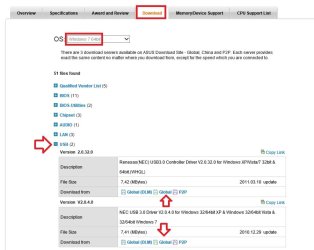
You should be able to get the USB 3.0 drivers (if available) from your motherboard manufacturer's or OEM computer's download webpage.

If you like post back with what brand and model your motherboard or OEM computer is, and we'll be happy to try and find the driver for you. :)
 

My Computer

Computer type
PC/Desktop
Computer Manufacturer/Model Number
Self built custom
OS
64-bit Windows 11 Pro for Workstations
CPU
Intel i7-8700K OC'd to 5 GHz
Motherboard
ASUS ROG Maximus XI Formula Z390
Memory
64 GB (4x16GB) G.SKILL TridentZ RGB DDR4 3600 MHz
Graphics Card(s)
ASUS ROG-STRIX-GTX1080TI-O11G-GAMING
Sound Card
Integrated
Monitor(s) Displays
2 x Samsung Odyssey G7 27"
Screen Resolution
2560x1440
Hard Drives
1TB Samsung 990 PRO M.2,
4TB Samsung 990 PRO PRO M.2,
TerraMaster F8 SSD Plus NAS
PSU
Seasonic Prime Titanium 850W
Case
Thermaltake Core P3
Cooling
Corsair Hydro H115i
Keyboard
Logitech wireless K800
Mouse
Logitech MX Master 4
Internet Speed
2 Gb/s Download and 100 Mb/s Upload
Antivirus
Malwarebyte Anti-Malware Premium
Browser
Google Chrome
Other Info
Logitech Z625 speaker system,
Logitech BRIO 4K Pro webcam,
HP Color LaserJet Pro MFP M477fdn,
APC SMART-UPS RT 1000 XL - SURT1000XLI,
Galaxy S23 Plus phone
Thxs for quick reply. Found BOM of PC, and for Motherboard it reads "ASUS P8P67 PRO LGA 1155 SATA 6Gbps and USB 3.0 Supported Intel P67 DDR3 2400 ATX Motherboard". Hummm, with that "3.0 Supported" in the description, does that mean it should already be able to handle USB 3.0? And, the problem is somewhere else?
 

My Computer

OS
Windows 7 64 bit

My Computer

Computer type
PC/Desktop
Computer Manufacturer/Model Number
Self built custom
OS
64-bit Windows 11 Pro for Workstations
CPU
Intel i7-8700K OC'd to 5 GHz
Motherboard
ASUS ROG Maximus XI Formula Z390
Memory
64 GB (4x16GB) G.SKILL TridentZ RGB DDR4 3600 MHz
Graphics Card(s)
ASUS ROG-STRIX-GTX1080TI-O11G-GAMING
Sound Card
Integrated
Monitor(s) Displays
2 x Samsung Odyssey G7 27"
Screen Resolution
2560x1440
Hard Drives
1TB Samsung 990 PRO M.2,
4TB Samsung 990 PRO PRO M.2,
TerraMaster F8 SSD Plus NAS
PSU
Seasonic Prime Titanium 850W
Case
Thermaltake Core P3
Cooling
Corsair Hydro H115i
Keyboard
Logitech wireless K800
Mouse
Logitech MX Master 4
Internet Speed
2 Gb/s Download and 100 Mb/s Upload
Antivirus
Malwarebyte Anti-Malware Premium
Browser
Google Chrome
Other Info
Logitech Z625 speaker system,
Logitech BRIO 4K Pro webcam,
HP Color LaserJet Pro MFP M477fdn,
APC SMART-UPS RT 1000 XL - SURT1000XLI,
Galaxy S23 Plus phone
To the OP, just to confirm i can plug a USB3.0 drive into a USB3.0 socket (my mobo only has these no USB2.0) with no additional drivers installed and it will recognise it and work but only at USB2.0 speeds until i install 3.0 drivers then it runs properly at higher speeds
 

My Computer

Computer type
PC/Desktop
Computer Manufacturer/Model Number
Pauly Special
OS
Win7 Ultimate X64
CPU
Intel i5 3570K
Motherboard
Gigabyte Z77X-DS3H
Memory
8GB DDR3 1600
Graphics Card(s)
Onboard
Sound Card
Onboard
Screen Resolution
1280x1024
Hard Drives
Samsung 840 Evo SSD (OS)
1TB Spinner (Data)
PSU
800W Arctic
Case
Cooler Master
Cooling
3x120mm Fans
Keyboard
MS Wireless
Mouse
MS Wireless
Internet Speed
20M
Thanks again Brink.

The quickness and detailed help is unlike anything I've found on such sites as this before. I will get the drivers.

Meanwhile, I have found that plugging the 3.0 external devices directly into the PC (taking the hubs out of the hookup) has significantly helped the access speed to information saved on the external drives.

I don't know where those little award medals come from. But, I'd award ya one if I could find 'em.
 

My Computer

OS
Windows 7 64 bit
You're welcome MeAgain. I'm glad we could help. :)

Yeah, I've always found that a direct connection works best as well.
 

My Computer

Computer type
PC/Desktop
Computer Manufacturer/Model Number
Self built custom
OS
64-bit Windows 11 Pro for Workstations
CPU
Intel i7-8700K OC'd to 5 GHz
Motherboard
ASUS ROG Maximus XI Formula Z390
Memory
64 GB (4x16GB) G.SKILL TridentZ RGB DDR4 3600 MHz
Graphics Card(s)
ASUS ROG-STRIX-GTX1080TI-O11G-GAMING
Sound Card
Integrated
Monitor(s) Displays
2 x Samsung Odyssey G7 27"
Screen Resolution
2560x1440
Hard Drives
1TB Samsung 990 PRO M.2,
4TB Samsung 990 PRO PRO M.2,
TerraMaster F8 SSD Plus NAS
PSU
Seasonic Prime Titanium 850W
Case
Thermaltake Core P3
Cooling
Corsair Hydro H115i
Keyboard
Logitech wireless K800
Mouse
Logitech MX Master 4
Internet Speed
2 Gb/s Download and 100 Mb/s Upload
Antivirus
Malwarebyte Anti-Malware Premium
Browser
Google Chrome
Other Info
Logitech Z625 speaker system,
Logitech BRIO 4K Pro webcam,
HP Color LaserJet Pro MFP M477fdn,
APC SMART-UPS RT 1000 XL - SURT1000XLI,
Galaxy S23 Plus phone
Brink, I just now got around to installing the downloads you told me would fix my problem. But, I can't figure out what to click on after I got them downloaded. I extracted the zipped files and then open them and there are lines and lines and lines of things that I have no idea what they are. I "think" I need to use the one that says, "Asus setup". But, I'm not sure. Sorry to be so PC-illiterate.
 

My Computer

OS
Windows 7 64 bit
Generally you need to run the file named setup.exe which is probably the file you mentioned above, if that doesnt work go to device manager select your USB 3.0 ports (they will probably have a yellow caution mark next to them if the drivers are not installed) and click to update driver then when asked point at the folder that contains your driver download
 

My Computer

Computer type
PC/Desktop
Computer Manufacturer/Model Number
Pauly Special
OS
Win7 Ultimate X64
CPU
Intel i5 3570K
Motherboard
Gigabyte Z77X-DS3H
Memory
8GB DDR3 1600
Graphics Card(s)
Onboard
Sound Card
Onboard
Screen Resolution
1280x1024
Hard Drives
Samsung 840 Evo SSD (OS)
1TB Spinner (Data)
PSU
800W Arctic
Case
Cooler Master
Cooling
3x120mm Fans
Keyboard
MS Wireless
Mouse
MS Wireless
Internet Speed
20M
Hello MeAgain,

It will be the Setup.exe file in the extracted folder. :)
 

My Computer

Computer type
PC/Desktop
Computer Manufacturer/Model Number
Self built custom
OS
64-bit Windows 11 Pro for Workstations
CPU
Intel i7-8700K OC'd to 5 GHz
Motherboard
ASUS ROG Maximus XI Formula Z390
Memory
64 GB (4x16GB) G.SKILL TridentZ RGB DDR4 3600 MHz
Graphics Card(s)
ASUS ROG-STRIX-GTX1080TI-O11G-GAMING
Sound Card
Integrated
Monitor(s) Displays
2 x Samsung Odyssey G7 27"
Screen Resolution
2560x1440
Hard Drives
1TB Samsung 990 PRO M.2,
4TB Samsung 990 PRO PRO M.2,
TerraMaster F8 SSD Plus NAS
PSU
Seasonic Prime Titanium 850W
Case
Thermaltake Core P3
Cooling
Corsair Hydro H115i
Keyboard
Logitech wireless K800
Mouse
Logitech MX Master 4
Internet Speed
2 Gb/s Download and 100 Mb/s Upload
Antivirus
Malwarebyte Anti-Malware Premium
Browser
Google Chrome
Other Info
Logitech Z625 speaker system,
Logitech BRIO 4K Pro webcam,
HP Color LaserJet Pro MFP M477fdn,
APC SMART-UPS RT 1000 XL - SURT1000XLI,
Galaxy S23 Plus phone
Windows 7 and UBS 3.0 Problems

Cannot find a "Setup.exe" in the extracted folder. All I see that comes close is "AsusSetup" and it is identified as the "application". I just tried to run that and got an error "1706 No valid source could be found for product Reneses Electronics USB 3.0" Another error also said "The feature you are trying to use is on a CD-Rom or other removable disc that is not available. Insert the Renesas Electronics USB 3.0 Host Controll Driver disc and click OK"

I have a CD that is identified as "P8P67 SERIES Intel P67 Chipset Support Rev.566.11 ASUS M1791". But, no "Reneses Electronics USB 3.0 Host Control Driver" disc. Is that something I also need to download?

There are other "Setup" options in the extracted folder. But, none end with ".exe". One is a "Configuration setting" file. Another is an "Application" file. And the last one is an "ISS" file.

When I tried to run the update for the "NEC" one I got a reply that a "later version was already installed on the PC" (or something like that).
 

My Computer

OS
Windows 7 64 bit

My Computer

Computer type
PC/Desktop
Computer Manufacturer/Model Number
Self built custom
OS
64-bit Windows 11 Pro for Workstations
CPU
Intel i7-8700K OC'd to 5 GHz
Motherboard
ASUS ROG Maximus XI Formula Z390
Memory
64 GB (4x16GB) G.SKILL TridentZ RGB DDR4 3600 MHz
Graphics Card(s)
ASUS ROG-STRIX-GTX1080TI-O11G-GAMING
Sound Card
Integrated
Monitor(s) Displays
2 x Samsung Odyssey G7 27"
Screen Resolution
2560x1440
Hard Drives
1TB Samsung 990 PRO M.2,
4TB Samsung 990 PRO PRO M.2,
TerraMaster F8 SSD Plus NAS
PSU
Seasonic Prime Titanium 850W
Case
Thermaltake Core P3
Cooling
Corsair Hydro H115i
Keyboard
Logitech wireless K800
Mouse
Logitech MX Master 4
Internet Speed
2 Gb/s Download and 100 Mb/s Upload
Antivirus
Malwarebyte Anti-Malware Premium
Browser
Google Chrome
Other Info
Logitech Z625 speaker system,
Logitech BRIO 4K Pro webcam,
HP Color LaserJet Pro MFP M477fdn,
APC SMART-UPS RT 1000 XL - SURT1000XLI,
Galaxy S23 Plus phone
Fixed the file folder extension so I can see the ".exe". Tried to run the setup again. Got same results. Namely ... "1706 No valid source could be found for product Reneses Electronics USB 3.0" Another error also said "The feature you are trying to use is on a CD-Rom or other removable disc that is not available. Insert the Renesas Electronics USB 3.0 Host Controll Driver disc and click OK"

Meanwhile, this morning none of my external USB 3.0 connected devices now appear in my list of storage sites. They were all there when I stopped working last night. Unplugging and re-plugging them does nothing.

I had another blue screen of death failure yesterday afternoon. And, as always before, once I unplug all the USB devices the PC will re-launch.

But unplugging and re-plugging does nothing today.
 

My Computer

OS
Windows 7 64 bit

My Computer

Computer type
PC/Desktop
Computer Manufacturer/Model Number
Pauly Special
OS
Win7 Ultimate X64
CPU
Intel i5 3570K
Motherboard
Gigabyte Z77X-DS3H
Memory
8GB DDR3 1600
Graphics Card(s)
Onboard
Sound Card
Onboard
Screen Resolution
1280x1024
Hard Drives
Samsung 840 Evo SSD (OS)
1TB Spinner (Data)
PSU
800W Arctic
Case
Cooler Master
Cooling
3x120mm Fans
Keyboard
MS Wireless
Mouse
MS Wireless
Internet Speed
20M
I have 16G of RAM on this PC. So, does that mean I can't get a dump file? Thanks to the amazingly wonderful step-by-step how-to guides I am actually finding my way into these deep dark crevasses of this PC setup. But, I am a bit confused about if I can do the BSOD dump file thing with this amount of RAM.

I used to have an INTEL tool on that give me a "low memory" warning just before one of the episodes would happen. But, I turned it off, thinking that tool was part of the problem. Dumb me.

I have noticed that just before each BSOD event that the PC gets slower and less responsive and then things just freeze up. When it happened yesterday I had a LOT of things open and running. Internet (email, youtube, and firefox, a Video editor, powerpoint. But, it has also happened with just email and Zinio (a magazine reader) open.

So, with 16G of RAM what do I do?

NOTE: We are in the early stages of an ice storm here and may lose internet connection (satellite). So, you might not hear back from me when you send your reply until this has passed and ice melts off the dish.

Many many thanks for your indulgence and help.
 

My Computer

OS
Windows 7 64 bit
RAM size is irrelevant, has no bearing on dump files, if you have any they will be located in C:\windows\minidump folder but you want to run the tool from the above link and it will collect dumps and lots of other ionfo from your machine to help us diagnose the problem
http://www.sevenforums.com/tutorials/92394-sf-diagnostic-tool-using-troubleshooting.html
From what you describe sounds like you may have an overheating issue, suggest you install temp monitor software and keep an eye on it see how it goes, you may run some stress tests if you wish to provoke temperatures but dont leave unattended the first time you run as if you have problems those temps will shoot up fast
http://www.sevenforums.com/tutorials/100352-hardware-stress-test-prime95.html
 

My Computer

Computer type
PC/Desktop
Computer Manufacturer/Model Number
Pauly Special
OS
Win7 Ultimate X64
CPU
Intel i5 3570K
Motherboard
Gigabyte Z77X-DS3H
Memory
8GB DDR3 1600
Graphics Card(s)
Onboard
Sound Card
Onboard
Screen Resolution
1280x1024
Hard Drives
Samsung 840 Evo SSD (OS)
1TB Spinner (Data)
PSU
800W Arctic
Case
Cooler Master
Cooling
3x120mm Fans
Keyboard
MS Wireless
Mouse
MS Wireless
Internet Speed
20M
Solved Computers with USB 3 and Windows 7

Thanks for reply. For the first time ever when I started my PC this morning I got a little black box in the upper left corner of the monitor that gives me, among other things, the temp of the motherboard and the CPU. Motherboard is 31.0 degrees C. CPU is 27.0 degrees C. There are 4 fans in this PC. CPU fan is running at 848 rpm. Chassis fan #1 is running at 737 rpm. Chassis fan # 2 is running at 713 rpm. Power fan is running at 715 rpm. One of these fans (I don't know which) is something called a "Master Blaster". The temp readings in the PC are holding steady. The rpm on the fans are changing a bit. I can add an external desktop fan behind the PC for even more airflow if you think this is worth trying. Meanwhile, I will see if I can get the BSOD file dump info for you.

Really appreciate all the help.
 

My Computer

OS
Windows 7 64 bit
OK folks. I got it. The BSOD info gathering tools works great. Not that I understand any of how. :) But, it downloaded and ran like a charm.

If I did all this right the BSOD dump file is zipped and attached.

Meanwhile, I've already put an external desktop fan behind this PC. It was running while the BSOD dump gathering tools was running. The CPU temp jumped to 36 degrees C. But, has now settled back to 26 degrees C. now that the tool has finished gathering the data. The Motherboard has remained pretty steady now around 31 degrees C.

Thanks again folks.
 

Attachments

My Computer

OS
Windows 7 64 bit
weird
 
Last edited:

My Computer

Computer type
PC/Desktop
Computer Manufacturer/Model Number
Pauly Special
OS
Win7 Ultimate X64
CPU
Intel i5 3570K
Motherboard
Gigabyte Z77X-DS3H
Memory
8GB DDR3 1600
Graphics Card(s)
Onboard
Sound Card
Onboard
Screen Resolution
1280x1024
Hard Drives
Samsung 840 Evo SSD (OS)
1TB Spinner (Data)
PSU
800W Arctic
Case
Cooler Master
Cooling
3x120mm Fans
Keyboard
MS Wireless
Mouse
MS Wireless
Internet Speed
20M
Back
Top