Windows 7 annoying problems

waterdrinker

New member
Local time
5:23 AM
Messages
16
Location
Paris
Hello everyone,

I just had some problems under Windows 7 32bit and I can't find a solution. Here a list of symptoms and possible causes that I doubt:

Symptoms:
1.
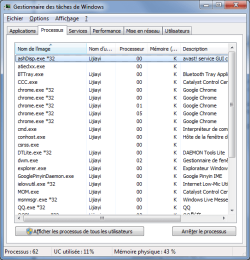
In the processes page of Task manager, the quantity of memory used by a process is not displayed, while that of the CPU is displayed as usual. The processes can still be sorted by memory occupation.
2.
From the right click menu, I can create nothing but a new folder in c:\. And in partitions of my portable HDD, the same thing happens in root directories and SOME OF the sub folders which are CREATED (not modified) after 1st Oct.
3.
Windows cannot show hidden files even after I changed the settings in the Registry(and in options). If I create a file and set it hidden, it will disappear in less than 1 second. I roughly checked all partitions with winrar, but nothing suspicious(like autorun.inf, ****.exe) has been found.

Possible Causes
1.
I just installed a usb Bluetooth adapter.
2.
Letters of my portable HDD (which were fixed for months) have been changed since I inserted an other portable HDD earlier today. I was not able to undo it.
3.
Virus or something, but I'm not quite sure. I found nothing unusual in start-up programs and running processes. My avast home edition detected nothing.


Please could someone help me?
 

My Computer

Computer type
PC/Desktop
OS
Windows 7
CPU
Intel® Pentium® E5300
Motherboard
MSI P45T-C51
Memory
Kingston ValueRAM DDRII 2 x 2 Go PC6400 CAS 5
Graphics Card(s)
Sapphire Radeon™ HD 4890 1 Go Battlestations Edition
Screen Resolution
1920*1080
Hard Drives
Seagate Barracuda 7200.12 S-ATA - 500 Go - 16 Mo
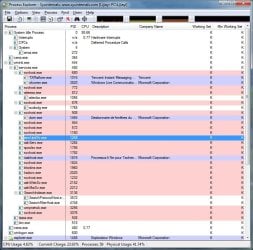
1) Download Process Explorer and see if you can see memory usage there after adding the right column. Then type resmon into the start menu and see if the memory amount is displayed there.

2) For the next issues run sfc /scannow to see if any system files have been damaged. What context menu entries are on the right click menu?

3) Run a full system scan with Malwarebytes Anti-Malware in safe mode.


Process Explorer

www.malwarebytes.org
 

My Computer

Computer Manufacturer/Model Number
Sony Vaio Z46GDU
OS
Windows 7 Ultimate x86-64
CPU
[email protected] 1066MHz FSB
Motherboard
Sony branded
Memory
6GB DDR3 1066MHz
Graphics Card(s)
9300M GS 256MB Dedicated (Speed) + Intel4500MHD (Stamina)
Sound Card
Realtek HD Audio
Monitor(s) Displays
13.1' WXGA
Screen Resolution
1600x900
Hard Drives
320GB 7200RPM w/ 16MB cache
Internet Speed
1MB/s
1. Readjust the column widths.

2. Did you try using Disk Management to change the drive letter?

3. ?
 

My Computer

Computer Manufacturer/Model Number
DIY
OS
W7x64 Pro, SuSe 12.1/** W7 x64 Pro, XP MCE
CPU
Phenom II 1090T w/Noctua NH-D14 /**4400+ X2 w/CM Hyper TX 3
Motherboard
ASRock 890FX Deluxe 4/**A8N-SLI
Memory
2 x 2GB Patriot PGS34g1600LLKA/**4x1GB Corsair VS
Graphics Card(s)
EVGA GTX460 SC/**EVGA 8800GTS
Sound Card
Asus Xonar D2X/**Xonar D1
Monitor(s) Displays
Acer X233H, Dell E152FPc /**LG M237-WD
Screen Resolution
1920x1080 & 1024x768/**1980x1080
Hard Drives
WDC 2TB, 1.5TB, 1TB, 500GB,Seagate 500GB , Maxtor 80GB /**500GB Seagate & WDC 1TB Black
PSU
CM RS600 w/ APC BX1000G/**Antec 500 TP w/ APC BX1000
Case
HAF922/**Antec 1040IIB
Cooling
3x200mm, 1x140 and 1x120mm/**5x80mm fans
Keyboard
Logitech Media USB/**Saitek Eclipse
Mouse
Cordless Trackman Wheel/**Ditto
Internet Speed
3.3Mbps
Other Info
SB 560 5.1 w/ Sennheiser RS140/**Creative T20 speakers, Dvico FusionHDTV7 Gold RT, Cisco E3000, HP 5510V AIO, Linksys E3000, Belkin F5U237 hub and **F5D8055 adapter
(** = 2nd rig)
Hello Frostmourne and seekermeister,

1. Process Explorer can't show memory usage either. Like Task manager, it shows only a "K" in the column.
2. sfc /scannow says some of the system files are damaged, and not all of them have been repaired correctly. It has generated a 12mb CBS.log....
3. I'll be soon running a full scan

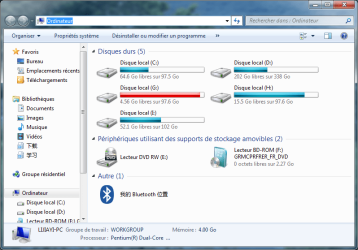
4. With Disk Management I have successfully changed the drive letters. But since I did it all drives have become "local disk" in explorer (still correct in disk management).

Please what should I do next? Thanks in advance!!
 

Attachments

  • Sans titre.png
    Sans titre.png
    20.8 KB · Views: 11
  • pe.jpg
    pe.jpg
    94.5 KB · Views: 11
  • computer.png
    computer.png
    44 KB · Views: 13

My Computer

Computer type
PC/Desktop
OS
Windows 7
CPU
Intel® Pentium® E5300
Motherboard
MSI P45T-C51
Memory
Kingston ValueRAM DDRII 2 x 2 Go PC6400 CAS 5
Graphics Card(s)
Sapphire Radeon™ HD 4890 1 Go Battlestations Edition
Screen Resolution
1920*1080
Hard Drives
Seagate Barracuda 7200.12 S-ATA - 500 Go - 16 Mo
Try running chkdsk /r.
 

My Computer

Computer Manufacturer/Model Number
DIY
OS
W7x64 Pro, SuSe 12.1/** W7 x64 Pro, XP MCE
CPU
Phenom II 1090T w/Noctua NH-D14 /**4400+ X2 w/CM Hyper TX 3
Motherboard
ASRock 890FX Deluxe 4/**A8N-SLI
Memory
2 x 2GB Patriot PGS34g1600LLKA/**4x1GB Corsair VS
Graphics Card(s)
EVGA GTX460 SC/**EVGA 8800GTS
Sound Card
Asus Xonar D2X/**Xonar D1
Monitor(s) Displays
Acer X233H, Dell E152FPc /**LG M237-WD
Screen Resolution
1920x1080 & 1024x768/**1980x1080
Hard Drives
WDC 2TB, 1.5TB, 1TB, 500GB,Seagate 500GB , Maxtor 80GB /**500GB Seagate & WDC 1TB Black
PSU
CM RS600 w/ APC BX1000G/**Antec 500 TP w/ APC BX1000
Case
HAF922/**Antec 1040IIB
Cooling
3x200mm, 1x140 and 1x120mm/**5x80mm fans
Keyboard
Logitech Media USB/**Saitek Eclipse
Mouse
Cordless Trackman Wheel/**Ditto
Internet Speed
3.3Mbps
Other Info
SB 560 5.1 w/ Sennheiser RS140/**Creative T20 speakers, Dvico FusionHDTV7 Gold RT, Cisco E3000, HP 5510V AIO, Linksys E3000, Belkin F5U237 hub and **F5D8055 adapter
(** = 2nd rig)
Boot from your windows 7 dvd and select the repair option
 

My Computer

Computer type
PC/Desktop
Computer Manufacturer/Model Number
Dell XPS 420
OS
Windows 10, Home Clean Install
CPU
Intel Core2 processsor Q8200(2.33Ghz 1333FSB) Quad Core Tech
Motherboard
Dell
Memory
6 gb
Graphics Card(s)
ATI Radeon 256MB HD3650
Sound Card
Intergrated 7.1 Channel Audio
Monitor(s) Displays
Dell SP2009W 20"
Hard Drives
640 GB Serial ATA Hard drive
Cooling
Fan
Keyboard
Dell USB Keyboard
Mouse
Dell Premium Optical USB
Internet Speed
DSL 2.85
I had the same problem.
This solution may help you/others.
Just check your Region and Language settings, click Additional settings. I had error message, that I need to check values because there are errors. I just clicked Reset button and voilà everything works fine now.
 
Last edited:

My Computer

OS
Windows 7 Professional 64
Back
Top