
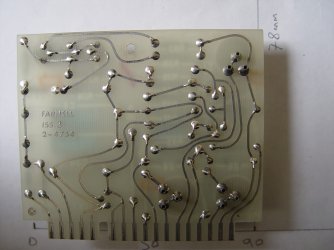
Basically I am looking for the best / easiest way to take a photo of the copper tracks side of a single sided printed circuit board and fill in the tracks in solid black so the new image can be printed on clear acetate sheet to make a copy board through photo resist coated PCB and etching. Some boards will have copper coloured tracks, some like this example with tinning on the copper so it looks silver. I have tried filling in with a digital paintbrush in Paint, but it's inaccurate and very tedious. Would some sort of PC Tablet with a stylus be better, or is there an app to flood selected areas in black? Thanks
Attachments
My Computer
At a glance
Win 7 Pro 64 BitIntel i5-4670K @ 3.4 GHz16 gigOn board
- Computer type
- PC/Desktop
- Computer Manufacturer/Model Number
- Custom
- OS
- Win 7 Pro 64 Bit
- CPU
- Intel i5-4670K @ 3.4 GHz
- Motherboard
- Gigabyte GA-Z97X-Gaming 3
- Memory
- 16 gig
- Graphics Card(s)
- On board
- Hard Drives
- SSD C: Drive
2 off 1 gig SATA in software RAID1 as D: Drive
- Antivirus
- Avast
- Browser
- Firefox


