Windows 7 Audio latency.

Asills2129

New member
Local time
11:28 PM
Messages
4
Location
Philadelphia
Hi, I'm working with FL Studio 9 and every time I play something. I get this crackling noise, or audio latency I think it's called. I've looked around and I think I have to increase or decrease my sound cards buffer. My problem is I don't know how to do so...Can anyone help me resolve this problem? Thank you.
 

My Computer

OS
Windows 7
Hi, I'm working with FL Studio 9 and every time I play something. I get this crackling noise, or audio latency I think it's called. I've looked around and I think I have to increase or decrease my sound cards buffer. My problem is I don't know how to do so...Can anyone help me resolve this problem? Thank you.

Hi and welcome

Latency, I believe is the time between when the video displays and the audio sounds. If crackling I suspect a driver or hardware. I dont know which sound card so cant tell you if/how to change its buffer

Ken J+
 

My Computer

Computer Manufacturer/Model Number
HP Pavillion dv-7 1005 Tx
OS
Win 8 Release candidate 8400
CPU
[email protected]
Memory
4 gigs
Graphics Card(s)
Nvidia 9600M
Sound Card
HD built-in
Monitor(s) Displays
17" Wxga
Screen Resolution
1440x900
Cooling
none
Internet Speed
45Mb down 5Mb up
It sounds like you may have your latency too low. You should be able to alter it within Fruity Loops in the audio preferences
 

My Computer

OS
Windows 7 64bit
CPU
Intel q6600 oc to 3.02
Motherboard
Abit IX38 QuadGT
Memory
4 GB PC2-8500C5 DDR2 XMS2 Corsair Dominator TwinX Ram
Graphics Card(s)
Sapphire HD 5870 VAPOR-X 1GB
Sound Card
Asus Xonar Xense
Monitor(s) Displays
DELL ST2410 & Samsung 2233LW
Screen Resolution
1920x1080
Hard Drives
2 x Seagate Barracuda 500GB SATA-II 32MB Cache
1 x Western Digital Blue 500GB SATA-II 1MB Cache
PSU
Corsair 650
Case
Antec Nine Hundred
Cooling
Freezer Pro
Keyboard
Logitech G15
Mouse
Logitech G500
Internet Speed
Sky 1.5mb
Disable any cpu throttling in the bios like Cool N Quiet etc...

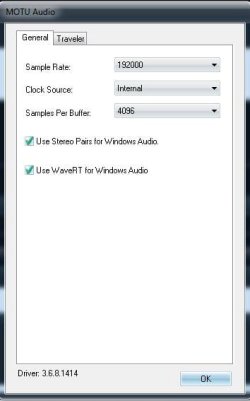
Only mid-range to high-end professional gear can have the latencies and buffers altered.
 

Attachments

  • Capture.JPG
    Capture.JPG
    23.9 KB · Views: 449

My Computer

Computer Manufacturer/Model Number
self built
OS
7600.20510 x86
CPU
P4 550 3.4 GHz HT running at 3.5 GHz
Motherboard
MSI PM8M3-V (MS-7211 v1.x) Micro-ATX mainboard
Memory
OCZ 2 GB(2x1GB) DDR400mHz running @ 414 mHz
Graphics Card(s)
HIS Radeon HD 3850 IceQ 3 Turbo HDMI Dual DL-DVI AGP
Sound Card
MOTU Traveler firewire studio interface 192 kHz 24 bit
Monitor(s) Displays
22" widescreen Acer X223W LCD, 17" Compaq P75 CRT
Screen Resolution
1680x1050 and 1280x1024
Hard Drives
SATA I x2 WD, 400 GB and 120 GB, SATA 2 WD Caviar Black 1 TB
PSU
350W generic
Case
Cybertronpc, it glows blue
Cooling
stock cpu fan, Ice-Q 3 gpu and system, many case fans
Keyboard
Logitch Classical Keyboard 200
Mouse
Logitech Mediaplay cordless
Internet Speed
1792/448 kbits/sec
Other Info
SATA II PCI fake RAID adapter, 1 GB Readyboost, original ATI Remote Wonder (even works with WMC perfectly), Logitech Rumblepad 2 game controller x2
Back
Top