Windows 7 auto-driver update

51M0N

New member
Local time
4:38 PM
Messages
6
Ok, I downloaded the ethernet drivers for my PC. But when I installed them, Windows 7 auto-updated the drivers to Microsoft ones. The drivers were made for Windows Vista, which may be the reason, but I don't think it is. It was for my graphics card. Note that the W7 ones weren't found on nVidia's website. I was stuck with 640 x 480 at 16-bit color.
 

My Computer

Computer Manufacturer/Model Number
HP Pavillion a1375a Media Centre PC (modified)
OS
Windows 7 Ultimate x64
CPU
Intel Pentium D 820 2.8GHz
Motherboard
ASUS P5LP-LE
Memory
1GB PC2-4200
Graphics Card(s)
nVidia GeForce 9600GT 512MB PCI-E
Sound Card
Realtek ALC 882
Monitor(s) Displays
BENQ FP71E
Screen Resolution
1280 x 1024 @ 60Hz
Hard Drives
Seagate 80GB 7,200RPM
PSU
Unknown
Case
Unknown
Cooling
Unknown
Keyboard
Microsoft Wireless MultiMedia Keyboard 1.1
Mouse
Microsoft Wireless Optical Mouse 2000
Internet Speed
I use my XP laptop for that.
Other Info
External Ritmo 80GB Mobile HDD 5,400RPM
Note that the Windows 7 ones weren't found on nVidia's website. I was stuck with 640 x 480 at 16-bit color
Nvidia fully supports 9600GT on windows 7
NVIDIA DRIVERS 260.99 WHQL


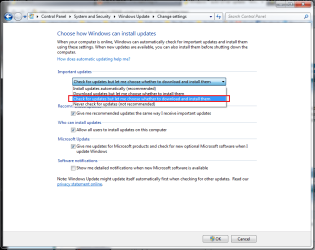
Disable auto updating in Windows Update
 

Attachments

  • Untitled.png
    Untitled.png
    36.4 KB · Views: 88

My Computer

Computer type
PC/Desktop
Computer Manufacturer/Model Number
Custom Build
OS
Windows 10 Pro x64, Arch Linux
CPU
Intel Core 2 Quad Q8200 OC'd 3.08GHz
Motherboard
Asus Rampage formula LGA775
Memory
8GB DDR2 900Mhz
Graphics Card(s)
MSI GT730 2GB GDDR5 (Kepler)
Sound Card
Supreme FX2
Monitor(s) Displays
Samsung LS22F350 LED
Screen Resolution
1080P
Hard Drives
Kingston SSDNow UV400 120GB, 500GB Hitachi, 2TB Samsung, 500GB Seagate FreeAgent, 640GB Samsung, 160GB Toshiba (Arch)
PSU
AeroCool 500W Bronze
Cooling
Cooler Master V6 + 3X fans
Keyboard
Prolink keyboard
Mouse
Logitech M705
Internet Speed
1MiB/s
Browser
Chrome Beta
Ok, I downloaded the ethernet drivers for my PC. But when I installed them, Windows 7 auto-updated the drivers to Microsoft ones. The drivers were made for Windows Vista, which may be the reason, but I don't think it is. It was for my graphics card. Note that the W7 ones weren't found on nVidia's website. I was stuck with 640 x 480 at 16-bit color.

1st, If you downloaded Ethernet drivers then that controls your Ethernet port which is used to hard-wire to your modem/router via an Ethernet cable.

2nd, Follow post #2 for Video Card drivers.


OS
 

My Computer

Computer Manufacturer/Model Number
Compaq Desktop
OS
Windows 7 Ultimate x64
CPU
AMD Sempron Dual Core
Memory
3GB
Graphics Card(s)
NVIDIA GeForce 6150SE nForce 430
Screen Resolution
1024x768
Hard Drives
150GB Sata
Welcome

It is always best to update your drivers at the Company website. Many times Windows one size fits all, is inferior to the tailor made drivers you can find at the website.
While at it go to search and type cmd
In cmd type driverquery. See any drivers that are very old,eEarly 08 or so.If you do, why not try to update.
 

My Computer

Computer type
PC/Desktop
Computer Manufacturer/Model Number
Dell XPS 420
OS
Windows 10, Home Clean Install
CPU
Intel Core2 processsor Q8200(2.33Ghz 1333FSB) Quad Core Tech
Motherboard
Dell
Memory
6 gb
Graphics Card(s)
ATI Radeon 256MB HD3650
Sound Card
Intergrated 7.1 Channel Audio
Monitor(s) Displays
Dell SP2009W 20"
Hard Drives
640 GB Serial ATA Hard drive
Cooling
Fan
Keyboard
Dell USB Keyboard
Mouse
Dell Premium Optical USB
Internet Speed
DSL 2.85
Back
Top