
Windows 7 awkward feel, missing WinXP, need advice

Most of the responses that I read didn't seem like rude responses like "get used to it, XP is dead". The responses were people either trying to offer advice on how to install some things to make it seem like it used to be, or people who offered examples that they weren't exactly gung-ho at first when they got on Windows 7...but they adjusted and got used to things the way they are.

Easing the transition as it were...

Sidebar: XP is far from dead. In it's present state XP is rock stable and is naturally faster than Win7. It remains the OS of choice by audiophiles and videophiles as Win7 is showing itself up to be a poor performer where multimedia is concerned. The fact that it is stable allows it to continue even without updates for quite some time, several years, in fact. New devices will continue to include XP/2000 drivers for quite some time to come. Even the disk manufacturers have recognized XP's dominance in creating tools to realign partition boundaries for their Advanced Format drives. I don't see XP dying off any time soon... Heck... I've got friends who are still happy as clams using Win2000!
 

My Computer

Computer Manufacturer/Model Number
Homebrew
OS
XP Pro SP3 X86 / Win7 Pro X86
CPU
Amd 64 x2 4200 (2.4ghz)
Motherboard
Asus M2N-MX SE Plus
Memory
Kingston DDR2 800 2gb
Graphics Card(s)
Nvidia GF-8400
Sound Card
Realtek on Motherboard
Monitor(s) Displays
Acer x-193bw
Screen Resolution
1440 x 900
Hard Drives
Western Digital 500g
PSU
350watt In-Win
Case
In-Win
Cooling
Air
Keyboard
yes
Mouse
yes
Internet Speed
5mpbs
Other Info
Also ASRock ION 330 as HTPC (on XP).
Acer Aspire as GP netbook (on XP).
What will eventually kill XP is the fact that it's a 32-bit OS from 2001 optimized for a Pentium 3 computer with maybe 256MB of RAM. For netbooks, that's fine, but for desktops and laptops outside of corporate holdovers, it's practically dead for new installations already. And for modern technologies like SSDs and DirectX 10/11? Forget it. And I say this as someone who bought a new computer for work with XP Pro a short 2 years ago.
 

My Computer

OS
Windows 7 Professional x64
CPU
Athlon II X2 250
Motherboard
GIGABYTE GA-MA790GPT-UD3H Socket AM3 (AMD 790GX)
Memory
4GB DDR3 1333
Graphics Card(s)
Integrated Radeon 3300
Monitor(s) Displays
1x 28" Hanns G, 1x 17" NEC
Screen Resolution
1920x1200 + 1280x1024
Hard Drives
Crucial CT64M225 2.5" 64GB SATA II SSD, Western Digital Black 500GB
PSU
Antec Earthwatts 380
Case
Antec NSK 4480B II
Internet Speed
6/1
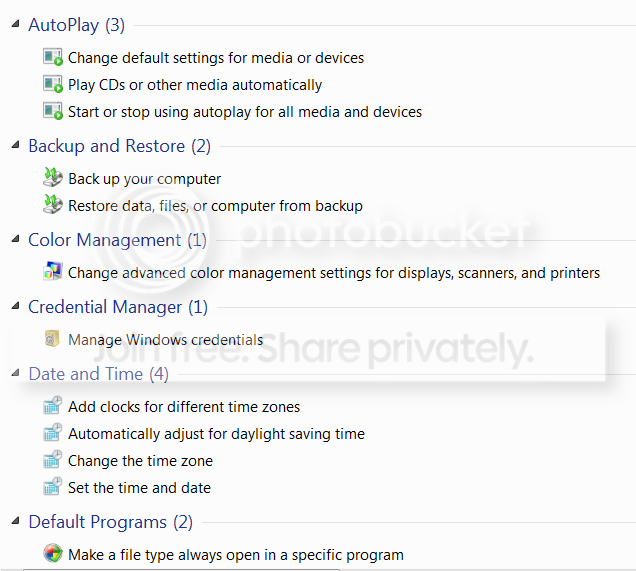
Paste the shell command below into any explorer window (not internet explorer) address bar. That will give you comprehensive list of all tasks in the system. If you double click on any entry, you get to the described function. If you right click on it, you get a shortcut on the desktop. From those shortcuts I made myself a handy toolbar with the ones I use frequently. Maybe that will help you to navigate Windows7 a little easier.

shell:::{ED7BA470-8E54-465E-825C-99712043E01C}

This is how they look, but we are still in the a,b,c, and d section. So there are a lot more (before and after).


2010-04-11_1327.png
 
Last edited:

My Computer

Computer Manufacturer/Model Number
HP, Dell, Gateway, Toshiba - 4 laptops and 2 desktops
OS
Vista, Windows7, Mint Mate, Zorin, Windows 8
CPU
from 1.6GHz Duo to i7
Monitor(s) Displays
2x HP w2207
Hard Drives
5x HDD, 7x SSD, 12x Externals
Keyboard
with trackball - no mices
Mouse
Trackball mice
Internet Speed
DSL 6000
if i can offer a little advice, as others have said, it is easy to get alot of Xp's way of doing things back, but it might be worth, maybe changing everything back except one or two items, and then when you get used to them, change a couple more things, until you're getting the full Win 7 experience, that way it doesn't seem so alien to start off with, thats what i did when i first got 7, and now im running it at "default" settings with no problems,
 

My Computer

Computer type
PC/Desktop
Computer Manufacturer/Model Number
Medion Erazer (note to self: insert model number) - with custom additions
OS
Windows 10 Pro x64
CPU
Intel Core i5 7400 @ 3.00GHz
Motherboard
OEM supllied with PC
Memory
8GB 2133Mhz DDR4 (OEM supplied)
Graphics Card(s)
Gygabyte Windforce GTX 1050Ti (Factory Overclocked)
Sound Card
Realtek
Monitor(s) Displays
Acer Al1980 + HKC
Screen Resolution
1360*768(HKC) / 1280*1024(Acer)
Hard Drives
1TB Toshiba
1TB WD Caviar Green
120GB Samsung Evo 840
PSU
OEM supplied (no power rating on case)
Case
OEM Supplied
Cooling
Stock
Keyboard
Logitech Wireless
Mouse
Logitect Wireless
Internet Speed
40Mb/s Down 10Mb/s Up
Antivirus
Defender
Browser
Firefox
I know exactly how you feel. I came to Win7 from XP just before Christmas and found it awkward to use. but now after following the many helpful tips and tutorials here on this site I have 7 working and looking pretty much like XP did.

The first thing I changed was the start menu, couldn't do with that scroll box for Programs. I now use Vista Start Menu which opens out like XP's

Libraries was the next to go as I couldn't find any use for them, although many here really like them. I use my User folder which contains everything I need. It's much like My Documents in XP except it includes My Docs!

Nearly all the things you mention can be changed to how you prefer, just ask and someone will point you in the right direction.

It's funny. One always likes what one is used to. I hate those fly-outs in XP and have stopped all of them in the Win7 start menue. On the other hand I love the Libraries. I have e.g. Videos on several drives and it is so easy to just include a folder into the library. If you have a setup with many drives, including external drives, it is very handy.
 

My Computer

Computer Manufacturer/Model Number
HP, Dell, Gateway, Toshiba - 4 laptops and 2 desktops
OS
Vista, Windows7, Mint Mate, Zorin, Windows 8
CPU
from 1.6GHz Duo to i7
Monitor(s) Displays
2x HP w2207
Hard Drives
5x HDD, 7x SSD, 12x Externals
Keyboard
with trackball - no mices
Mouse
Trackball mice
Internet Speed
DSL 6000
What will eventually kill XP is the fact that it's a 32-bit OS from 2001 optimized for a Pentium 3 computer with maybe 256MB of RAM. For netbooks, that's fine, but for desktops and laptops outside of corporate holdovers, it's practically dead for new installations already. And for modern technologies like SSDs and DirectX 10/11? Forget it. And I say this as someone who bought a new computer for work with XP Pro a short 2 years ago.

Hate to break it to you but I have two XP systems under my care using SSDs, and all my xp systems are currently running drirect x 10...
 

My Computer

Computer Manufacturer/Model Number
Homebrew
OS
XP Pro SP3 X86 / Win7 Pro X86
CPU
Amd 64 x2 4200 (2.4ghz)
Motherboard
Asus M2N-MX SE Plus
Memory
Kingston DDR2 800 2gb
Graphics Card(s)
Nvidia GF-8400
Sound Card
Realtek on Motherboard
Monitor(s) Displays
Acer x-193bw
Screen Resolution
1440 x 900
Hard Drives
Western Digital 500g
PSU
350watt In-Win
Case
In-Win
Cooling
Air
Keyboard
yes
Mouse
yes
Internet Speed
5mpbs
Other Info
Also ASRock ION 330 as HTPC (on XP).
Acer Aspire as GP netbook (on XP).
Wow, this really is a warm welcome. It means a lot to me, guys.
Some of the things that bother me seem to have solutions and I'll apply them as soon as possible, but IMHO it would have been better if Microsoft had included the original XP theme(using the same layout,icons, buttons, etc).
 

My Computer

OS
Windows 7 Professional x64
Wow, this really is a warm welcome. It means a lot to me, guys.
Some of the things that bother me seem to have solutions and I'll apply them as soon as possible, but IMHO it would have been better if Microsoft had included the original XP theme(using the same layout,icons, buttons, etc).

That'd be too easy. No, I hear ya. The pleasing aesthetics of Win7 is , I think, one of it's key features, but it's hard to see it when it's not what your'e used to.

Like being on a long road-trip, looking at beautiful scenery and houses, but nothing compares to the sight of your own front door, no matter how old it might be.
 

My Computer

Computer Manufacturer/Model Number
Laptop Acer Aspire 6930
OS
Windows 7 Professional
CPU
Intel Core2 Duo CPU T6400 @ 2.00GHz
Memory
3 GB
Graphics Card(s)
lowly Intel Express Chipset WHOPPING 64 mb dedicated.LOL
Monitor(s) Displays
26" RCA and 40" Haier, and laptop 17" screen
Screen Resolution
26":1366X768 40":1920X1080 Laptop Screen: 1366X768
Hard Drives
Onboard HDD 300 GB/
Seagate 1TB External HDD/
Verbatim 500 GB External HDD/
Firelite 160 GB USB HDD
Keyboard
Microsoft Intellitype Wireless Multimedia Keyboard 1.1
Mouse
Microsoft Wireless Optical Mouse 2000
Other Info
Currently using Telus DSL. I currently have a 3.0 connection, but on wait list for 15.0 connection.
Wow, this really is a warm welcome. It means a lot to me, guys.
Some of the things that bother me seem to have solutions and I'll apply them as soon as possible, but IMHO it would have been better if Microsoft had included the original XP theme(using the same layout,icons, buttons, etc).

If you've been following the "Update now" drama for any time, you will quickly realize that the whole point --especially on microsoft's behalf-- is that "This is NOT XP"... Most of the original features are there but the've "hidden" them in the start menu and navigation panes... It's pretty easy to get them back, just by dragging them out to the desktop as I explained earlier.

The big problem for those needing a bit of transitional help is that for some reason a lot of people, mostly the ones who started out with Vista, have jumped on the Windows 7 bandwagon with little or no real knowledge of XP and thus don't realize the simple tricks that can be used to get back to a workable scenario.

I could not operate a computer without My Computer, My Network and My Documents on the desktop... It's such a habit that the first thing I did was to figure out how to get them there... turns out it was real easy.

So... beware the "you gotta download this" or "edit that" gang... seek simple solutions... click on stuff, try dragging stuff around... you'll figure it out.
 

My Computer

Computer Manufacturer/Model Number
Homebrew
OS
XP Pro SP3 X86 / Win7 Pro X86
CPU
Amd 64 x2 4200 (2.4ghz)
Motherboard
Asus M2N-MX SE Plus
Memory
Kingston DDR2 800 2gb
Graphics Card(s)
Nvidia GF-8400
Sound Card
Realtek on Motherboard
Monitor(s) Displays
Acer x-193bw
Screen Resolution
1440 x 900
Hard Drives
Western Digital 500g
PSU
350watt In-Win
Case
In-Win
Cooling
Air
Keyboard
yes
Mouse
yes
Internet Speed
5mpbs
Other Info
Also ASRock ION 330 as HTPC (on XP).
Acer Aspire as GP netbook (on XP).
*************I could not operate a computer without My Computer, My Network and My Documents on the desktop... It's such a habit that the first thing I did was to figure out how to get them there... turns out it was real easy.

So... beware the "you gotta download this" or "edit that" gang... seek simple solutions... click on stuff, try dragging stuff around... you'll figure it out.
1 Minute Ago 02:12 PM**************************

Good point CommonTater, just messing around with it helped me learn alot, and make things simple for myself.
 

My Computer

Computer Manufacturer/Model Number
Laptop Acer Aspire 6930
OS
Windows 7 Professional
CPU
Intel Core2 Duo CPU T6400 @ 2.00GHz
Memory
3 GB
Graphics Card(s)
lowly Intel Express Chipset WHOPPING 64 mb dedicated.LOL
Monitor(s) Displays
26" RCA and 40" Haier, and laptop 17" screen
Screen Resolution
26":1366X768 40":1920X1080 Laptop Screen: 1366X768
Hard Drives
Onboard HDD 300 GB/
Seagate 1TB External HDD/
Verbatim 500 GB External HDD/
Firelite 160 GB USB HDD
Keyboard
Microsoft Intellitype Wireless Multimedia Keyboard 1.1
Mouse
Microsoft Wireless Optical Mouse 2000
Other Info
Currently using Telus DSL. I currently have a 3.0 connection, but on wait list for 15.0 connection.
*************I could not operate a computer without My Computer, My Network and My Documents on the desktop... It's such a habit that the first thing I did was to figure out how to get them there... turns out it was real easy.

So... beware the "you gotta download this" or "edit that" gang... seek simple solutions... click on stuff, try dragging stuff around... you'll figure it out.
1 Minute Ago 02:12 PM**************************

Good point CommonTater, just messing around with it helped me learn alot, and make things simple for myself.

Occam's Razor... "When all other things are equal, the simplest solution is the best"
 

My Computer

Computer Manufacturer/Model Number
Homebrew
OS
XP Pro SP3 X86 / Win7 Pro X86
CPU
Amd 64 x2 4200 (2.4ghz)
Motherboard
Asus M2N-MX SE Plus
Memory
Kingston DDR2 800 2gb
Graphics Card(s)
Nvidia GF-8400
Sound Card
Realtek on Motherboard
Monitor(s) Displays
Acer x-193bw
Screen Resolution
1440 x 900
Hard Drives
Western Digital 500g
PSU
350watt In-Win
Case
In-Win
Cooling
Air
Keyboard
yes
Mouse
yes
Internet Speed
5mpbs
Other Info
Also ASRock ION 330 as HTPC (on XP).
Acer Aspire as GP netbook (on XP).
*************I could not operate a computer without My Computer, My Network and My Documents on the desktop... It's such a habit that the first thing I did was to figure out how to get them there... turns out it was real easy.

So... beware the "you gotta download this" or "edit that" gang... seek simple solutions... click on stuff, try dragging stuff around... you'll figure it out.
1 Minute Ago 02:12 PM**************************

Good point CommonTater, just messing around with it helped me learn alot, and make things simple for myself.

Occam's Razor... "When all other things are equal, the simplest solution is the best"


I agree!:)
 

My Computer

Computer Manufacturer/Model Number
Laptop Acer Aspire 6930
OS
Windows 7 Professional
CPU
Intel Core2 Duo CPU T6400 @ 2.00GHz
Memory
3 GB
Graphics Card(s)
lowly Intel Express Chipset WHOPPING 64 mb dedicated.LOL
Monitor(s) Displays
26" RCA and 40" Haier, and laptop 17" screen
Screen Resolution
26":1366X768 40":1920X1080 Laptop Screen: 1366X768
Hard Drives
Onboard HDD 300 GB/
Seagate 1TB External HDD/
Verbatim 500 GB External HDD/
Firelite 160 GB USB HDD
Keyboard
Microsoft Intellitype Wireless Multimedia Keyboard 1.1
Mouse
Microsoft Wireless Optical Mouse 2000
Other Info
Currently using Telus DSL. I currently have a 3.0 connection, but on wait list for 15.0 connection.
Wow... long thread. Hey Nick, if I may... I'd like to share my "usage model" in Windows 7. Personally, I rarely open start menu. Every application that I use is docked at taskbar, any child windows of those applications will show up when I click the docked icon.

At first, I tried the XP usage model, I created a "Quick Launch" menu (using a guide I found in this forum) and rely on Start menu for opening applications. The search feature is quite handy (I skipped Vista, so I only familiar with XP at that time) for "getting" apps I want from the jumble I call start menu... Then after several days, I started to experience difficulties of juggling open windows... See, my primary monitor is a 24" Dell (1920x1200 desktop resolution), the taskbar real estate is way shorter than in XP, just because I can't undock my quick launch toolbar off taskbar, and I have more than 30 open windows at any time and thus, I got SCROLL BAR on my taskbar :shock:. Not to mention I can't have a "connect to" menu that "fly out" so that I can connect to any of my clients with less than 3 clicks. It was all nightmare... Until I start ditching the "XP usage model" and start using "7's usage model", that is using jumplists, docking most used apps on taskbar then rely on aero to "see" open windows. So far its WAY BETTER than XP, I rarely see a scrollbar on my taskbar (unless I open more than 10 applications that are not docked on the taskbar [NOT 10 windows !!!]). Now, opening "Power Options" is just 2 clicks away, I docked "Control Panel" and use jumplist to access "Power Options".

Oh, and to get that "speedy-ness" in 7, I disabled UAC (DO NOT DISABLE UAC UNLESS YOU KNOW WHAT YOU'RE DOING). Once UAC is disabled, Windows 7 became super snappy... :o

Well, that's all from me...

zzz2496
 

My Computer

Computer Manufacturer/Model Number
Self Built
OS
Windows7 Ultimate 64bit
CPU
Intel Core 2 Quad Q6600
Motherboard
Abit IN9-32X-MMAX
Memory
DDR2 Adata 4GB
Graphics Card(s)
Nvidia GeForce GTX 285 1024 and Nvidia GeForce 8800GT 512
Sound Card
Asus Xonar HDAV 1.3
Monitor(s) Displays
Dell 2407WFP and BenQ 2400v and Philips 150v3
Screen Resolution
3840x1200 and 1024x768
Hard Drives
2 WDC 1TB
1 WDC 1.5TB
1 WDC 640GB
1 WDC 320GB
1 Seagate 200GB
PSU
Corsair TX 850W
Case
Cooler Master HAF932
Cooling
Arctic Cooling Freezer Extreme and plenty of fans...
Keyboard
MicrosoftNaturalKeyboard 4000/Apple Alu keyboard/Dinovo mini
Mouse
Logitech G5/MarbleMouseTrackball/PerformanceMX/SpacePilotPRO
Internet Speed
1.5Mbps down/384Kbps up
Other Info
APC SURT 1000XL
Logitech Z-560
Wiimote
Mikrotik Router
Linksys (now Cisco) SD2008 8 port Gigabit switch
Linksys WRT54G (acting as AP)
Apple wireless Aluminium keyboard
Apple Magic Mouse
Xbox360 wired controller

My Computer

Computer Manufacturer/Model Number
HP, Dell, Gateway, Toshiba - 4 laptops and 2 desktops
OS
Vista, Windows7, Mint Mate, Zorin, Windows 8
CPU
from 1.6GHz Duo to i7
Monitor(s) Displays
2x HP w2207
Hard Drives
5x HDD, 7x SSD, 12x Externals
Keyboard
with trackball - no mices
Mouse
Trackball mice
Internet Speed
DSL 6000
whs, I know what UAC is... to me, it's a weird piece of technology that doesn't really fit anywhere, thus I disabled it... It's sandboxing process took way too much overhead, and is not fundamentally secure...

zzz2496
 

My Computer

Computer Manufacturer/Model Number
Self Built
OS
Windows7 Ultimate 64bit
CPU
Intel Core 2 Quad Q6600
Motherboard
Abit IN9-32X-MMAX
Memory
DDR2 Adata 4GB
Graphics Card(s)
Nvidia GeForce GTX 285 1024 and Nvidia GeForce 8800GT 512
Sound Card
Asus Xonar HDAV 1.3
Monitor(s) Displays
Dell 2407WFP and BenQ 2400v and Philips 150v3
Screen Resolution
3840x1200 and 1024x768
Hard Drives
2 WDC 1TB
1 WDC 1.5TB
1 WDC 640GB
1 WDC 320GB
1 Seagate 200GB
PSU
Corsair TX 850W
Case
Cooler Master HAF932
Cooling
Arctic Cooling Freezer Extreme and plenty of fans...
Keyboard
MicrosoftNaturalKeyboard 4000/Apple Alu keyboard/Dinovo mini
Mouse
Logitech G5/MarbleMouseTrackball/PerformanceMX/SpacePilotPRO
Internet Speed
1.5Mbps down/384Kbps up
Other Info
APC SURT 1000XL
Logitech Z-560
Wiimote
Mikrotik Router
Linksys (now Cisco) SD2008 8 port Gigabit switch
Linksys WRT54G (acting as AP)
Apple wireless Aluminium keyboard
Apple Magic Mouse
Xbox360 wired controller
whs, I know what UAC is... to me, it's a weird piece of technology that doesn't really fit anywhere, thus I disabled it... It's sandboxing process took way too much overhead, and is not fundamentally secure...

zzz2496
I know you did your homework. I just thought that is an interesting article for people that are not that familiar with the subject.
 

My Computer

Computer Manufacturer/Model Number
HP, Dell, Gateway, Toshiba - 4 laptops and 2 desktops
OS
Vista, Windows7, Mint Mate, Zorin, Windows 8
CPU
from 1.6GHz Duo to i7
Monitor(s) Displays
2x HP w2207
Hard Drives
5x HDD, 7x SSD, 12x Externals
Keyboard
with trackball - no mices
Mouse
Trackball mice
Internet Speed
DSL 6000

My Computer

Computer type
PC/Desktop
Computer Manufacturer/Model Number
Medion Erazer (note to self: insert model number) - with custom additions
OS
Windows 10 Pro x64
CPU
Intel Core i5 7400 @ 3.00GHz
Motherboard
OEM supllied with PC
Memory
8GB 2133Mhz DDR4 (OEM supplied)
Graphics Card(s)
Gygabyte Windforce GTX 1050Ti (Factory Overclocked)
Sound Card
Realtek
Monitor(s) Displays
Acer Al1980 + HKC
Screen Resolution
1360*768(HKC) / 1280*1024(Acer)
Hard Drives
1TB Toshiba
1TB WD Caviar Green
120GB Samsung Evo 840
PSU
OEM supplied (no power rating on case)
Case
OEM Supplied
Cooling
Stock
Keyboard
Logitech Wireless
Mouse
Logitect Wireless
Internet Speed
40Mb/s Down 10Mb/s Up
Antivirus
Defender
Browser
Firefox
whs, I know what UAC is... to me, it's a weird piece of technology that doesn't really fit anywhere, thus I disabled it... It's sandboxing process took way too much overhead, and is not fundamentally secure...

zzz2496

It's really nothing that doesn't exist in many of the other common operating systems out there. OSX, Linux, Unix, etc. I think it's really only strange to people who are used to just having Windows and always being an admin...which has proved over the years to be a dangerous problem that has left many systems in complete ruin.


Oh, and to get that "speedy-ness" in 7, I disabled UAC (DO NOT DISABLE UAC UNLESS YOU KNOW WHAT YOU'RE DOING). Once UAC is disabled, Windows 7 became super snappy... :o

Care to share a bit about where this speediness comes from when you disable UAC? Aside from the fact that you don't have a small prompt when a program has to elevate to admin (and that should be few apps)...what else is happening which provides a faster system?
 

My Computer

Computer Manufacturer/Model Number
Self-Built in July 2009
OS
Windows 7 Ultimate x64
CPU
Intel Q9550 2.83Ghz OC'd to 3.40Ghz
Motherboard
Gigabyte GA-EP45-UD3R rev. 1.1, F12 BIOS
Memory
8GB G.Skill PI DDR2-800, 4-4-4-12 timings
Graphics Card(s)
EVGA 1280MB Nvidia GeForce GTX570
Sound Card
Realtek ALC899A 8 channel onboard audio
Monitor(s) Displays
23" Acer x233H
Screen Resolution
1920x1080
Hard Drives
Intel X25-M 80GB Gen 2 SSD
Western Digital 1TB Caviar Black, 32MB cache. WD1001FALS
PSU
Corsair 620HX modular
Case
Antec P182
Cooling
stock
Keyboard
ABS M1 Mechanical
Mouse
Logitech G9 Laser Mouse
Internet Speed
15/2 cable modem
Other Info
Windows and Linux enthusiast. Logitech G35 Headset.
whs, I know what UAC is... to me, it's a weird piece of technology that doesn't really fit anywhere, thus I disabled it... It's sandboxing process took way too much overhead, and is not fundamentally secure...

zzz2496

It's really nothing that doesn't exist in many of the other common operating systems out there. OSX, Linux, Unix, etc. I think it's really only strange to people who are used to just having Windows and always being an admin...which has proved over the years to be a dangerous problem that has left many systems in complete ruin.


Oh, and to get that "speedy-ness" in 7, I disabled UAC (DO NOT DISABLE UAC UNLESS YOU KNOW WHAT YOU'RE DOING). Once UAC is disabled, Windows 7 became super snappy... :o

Care to share a bit about where this speediness comes from when you disable UAC? Aside from the fact that you don't have a small prompt when a program has to elevate to admin (and that should be few apps)...what else is happening which provides a faster system?

Why Windows 7 go all speedy when UAC disabled? The answer is easy, it's because UAC is running it's own safety measures (or sandboxed) to prepare the environment prior an application runtime. Sandboxing is known to be very resource intensive, look at JAVA, it uses a Sandbox to isolate the VM off our precious OS, no JAVA app can be as responsive as "native" app, for one because it's using a VM, second, everything it does must go through it's sandbox (it checks EVERYTHING to make sure that it's safe). All this overhead are disabled when you disable UAC. The right way would be using a limited user account, make sure that your limited user account can ONLY read system related files/subsystems (including registry). This way is MUCH SAFER than using that weird resource hogging UAC. NTFS ACLs is MUCH SAFER and faster to work with...

zzz2496
 

My Computer

Computer Manufacturer/Model Number
Self Built
OS
Windows7 Ultimate 64bit
CPU
Intel Core 2 Quad Q6600
Motherboard
Abit IN9-32X-MMAX
Memory
DDR2 Adata 4GB
Graphics Card(s)
Nvidia GeForce GTX 285 1024 and Nvidia GeForce 8800GT 512
Sound Card
Asus Xonar HDAV 1.3
Monitor(s) Displays
Dell 2407WFP and BenQ 2400v and Philips 150v3
Screen Resolution
3840x1200 and 1024x768
Hard Drives
2 WDC 1TB
1 WDC 1.5TB
1 WDC 640GB
1 WDC 320GB
1 Seagate 200GB
PSU
Corsair TX 850W
Case
Cooler Master HAF932
Cooling
Arctic Cooling Freezer Extreme and plenty of fans...
Keyboard
MicrosoftNaturalKeyboard 4000/Apple Alu keyboard/Dinovo mini
Mouse
Logitech G5/MarbleMouseTrackball/PerformanceMX/SpacePilotPRO
Internet Speed
1.5Mbps down/384Kbps up
Other Info
APC SURT 1000XL
Logitech Z-560
Wiimote
Mikrotik Router
Linksys (now Cisco) SD2008 8 port Gigabit switch
Linksys WRT54G (acting as AP)
Apple wireless Aluminium keyboard
Apple Magic Mouse
Xbox360 wired controller
While I understand that sandboxing can be resource intensive, all of the testing that I have performed with a stopwatch and a controlled test build hasn't shown hardly any difference with UAC on or off. I've measured startup and shut down times and have run through a handful of tests involving a handful of apps..some of which required UAC and some which don't require UAC and the timing tests haven't shown much difference at all.

While I agree that using a standard account is a far better security setup, I think it's somewhat impractical for most people. The amount of time to log off and on as a secondary admin account will consume far more time than the UAC system is going to consume. And when people have 2 accounts (one a full admin and 1 a standard restricted user)...it's natural for them to simply use the admin account for everything. Thus, in my opinion, the UAC system provides a nice middle ground.

In short, I just don't find the actual UAC system to be very resource hogging at all. Perhaps it's because every machine that I have used with Windows 7 is simply powerful enough to mask the issue.
 

My Computer

Computer Manufacturer/Model Number
Self-Built in July 2009
OS
Windows 7 Ultimate x64
CPU
Intel Q9550 2.83Ghz OC'd to 3.40Ghz
Motherboard
Gigabyte GA-EP45-UD3R rev. 1.1, F12 BIOS
Memory
8GB G.Skill PI DDR2-800, 4-4-4-12 timings
Graphics Card(s)
EVGA 1280MB Nvidia GeForce GTX570
Sound Card
Realtek ALC899A 8 channel onboard audio
Monitor(s) Displays
23" Acer x233H
Screen Resolution
1920x1080
Hard Drives
Intel X25-M 80GB Gen 2 SSD
Western Digital 1TB Caviar Black, 32MB cache. WD1001FALS
PSU
Corsair 620HX modular
Case
Antec P182
Cooling
stock
Keyboard
ABS M1 Mechanical
Mouse
Logitech G9 Laser Mouse
Internet Speed
15/2 cable modem
Other Info
Windows and Linux enthusiast. Logitech G35 Headset.
Back
Top