Windows 7 Backup and Restore

ibit

New member
Local time
8:57 AM
Messages
9
Hey guys I have backed up my computer using the backup and resotre utility which went fine.

When I went to the location were the backup was saved it has an image file and folder

See screen 1


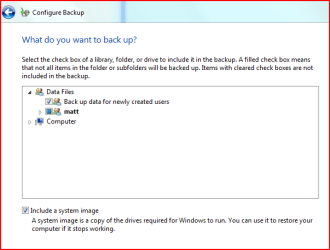
Also I noticed in the settings for setting up a backup there is an option to Include a System image. I have the ability to untick this option.

See screen 2

If I untick this option will I not be able to restore my pc?

Also whats the difference between the Windows7 image file and the WindowsImageBackup folder?

thanks in advance
 

Attachments

  • screen1.PNG
    screen1.PNG
    2.1 KB · Views: 41
  • screen2.PNG
    screen2.PNG
    10.7 KB · Views: 93

My Computer

Computer Manufacturer/Model Number
HP Media Center
OS
Windows 7 32bit
There are some tutorials on this site about using the Backup Restore function, which are very helpful. The basic difference is the image backup is a snapshot of your drive to be restored at once. The files backup allows you to restore all or some of the files backed up.

If you do an image backup and replace your hard drive, your system will restore back to the way it was. If you do the files backup, you have to reinstall the OS and other programs depending on what you backed up.

Just like in Vista, the image backup won't be available in all versions of the Retail W7.
 

My Computer

Computer Manufacturer/Model Number
Homebuilt
OS
Windows 7 x64
CPU
i7-2600K
Motherboard
Asus P8Z77-v Pro
Memory
8 G
Graphics Card(s)
GTX 480
Sound Card
Onboard
Monitor(s) Displays
LG W2753V
Screen Resolution
1920x1080
Hard Drives
Crucial M4 128 G SSD
I do nightly backups of my system image on my desktop computers.

It has saved me countless hours of grief and aggravation more than once over the last year or so:D:D

On Wed for example I couldn't start Windows 7 so I booted using the F8 key and did a system image restore. It took about an hour of mostly unattended time and worked perfectly.

I highly suggest using backup to create a system image as often as is consistent with the usage and of the computer and type of activity performed on the computer.
 

My Computer

Computer Manufacturer/Model Number
Dell 570MT
OS
Windows 7 Home Premium 64bit
CPU
Athlon XII
Motherboard
?
Memory
4GB
Graphics Card(s)
ATI Radeon 4200
Sound Card
?
Monitor(s) Displays
Asus and Dell
Hard Drives
Unknown
PSU
unknown
Case
unknown
Cooling
unknown
Definitely read the tutorials. Especially image creation and restoring.
Here is a copy of something I wrote a while ago but it may help ...........

Restore Points: Backs up a subset of the OS information. Windows will do it for example before installing updates so that if things go wrong you go back to a restore point containing the system subset information. I've had problems with restore points (probably a quirk of my system) and prefer to restore a full image if needed.
Windows Backup & Restore: In addition to restore points Windows "Backup & Restore" form 2 additional and functionally separate backup capabilities.
Folder File Backup
One backs up folders and files you choose and/or a set of personal folders and files windows defaults to. This does not backup the OS or 3rd party applications which have been integrated into windows. Standalone *.exe apps can be stored. These backups are stored as *.zip files and are easily accessed and incrementally added to. You can browse and pull files easily without going into "Disk Management". I think it is intended for the average windows user to feel comfortable with. The down side is that the process tends to be on the slow side.
System Image Backup
A system image backs up everything (except what windows deems to be rubbish). This includes all the OS, 3rd party applications your files etc.... It's like a snapshot of the full computer back when the image was made. The backups are stored as very large *.vhd files. My computer can create an image for a 50 GB system in around 20 min to a USB ext HDD and restore in about the same time.
Windows stores the backups in a root partition as [WindowsImageBackup]. This one image per partition constraint is a weakness of the Windows imaging. The workaround is to simply rename the image to [WindowsImageBackupxxxx]. Rename it back to [WindowsImageBackup] for windows to recognise it in the restore process. I store multiple windows images on the one partition.
Windows enables you to select "Create a System Image" or include an image in the folder/file backup procedure. When you tick the image box you are selecting 2 separate backup processes to be run. I always create system images on their own and run file/folder backup alone without an image. Look for the "Create a System Image" option over on the left of the Backup & Restore screen.

A windows image (vhd file) can be easily attached under disk management and browsed like you were browsing the original disk partition. Files can also be extracted but I think the more you touch the image the more you risk it's ultimate purpose - an image restore.

Some people have problems with windows imaging. It either doesn't work for them or they want greater flexibility. I use Macrium as well as a safeguard and when I need the added flexibility. It also use *.vhd files like windows and I find runs about the same speed as windows imaging but you can get higher compression if you want (big deal). Macrium images are very easily browsed.
 

My Computer

Computer type
PC/Desktop
Computer Manufacturer/Model Number
Own build
OS
Windows 7x64 Home Premium SP1
CPU
Intel i7 2600k
Motherboard
ASUS P8Z68 Deluxe
Memory
G.Skill Ripjaws (DDR3-1600) 2x4GB
Graphics Card(s)
Nvidia GeForce GTS 450; Intel HD Graphics 3000(GT2+)
Monitor(s) Displays
Dell Ultrasharp IPS panel U2311H, Samsung SyncMaster P2350
Screen Resolution
1920x1080
Hard Drives
Samsung 850 Pro SSD 256GB, Samsung SSD 840 120GB, Seagates 1TB Barracuda ST31000528AS x2
PSU
Seasonic M12II 520W
Case
Lian Li Lancool PC-K60
Cooling
Case: 1x120mm, 3x140mm CPU: Hyper 212+
Keyboard
Logitech MK520 (wireless)
Mouse
Logitech MK520
Internet Speed
6-7 Mbps
Antivirus
Norton Security Premium, Malwarebytes on 2 (MSE on 3rd PC)
Browser
FireFox
Other Info
Audio: Logitech Z523 2.1
Back
Top