Windows 7 Backup Broken

Matt8445

New member
Local time
8:08 PM
Messages
5
I am finding that I have a bit of a problem at the moment. I installed a trial version of Acronis True Image Home and decided to give it a try for a few days to compare it to the built in Windows backup.

I liked it but decided it was not much different then the windows backup and uninstalled it. Sense that point my windows backup has not worked. I do not know what to do at this point. I go to the control panel - System and Security - and try to click on either Backup and Restore or Back up your computer and neither are able to be selected. I click on them and nothing happens.

I have asked Acronis about this and they have acknowledged the problem and offered some fixes, but none of them have solved my problem. Is there anyone here who might have some insight into what I might be able to do?

I do not want my option to be that I have to go back to buying and using Acronis after they have caused massive amounts of frustration for me.

On another note does anyone know a way of using a backup utility of some type that would allow me to create multiple backups on multiple drives at the same time? I.E. I have a usb external drive connected to a laptop dock at my office and a network drive at my house. I want them to both be backed up to, but I have not found something that will do the same backup say daily to multiple drives.

Thanks in advance for any help on this.

Matt
 

My Computer

OS
Windows 7 Professional x64
You should still be able to do a system restore to before you installed the software.

Personally I only back up files, not whole disk images. If problems arise I always like to start from fresh with only my files being the thing the same as before.

Sent from my BlackBerry 9900 using Tapatalk
 

My Computer

Computer type
PC/Desktop
Computer Manufacturer/Model Number
Built by badgers!!!
OS
Windows 7 Ultimate x64, & Mac OS X 10.9.2
CPU
Intel Core i5 2500k
Motherboard
Asus P8z68 LE
Memory
Corsair Vengence 8gb 1866mhz
Graphics Card(s)
Nvidia GTX 770 OC
Monitor(s) Displays
2x ASUS LED 22" IPS
Screen Resolution
3840x1080
Hard Drives
240GB Crucial M500 SSD
120gb Corsair Force 3 SSD
1TB Western Digital
PSU
Corsair HX650w Modular
Case
Corsair Air 540
Cooling
Corsair H60 Push/Pull
Keyboard
Corsair K70/ Logitech G27 wheel
Mouse
Saitek R.A.T 9
Internet Speed
Too slow!
Other Info
AMD fusion E350N Home server-Windows Home Server 2011 (also made by badgers!)
2011 Macbook 2.4ghz Core2Duo, 4gb ddr3, 120gb Ocz Vertex SSD
I am only backing up data not doing a disk image. I just tried out the acronis true image. That is why I want to be able to go back.

I did try doing a system restore, but no luck. The oldest restore I have is after I installed that unless there is something I am not aware of to go back further.

Matt
 

My Computer

OS
Windows 7 Professional x64
Sorry about your predicament - and can't help you with that I'm afraid. I use Macrium Reflect free version to image to a second internal HDD and then Teracopy this to the system drive (separate partition). I also save a copy on a USB HDD. With my images being less than 15GB I can store quite a few versions. I believe a back-up utility such as SyncBack or SyncToy can be scheduled to do automatic copying - SyncBack certainly can and there is a free version. I use SyncBack to back-up my data regularly but I don't use an automatic schedule. I have done several restores using the original images all of which have succeeded so I've never needed any back-up copies. Better safe than sorry though since HDD space is (was) cheap.

:huh: :rolleyes:
 

My Computer

Computer Manufacturer/Model Number
Compaq desktop
OS
Windows 7 x64 SP1
CPU
Athlon II x2 215
Memory
4.0 GB
Graphics Card(s)
Onboard
Sound Card
Creative SB X-Fi Titanium HD (nice)
Monitor(s) Displays
24" Dell LCD
Screen Resolution
1900 x 1200
Hard Drives
320 GB, 500 GB and 750 GB 7200 rpm
PSU
430w
Keyboard
USB
Mouse
USB
Internet Speed
approx 10 Mbps
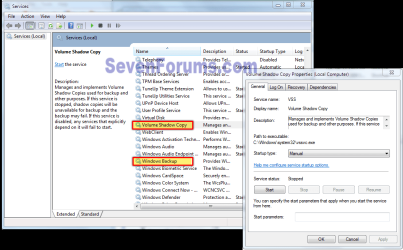
Go to Control Panel\All Control Panel Items\Administrative Tools\Services and make sure Volume Shadow copy And windows Backup services are enabled and set to Manual.
VSC.PNG

Acronis and Macrium are better imaging choices than the native Windows Backup. They are both configurable while Windows Backup is not.

After you back up your data, you can try a http://www.sevenforums.com/tutorials/3413-repair-install.html#post31238
 

My Computer

Computer type
PC/Desktop
Computer Manufacturer/Model Number
Home Built Desktop By DataTech
OS
Windows 7 Ultimate X64 SP1
CPU
Intel i5-2550K, Differing ~4.4-4.8GHz No built in GPU
Motherboard
ASUS P8Z68-V PRO/GEN3
Memory
16GB G.Skill Sniper 1866MHz @ 2133MHz 2x8GB
Graphics Card(s)
ASUS GTX650TIB-DC2OC-2GD5, (650TI Boost)
Sound Card
Onboard Realtek 5-1
Monitor(s) Displays
Samsung P2570HD
Screen Resolution
1920x1080
Hard Drives
Samsung 840 Pro 256GB SSD for OS, 500GB Seagate Constellation (Enterprise drive) for Data
PSU
Corsair HX650W
Case
Inwin Dragon Rider
Cooling
Hyper 212 EVO w/two Noctua fans, push-pull, @1300 RPM
Keyboard
E-Z Eyes, bright yellow keys with large characters
Mouse
steelseries SENSEI Laser Pro Gaming
Internet Speed
48-51Mbs Mbs down, 11 Mbs up Xfinity Cable
Antivirus
Norton Internet Security 2013
Browser
IE 10, Opera, Pale Moon if needed
Other Info
4 case fans, LG BluRay-RE, ASUS DVD-RW, Mr. Fusion power supply, 1.21 gigawatts.
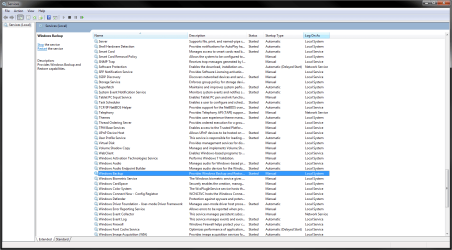
Both are set to manual and the windows backup is "started". Still no luck.
 

Attachments

  • Services.png
    Services.png
    46.1 KB · Views: 10

My Computer

OS
Windows 7 Professional x64
Ok, good, check to see if there are any Acronis services listed and diasable them if so. You may have to look at descriptions to find them too.
 

My Computer

Computer type
PC/Desktop
Computer Manufacturer/Model Number
Home Built Desktop By DataTech
OS
Windows 7 Ultimate X64 SP1
CPU
Intel i5-2550K, Differing ~4.4-4.8GHz No built in GPU
Motherboard
ASUS P8Z68-V PRO/GEN3
Memory
16GB G.Skill Sniper 1866MHz @ 2133MHz 2x8GB
Graphics Card(s)
ASUS GTX650TIB-DC2OC-2GD5, (650TI Boost)
Sound Card
Onboard Realtek 5-1
Monitor(s) Displays
Samsung P2570HD
Screen Resolution
1920x1080
Hard Drives
Samsung 840 Pro 256GB SSD for OS, 500GB Seagate Constellation (Enterprise drive) for Data
PSU
Corsair HX650W
Case
Inwin Dragon Rider
Cooling
Hyper 212 EVO w/two Noctua fans, push-pull, @1300 RPM
Keyboard
E-Z Eyes, bright yellow keys with large characters
Mouse
steelseries SENSEI Laser Pro Gaming
Internet Speed
48-51Mbs Mbs down, 11 Mbs up Xfinity Cable
Antivirus
Norton Internet Security 2013
Browser
IE 10, Opera, Pale Moon if needed
Other Info
4 case fans, LG BluRay-RE, ASUS DVD-RW, Mr. Fusion power supply, 1.21 gigawatts.
The full version of Acronis takes over windows backup. Simply uninstalling Acronis does not reverse this. Acronis takes over registry keys and is extremely hard to remove. This link from Microsoft Answers may help. Here is the link from Acronis to remove it.
 

My Computers

System One System Two

  • Computer type
    PC/Desktop
    Computer Manufacturer/Model Number
    ALWAYS UNDER CONSTRUCTION
    OS
    Windows 11 Pro
    CPU
    Ryzen 9 5900X
    Motherboard
    Asus X570 Crosshair Viii Hero
    Memory
    32GB G Skill DDR4-3600
    Graphics Card(s)
    EVGA RTX 3080 FTW 3 Ultra
    Sound Card
    On Board/Sennheiser PC37X Headset
    Monitor(s) Displays
    3 X Asus 27"
    Screen Resolution
    2560x1440
    Hard Drives
    2 X 1 TB NVME drives
    PSU
    EVGA 850
    Case
    Phanteks Eclipse P400A
    Cooling
    EVGA 280 AIO
    Keyboard
    Logitech G510s/ Logitech G13
    Mouse
    Logitech G502
    Internet Speed
    24/1
    Antivirus
    ESET/MBAM Pro/SAS Pro
    Browser
    Chrome/ Firefox/ Edge
  • Computer type
    Laptop
    System Manufacturer/Model Number
    Dell 16 Plus
    OS
    Windows 11 Pro
    CPU
    Intel Ultra 9 288V
    Memory
    32 GB LPDDR5X 8533
    Monitor(s) Displays
    16" Mini-LED HDR600 Touch 90 Hz
    Screen Resolution
    2560X1600
    Hard Drives
    1 TB NVME
no acronis stuff in the services not anything labeled as such at least.
 

My Computer

OS
Windows 7 Professional x64
OK, run Essenbe's removal tools, it is hard to get rid of all of its bits.
 

My Computer

Computer type
PC/Desktop
Computer Manufacturer/Model Number
Home Built Desktop By DataTech
OS
Windows 7 Ultimate X64 SP1
CPU
Intel i5-2550K, Differing ~4.4-4.8GHz No built in GPU
Motherboard
ASUS P8Z68-V PRO/GEN3
Memory
16GB G.Skill Sniper 1866MHz @ 2133MHz 2x8GB
Graphics Card(s)
ASUS GTX650TIB-DC2OC-2GD5, (650TI Boost)
Sound Card
Onboard Realtek 5-1
Monitor(s) Displays
Samsung P2570HD
Screen Resolution
1920x1080
Hard Drives
Samsung 840 Pro 256GB SSD for OS, 500GB Seagate Constellation (Enterprise drive) for Data
PSU
Corsair HX650W
Case
Inwin Dragon Rider
Cooling
Hyper 212 EVO w/two Noctua fans, push-pull, @1300 RPM
Keyboard
E-Z Eyes, bright yellow keys with large characters
Mouse
steelseries SENSEI Laser Pro Gaming
Internet Speed
48-51Mbs Mbs down, 11 Mbs up Xfinity Cable
Antivirus
Norton Internet Security 2013
Browser
IE 10, Opera, Pale Moon if needed
Other Info
4 case fans, LG BluRay-RE, ASUS DVD-RW, Mr. Fusion power supply, 1.21 gigawatts.
I am only backing up data not doing a disk image. I just tried out the acronis true image. That is why I want to be able to go back.

I did try doing a system restore, but no luck. The oldest restore I have is after I installed that unless there is something I am not aware of to go back further.

Matt

On the System Restore Screen, where you select the Restore point, there is a checkbox to allow you to see ALL the Restore Points, not just the most recent. Make sure you check this!
 

My Computer

Computer Manufacturer/Model Number
Gateway DX4720-03
OS
Windows 7 64bit
CPU
Pentium dual-core E5200(2.50GHz) 2MB L2 Cache 2MB FSB 800MHz
Memory
4 GB of DDR2 667/800 MHz SDRAM
Graphics Card(s)
NVIDIA GeForce 7100 Integrated Graphics
Sound Card
8-Channel (7.1) High Definition Audio
Monitor(s) Displays
Gateway 19'' flat-screen monitor
Screen Resolution
1024 X 768
Hard Drives
640GB SATA II, 16MB Cache 7200 RPM
500GB Parallel ATA hard disk 5400 RPM
Case
16.34" x 7.09" x 11.22" 24.25 lbs
Keyboard
Premium Multimedia Keyboard
Mouse
USB Optical 2-Button Wheel Mouse
Internet Speed
Cable Internet Road Runner
Other Info
18X DVD+/-R/RW SuperMulti Drive featuring Labelflash Technology

10/100/1000 Mbps Ethernet LAN

300W

Card Reader - 15-in-1 High Speed Digital Media Card Reader w/Smart Copy Button
Compact Flash I & II, IBM Microdrive, Secure Digital (SD & Mini SD), Multi Media Card (MMC, MMC Plus, RS-MMC, and MMC Mobile), Memory Stick (MS, MS Duo, MS Pro, and MS Pro Duo), xD-Picture Card, SmartMedia Card
Here is a discussion of the problem from the Acronis forums. There is an Acronis removal tool on CNet. However many have reported success with reinstalling it, and in the program configuration there is an option to let Acronis take over backups, reverse that then remove it. Some of these methods work for some people and not for others. I had the same problem and found that it was easier to do a clean install than all the work it would take to get rid of it. The free versions do not cause this problem, but the retail versions are a nightmare to get rid of.
 

My Computers

System One System Two

  • Computer type
    PC/Desktop
    Computer Manufacturer/Model Number
    ALWAYS UNDER CONSTRUCTION
    OS
    Windows 11 Pro
    CPU
    Ryzen 9 5900X
    Motherboard
    Asus X570 Crosshair Viii Hero
    Memory
    32GB G Skill DDR4-3600
    Graphics Card(s)
    EVGA RTX 3080 FTW 3 Ultra
    Sound Card
    On Board/Sennheiser PC37X Headset
    Monitor(s) Displays
    3 X Asus 27"
    Screen Resolution
    2560x1440
    Hard Drives
    2 X 1 TB NVME drives
    PSU
    EVGA 850
    Case
    Phanteks Eclipse P400A
    Cooling
    EVGA 280 AIO
    Keyboard
    Logitech G510s/ Logitech G13
    Mouse
    Logitech G502
    Internet Speed
    24/1
    Antivirus
    ESET/MBAM Pro/SAS Pro
    Browser
    Chrome/ Firefox/ Edge
  • Computer type
    Laptop
    System Manufacturer/Model Number
    Dell 16 Plus
    OS
    Windows 11 Pro
    CPU
    Intel Ultra 9 288V
    Memory
    32 GB LPDDR5X 8533
    Monitor(s) Displays
    16" Mini-LED HDR600 Touch 90 Hz
    Screen Resolution
    2560X1600
    Hard Drives
    1 TB NVME
matt8445, how are things going? did you resolve the problem? If you did let us know so others can benefit from your experience.
 

My Computers

System One System Two

  • Computer type
    PC/Desktop
    Computer Manufacturer/Model Number
    ALWAYS UNDER CONSTRUCTION
    OS
    Windows 11 Pro
    CPU
    Ryzen 9 5900X
    Motherboard
    Asus X570 Crosshair Viii Hero
    Memory
    32GB G Skill DDR4-3600
    Graphics Card(s)
    EVGA RTX 3080 FTW 3 Ultra
    Sound Card
    On Board/Sennheiser PC37X Headset
    Monitor(s) Displays
    3 X Asus 27"
    Screen Resolution
    2560x1440
    Hard Drives
    2 X 1 TB NVME drives
    PSU
    EVGA 850
    Case
    Phanteks Eclipse P400A
    Cooling
    EVGA 280 AIO
    Keyboard
    Logitech G510s/ Logitech G13
    Mouse
    Logitech G502
    Internet Speed
    24/1
    Antivirus
    ESET/MBAM Pro/SAS Pro
    Browser
    Chrome/ Firefox/ Edge
  • Computer type
    Laptop
    System Manufacturer/Model Number
    Dell 16 Plus
    OS
    Windows 11 Pro
    CPU
    Intel Ultra 9 288V
    Memory
    32 GB LPDDR5X 8533
    Monitor(s) Displays
    16" Mini-LED HDR600 Touch 90 Hz
    Screen Resolution
    2560X1600
    Hard Drives
    1 TB NVME
Back
Top