Solved Windows 7 Backup identifies wrong drive as a system drive

weaselbites

New member
Local time
7:52 AM
Messages
6
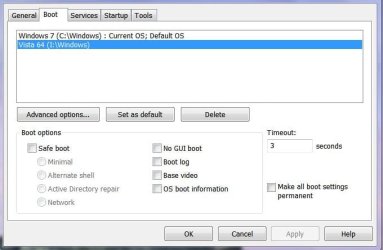
This is a silly problem to be having. I have two operating systems in a dual boot system. Windows 7 Home Premium 32 bit, C drive, (where I am trying to run the backup from) and Windows Vista Ultimate 64 bit (I drive).

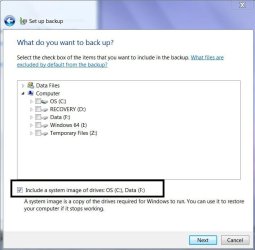
It used to work fine, I think round about 4 weeks ago or so. I am not sure what has changed but it no longer works properly. Instead it identifies my data drive as being a system which needs a system image created for.

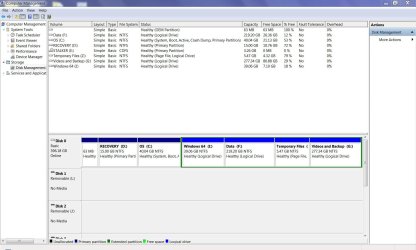
I tried using the Backup reset registry key from the tutorials section but that does not work either. They say a picture can paint a thousand words, so here are some screenshots.

I am not sure what else you need to know. Its Dell XPS 420 with a RAID 0 (striping) drive...that is to say two drives combined together in an array (as I understand it). So it acts like one big hard drive.

Any help would be most appreciated!
 

Attachments

  • Capture.JPG
    Capture.JPG
    89.8 KB · Views: 87
  • msconfig.JPG
    msconfig.JPG
    38.5 KB · Views: 69

My Computer My Computer

OS
Windows 7 Home Premium
Welcome to the forum,

From your screenshots I don't see the problem you're talking about, Can't you just select the partitions you want and go from there?

What does it show when you expand the top "Data Files" ?
 

My Computer My Computer

Computer type
PC/Desktop
Computer Manufacturer/Model Number
Self Built
OS
Win 10 Pro x64
CPU
Intel I5-2500K @3.3GHz
Motherboard
Asrock P67 Extreme4
Memory
16GB G.Skill Ripjaws X (4x4GB)
Graphics Card(s)
EVGA GeForce 750 Ti SC 2GB
Sound Card
ASUS Xonar DG 5.1 Channels 24-bit 96KHz PCI Interface Sound
Monitor(s) Displays
auria eq2367
Screen Resolution
1920 x 1080
Hard Drives
250GB Samsung 850 EVO SSD
1TB WD Blue
1TB Hitachi
PSU
SeaSonic X 650W 80 Plus Gold
Case
Corsair Obsidian 750D
Cooling
Corsair H60, Three 140mm case fans
Keyboard
Logitech Wireless Keyboard K520
Mouse
Logitech Wireless Mouse M310
Internet Speed
Wave Broadband ~ 100 dn 5 up
Antivirus
Windows Defender, Malwarebytes Premium
Browser
Edge, IE11, Chrome
Other Info
Laptop specs: HP g7-1365dx /
CPU: AMD A6-3420M APU with Radeon(tm) HD Graphics /
RAM: Crucial 8Gb (2x4Gb) /
SSD: Crucial M4-CT128M4SSD2 ATA Device/ FW 000F /
GFX: AMD Radeon HD 6520G /
OS: Windows 10 Pro x64
Thank you for the welcome :)

In the "include system images" at the bottom of the backup it shows "Data (F)" as being one of the images. I enclose a more clear screenshot. Apologies!

My concern is that although I could possibly uncheck that box, if something does go wrong with my Windows and I am no longer able to boot into it, then restoring the files alone will not be enough to make it work properly. As I understand it, it needs to be a system image for it to work correctly. I don't actually need a "file backup", I need a system backup say for instance if I am installing new drivers and Windows dies or whatever and can't get into safe mode.

I hope you understand my concern, and see what I am talking about when I say Backup is choosing the wrong drives. (I want C and I selected).
 

Attachments

  • Capture2.jpg
    Capture2.jpg
    48.6 KB · Views: 18

My Computer My Computer

OS
Windows 7 Home Premium
Hello Weaselbites, and welcome to Seven Forums.


The Data F: drive would also be included as a system drive if either one or more have been done:
If not, then could you post a screenshot of your Disk Management showing all of your drives layout?

Hope this helps,
Shawn
 
Last edited:

My Computer My Computer

Computer type
PC/Desktop
Computer Manufacturer/Model Number
Self built custom
OS
64-bit Windows 11 Pro for Workstations
CPU
Intel i7-8700K OC'd to 5 GHz
Motherboard
ASUS ROG Maximus XI Formula Z390
Memory
64 GB (4x16GB) G.SKILL TridentZ RGB DDR4 3600 MHz
Graphics Card(s)
ASUS ROG-STRIX-GTX1080TI-O11G-GAMING
Sound Card
Integrated
Monitor(s) Displays
2 x Samsung Odyssey G7 27"
Screen Resolution
2560x1440
Hard Drives
1TB Samsung 990 PRO M.2,
4TB Samsung 990 PRO PRO M.2,
TerraMaster F8 SSD Plus NAS
PSU
Seasonic Prime Titanium 850W
Case
Thermaltake Core P3
Cooling
Corsair Hydro H115i
Keyboard
Logitech wireless K800
Mouse
Logitech MX Master 4
Internet Speed
2 Gb/s Download and 100 Mb/s Upload
Antivirus
Malwarebyte Anti-Malware Premium
Browser
Google Chrome
Other Info
Logitech Z625 speaker system,
Logitech BRIO 4K Pro webcam,
HP Color LaserJet Pro MFP M477fdn,
APC SMART-UPS RT 1000 XL - SURT1000XLI,
Galaxy S23 Plus phone
Hi there Brink! (Can I just say I love your tutorials - they have shown me any number of times how to do things and made it soooo easy!).

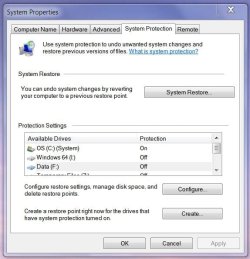
On to the problem at hand. System restore is off for every single drive except the C drive. (I drive - my other windows always used to be recognised as a system drive).

Capture3.JPG

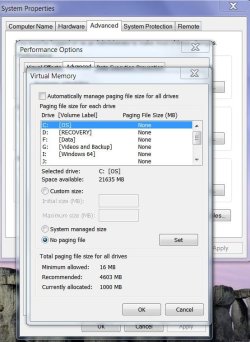
My data (f) drive has no page file on it. Its on the Z drive (i created a logical drive for it over a year ago)...but I cant seem to fit all the drives in.

page.JPG


Oppps the disk management screenshot coming up. Sorry!

Does this help any, or do you need the graphical part which is all compressed together. Not sure!

Capture4.JPG
 
Last edited:

My Computer My Computer

OS
Windows 7 Home Premium
Hmm, I see no reason above for why so far in Windows 7. How about anything from my post above in Vista?

What do you have on the F: drive? Any programs or anything set to save to the F: drive automatically? For example, a library, Windows Media Player (music, etc...), Windows Media Center, etc.....
 

My Computer My Computer

Computer type
PC/Desktop
Computer Manufacturer/Model Number
Self built custom
OS
64-bit Windows 11 Pro for Workstations
CPU
Intel i7-8700K OC'd to 5 GHz
Motherboard
ASUS ROG Maximus XI Formula Z390
Memory
64 GB (4x16GB) G.SKILL TridentZ RGB DDR4 3600 MHz
Graphics Card(s)
ASUS ROG-STRIX-GTX1080TI-O11G-GAMING
Sound Card
Integrated
Monitor(s) Displays
2 x Samsung Odyssey G7 27"
Screen Resolution
2560x1440
Hard Drives
1TB Samsung 990 PRO M.2,
4TB Samsung 990 PRO PRO M.2,
TerraMaster F8 SSD Plus NAS
PSU
Seasonic Prime Titanium 850W
Case
Thermaltake Core P3
Cooling
Corsair Hydro H115i
Keyboard
Logitech wireless K800
Mouse
Logitech MX Master 4
Internet Speed
2 Gb/s Download and 100 Mb/s Upload
Antivirus
Malwarebyte Anti-Malware Premium
Browser
Google Chrome
Other Info
Logitech Z625 speaker system,
Logitech BRIO 4K Pro webcam,
HP Color LaserJet Pro MFP M477fdn,
APC SMART-UPS RT 1000 XL - SURT1000XLI,
Galaxy S23 Plus phone
Sorry for the delay in getting back to you. Okay to give a rundown on whats on what drive....

C - Contains Windows 7 Home Premium and associated programs.

D - OEM Recovery partition.

E - CD ROM Drive.

F - Data. Contains Audio files, Downloads (about 12GB - lots of patches etc) , CD Images such as ISOs etc, Games folder, Miscellaneous other programs that I don't intend to be permanent such as FreeOCR, nitroreader pdf, nlite, openoffice etc and finally System Volume information (which seems to appear on every drive but is always inaccessible),


G - Backup and virtual machines.

I - Windows Vista Ultimate 64bit.


WIth regards to libraries, there are links to G and F in both of them (eg for music there is a link to F, and i created a library called downloads whcih also links to F, Documents links to G....


I am going to boot into Vista and see if there is anything odd there...see if Vista for some reason marked it as a system drive.
 

My Computer My Computer

OS
Windows 7 Home Premium
I found the answer eventually, hidden away in the middle of a microsoft forum where it was not the actual answer, but seemed to help me.

It seems, that Windows Backup bases a system drive on criteria that include "any drive where a service is launched from".

I recently upgraded Nitro PDF reader which put a service in it. That was in my F:\progs directory. This made Windows Backup think that my F drive was a system drive. GRRRRRRRR.

(You could ask, why I would have a folder called progs somewhere separate from my system drive, but its usually portable stuff or things I don't want for very long).

I hope this helps someone else - save them from hours of searching if nothing else.

Thank you VERY much for your help derekimo and Brink :)
 

My Computer My Computer

OS
Windows 7 Home Premium
Thank you for posting back, it will definately help someone else.

You're welcome and we're glad you got it figured out. :)
 

My Computer My Computer

Computer type
PC/Desktop
Computer Manufacturer/Model Number
Self Built
OS
Win 10 Pro x64
CPU
Intel I5-2500K @3.3GHz
Motherboard
Asrock P67 Extreme4
Memory
16GB G.Skill Ripjaws X (4x4GB)
Graphics Card(s)
EVGA GeForce 750 Ti SC 2GB
Sound Card
ASUS Xonar DG 5.1 Channels 24-bit 96KHz PCI Interface Sound
Monitor(s) Displays
auria eq2367
Screen Resolution
1920 x 1080
Hard Drives
250GB Samsung 850 EVO SSD
1TB WD Blue
1TB Hitachi
PSU
SeaSonic X 650W 80 Plus Gold
Case
Corsair Obsidian 750D
Cooling
Corsair H60, Three 140mm case fans
Keyboard
Logitech Wireless Keyboard K520
Mouse
Logitech Wireless Mouse M310
Internet Speed
Wave Broadband ~ 100 dn 5 up
Antivirus
Windows Defender, Malwarebytes Premium
Browser
Edge, IE11, Chrome
Other Info
Laptop specs: HP g7-1365dx /
CPU: AMD A6-3420M APU with Radeon(tm) HD Graphics /
RAM: Crucial 8Gb (2x4Gb) /
SSD: Crucial M4-CT128M4SSD2 ATA Device/ FW 000F /
GFX: AMD Radeon HD 6520G /
OS: Windows 10 Pro x64
You're welcome Weaselbites. Thank you for posting back with your solution. :)
 

My Computer My Computer

Computer type
PC/Desktop
Computer Manufacturer/Model Number
Self built custom
OS
64-bit Windows 11 Pro for Workstations
CPU
Intel i7-8700K OC'd to 5 GHz
Motherboard
ASUS ROG Maximus XI Formula Z390
Memory
64 GB (4x16GB) G.SKILL TridentZ RGB DDR4 3600 MHz
Graphics Card(s)
ASUS ROG-STRIX-GTX1080TI-O11G-GAMING
Sound Card
Integrated
Monitor(s) Displays
2 x Samsung Odyssey G7 27"
Screen Resolution
2560x1440
Hard Drives
1TB Samsung 990 PRO M.2,
4TB Samsung 990 PRO PRO M.2,
TerraMaster F8 SSD Plus NAS
PSU
Seasonic Prime Titanium 850W
Case
Thermaltake Core P3
Cooling
Corsair Hydro H115i
Keyboard
Logitech wireless K800
Mouse
Logitech MX Master 4
Internet Speed
2 Gb/s Download and 100 Mb/s Upload
Antivirus
Malwarebyte Anti-Malware Premium
Browser
Google Chrome
Other Info
Logitech Z625 speaker system,
Logitech BRIO 4K Pro webcam,
HP Color LaserJet Pro MFP M477fdn,
APC SMART-UPS RT 1000 XL - SURT1000XLI,
Galaxy S23 Plus phone
Process Monitor could help

I used to have the same problem (data drive as a system drive). After days I've found solution:
1) Download and install Sysinternals Process Monitor Process Monitor
2) Start System properties - System protection (with button "Create").
3) Run Process Monitor and set Filter:
Process name is SystemPropertiesProtection.exe
(SystemPropertiesProtection.exe is name of process, which creates restore points).​
4) In System protection press button "Create" and make a restore point.
5) In process Monitor find every occurrence of your not system drive, eg. "D:\" (without quotes).​

After these steps I could find the reason why Win7 thought that my data disk is system - I had two incorrect junk links from system drive to data disk. Windows followed these junk links and tried to find some Windows gadgets...
I corrected junk links (from system disk to system disk) and finally is my backup working.

Thanks Sysinternals for their small useful tools - only Process Monitor could reveal me why Windows recognized my data disk as system disk.
 

My Computer My Computer

OS
Window 7 proffesional x64
Back
Top