
Windows 7 Backup problem

mikemyers

New member
Local time
10:56 PM
Messages
29
I configured Windows to backup up to an external network hard disk.

When the program is almost done, it comes up with an error message:
"Windows Backup did not complete successfully. The backup completed but some files were skipped.

When I click on the link to view the skipped files, I see this:
Backup encountered a problem while backing up file C:\Windows\System32\config\systemprofile\Music. Error: The system cannot find the file specified. (0x80070002))

Sure enough, if I go to C:\Windows\System32\config\systemprofile there is nothing listed for "Music".


I don't play music on the computer, so maybe that's why?
If I just create a file called "Music", will that satisfy the backup program, or is there a way to fix things to however they should be done?


I did some searching for the error message, and while I found out about other things that might be missing, I never found "systemprofile\Music".
 

My Computer

Computer Manufacturer/Model Number
Self-Assembled
OS
Windows 7 Ultimate 64-bit, 6.1.7600 Build 7600
CPU
Intel(R) Core(TM)2 Quad CPU Q9300 @ 2.50GHz, 2500 Mhz,
Motherboard
nForce 790i Ultra SLI Mainboard
Memory
4GB Corsair XMS3 DHX PC3-12800 1600MHz 240 pin DDR3 CL9
Graphics Card(s)
GeForce 8800 GT
Sound Card
no additional sound card
Monitor(s) Displays
Samsung 2243 BWX, Dell
Screen Resolution
Samsung - 1680 x 1050, Dell -
Hard Drives
First drive: C: 100gb, D: 200gb
Second drive: F: 500 gb
Duo-Pro Raid-1: 500 gb
My Book World backup: 1 TB
PSU
pc power and cooling silencer 760 quad #s75qb 750 watt
Case
Cooler Master
Cooling
water cooling being installed soon...
Keyboard
Logitech Illuminated Keyboard
Mouse
Logitech G9x
Internet Speed
Download: 5349 Kb/s, Upload: 424 Kb/s
My Computer

Computer type
PC/Desktop
Computer Manufacturer/Model Number
Self Assembled
OS
Microsoft Windows 10 Pro Insider Preview 64-bit
CPU
Intel(R) Core(TM) i3-4130 CPU @ 3.40GHz
Motherboard
Gigabyte Technology Co., Ltd. B85M-D3H
Memory
Corsair Vengence 4GB x2 (8.00GB Dual-Channel DDR3 @ 798MHz)
Graphics Card(s)
2047MB GeForce GTS 450 (ZOTAC International)
Sound Card
Onboard (Realtek High Definition Audio)
Monitor(s) Displays
LG Flatron E2040T
Screen Resolution
1600x900
Hard Drives
Western Digital 1 TB
Seagate 500 GB
PSU
Corsair VS550
Case
Cooler Master K380
Cooling
Cooler Master Seidon 120V Plus
Keyboard
Logitech MK260r
Mouse
Logitech MK260r
Internet Speed
PMPL Broadband
Antivirus
Windows Defender + MBAM
Browser
Firefox
Other Info
Dell Studio 15" Laptop
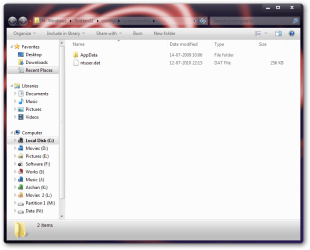
I play music off and on, but still I dont have any music folder in ststemprofile folder . the manual search result is
View attachment 89564

And the run command search result is
View attachment 89565

While taking backups, I use the tutorial made by Brink : http://www.sevenforums.com/tutorials/663-backup-complete-computer-create-image-backup.html . It never failed for me .


Actually, Windows 7 Backup is designed to do both. Creating an image backup is great insurance, but doing daily or weekly incremental backups is also useful. I'd like to fix this so it works as intended, as it does on my other computers.

Have you tried to do a Backup the other way (non-image-file) and do you get the same error message?
 

My Computer

Computer Manufacturer/Model Number
Self-Assembled
OS
Windows 7 Ultimate 64-bit, 6.1.7600 Build 7600
CPU
Intel(R) Core(TM)2 Quad CPU Q9300 @ 2.50GHz, 2500 Mhz,
Motherboard
nForce 790i Ultra SLI Mainboard
Memory
4GB Corsair XMS3 DHX PC3-12800 1600MHz 240 pin DDR3 CL9
Graphics Card(s)
GeForce 8800 GT
Sound Card
no additional sound card
Monitor(s) Displays
Samsung 2243 BWX, Dell
Screen Resolution
Samsung - 1680 x 1050, Dell -
Hard Drives
First drive: C: 100gb, D: 200gb
Second drive: F: 500 gb
Duo-Pro Raid-1: 500 gb
My Book World backup: 1 TB
PSU
pc power and cooling silencer 760 quad #s75qb 750 watt
Case
Cooler Master
Cooling
water cooling being installed soon...
Keyboard
Logitech Illuminated Keyboard
Mouse
Logitech G9x
Internet Speed
Download: 5349 Kb/s, Upload: 424 Kb/s
Just for the record - I know it's not the right way to do it, but I created an empty directory called "Music" and that was all it took to get Windows Backup to "complete successfully". Apparently without that folder, Windows Backup could not create the "image file".

If anyone knows what is "supposed" to go there, rather than my empty folder, please say so...
 

My Computer

Computer Manufacturer/Model Number
Self-Assembled
OS
Windows 7 Ultimate 64-bit, 6.1.7600 Build 7600
CPU
Intel(R) Core(TM)2 Quad CPU Q9300 @ 2.50GHz, 2500 Mhz,
Motherboard
nForce 790i Ultra SLI Mainboard
Memory
4GB Corsair XMS3 DHX PC3-12800 1600MHz 240 pin DDR3 CL9
Graphics Card(s)
GeForce 8800 GT
Sound Card
no additional sound card
Monitor(s) Displays
Samsung 2243 BWX, Dell
Screen Resolution
Samsung - 1680 x 1050, Dell -
Hard Drives
First drive: C: 100gb, D: 200gb
Second drive: F: 500 gb
Duo-Pro Raid-1: 500 gb
My Book World backup: 1 TB
PSU
pc power and cooling silencer 760 quad #s75qb 750 watt
Case
Cooler Master
Cooling
water cooling being installed soon...
Keyboard
Logitech Illuminated Keyboard
Mouse
Logitech G9x
Internet Speed
Download: 5349 Kb/s, Upload: 424 Kb/s

My Computer

Computer type
PC/Desktop
Computer Manufacturer/Model Number
Self Assembled
OS
Microsoft Windows 10 Pro Insider Preview 64-bit
CPU
Intel(R) Core(TM) i3-4130 CPU @ 3.40GHz
Motherboard
Gigabyte Technology Co., Ltd. B85M-D3H
Memory
Corsair Vengence 4GB x2 (8.00GB Dual-Channel DDR3 @ 798MHz)
Graphics Card(s)
2047MB GeForce GTS 450 (ZOTAC International)
Sound Card
Onboard (Realtek High Definition Audio)
Monitor(s) Displays
LG Flatron E2040T
Screen Resolution
1600x900
Hard Drives
Western Digital 1 TB
Seagate 500 GB
PSU
Corsair VS550
Case
Cooler Master K380
Cooling
Cooler Master Seidon 120V Plus
Keyboard
Logitech MK260r
Mouse
Logitech MK260r
Internet Speed
PMPL Broadband
Antivirus
Windows Defender + MBAM
Browser
Firefox
Other Info
Dell Studio 15" Laptop
I had a similar problem in that backup reported errors reading drive D. As I didn't have a drive D I was a bit mistified. I googled the error number,1327, and found a Microsoft page which gave instructions on how to edit the registry to stop getting this message. I guess that you will have to edit the registry too but I can't tell you where.
 

My Computer

OS
Win 7 Professinal 64 bit
CPU
Intel Core i7 920
Motherboard
Gigabyte EX58-DS4
Memory
6Gb Corsair
I had a similar problem to this when I once attempted to create a new library. Everything seemed ok until I ran a backup and got similar messages. I got rid of the library and backup was happy. I put it down to my ignorance in working with user created libraries.
 

My Computer

Computer type
PC/Desktop
Computer Manufacturer/Model Number
Own build
OS
Windows 7x64 Home Premium SP1
CPU
Intel i7 2600k
Motherboard
ASUS P8Z68 Deluxe
Memory
G.Skill Ripjaws (DDR3-1600) 2x4GB
Graphics Card(s)
Nvidia GeForce GTS 450; Intel HD Graphics 3000(GT2+)
Monitor(s) Displays
Dell Ultrasharp IPS panel U2311H, Samsung SyncMaster P2350
Screen Resolution
1920x1080
Hard Drives
Samsung 850 Pro SSD 256GB, Samsung SSD 840 120GB, Seagates 1TB Barracuda ST31000528AS x2
PSU
Seasonic M12II 520W
Case
Lian Li Lancool PC-K60
Cooling
Case: 1x120mm, 3x140mm CPU: Hyper 212+
Keyboard
Logitech MK520 (wireless)
Mouse
Logitech MK520
Internet Speed
6-7 Mbps
Antivirus
Norton Security Premium, Malwarebytes on 2 (MSE on 3rd PC)
Browser
FireFox
Other Info
Audio: Logitech Z523 2.1
Since creating an empty "Music" folder where the backup utility wants to find it, that seems to have allowed the backup to do everything it needs to do for a "correct" backup.

I've also moved my user folders from C: to D:, so an ordinary crash won't destroy them, but I still want a backup of both drives "just in case". Actually, I want a backup of all the drives, preferably in three locations.
 

My Computer

Computer Manufacturer/Model Number
Self-Assembled
OS
Windows 7 Ultimate 64-bit, 6.1.7600 Build 7600
CPU
Intel(R) Core(TM)2 Quad CPU Q9300 @ 2.50GHz, 2500 Mhz,
Motherboard
nForce 790i Ultra SLI Mainboard
Memory
4GB Corsair XMS3 DHX PC3-12800 1600MHz 240 pin DDR3 CL9
Graphics Card(s)
GeForce 8800 GT
Sound Card
no additional sound card
Monitor(s) Displays
Samsung 2243 BWX, Dell
Screen Resolution
Samsung - 1680 x 1050, Dell -
Hard Drives
First drive: C: 100gb, D: 200gb
Second drive: F: 500 gb
Duo-Pro Raid-1: 500 gb
My Book World backup: 1 TB
PSU
pc power and cooling silencer 760 quad #s75qb 750 watt
Case
Cooler Master
Cooling
water cooling being installed soon...
Keyboard
Logitech Illuminated Keyboard
Mouse
Logitech G9x
Internet Speed
Download: 5349 Kb/s, Upload: 424 Kb/s
Back
Top