Windows 7 Backup

Cheemag

New member
Member
VIP
Local time
12:26 AM
Messages
247
Location
Englandshire, Scotland
My Acronis True Image 2009 failed today. I found out later that it is not designed for Windows 7.

I took a complete backup (an image of drive C: presumably) using Windows 7's inbuilt backup system.

Whilst it doesn't have all the bells and whistles of the Acronis system, is the built-in system as reliable as comparable paid-for products? I really do not want to buy the latest Acronis system at the moment.
 

My Computer

Computer Manufacturer/Model Number
Gigabyte
OS
Windows 7 Professional 64-bit
CPU
Intel Core 2 Duo
Motherboard
EP41T-UD3L
Memory
4 GB
Graphics Card(s)
Nvidia GE Force 9500GT
Sound Card
On-board
Monitor(s) Displays
Acer V203H
Hard Drives
Two Samsung HD103SJ 1TB
PSU
?
Case
?
Cooling
Fan

My Computer

Computer type
PC/Desktop
Computer Manufacturer/Model Number
Dell XPS 420
OS
Windows 10, Home Clean Install
CPU
Intel Core2 processsor Q8200(2.33Ghz 1333FSB) Quad Core Tech
Motherboard
Dell
Memory
6 gb
Graphics Card(s)
ATI Radeon 256MB HD3650
Sound Card
Intergrated 7.1 Channel Audio
Monitor(s) Displays
Dell SP2009W 20"
Hard Drives
640 GB Serial ATA Hard drive
Cooling
Fan
Keyboard
Dell USB Keyboard
Mouse
Dell Premium Optical USB
Internet Speed
DSL 2.85
If you don't want to buy Acronis (and I don't blame you for wanting to save the cash), I've used Macrium Reflect free as well as EaseUsToDo at work on test and demo machines and both products have always worked well for me.
 

My Computer

Computer Manufacturer/Model Number
Self-Built in July 2009
OS
Windows 7 Ultimate x64
CPU
Intel Q9550 2.83Ghz OC'd to 3.40Ghz
Motherboard
Gigabyte GA-EP45-UD3R rev. 1.1, F12 BIOS
Memory
8GB G.Skill PI DDR2-800, 4-4-4-12 timings
Graphics Card(s)
EVGA 1280MB Nvidia GeForce GTX570
Sound Card
Realtek ALC899A 8 channel onboard audio
Monitor(s) Displays
23" Acer x233H
Screen Resolution
1920x1080
Hard Drives
Intel X25-M 80GB Gen 2 SSD
Western Digital 1TB Caviar Black, 32MB cache. WD1001FALS
PSU
Corsair 620HX modular
Case
Antec P182
Cooling
stock
Keyboard
ABS M1 Mechanical
Mouse
Logitech G9 Laser Mouse
Internet Speed
15/2 cable modem
Other Info
Windows and Linux enthusiast. Logitech G35 Headset.
Last edited:

My Computer

Computer Manufacturer/Model Number
Gigabyte
OS
Windows 7 Professional 64-bit
CPU
Intel Core 2 Duo
Motherboard
EP41T-UD3L
Memory
4 GB
Graphics Card(s)
Nvidia GE Force 9500GT
Sound Card
On-board
Monitor(s) Displays
Acer V203H
Hard Drives
Two Samsung HD103SJ 1TB
PSU
?
Case
?
Cooling
Fan
You are very welcome.
 

My Computer

Computer type
PC/Desktop
Computer Manufacturer/Model Number
Dell XPS 420
OS
Windows 10, Home Clean Install
CPU
Intel Core2 processsor Q8200(2.33Ghz 1333FSB) Quad Core Tech
Motherboard
Dell
Memory
6 gb
Graphics Card(s)
ATI Radeon 256MB HD3650
Sound Card
Intergrated 7.1 Channel Audio
Monitor(s) Displays
Dell SP2009W 20"
Hard Drives
640 GB Serial ATA Hard drive
Cooling
Fan
Keyboard
Dell USB Keyboard
Mouse
Dell Premium Optical USB
Internet Speed
DSL 2.85
If you don't want to buy Acronis (and I don't blame you for wanting to save the cash), I've used Macrium Reflect free as well as EaseUsToDo at work on test and demo machines and both products have always worked well for me.

Macrium's support is poor - no EMail or telephone support even after you've purchased the programme.

Pre-purchase support is non-existent: you can't even post in the forum! Your questions remain unanswered until, too late, you've bought the application.

Reading the forum, restoring a hard disc from an image is far from a straightforward process and fraught with difficulties, particularly in Windows-7.

I'll have a look at Easeus.
 
Last edited:

My Computer

Computer Manufacturer/Model Number
Gigabyte
OS
Windows 7 Professional 64-bit
CPU
Intel Core 2 Duo
Motherboard
EP41T-UD3L
Memory
4 GB
Graphics Card(s)
Nvidia GE Force 9500GT
Sound Card
On-board
Monitor(s) Displays
Acer V203H
Hard Drives
Two Samsung HD103SJ 1TB
PSU
?
Case
?
Cooling
Fan
I've never had a need or a desire to contact Macrium...so support is a non-issue for me.

I've restored machines dozens of times with Macrium without a problem. It's a few steps, you have to restore the partitions one at a time and put the MBR back in place....but it works on Windows 7 without issue....or at least it has worked that way for me.

EaseUs is pretty much the same way. The primary reason that I use EaseUs is because it works with Server 2008 as well...and that is something that I use for testing at work.
 

My Computer

Computer Manufacturer/Model Number
Self-Built in July 2009
OS
Windows 7 Ultimate x64
CPU
Intel Q9550 2.83Ghz OC'd to 3.40Ghz
Motherboard
Gigabyte GA-EP45-UD3R rev. 1.1, F12 BIOS
Memory
8GB G.Skill PI DDR2-800, 4-4-4-12 timings
Graphics Card(s)
EVGA 1280MB Nvidia GeForce GTX570
Sound Card
Realtek ALC899A 8 channel onboard audio
Monitor(s) Displays
23" Acer x233H
Screen Resolution
1920x1080
Hard Drives
Intel X25-M 80GB Gen 2 SSD
Western Digital 1TB Caviar Black, 32MB cache. WD1001FALS
PSU
Corsair 620HX modular
Case
Antec P182
Cooling
stock
Keyboard
ABS M1 Mechanical
Mouse
Logitech G9 Laser Mouse
Internet Speed
15/2 cable modem
Other Info
Windows and Linux enthusiast. Logitech G35 Headset.
and put the MBR back in place
I thought you just restored the partitions. Can you explain what you mean by the above?
 

My Computer

Computer type
PC/Desktop
Computer Manufacturer/Model Number
Own build
OS
Windows 7x64 Home Premium SP1
CPU
Intel i7 2600k
Motherboard
ASUS P8Z68 Deluxe
Memory
G.Skill Ripjaws (DDR3-1600) 2x4GB
Graphics Card(s)
Nvidia GeForce GTS 450; Intel HD Graphics 3000(GT2+)
Monitor(s) Displays
Dell Ultrasharp IPS panel U2311H, Samsung SyncMaster P2350
Screen Resolution
1920x1080
Hard Drives
Samsung 850 Pro SSD 256GB, Samsung SSD 840 120GB, Seagates 1TB Barracuda ST31000528AS x2
PSU
Seasonic M12II 520W
Case
Lian Li Lancool PC-K60
Cooling
Case: 1x120mm, 3x140mm CPU: Hyper 212+
Keyboard
Logitech MK520 (wireless)
Mouse
Logitech MK520
Internet Speed
6-7 Mbps
Antivirus
Norton Security Premium, Malwarebytes on 2 (MSE on 3rd PC)
Browser
FireFox
Other Info
Audio: Logitech Z523 2.1
I've never had a need or a desire to contact Macrium...so support is a non-issue for me.

I've restored machines dozens of times with Macrium without a problem. It's a few steps, you have to restore the partitions one at a time and put the MBR back in place....but it works on Windows 7 without issue....or at least it has worked that way for me.

EaseUs is pretty much the same way. The primary reason that I use EaseUs is because it works with Server 2008 as well...and that is something that I use for testing at work.

Now that I've decided against Macrium, can anyone suggest how I can recover the 100M or so of disc space that it's reserved on the second HD for "System Reserved"?
 

My Computer

Computer Manufacturer/Model Number
Gigabyte
OS
Windows 7 Professional 64-bit
CPU
Intel Core 2 Duo
Motherboard
EP41T-UD3L
Memory
4 GB
Graphics Card(s)
Nvidia GE Force 9500GT
Sound Card
On-board
Monitor(s) Displays
Acer V203H
Hard Drives
Two Samsung HD103SJ 1TB
PSU
?
Case
?
Cooling
Fan
As a user and devoted believer in the Win 7 Backup and Restore, I 100% recommend Win 7 Backup and Restore.

If you have any questions re the use thereof please ask. I'll be more than happy to answer them.

Win 7 Backup and Restore has saved me more than once.
 

My Computer

Computer Manufacturer/Model Number
Toshiba Satellite S875D-S7239 laptop
OS
MS Windows 7 Ultimate SP1 64-bit
CPU
AMD A10-4600M
Motherboard
AMD Pumori (Socket FT1)
Memory
6.00 GB Dual-Channel DDR3 @ 798MHz (11-11-12-28)
Graphics Card(s)
AMD Radeon HD 7660G
Sound Card
High Definition Audio Device
Monitor(s) Displays
Generic PnP Monitor (1600x900@60Hz)
Screen Resolution
1600x900@60Hz
Hard Drives
SSD 119GB Corsair CSSD-V128GB2 ATA Device
Keyboard
Standard PS/2 Keyboard
Mouse
HP Wireless Optical Mobile Mouse Model FHA-3410
Internet Speed
What the local pub, local coffee shop offers.
Other Info
Optical Drive:MATSHITA BD-CMB UJ160B ATA Device


Also have an Asus ha1002xp netbook with Win 7 Ultimate installed.
As a user and devoted believer in the Win 7 Backup and Restore, I 100% recommend Win 7 Backup and Restore.

If you have any questions re the use thereof please ask. I'll be more than happy to answer them.

Win 7 Backup and Restore has saved me more than once.

I will, thanks. Technical support is certainly better than Macrium's.

A propos: I notice the backup file itself is 'Access denied'. I presume it is necessary to keep the 'Access denied' file mediaid.bin on the backup drive?

Unfortunate though, that Win-7's backup doesn't let you choose the folder and filename for your backup.
 

My Computer

Computer Manufacturer/Model Number
Gigabyte
OS
Windows 7 Professional 64-bit
CPU
Intel Core 2 Duo
Motherboard
EP41T-UD3L
Memory
4 GB
Graphics Card(s)
Nvidia GE Force 9500GT
Sound Card
On-board
Monitor(s) Displays
Acer V203H
Hard Drives
Two Samsung HD103SJ 1TB
PSU
?
Case
?
Cooling
Fan
Now that I've decided against Macrium, can anyone suggest how I can recover the 100M or so of disc space that it's reserved on the second HD for "System Reserved"?

False alarm - that partitition belongs to Windows-7, but why on earth is it empty?
 

My Computer

Computer Manufacturer/Model Number
Gigabyte
OS
Windows 7 Professional 64-bit
CPU
Intel Core 2 Duo
Motherboard
EP41T-UD3L
Memory
4 GB
Graphics Card(s)
Nvidia GE Force 9500GT
Sound Card
On-board
Monitor(s) Displays
Acer V203H
Hard Drives
Two Samsung HD103SJ 1TB
PSU
?
Case
?
Cooling
Fan
A propos: I notice the backup file itself is 'Access denied'. I presume it is necessary to keep the 'Access denied' file mediaid.bin on the backup drive?

Unfortunate though, that Win-7's backup doesn't let you choose the folder and filename for your backup.

True that the Access Denied is big brother MS trying to protect us from ourselves. Now I will tell you how to get around that.

One way around is to run the UAC slider all of the way down. Only do this when not connected to the Internet and run it back up to one down from maximum when your finished.

2nd way around is to copy the file and then paste into another folder on another drive, for example, to the \Documents folder.


Now to that folder naming problem: I agree. I would like to change the name before the I make the image backup. What you can do, and what I do to prevent Win7 from overwriting the system image when I make another scheduled backup is to rename the folder which actually contains the VHD file.
It's about 0500 hours here and I can't remember the name and am too lazy to reconnect my usb right now. Tomorrow, after I've slept some I'll get back with the precise folder name.
 

My Computer

Computer Manufacturer/Model Number
Toshiba Satellite S875D-S7239 laptop
OS
MS Windows 7 Ultimate SP1 64-bit
CPU
AMD A10-4600M
Motherboard
AMD Pumori (Socket FT1)
Memory
6.00 GB Dual-Channel DDR3 @ 798MHz (11-11-12-28)
Graphics Card(s)
AMD Radeon HD 7660G
Sound Card
High Definition Audio Device
Monitor(s) Displays
Generic PnP Monitor (1600x900@60Hz)
Screen Resolution
1600x900@60Hz
Hard Drives
SSD 119GB Corsair CSSD-V128GB2 ATA Device
Keyboard
Standard PS/2 Keyboard
Mouse
HP Wireless Optical Mobile Mouse Model FHA-3410
Internet Speed
What the local pub, local coffee shop offers.
Other Info
Optical Drive:MATSHITA BD-CMB UJ160B ATA Device


Also have an Asus ha1002xp netbook with Win 7 Ultimate installed.

My Computer

Computer Manufacturer/Model Number
Toshiba Satellite S875D-S7239 laptop
OS
MS Windows 7 Ultimate SP1 64-bit
CPU
AMD A10-4600M
Motherboard
AMD Pumori (Socket FT1)
Memory
6.00 GB Dual-Channel DDR3 @ 798MHz (11-11-12-28)
Graphics Card(s)
AMD Radeon HD 7660G
Sound Card
High Definition Audio Device
Monitor(s) Displays
Generic PnP Monitor (1600x900@60Hz)
Screen Resolution
1600x900@60Hz
Hard Drives
SSD 119GB Corsair CSSD-V128GB2 ATA Device
Keyboard
Standard PS/2 Keyboard
Mouse
HP Wireless Optical Mobile Mouse Model FHA-3410
Internet Speed
What the local pub, local coffee shop offers.
Other Info
Optical Drive:MATSHITA BD-CMB UJ160B ATA Device


Also have an Asus ha1002xp netbook with Win 7 Ultimate installed.
Unfortunate though, that Win-7's backup doesn't let you choose the folder and filename for your backup.

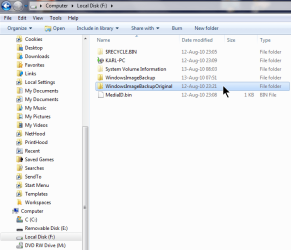
As promised, here's a snapshot of renaming After the Fact.

TwoBackupsWithOldOneRenamed.png

You will notice that the older (by about 1 day) of the two system images has been renamed. Thus, I have my original system image backup and the current backup on the same drive.

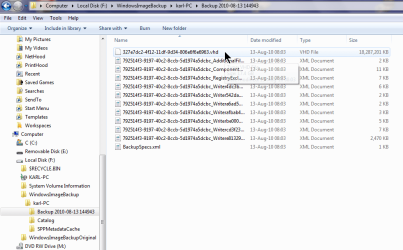
Inside the WindowImageBackup, be it old or new, is the system image made at that time. The system image file is a VHD file.

Here's a snapshot showing location of latest VHD.

LocationOfSystemImageVHD.png

If you would like to examine the VHD, then you can use Disk Management.

In Disk Management you "ATTACH" the VHD and the Virtual Hard Disk will be "attached" (also called "mounted") on a drive which you can open/explore/etc.
 

My Computer

Computer Manufacturer/Model Number
Toshiba Satellite S875D-S7239 laptop
OS
MS Windows 7 Ultimate SP1 64-bit
CPU
AMD A10-4600M
Motherboard
AMD Pumori (Socket FT1)
Memory
6.00 GB Dual-Channel DDR3 @ 798MHz (11-11-12-28)
Graphics Card(s)
AMD Radeon HD 7660G
Sound Card
High Definition Audio Device
Monitor(s) Displays
Generic PnP Monitor (1600x900@60Hz)
Screen Resolution
1600x900@60Hz
Hard Drives
SSD 119GB Corsair CSSD-V128GB2 ATA Device
Keyboard
Standard PS/2 Keyboard
Mouse
HP Wireless Optical Mobile Mouse Model FHA-3410
Internet Speed
What the local pub, local coffee shop offers.
Other Info
Optical Drive:MATSHITA BD-CMB UJ160B ATA Device


Also have an Asus ha1002xp netbook with Win 7 Ultimate installed.
Can anyone suggest how I can recover the 100M or so of disc space that it's reserved on the second HD for "System Reserved"?

False alarm - that partitition belongs to Windows-7, but why on earth is it empty?

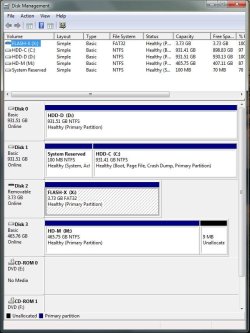
Use the Snipping Tool or MS Paint make a snapshot of the maximized output of Disk Management (DISKMGMT.MSC) and attach to your next post.

There you go, there's nothing below the two DVD drives:
 

Attachments

  • Dskmgmtdsc.jpg
    Dskmgmtdsc.jpg
    78.1 KB · Views: 7

My Computer

Computer Manufacturer/Model Number
Gigabyte
OS
Windows 7 Professional 64-bit
CPU
Intel Core 2 Duo
Motherboard
EP41T-UD3L
Memory
4 GB
Graphics Card(s)
Nvidia GE Force 9500GT
Sound Card
On-board
Monitor(s) Displays
Acer V203H
Hard Drives
Two Samsung HD103SJ 1TB
PSU
?
Case
?
Cooling
Fan
A propos: I notice the backup file itself is 'Access denied'. I presume it is necessary to keep the 'Access denied' file mediaid.bin on the backup drive?

Unfortunate though, that Win-7's backup doesn't let you choose the folder and filename for your backup.

True that the Access Denied is big brother MS trying to protect us from ourselves. Now I will tell you how to get around that.

One way around is to run the UAC slider all of the way down. Only do this when not connected to the Internet and run it back up to one down from maximum when your finished.

2nd way around is to copy the file and then paste into another folder on another drive, for example, to the \Documents folder.

Don't know if there is much point. Is there anything in there of any use other than the file itself when re-installing?

Now to that folder naming problem: I agree. I would like to change the name before the I make the image backup. What you can do, and what I do to prevent Win7 from overwriting the system image when I make another scheduled backup is to rename the folder which actually contains the VHD file.
It's about 0500 hours here and I can't remember the name and am too lazy to reconnect my usb right now. Tomorrow, after I've slept some I'll get back with the precise folder name.
It's m:\windowsimagebackup in my case. I'd prefer to take a full backup each time, so I don't suppose there would be a problem with the file being overwritten.
 

My Computer

Computer Manufacturer/Model Number
Gigabyte
OS
Windows 7 Professional 64-bit
CPU
Intel Core 2 Duo
Motherboard
EP41T-UD3L
Memory
4 GB
Graphics Card(s)
Nvidia GE Force 9500GT
Sound Card
On-board
Monitor(s) Displays
Acer V203H
Hard Drives
Two Samsung HD103SJ 1TB
PSU
?
Case
?
Cooling
Fan
That 100 MB partition is used for recovery purposes. You will notice that, from the Disk Management snapshot, that the partition is not empty.

You can live without it or with it. I've deleted it on the laptop I'm using to send this post. I've not deleted from my netbook--just laziness on my part--after all it's only 100 MB. It's only gone from this laptop because I wanted to see if I could delete it.

Google System Reserved Partition for more info.
 

My Computer

Computer Manufacturer/Model Number
Toshiba Satellite S875D-S7239 laptop
OS
MS Windows 7 Ultimate SP1 64-bit
CPU
AMD A10-4600M
Motherboard
AMD Pumori (Socket FT1)
Memory
6.00 GB Dual-Channel DDR3 @ 798MHz (11-11-12-28)
Graphics Card(s)
AMD Radeon HD 7660G
Sound Card
High Definition Audio Device
Monitor(s) Displays
Generic PnP Monitor (1600x900@60Hz)
Screen Resolution
1600x900@60Hz
Hard Drives
SSD 119GB Corsair CSSD-V128GB2 ATA Device
Keyboard
Standard PS/2 Keyboard
Mouse
HP Wireless Optical Mobile Mouse Model FHA-3410
Internet Speed
What the local pub, local coffee shop offers.
Other Info
Optical Drive:MATSHITA BD-CMB UJ160B ATA Device


Also have an Asus ha1002xp netbook with Win 7 Ultimate installed.
Unfortunate though, that Win-7's backup doesn't let you choose the folder and filename for your backup.

As promised, here's a snapshot of renaming After the Fact.

View attachment 91026

You will notice that the older (by about 1 day) of the two system images has been renamed. Thus, I have my original system image backup and the current backup on the same drive.

Inside the WindowImageBackup, be it old or new, is the system image made at that time. The system image file is a VHD file.

Here's a snapshot showing location of latest VHD.

View attachment 91027

If you would like to examine the VHD, then you can use Disk Management.

In Disk Management you "ATTACH" the VHD and the Virtual Hard Disk will be "attached" (also called "mounted") on a drive which you can open/explore/etc.

Not sure I'm following all of that, but it might explain where the provenance of a ghost drive G: which appeared on the system yesterday, but is gone today.

I don't know how it got there, but I didn't mount it deliberately.

Useful if you can explore the backup and select individual files to replace. The Macrium backup allows this. In fact it seems the ghost drive is created when you explore the Macrium backup file.
 

My Computer

Computer Manufacturer/Model Number
Gigabyte
OS
Windows 7 Professional 64-bit
CPU
Intel Core 2 Duo
Motherboard
EP41T-UD3L
Memory
4 GB
Graphics Card(s)
Nvidia GE Force 9500GT
Sound Card
On-board
Monitor(s) Displays
Acer V203H
Hard Drives
Two Samsung HD103SJ 1TB
PSU
?
Case
?
Cooling
Fan
That 100 MB partition is used for recovery purposes. You will notice that, from the Disk Management snapshot, that the partition is not empty.

Yes, some 30M used.

You can live without it or with it. I've deleted it on the laptop I'm using to send this post. I've not deleted from my netbook--just laziness on my part--after all it's only 100 MB. It's only gone from this laptop because I wanted to see if I could delete it.

Google System Reserved Partition for more info.

Thanks.
 

My Computer

Computer Manufacturer/Model Number
Gigabyte
OS
Windows 7 Professional 64-bit
CPU
Intel Core 2 Duo
Motherboard
EP41T-UD3L
Memory
4 GB
Graphics Card(s)
Nvidia GE Force 9500GT
Sound Card
On-board
Monitor(s) Displays
Acer V203H
Hard Drives
Two Samsung HD103SJ 1TB
PSU
?
Case
?
Cooling
Fan
Back
Top