
Solved Windows 7 Backup

ozarkopa

New member
Local time
1:50 PM
Messages
5
I am unable to backup a 1gb system disk to a 1.5gb external drive with 1.3gb free.
get the following screens when I attempt to backup. I saw an older post concerning this with Vista. All help appreciated.
 

My Computer

Computer type
PC/Desktop
Computer Manufacturer/Model Number
Custom built
OS
Windows 7 Ultimate 64bit
CPU
AMD Phenom II X6 1045T
Motherboard
Gigabyte GA-970A-D3
Memory
8 gb
Graphics Card(s)
Radeon HD4350
Sound Card
On mother board
Monitor(s) Displays
Samsung Syncmaster
Screen Resolution
Variable
Hard Drives
WD 1 TB
WD 2 TB (system)
PSU
700 watt
Case
Antec
Cooling
Came with case
Keyboard
Logitech wireless
Mouse
Logitech wireless
Internet Speed
Broadband
Antivirus
AVG free version
Browser
IE, Chrome, Firefox.
Other Info
Problem did not occur until starting to use Sleep function which is set to
occur after 10 minutes of no activity.
Can you post some screenshots? or specify the error correctly.
Take Care
 

My Computer

Computer Manufacturer/Model Number
Compaq Presario CQ61
OS
Windows 7 Home Premium Service Pack 1 x64
CPU
Intel(R) Core(TM)2 Duo CPU T6400 @ 2.00GHz
Memory
3GB
Graphics Card(s)
NVIDIA GeForce G 103M; Codename: G98
Screen Resolution
1366x768
Tiniest external drive I ever heard of.

Tiniest system disk I can recall.

I don't see any screens.
 

My Computer

Computer type
PC/Desktop
Computer Manufacturer/Model Number
Ignatz Special; 4 speed manual gearbox; factory air conditioning; one of one
OS
Windows 7 Home Premium SP1, 64-bit
CPU
Intel Skylake i5-6600K, not overclocked
Motherboard
AsRock Z170M Extreme 4, micro ATX
Memory
8 GB HyperX DDR4-2666 (2 x 4 GB)
Graphics Card(s)
none; graphics are integrated on CPU
Sound Card
onboard: Realtek ALC1150; external: USB Behringer UF0-202
Monitor(s) Displays
Dell S2340M 23 inch IPS
Screen Resolution
1600 x 900
Hard Drives
System: Crucial MX100 series SSD, 128 GB;
Data: Samsung Spinpoint 103SJ, 1 TB;
Backup: WD Caviar Green WD30EZRX-00D8PB0, 3 TB
PSU
Rosewill SilentNight 500 watt fanless, semi-modular
Case
Antec Solo II
Cooling
Noctua NH-U12S; Noctua F12 intake, Noctua S12A exhaust
Keyboard
Microsoft 200 6JH-00001 USB
Mouse
Dell or Microsoft optical wired; USB
Antivirus
Microsoft Security Essentials and Malwarebytes Premium
Browser
Pale Moon
Other Info
All fans PWM; speeds at idle: CPU circa 500 rpm; intake circa 600 rpm; exhaust circa 600 rpm; CPU temps 27 idle and 47 C load in a warm room (27 C/81 F) when running Intel Extreme Tuning Utility stress test.
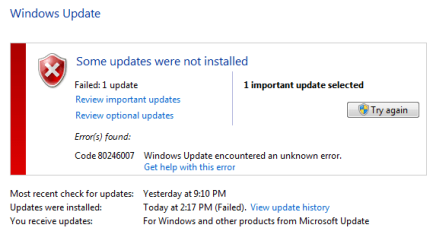
This screen shot is of the message that pops up when trying to set up backup.

Backup.PNG

I am trying to backup a 1gb WD drive to a 1.5gb Seagate.
Please disregard the screen about update that failed.
I am having trouble getting this post corrected.
 

Attachments

  • Backup 2.PNG
    Backup 2.PNG
    8.9 KB · Views: 9
Last edited:

My Computer

Computer type
PC/Desktop
Computer Manufacturer/Model Number
Custom built
OS
Windows 7 Ultimate 64bit
CPU
AMD Phenom II X6 1045T
Motherboard
Gigabyte GA-970A-D3
Memory
8 gb
Graphics Card(s)
Radeon HD4350
Sound Card
On mother board
Monitor(s) Displays
Samsung Syncmaster
Screen Resolution
Variable
Hard Drives
WD 1 TB
WD 2 TB (system)
PSU
700 watt
Case
Antec
Cooling
Came with case
Keyboard
Logitech wireless
Mouse
Logitech wireless
Internet Speed
Broadband
Antivirus
AVG free version
Browser
IE, Chrome, Firefox.
Other Info
Problem did not occur until starting to use Sleep function which is set to
occur after 10 minutes of no activity.
Check the shadow storage size for the target drive to receive the Backup.

Control Panel > System > System Protection > highlight your drive and click on the tile (Change settings or whatever it is). Observe what it is, and then slide the slider to max space.
 

My Computer

Computer type
PC/Desktop
Computer Manufacturer/Model Number
Custom
OS
Windows 7
CPU
AMD Phenom II X2 (dual-core)
Motherboard
GA-MA785GM-US2H
Memory
4G
Graphics Card(s)
integrated ATI HD 4200
Sound Card
integrated
Monitor(s) Displays
Samsung 24"
Screen Resolution
1920x1080
Hard Drives
1 SSD - Samsung 840 - 500 GB - OS and DATA partitions
1 SSD - Intel 320 - 120 GB (used for backups) - Misc/BACKUP
1 SATA HD - WD, 500 GB - BACKUP
PSU
Ultra X4 500W
Case
Ultra X-blaster
Keyboard
Microsoft Digital Media Pro
Mouse
Logitech WIRED!
Internet Speed
15 Mbps FIOS
I did as you suggested. I enabled system protection on the backup drive; shows 1.3gb of free space. I set for maximum for backup. After this, I got the same image pop up about insufficient space for shadow image......
I'm in over my head on this I know, but would like this backup to be possible.
Thanks for your previous input.
 

My Computer

Computer type
PC/Desktop
Computer Manufacturer/Model Number
Custom built
OS
Windows 7 Ultimate 64bit
CPU
AMD Phenom II X6 1045T
Motherboard
Gigabyte GA-970A-D3
Memory
8 gb
Graphics Card(s)
Radeon HD4350
Sound Card
On mother board
Monitor(s) Displays
Samsung Syncmaster
Screen Resolution
Variable
Hard Drives
WD 1 TB
WD 2 TB (system)
PSU
700 watt
Case
Antec
Cooling
Came with case
Keyboard
Logitech wireless
Mouse
Logitech wireless
Internet Speed
Broadband
Antivirus
AVG free version
Browser
IE, Chrome, Firefox.
Other Info
Problem did not occur until starting to use Sleep function which is set to
occur after 10 minutes of no activity.
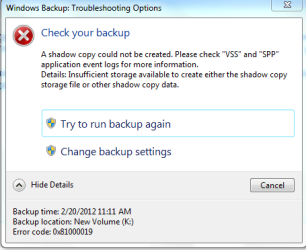
I noticed an error code on this screen shot.
 

Attachments

  • Backup2.PNG
    Backup2.PNG
    12.2 KB · Views: 6

My Computer

Computer type
PC/Desktop
Computer Manufacturer/Model Number
Custom built
OS
Windows 7 Ultimate 64bit
CPU
AMD Phenom II X6 1045T
Motherboard
Gigabyte GA-970A-D3
Memory
8 gb
Graphics Card(s)
Radeon HD4350
Sound Card
On mother board
Monitor(s) Displays
Samsung Syncmaster
Screen Resolution
Variable
Hard Drives
WD 1 TB
WD 2 TB (system)
PSU
700 watt
Case
Antec
Cooling
Came with case
Keyboard
Logitech wireless
Mouse
Logitech wireless
Internet Speed
Broadband
Antivirus
AVG free version
Browser
IE, Chrome, Firefox.
Other Info
Problem did not occur until starting to use Sleep function which is set to
occur after 10 minutes of no activity.
error code suffix 0x0019 is "The drive cannot locate a specific area or track on the disk."
 

My Computer

Computer type
PC/Desktop
Computer Manufacturer/Model Number
Custom
OS
Windows 7
CPU
AMD Phenom II X2 (dual-core)
Motherboard
GA-MA785GM-US2H
Memory
4G
Graphics Card(s)
integrated ATI HD 4200
Sound Card
integrated
Monitor(s) Displays
Samsung 24"
Screen Resolution
1920x1080
Hard Drives
1 SSD - Samsung 840 - 500 GB - OS and DATA partitions
1 SSD - Intel 320 - 120 GB (used for backups) - Misc/BACKUP
1 SATA HD - WD, 500 GB - BACKUP
PSU
Ultra X4 500W
Case
Ultra X-blaster
Keyboard
Microsoft Digital Media Pro
Mouse
Logitech WIRED!
Internet Speed
15 Mbps FIOS
OK Jim, what shall I do next? I'm completely lost here. Is it workable? Would reformatting the backup drive help?
 

My Computer

Computer type
PC/Desktop
Computer Manufacturer/Model Number
Custom built
OS
Windows 7 Ultimate 64bit
CPU
AMD Phenom II X6 1045T
Motherboard
Gigabyte GA-970A-D3
Memory
8 gb
Graphics Card(s)
Radeon HD4350
Sound Card
On mother board
Monitor(s) Displays
Samsung Syncmaster
Screen Resolution
Variable
Hard Drives
WD 1 TB
WD 2 TB (system)
PSU
700 watt
Case
Antec
Cooling
Came with case
Keyboard
Logitech wireless
Mouse
Logitech wireless
Internet Speed
Broadband
Antivirus
AVG free version
Browser
IE, Chrome, Firefox.
Other Info
Problem did not occur until starting to use Sleep function which is set to
occur after 10 minutes of no activity.
Back
Top