windows 7 basic..

chenpaoli

New member
Local time
11:40 PM
Messages
5
hi, i'm just new here,uhmmm
i bought my laptop with windows 7 home basic OS already
and i notice that in my control panel, i don't have personalization icon...
is that means i can't change themes?
i have seen a lot of themes for windows 7
and i want to try it...
but how?
pls help... :cry:
 

My Computer

OS
windows 7
Sorry buddy,

If you don't see that feature, it means it's not there. Read this for more more info.

On a more cheerful note, welcome to the forums! :party:
 

My Computer

Computer Manufacturer/Model Number
Custom
OS
Windows 7 Professional x64
CPU
Intel i7 2600K OC'd @ 4620 MHz
Motherboard
Asus P8Z68-V Pro
Memory
16GB GSkill Sniper 2133 Mhz (4x4GB)
Graphics Card(s)
EVGA GeForce GTX 480 SuperClocked+
Sound Card
Realtek High Definition Audio
Monitor(s) Displays
2x Acer S273HLbmii 27"
Screen Resolution
2 x 1920x1080
Hard Drives
64GB Crucial M4 SSD

Storage: Hitachi 1TB 5400RPM, Samsung 1.5TB 5400RPM
PSU
Corsair HW Series 750w (modular)
Case
Cooler Master HAF 932 Advanced Blue Edition
Cooling
CM Hyper 212+ CPU cooler, 3x 230mm + 1x 140mm case fans
Keyboard
Logitech MK320 (wireless)
Mouse
Logitech MK320 (wireless)
Internet Speed
30 Mb/s : 2 Mb/s
Sorry buddy,

If you don't see that feature, it means it's not there. Read this for more more info.

On a more cheerful note, welcome to the forums! :party:

it means i need to upgrade it to premium for me to change themes?
aw... :cry:

thanks :D
 

My Computer

OS
windows 7
Only Windows 7 version where you can not use themes and change wallpaper is Windows 7 Starter. You should be able to change desktop colors, theme and wallpaper in your Windows 7 Home Basic. Some Aero features are not available in Home Basic.

If you right click on empty desktop do you see Personalize in the context menu?


Kari
 

My Computer

Computer type
Laptop
Computer Manufacturer/Model Number
HP ENVY 17-1150eg
OS
Windows 10 Pro x64 EN-GB
CPU
1.6 GHz Intel Core i7-720QM Processor
Memory
6 GB
Graphics Card(s)
ATI Mobility Radeon HD 5850 Graphics
Sound Card
Beats sound system with integrated subwoofer
Monitor(s) Displays
17" laptop display, 22" LED and 32" Full HD TV through HDMI
Screen Resolution
1600*900 (1), 1920*1080 (2&3)
Hard Drives
Internal: 2 x 500 GB SATA Hard Disk Drive 7200 rpm
External: 2TB for backups, 3TB USB3 network drive for media
Cooling
As Envy runs a bit warm, I have it on a Cooler Master pad
Keyboard
Logitech diNovo Media Desktop Laser (bluetooth)
Mouse
Logitech Performance Mouse MX
Internet Speed
50/10 Mbps VDSL
Antivirus
Windows Defender 4.3.9431.0
Browser
Maxthon 3.5.2., IE11
Only Windows 7 version where you can not use themes and change wallpaper is Windows 7 Starter. You should be able to change desktop colors, theme and wallpaper in your Windows 7 Home Basic. Some Aero features are not available in Home Basic.

If you right click on empty desktop do you see Personalize in the context menu?


Kari

no, i don't see it... :cry:
 

My Computer

OS
windows 7
Are you sure you have Home Basic? Could it be you have Windows 7 Starter?
 

My Computer

Computer type
Laptop
Computer Manufacturer/Model Number
HP ENVY 17-1150eg
OS
Windows 10 Pro x64 EN-GB
CPU
1.6 GHz Intel Core i7-720QM Processor
Memory
6 GB
Graphics Card(s)
ATI Mobility Radeon HD 5850 Graphics
Sound Card
Beats sound system with integrated subwoofer
Monitor(s) Displays
17" laptop display, 22" LED and 32" Full HD TV through HDMI
Screen Resolution
1600*900 (1), 1920*1080 (2&3)
Hard Drives
Internal: 2 x 500 GB SATA Hard Disk Drive 7200 rpm
External: 2TB for backups, 3TB USB3 network drive for media
Cooling
As Envy runs a bit warm, I have it on a Cooler Master pad
Keyboard
Logitech diNovo Media Desktop Laser (bluetooth)
Mouse
Logitech Performance Mouse MX
Internet Speed
50/10 Mbps VDSL
Antivirus
Windows Defender 4.3.9431.0
Browser
Maxthon 3.5.2., IE11
Are you sure you have Home Basic? Could it be you have Windows 7 Starter?

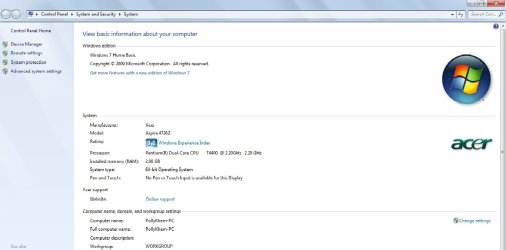
i'm sure of it...
here's the picture of my properties.
 

Attachments

  • properties.jpg
    properties.jpg
    54 KB · Views: 293

My Computer

OS
windows 7
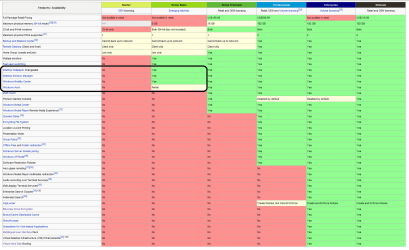
OK. It's weird, look at this version comparison chart:

7versions.png

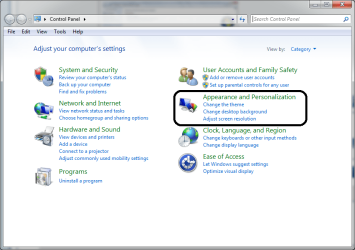
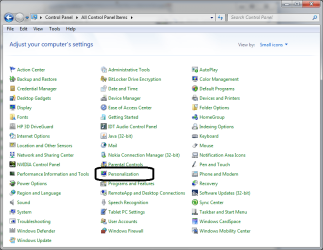
You should have limited Aero features and normal possibilities to change colors, themes and wallpapers, either choosing Personalize from desktop context menu or from Control Panel.

Kari
 

Attachments

  • cp1.png
    cp1.png
    37.9 KB · Views: 60
  • cp2.png
    cp2.png
    44 KB · Views: 96

My Computer

Computer type
Laptop
Computer Manufacturer/Model Number
HP ENVY 17-1150eg
OS
Windows 10 Pro x64 EN-GB
CPU
1.6 GHz Intel Core i7-720QM Processor
Memory
6 GB
Graphics Card(s)
ATI Mobility Radeon HD 5850 Graphics
Sound Card
Beats sound system with integrated subwoofer
Monitor(s) Displays
17" laptop display, 22" LED and 32" Full HD TV through HDMI
Screen Resolution
1600*900 (1), 1920*1080 (2&3)
Hard Drives
Internal: 2 x 500 GB SATA Hard Disk Drive 7200 rpm
External: 2TB for backups, 3TB USB3 network drive for media
Cooling
As Envy runs a bit warm, I have it on a Cooler Master pad
Keyboard
Logitech diNovo Media Desktop Laser (bluetooth)
Mouse
Logitech Performance Mouse MX
Internet Speed
50/10 Mbps VDSL
Antivirus
Windows Defender 4.3.9431.0
Browser
Maxthon 3.5.2., IE11
OK. It's weird, look at this version comparison chart:

View attachment 43287

You should have limited Aero features and normal possibilities to change colors, themes and wallpapers, either choosing Personalize from desktop context menu or from Control Panel.

Kari

:cry::cry::cry:
i don't have it on my control panel.
:cry::cry::cry:
i'm thinking to upgrade it with windows 7 home premium...
 

My Computer

OS
windows 7
Back
Top