

Mary Jo reports that a number of Windows 7 Beta testers have come across a bug that crashes the system randomly whenever they try to start a Windows Update or install anything using Microsoft's MSI installer.
source: neowin.net
Enthusiast Chris Holmes claims that many users have started experiencing random crashing of explorer and msiexec.exe when trying to start Windows Update or install anything that uses an MSI based installer. Some have gone to the extent of reinstalling the beta.
Rafael has discovered that the fault arises from the Software Quality Management (SQM) Client which is a part of the Customer Experience Improvement Program (CEIP). It seems that any process that calls WinSqmStartSession in ntdll.dll will start crashing when machine throttling is enabled in the registry and when CEIP is running.
The suggested workarounds are as follows:
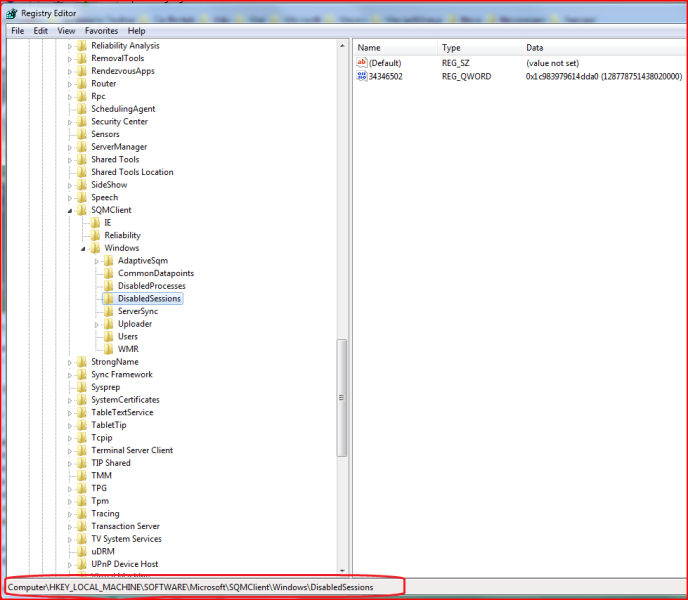
1) Deleting the string values other than Default value in HKLM\Software\Microsoft\SQMClient\Windows\DisabledSessions in the Windows Registry [Or] renaming MachineThrottling to _MachineThrottling in the same node.
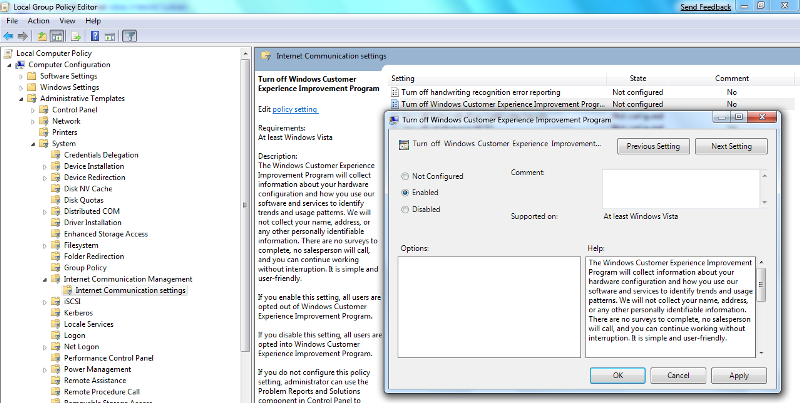
2) Turn Off Windows Customer Experience Improvement Program which can be done by traversing through the nodes - Computer Configuration->Administrative Templates->System->Internet Communication Management->Internet Communication settings in the Local Group Policy Editor.
If you are a Windows 7 Beta tester, please make sure that you report any bugs to Microsoft using the new Send Feedback tool

Rafael has discovered that the fault arises from the Software Quality Management (SQM) Client which is a part of the Customer Experience Improvement Program (CEIP). It seems that any process that calls WinSqmStartSession in ntdll.dll will start crashing when machine throttling is enabled in the registry and when CEIP is running.
The suggested workarounds are as follows:
1) Deleting the string values other than Default value in HKLM\Software\Microsoft\SQMClient\Windows\DisabledSessions in the Windows Registry [Or] renaming MachineThrottling to _MachineThrottling in the same node.
2) Turn Off Windows Customer Experience Improvement Program which can be done by traversing through the nodes - Computer Configuration->Administrative Templates->System->Internet Communication Management->Internet Communication settings in the Local Group Policy Editor.
If you are a Windows 7 Beta tester, please make sure that you report any bugs to Microsoft using the new Send Feedback tool
source: neowin.net
My Computer
- Computer Manufacturer/Model Number
- Home Brew
- OS
- Vista X64 ultimate/ 7 X64 Ultimate (7264)
- CPU
- Q6600 @3.4GHz
- Motherboard
- Asus P5Q-Pro
- Memory
- Crucial Ballastix 4GB DDR2 PC2-6400C4 @ 1033MHz
- Graphics Card(s)
- Nvidia 7600gt (Got better things to do than game!)
- Sound Card
- Onboard
- Monitor(s) Displays
- 19" Widescreen
- Screen Resolution
- 1440 x 900
- Hard Drives
- WD800HLFS OS Drive
1.5TB Total Storage
- PSU
- Hiper Type-M 880W
- Case
- Tai-Chi
- Cooling
- Custom water
- Keyboard
- Generic
- Mouse
- Logitech MX1100 Laser Cordless
- Internet Speed
- 20Meg


