Windows 7 boot from Dynamic Disk

viperciyes

New member
Local time
9:59 PM
Messages
2
Hi,

last night I accidentally converted a friend's primary hard disk to a dynamic disk. I read the warning but I was slow on the uptake. Whatever, I clicked yes, it converted, then I looked for solutions on the internet and found some solutions in here. I got ready to go on with those, but when I restarted the computer, there was no error message, the system was able to boot. I would like to know why that computer didnot give an error message. (I spent three hours to find a solution, just in case, for an error that never showed up!)
 

My Computer

Computer type
PC/Desktop
OS
win8

My Computer

Computer type
PC/Desktop
Computer Manufacturer/Model Number
Self built custom
OS
64-bit Windows 11 Pro for Workstations
CPU
Intel i7-8700K OC'd to 5 GHz
Motherboard
ASUS ROG Maximus XI Formula Z390
Memory
64 GB (4x16GB) G.SKILL TridentZ RGB DDR4 3600 MHz
Graphics Card(s)
ASUS ROG-STRIX-GTX1080TI-O11G-GAMING
Sound Card
Integrated
Monitor(s) Displays
2 x Samsung Odyssey G7 27"
Screen Resolution
2560x1440
Hard Drives
1TB Samsung 990 PRO M.2,
4TB Samsung 990 PRO PRO M.2,
TerraMaster F8 SSD Plus NAS
PSU
Seasonic Prime Titanium 850W
Case
Thermaltake Core P3
Cooling
Corsair Hydro H115i
Keyboard
Logitech wireless K800
Mouse
Logitech MX Master 4
Internet Speed
2 Gb/s Download and 100 Mb/s Upload
Antivirus
Malwarebyte Anti-Malware Premium
Browser
Google Chrome
Other Info
Logitech Z625 speaker system,
Logitech BRIO 4K Pro webcam,
HP Color LaserJet Pro MFP M477fdn,
APC SMART-UPS RT 1000 XL - SURT1000XLI,
Galaxy S23 Plus phone
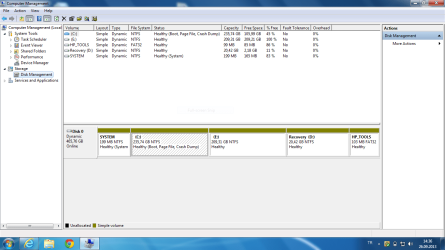
Screen shot

attached is the screen shot of the disk management menu. My friend tells me that the computer boots slower than usual (it's just a week since he bought it). should I try and get it back to basic disk?
 

Attachments

  • Capture.PNG
    Capture.PNG
    47.4 KB · Views: 5

My Computer

Computer type
PC/Desktop
OS
win8

My Computer

Computer type
PC/Desktop
Computer Manufacturer/Model Number
Self built custom
OS
64-bit Windows 11 Pro for Workstations
CPU
Intel i7-8700K OC'd to 5 GHz
Motherboard
ASUS ROG Maximus XI Formula Z390
Memory
64 GB (4x16GB) G.SKILL TridentZ RGB DDR4 3600 MHz
Graphics Card(s)
ASUS ROG-STRIX-GTX1080TI-O11G-GAMING
Sound Card
Integrated
Monitor(s) Displays
2 x Samsung Odyssey G7 27"
Screen Resolution
2560x1440
Hard Drives
1TB Samsung 990 PRO M.2,
4TB Samsung 990 PRO PRO M.2,
TerraMaster F8 SSD Plus NAS
PSU
Seasonic Prime Titanium 850W
Case
Thermaltake Core P3
Cooling
Corsair Hydro H115i
Keyboard
Logitech wireless K800
Mouse
Logitech MX Master 4
Internet Speed
2 Gb/s Download and 100 Mb/s Upload
Antivirus
Malwarebyte Anti-Malware Premium
Browser
Google Chrome
Other Info
Logitech Z625 speaker system,
Logitech BRIO 4K Pro webcam,
HP Color LaserJet Pro MFP M477fdn,
APC SMART-UPS RT 1000 XL - SURT1000XLI,
Galaxy S23 Plus phone
You may need to delete the E partition which tipped it to Dynamic before it will convert. You can only have four primary partitions or 3 Primary and unlimited contiguous Logicals.

Afterwards the best way to add a partition to HP to keep it's OS and Recovery bootable is to convert C to Logical which will allow adding as many adjacent Logical partitions as you wish. How to set partition as Primary or Logical.
Partition Wizard Create Partition - Video Help

But remember that the HP preinstalled Win7 is the worst possible install of WIn7 one can have, with the biggest load of crapware including duplicate utilities which interfere with better versions built into Win7. That's why most tech enthusiasts choose to Clean Reinstall - Factory OEM Windows 7. At the minimum I'd Clean Up Factory Bloatware
 
Back
Top