Windows 7 BOOT HELP !!!

lolittle

New member
Local time
2:59 PM
Messages
6
Iv had windows xp installed on my computer for a while until windows 7 became available which i then installed on a dual boot but afterwards i wasnt able to access windows xp.

To fix it i used the xp installation disc but accidently did a fresh install over the xp partition so now im stuck with windows xp and i cant boot into windows 7.

Problem is that the windows 7 installion disc will no longer boot, and neither will any new disc I burn. i get boot error 5 :confused:

Is there anyway i can get back into windows 7 without doing a fresh install???
 

My Computer

OS
Dual Boot ... Well Kinda
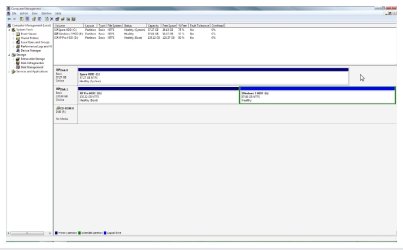
it can probably be done, if you didn't format the Windows 7 partition or install XP to it. Can you attach a screenshot of disk management so we can have a look?
 

My Computer

Computer Manufacturer/Model Number
Too many to list.
OS
XP, Seven, 2008R2
CPU
AMD, Intel, VIA
Motherboard
Various
Memory
Corsair, Kingston, etc.
Graphics Card(s)
ATI, NVIDIA
Monitor(s) Displays
Samsung
Hard Drives
Maxtor, Western Digital
Keyboard
qwerty
Internet Speed
22 Mb/s @ home, 1 Gb/s @ server
Other Info
All of my systems still run fastest on XP 32-bit for the most part. Win7 is fun to play with, but I still prefer XP for raw speed, security, and functionality.
SS

If xp was installed first, then win 7 and was dual booted the boot files would be kept in the boot folder on the XP root directory. Since xp was re-installed it might not still be there.

Ken
 

My Computer

Computer Manufacturer/Model Number
HP Pavillion dv-7 1005 Tx
OS
Win 8 Release candidate 8400
CPU
[email protected]
Memory
4 gigs
Graphics Card(s)
Nvidia 9600M
Sound Card
HD built-in
Monitor(s) Displays
17" Wxga
Screen Resolution
1440x900
Cooling
none
Internet Speed
45Mb down 5Mb up
yes that is correct and in that case you can recreate the boot files with the bcdboot command. And also need to reinstall the Windows 7 boot sector. Sometimes it's possible to do those things without having to reinstall Windows 7. I've done it many times.
 

My Computer

Computer Manufacturer/Model Number
Too many to list.
OS
XP, Seven, 2008R2
CPU
AMD, Intel, VIA
Motherboard
Various
Memory
Corsair, Kingston, etc.
Graphics Card(s)
ATI, NVIDIA
Monitor(s) Displays
Samsung
Hard Drives
Maxtor, Western Digital
Keyboard
qwerty
Internet Speed
22 Mb/s @ home, 1 Gb/s @ server
Other Info
All of my systems still run fastest on XP 32-bit for the most part. Win7 is fun to play with, but I still prefer XP for raw speed, security, and functionality.
SS

figured you knew but better to be safe.

DVD is dell's not win 7.
 

My Computer

Computer Manufacturer/Model Number
HP Pavillion dv-7 1005 Tx
OS
Win 8 Release candidate 8400
CPU
[email protected]
Memory
4 gigs
Graphics Card(s)
Nvidia 9600M
Sound Card
HD built-in
Monitor(s) Displays
17" Wxga
Screen Resolution
1440x900
Cooling
none
Internet Speed
45Mb down 5Mb up
Thanks,

I think another problem that needs fixing (and maybe the one to focus on) is to get his computer to boot from the DVD again.

I've never had DVD stop working by installing XP or Win7.
 

My Computer

Computer Manufacturer/Model Number
Too many to list.
OS
XP, Seven, 2008R2
CPU
AMD, Intel, VIA
Motherboard
Various
Memory
Corsair, Kingston, etc.
Graphics Card(s)
ATI, NVIDIA
Monitor(s) Displays
Samsung
Hard Drives
Maxtor, Western Digital
Keyboard
qwerty
Internet Speed
22 Mb/s @ home, 1 Gb/s @ server
Other Info
All of my systems still run fastest on XP 32-bit for the most part. Win7 is fun to play with, but I still prefer XP for raw speed, security, and functionality.
to use the bcdboot command i would need to boot into the installation disc... which i cant .. dont know why i cant because i have been able to before up until after installing windows xp again

heres a screen .. from xp of course

Imageshack - screenwg

Have you changed your BIOS settings to boot from DVD,

or are you limited to booting HDD with XP now?

What sort of 'Error messages' booting from DVD ?
 

My Computer

Computer Manufacturer/Model Number
Gateway GT5056
OS
XP_Pro, W7_7201, W7RC.vhd, SciLinux5.3, Fedora12, Fedora9_2x, OpenSolaris_09-06
CPU
AMD 64x2
Motherboard
Yes
Memory
1 gig
Graphics Card(s)
Dunno
Sound Card
Realtek something
Monitor(s) Displays
Samsung SyncMaster 940MW w/TV
Screen Resolution
1280x1024
Hard Drives
250 GB WD, USB Seagate Freedesk 1.5 T
Internet Speed
Cable modem
Other Info
1 + 1 = 10b,
7 + 7 = 16o,
a + b = 15h.
Yeah. Two problems here. Fixing to boot from DVD would be my priority. Although if you can't figure it out we can still run some commands to get 7 up and running.

you need a boot folder and bootmgr file on the C: drive

you can copy them from the Windows 7 DVD. Just pop it in your drive.

now all is left is to fix the boot sector and modify the Operating System entries. I would use EasyBCD for that, to make life a little easier.
 

My Computer

Computer Manufacturer/Model Number
Too many to list.
OS
XP, Seven, 2008R2
CPU
AMD, Intel, VIA
Motherboard
Various
Memory
Corsair, Kingston, etc.
Graphics Card(s)
ATI, NVIDIA
Monitor(s) Displays
Samsung
Hard Drives
Maxtor, Western Digital
Keyboard
qwerty
Internet Speed
22 Mb/s @ home, 1 Gb/s @ server
Other Info
All of my systems still run fastest on XP 32-bit for the most part. Win7 is fun to play with, but I still prefer XP for raw speed, security, and functionality.
ok so ive got the files ... i put them on the C drive .. that being my spare hard drive not the partition of xp or windows 7

EasyBCD says it wants to edit my boot to be vista ?? is that ok ??

can i even use easyBCD on xp .. its saying it cannot find my boot
 

My Computer

OS
Dual Boot ... Well Kinda
ok now ive managed to get the computer to boot into windows 7 ... i used the windows vista installation disc to fix the boot...

but now i cant boot into xp again .. and is there a way of changing drive letters without messing the whole thing up again lol
 

My Computer

OS
Dual Boot ... Well Kinda
hi,

so you were able to get the DVD to boot? That's good.

you can use EasyBCD or bcdedit to create bootloader entry for Windows XP.

bcdedit /create {ntldr} /d "Windows XP"
bcdedit /set {ntldr} device partition=c:
bcdedit /set {ntldr} path \ntldr
bcdedit /displayorder {ntldr} /addlast

I don't think the Windows partition letter is easy to change after install.
 
Last edited:

My Computer

Computer Manufacturer/Model Number
Too many to list.
OS
XP, Seven, 2008R2
CPU
AMD, Intel, VIA
Motherboard
Various
Memory
Corsair, Kingston, etc.
Graphics Card(s)
ATI, NVIDIA
Monitor(s) Displays
Samsung
Hard Drives
Maxtor, Western Digital
Keyboard
qwerty
Internet Speed
22 Mb/s @ home, 1 Gb/s @ server
Other Info
All of my systems still run fastest on XP 32-bit for the most part. Win7 is fun to play with, but I still prefer XP for raw speed, security, and functionality.
thanks for that ... easybcd want add my XP partition to the boot for some reason :S ... it just adds it as drive U ... so ive done it through cmd but when i came to this part ..

bcdedit /set {ntldr} path=\ntldr

it said the element data type specified is not recognized, or does not apply to the specified entry
Element not found

EDIT::

It just skipped the bootmanager on startup and loaded windows 7 ...
 

My Computer

OS
Dual Boot ... Well Kinda
i used the windows vista installation disc to fix the boot...
Just curious:

How did you manage to "use the windows vista installation disc" ?

Isn't that a DVD, like w7 ?

Did you boot from a Vista DVD ?
 

My Computer

Computer Manufacturer/Model Number
Gateway GT5056
OS
XP_Pro, W7_7201, W7RC.vhd, SciLinux5.3, Fedora12, Fedora9_2x, OpenSolaris_09-06
CPU
AMD 64x2
Motherboard
Yes
Memory
1 gig
Graphics Card(s)
Dunno
Sound Card
Realtek something
Monitor(s) Displays
Samsung SyncMaster 940MW w/TV
Screen Resolution
1280x1024
Hard Drives
250 GB WD, USB Seagate Freedesk 1.5 T
Internet Speed
Cable modem
Other Info
1 + 1 = 10b,
7 + 7 = 16o,
a + b = 15h.
yeh i booted with the vista dvd ... the windows 7 dvd wont boot i get boot error 5 when i try ... so i fixed the windows 7 boot using the vista repair.. seemed to work lol

Im still having problems now ... Windows XP believes it is installed onto Partition D: but Windows 7 thinks that the XP partion is actually Drive C: ...

so ..

Windows XP sees this .. windows xp drive D... Windows 7 drive.. E

Windows 7 sees this .. windows xp drive C: and windows 7 drive F

Easybcd cant find XP and wont add it .. and i cant add xp to the windows 7 boot manually.
 

My Computer

OS
Dual Boot ... Well Kinda
when i came to this part ..

bcdedit /set {ntldr} path=\ntldr

it said the element data type specified is not recognized

sorry, replace = with a space
 

My Computer

Computer Manufacturer/Model Number
Too many to list.
OS
XP, Seven, 2008R2
CPU
AMD, Intel, VIA
Motherboard
Various
Memory
Corsair, Kingston, etc.
Graphics Card(s)
ATI, NVIDIA
Monitor(s) Displays
Samsung
Hard Drives
Maxtor, Western Digital
Keyboard
qwerty
Internet Speed
22 Mb/s @ home, 1 Gb/s @ server
Other Info
All of my systems still run fastest on XP 32-bit for the most part. Win7 is fun to play with, but I still prefer XP for raw speed, security, and functionality.

My Computers

System One System Two

  • Computer type
    PC/Desktop
    OS
    7 X64
    CPU
    i5 8400
    Motherboard
    gigabyte b365m ds3h
    Memory
    2x8gb 3200mhz
    Hard Drives
    various
    PSU
    pure power 11 400w cm
    Case
    Coolermaster
    Cooling
    cryorig m9i
  • Computer type
    PC/Desktop
    OS
    7x64
    CPU
    g5400
    Motherboard
    ga b365m ds3h
    Memory
    8gb ddr4 2400
    PSU
    xfx pro 450w
Back
Top