Windows 7 boot issue

unknownsingh

New member
Local time
4:38 AM
Messages
6
Hi,

i have a issue with my pc running windows 7 ultimate 64bit

my pc has two hard drives, main drive C: (the C: drive is a new hard drive with a fresh install of windows 7 ultimate which has replaced my old main drive which became faulty)

Secondary drive F: has just media on it,

my issue is that my pc will only boot if drive F: is selected as primary even though there is nothing but media on it, if i remove drive F: the pc will not boot altogether.

i installed windows 7 with both hard drives fitted in which i think is the cause of the issue. does anyone have a solution to this issue without a full format and reinstall of windows to my main C: drive with the secondary drive disconnected?

Thanks

Any help is greatly appreciated.

:confused:
 

My Computer

OS
Windows 7 Ultimate 64Bit
CPU
Q6600 QUAD CORE @ 2.4GHZ
Memory
4GB RAM
Graphics Card(s)
XFX GTX 260 BLACK EDITION
Monitor(s) Displays
HYUNDAI 24" PVA MONITOR (1920X1200)
Hard Drives
1TB SAMSUNG SPINPOINT F1
1TB SAMSUNG SPINPOINT F3
PSU
750 WATT
Case
NZXT LEXA BLACKLINE
Cooling
ARTIC COOLER PRO
Welcome!

This seems relatively simple to fix. First, make sure the C partition is Primary. If it is Logical, make it Primary with Partition Wizard.

Then, mark the C partition as active. You can use Partition Wizard for that also.

Finally, run a startup repair with the F drive disconnected. You may need to run it multiple times
 

My Computer

Computer Manufacturer/Model Number
Custom
OS
Windows 7 Professional x64
CPU
Intel i7 2600K OC'd @ 4620 MHz
Motherboard
Asus P8Z68-V Pro
Memory
16GB GSkill Sniper 2133 Mhz (4x4GB)
Graphics Card(s)
EVGA GeForce GTX 480 SuperClocked+
Sound Card
Realtek High Definition Audio
Monitor(s) Displays
2x Acer S273HLbmii 27"
Screen Resolution
2 x 1920x1080
Hard Drives
64GB Crucial M4 SSD

Storage: Hitachi 1TB 5400RPM, Samsung 1.5TB 5400RPM
PSU
Corsair HW Series 750w (modular)
Case
Cooler Master HAF 932 Advanced Blue Edition
Cooling
CM Hyper 212+ CPU cooler, 3x 230mm + 1x 140mm case fans
Keyboard
Logitech MK320 (wireless)
Mouse
Logitech MK320 (wireless)
Internet Speed
30 Mb/s : 2 Mb/s
hi just tried what you suggested but no luck.

c: partition was already primary, i was unable to set it as active with partion wizard (option was greyed out) so instead i right clicked computer > manage> disk management and was able to set it there.

i disconnected my F: drive and ran start repair seven times, however each time it said no startup issues detected.

in the start repair dialog box it stated "windows 7 os (recovered)

also is partition wizard status of drive c: is Active and Sytem (primary)
and status of drive F: is Active and boot (primary)

thanks.


:confused:
 

My Computer

OS
Windows 7 Ultimate 64Bit
CPU
Q6600 QUAD CORE @ 2.4GHZ
Memory
4GB RAM
Graphics Card(s)
XFX GTX 260 BLACK EDITION
Monitor(s) Displays
HYUNDAI 24" PVA MONITOR (1920X1200)
Hard Drives
1TB SAMSUNG SPINPOINT F1
1TB SAMSUNG SPINPOINT F3
PSU
750 WATT
Case
NZXT LEXA BLACKLINE
Cooling
ARTIC COOLER PRO
Is your F: HD pluged in to Sata 1 or Sata 2.
 

My Computer

OS
ME/XP/Vista/Win7

My Computer

Computer Manufacturer/Model Number
Custom
OS
Windows 7 Professional x64
CPU
Intel i7 2600K OC'd @ 4620 MHz
Motherboard
Asus P8Z68-V Pro
Memory
16GB GSkill Sniper 2133 Mhz (4x4GB)
Graphics Card(s)
EVGA GeForce GTX 480 SuperClocked+
Sound Card
Realtek High Definition Audio
Monitor(s) Displays
2x Acer S273HLbmii 27"
Screen Resolution
2 x 1920x1080
Hard Drives
64GB Crucial M4 SSD

Storage: Hitachi 1TB 5400RPM, Samsung 1.5TB 5400RPM
PSU
Corsair HW Series 750w (modular)
Case
Cooler Master HAF 932 Advanced Blue Edition
Cooling
CM Hyper 212+ CPU cooler, 3x 230mm + 1x 140mm case fans
Keyboard
Logitech MK320 (wireless)
Mouse
Logitech MK320 (wireless)
Internet Speed
30 Mb/s : 2 Mb/s
Is C drive set as first HD to boot in BIOS setup, after DVD drive?

Boot PW, try rightclicking F>modify>Set to Inactive. Now run Startup Repair again X3.
 

My Computer

OS
Windows 7 Ultimate 64Bit
CPU
Q6600 QUAD CORE @ 2.4GHZ
Memory
4GB RAM
Graphics Card(s)
XFX GTX 260 BLACK EDITION
Monitor(s) Displays
HYUNDAI 24" PVA MONITOR (1920X1200)
Hard Drives
1TB SAMSUNG SPINPOINT F1
1TB SAMSUNG SPINPOINT F3
PSU
750 WATT
Case
NZXT LEXA BLACKLINE
Cooling
ARTIC COOLER PRO

My Computer

OS
Windows 7 Ultimate 64Bit
CPU
Q6600 QUAD CORE @ 2.4GHZ
Memory
4GB RAM
Graphics Card(s)
XFX GTX 260 BLACK EDITION
Monitor(s) Displays
HYUNDAI 24" PVA MONITOR (1920X1200)
Hard Drives
1TB SAMSUNG SPINPOINT F1
1TB SAMSUNG SPINPOINT F3
PSU
750 WATT
Case
NZXT LEXA BLACKLINE
Cooling
ARTIC COOLER PRO
Is C drive set as first HD to boot in BIOS setup, after DVD drive?

Boot PW, try rightclicking F>modify>Set to Inactive. Now run Startup Repair again X3.

yes it is when im running setup repair, otherwise it has to be F:
 

My Computer

OS
Windows 7 Ultimate 64Bit
CPU
Q6600 QUAD CORE @ 2.4GHZ
Memory
4GB RAM
Graphics Card(s)
XFX GTX 260 BLACK EDITION
Monitor(s) Displays
HYUNDAI 24" PVA MONITOR (1920X1200)
Hard Drives
1TB SAMSUNG SPINPOINT F1
1TB SAMSUNG SPINPOINT F3
PSU
750 WATT
Case
NZXT LEXA BLACKLINE
Cooling
ARTIC COOLER PRO

My Computer

OS
ME/XP/Vista/Win7
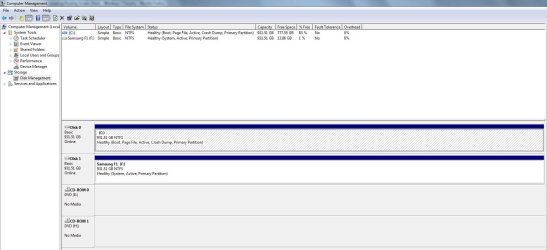
Could you please post a screenshot of your Disk Management window?

http://www.sevenforums.com/general-...ed-method-uploading-posting-screen-shots.html

Try booting up the repair disc, opening a command prompt (Shift+F10 on language screen), and enter the following:
Code:
bootrec /fixboot
bootrec /fixmbr
bootrec /rebuildbcd

View attachment 79180


trying those promts now will report back

Remove F: drive first.

thanks i did, and it worked not sure which command exactly was responisble but it is now working perfectly boots with or without F: drive.

below is what was stated after each command.

bootrec /fixboot - completed succesfully
bootrec /fixmbr - completed successfully
bootrec /rebuildbcd - after scanning hard drives said something like 0
installations of windows found.


thank you very much jonathan_king for the solution, saves me having to reformat and reinstall everything after i just did two weeks ago after replacing for faulty c: drive.

thank you everyones else for your help.

:):thumbsup:
 

My Computer

OS
Windows 7 Ultimate 64Bit
CPU
Q6600 QUAD CORE @ 2.4GHZ
Memory
4GB RAM
Graphics Card(s)
XFX GTX 260 BLACK EDITION
Monitor(s) Displays
HYUNDAI 24" PVA MONITOR (1920X1200)
Hard Drives
1TB SAMSUNG SPINPOINT F1
1TB SAMSUNG SPINPOINT F3
PSU
750 WATT
Case
NZXT LEXA BLACKLINE
Cooling
ARTIC COOLER PRO
Back
Top