Windows 7 Boot Issues and Stuttering!!! HELP!!!

lordbob24

New member
Local time
6:32 AM
Messages
12
Hello all!

I'm very new to these forums so hello to everyone!

I've looked through a bunch of other threads to find a solution to this problem and so far haven't had any luck, so here goes.

I've recently done a fresh install of Windows 7 Ultimate RC 64-bit Build 7100 on my Dell XPS 420. Everything was running fine for the most part but recently i've been getting an odd stuttering when booting into windows. This problem seems to occur randomly; sometimes windows boots and is perfectly fine. I've also noticed that neither my network or sound volume icons appear on the taskbar and many programs refuse to launch. Right clicking on the desktop seems to show the most noticeable stuttering since it takes 5-6 seconds for the menu to appear. Basically it makes windows unusable.

There are a couple of things that i can think of that may be causing this but i'd like to see if any of you might have come across this before i spend time reinstalling every application or reinstalling windows!

I've got a Quad-core Intel Centrino, 8GB RAM, nVidia 8800 GTS, Creative X-Fi Fatality. I've installed manufacturer drivers for the sound and graphics cards. I also have Steam, Norton Internet Security 2009 and MagicDisc (Virtual CD Drive) installed. I do have MagicDisc and Norton installed on my laptop which is running the same version of windows and i've had no problems with that.

Any help on this would be appreciated! Thanks in advance for any responses!
 

My Computer

OS
windows 7 RC
I had this exact same issue when turning my Dell M1530 laptop on today with Windows 7 RTM 32-bit which I installed yesterday. I have Norton Internet Security 2010 beta installed, I think this may be the cause. ;)

You also seem to have Norton but the 2009 version, I believe the 2009 version is also in beta for Windows 7.

I think this could be a problem with Norton even though you said it works for your laptop. We should try a different security product which should solve this issue. :(
 
Hello all!

I'm very new to these forums so hello to everyone!

I've looked through a bunch of other threads to find a solution to this problem and so far haven't had any luck, so here goes.

I've recently done a fresh install of Windows 7 Ultimate RC 64-bit Build 7100 on my Dell XPS 420. Everything was running fine for the most part but recently i've been getting an odd stuttering when booting into windows. This problem seems to occur randomly; sometimes windows boots and is perfectly fine. I've also noticed that neither my network or sound volume icons appear on the taskbar and many programs refuse to launch. Right clicking on the desktop seems to show the most noticeable stuttering since it takes 5-6 seconds for the menu to appear. Basically it makes windows unusable.

There are a couple of things that i can think of that may be causing this but i'd like to see if any of you might have come across this before i spend time reinstalling every application or reinstalling windows!

I've got a Quad-core Intel Centrino, 8GB RAM, nVidia 8800 GTS, Creative X-Fi Fatality. I've installed manufacturer drivers for the sound and graphics cards. I also have Steam, Norton Internet Security 2009 and MagicDisc (Virtual CD Drive) installed. I do have MagicDisc and Norton installed on my laptop which is running the same version of windows and i've had no problems with that.

Any help on this would be appreciated! Thanks in advance for any responses!


could you check in event viewer (type event viewer in search) to see if there are any relevant errors?

Thanks

Ken
 

My Computer

Computer Manufacturer/Model Number
HP Pavillion dv-7 1005 Tx
OS
Win 8 Release candidate 8400
CPU
[email protected]
Memory
4 gigs
Graphics Card(s)
Nvidia 9600M
Sound Card
HD built-in
Monitor(s) Displays
17" Wxga
Screen Resolution
1440x900
Cooling
none
Internet Speed
45Mb down 5Mb up
I wasn't actually able to even type anything in the search bar so i rebooted in safe mode. Whilst in safe mode i uninstalled the graphics and sound drivers. I then rebooted again and windows seemed to boot properly and began downloading windows updates to replace the missing drivers. It's been ok for the last couple of times i've booted so maybe that was causing it? I'll keep testing and post back what i've found.

I did eventually get events viewer open but didn't notice anything obvious.
 

My Computer

OS
windows 7 RC
Speaking of "boot issues" my boot screen animation does not work and I'm using the final RTM! :p
 

My Computer

OS
Windows 7 Ultimate (x64)
I wasn't actually able to even type anything in the search bar so i rebooted in safe mode. Whilst in safe mode i uninstalled the graphics and sound drivers. I then rebooted again and windows seemed to boot properly and began downloading windows updates to replace the missing drivers. It's been ok for the last couple of times i've booted so maybe that was causing it? I'll keep testing and post back what i've found.

I did eventually get events viewer open but didn't notice anything obvious.


Bob

it shouldn't look like this

K
 
Last edited:

My Computer

Computer Manufacturer/Model Number
HP Pavillion dv-7 1005 Tx
OS
Win 8 Release candidate 8400
CPU
[email protected]
Memory
4 gigs
Graphics Card(s)
Nvidia 9600M
Sound Card
HD built-in
Monitor(s) Displays
17" Wxga
Screen Resolution
1440x900
Cooling
none
Internet Speed
45Mb down 5Mb up
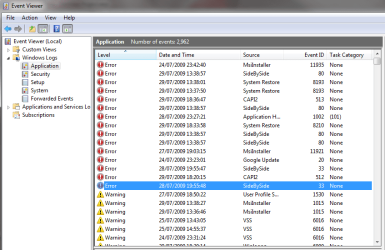
Nope, turns out that whatever i did before hasn't solved anything at all. I got the event viewer open and you can see what it looks like in the attachment. Not good.

I've tried a bunch of different things but given that i've only just installed it, i might just do a fresh install again and see if i can avoid it. If there's anything in the event viewer that stands out as a possible cause, it would be good to know. The Error 'SideBySide' has something to do with Nero 8, which i also have installed on my laptop. As i said before i've had no such problems with my laptop.
 

Attachments

  • Untitled.png
    Untitled.png
    24.3 KB · Views: 46

My Computer

OS
windows 7 RC
Nope, turns out that whatever i did before hasn't solved anything at all. I got the event viewer open and you can see what it looks like in the attachment. Not good.

I've tried a bunch of different things but given that i've only just installed it, i might just do a fresh install again and see if i can avoid it. If there's anything in the event viewer that stands out as a possible cause, it would be good to know. The Error 'SideBySide' has something to do with Nero 8, which i also have installed on my laptop. As i said before i've had no such problems with my laptop.

Well for starters this is the third problem today involving Nero. Nero runs alot of background services. Let me go thru event viewer

Did the problem start 5 days ago?

Ken
 

My Computer

Computer Manufacturer/Model Number
HP Pavillion dv-7 1005 Tx
OS
Win 8 Release candidate 8400
CPU
[email protected]
Memory
4 gigs
Graphics Card(s)
Nvidia 9600M
Sound Card
HD built-in
Monitor(s) Displays
17" Wxga
Screen Resolution
1440x900
Cooling
none
Internet Speed
45Mb down 5Mb up
Yeah 5 days sounds about right, although i only really started to notice the problem over the last couple of days.

I've done a fresh install already and i think i'm going to avoid using Nero.

Thanks Ken.
 

My Computer

OS
windows 7 RC
I've just encountered the same problem on my recent re-install of windows 7 and i haven't installed Nero yet, so there's a chance that that wasn't causing this particular problem. One other program that i think could be causing it is one that i don't have installed on my laptop. That program is Canopus ProCoder 3. It installs a couple drivers when it installs so they could be causing an issue. I've uninstalled it and will see if it happens again.
 

My Computer

OS
windows 7 RC
I'm still not getting anywhere with this problem. I've removed all programs that are likely to be causing this problem with no luck. I'm now beginning to think that it's driver related since booting into safe mode with most drivers disabled seems to work fine.

I have an almost identical XPS 420 at work running the same version of W7 and the only differences between the 2 would be my Linksys Wireless Network adaptor, my nVidia 8800 GTS and my Creative X-Fi Fatality. Has anyone come across any problems with these drivers in W7?
 

My Computer

OS
windows 7 RC
I'm still not getting anywhere with this problem. I've removed all programs that are likely to be causing this problem with no luck. I'm now beginning to think that it's driver related since booting into safe mode with most drivers disabled seems to work fine.

I have an almost identical XPS 420 at work running the same version of W7 and the only differences between the 2 would be my Linksys Wireless Network adaptor, my nVidia 8800 GTS and my Creative X-Fi Fatality. Has anyone come across any problems with these drivers in W7?


Bob

I dont think the linksys is the problem, more likely th 8800 or fatality. Might want to search here for solutions to both.

Ken
 

My Computer

Computer Manufacturer/Model Number
HP Pavillion dv-7 1005 Tx
OS
Win 8 Release candidate 8400
CPU
[email protected]
Memory
4 gigs
Graphics Card(s)
Nvidia 9600M
Sound Card
HD built-in
Monitor(s) Displays
17" Wxga
Screen Resolution
1440x900
Cooling
none
Internet Speed
45Mb down 5Mb up
Thanks Ken,

It's looking more and more like it's the 8800. I've uninstalled the display driver and W7 seems to boot perfectly every time. The second that the driver has been installed (either through windows update or from nVidia direct), the boot problems begin.

I'll look for more specific solutions linked to the 8800.

Cheers
 

My Computer

OS
windows 7 RC
Back
Top