Windows 7 boot problem

splashing

New member
Local time
8:04 PM
Messages
5
In few days before, i created new partition using third party partition software..
and after that whenever i shutdown my PC and start again, windows always boot after 40-50 seconds.. and after that it worked fine.... i also run recovery disc and recover my system but it doesn't do any thing, windows always start after 40-50 seconds...
please help me why this happens...
 

My Computer

OS
Windows 7 Home Basic 64 bit
Welcome to Windows Seven Forums.

I'm not exactly sure what your problem is.

If you are saying that it takes Windows 40 seconds or so to get to the desktop from initially switching on you don't have too much of a problem.

If, on the other hand, there is a 40-50 second delay before Windows starts the boot routine then you do have a problem.

Which third-party software did you use?

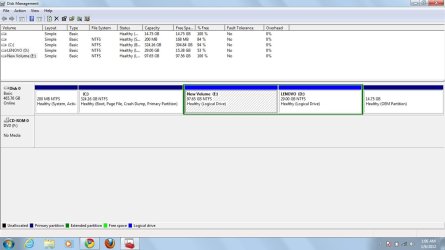
Also, please upload a screenshot of your expanded disk management layout so that we can see what is going on.

http://www.sevenforums.com/tutorials/9733-screenshots-files-upload-post-seven-forums.html
 

My Computer

Computer Manufacturer/Model Number
HP Pavilion Elite 495UK
OS
Windows 7 Ultimate SP1 64-Bit
CPU
Intel Core i7 870 @ 2.93GHz
Motherboard
MSI 2A9C (CPU1)
Memory
8Gb Dual-Channel DDR3 @ 664MHz
Graphics Card(s)
nVidia GeForce GTX 460 1024MB dedicated RAM
Sound Card
Realtek HD Audio
Monitor(s) Displays
HP2310i
Screen Resolution
1920 x 1080
Hard Drives
1x1954GB Hitachi HDS22020ALA 330 (RAID), 1x1954GB Hitachi External for backup and storage
PSU
460W
Case
HP Elite
Cooling
Air cooled
Keyboard
Logitech K750 solar-powered keyboard
Mouse
Logitech Wireless M180 mouse
Internet Speed
2Mb
Other Info
Pure Avanti Flow Internet Radio with iPod Dock, 64Gb iPod, HP USB Speakers, Sony MDR-V500 Headphones, Sony Vaio F-Series Laptop
All the points Seavixen32 raised are highly valid. I am also asking you ... what is the third party software that you have used ? Have you installed that software just before making that partition ? If so, there is a good possibility that it put a startup entry which is delaying the startup procedure.

Press the windows button and R simultaneously in your keyboard .... the run window will appear. Type "msconfig" (without quotes) there and hit enter; you will get the system configuration window. Click on the startup tab of the window, and see if there is a startup entry for the disk partitioning/management software. if there is something like this, disable it. Now restart and see if there is any changes.
 

My Computer

Computer type
PC/Desktop
Computer Manufacturer/Model Number
Self Assembled
OS
Microsoft Windows 10 Pro Insider Preview 64-bit
CPU
Intel(R) Core(TM) i3-4130 CPU @ 3.40GHz
Motherboard
Gigabyte Technology Co., Ltd. B85M-D3H
Memory
Corsair Vengence 4GB x2 (8.00GB Dual-Channel DDR3 @ 798MHz)
Graphics Card(s)
2047MB GeForce GTS 450 (ZOTAC International)
Sound Card
Onboard (Realtek High Definition Audio)
Monitor(s) Displays
LG Flatron E2040T
Screen Resolution
1600x900
Hard Drives
Western Digital 1 TB
Seagate 500 GB
PSU
Corsair VS550
Case
Cooler Master K380
Cooling
Cooler Master Seidon 120V Plus
Keyboard
Logitech MK260r
Mouse
Logitech MK260r
Internet Speed
PMPL Broadband
Antivirus
Windows Defender + MBAM
Browser
Firefox
Other Info
Dell Studio 15" Laptop
Reply

yes, your second suggestion is correct i have exactly this problem my windows start after 40-50 seconds delay....and sorry to say that i not remember the name of software.....and here is the screen short please reply me soon... i am anxiously waiting for your help....
 

Attachments

  • disc.jpg
    disc.jpg
    81.7 KB · Views: 35

My Computer

OS
Windows 7 Home Basic 64 bit
its not happening when i am restarting my windows .... its only happening after shutting down the computer....like somebody press the pause button for 40-50 seconds.
 

My Computer

OS
Windows 7 Home Basic 64 bit
That means you dont have that software installed now ?

If you want to restart\reboot, you are to shutdown at first ! Did you mean it happens if you disconnect the power and then start windows ?
 

My Computer

Computer type
PC/Desktop
Computer Manufacturer/Model Number
Self Assembled
OS
Microsoft Windows 10 Pro Insider Preview 64-bit
CPU
Intel(R) Core(TM) i3-4130 CPU @ 3.40GHz
Motherboard
Gigabyte Technology Co., Ltd. B85M-D3H
Memory
Corsair Vengence 4GB x2 (8.00GB Dual-Channel DDR3 @ 798MHz)
Graphics Card(s)
2047MB GeForce GTS 450 (ZOTAC International)
Sound Card
Onboard (Realtek High Definition Audio)
Monitor(s) Displays
LG Flatron E2040T
Screen Resolution
1600x900
Hard Drives
Western Digital 1 TB
Seagate 500 GB
PSU
Corsair VS550
Case
Cooler Master K380
Cooling
Cooler Master Seidon 120V Plus
Keyboard
Logitech MK260r
Mouse
Logitech MK260r
Internet Speed
PMPL Broadband
Antivirus
Windows Defender + MBAM
Browser
Firefox
Other Info
Dell Studio 15" Laptop
Post a snip of your msconfig startup tab opened.
 

My Computer

Computer type
PC/Desktop
Computer Manufacturer/Model Number
Home Built Desktop By DataTech
OS
Windows 7 Ultimate X64 SP1
CPU
Intel i5-2550K, Differing ~4.4-4.8GHz No built in GPU
Motherboard
ASUS P8Z68-V PRO/GEN3
Memory
16GB G.Skill Sniper 1866MHz @ 2133MHz 2x8GB
Graphics Card(s)
ASUS GTX650TIB-DC2OC-2GD5, (650TI Boost)
Sound Card
Onboard Realtek 5-1
Monitor(s) Displays
Samsung P2570HD
Screen Resolution
1920x1080
Hard Drives
Samsung 840 Pro 256GB SSD for OS, 500GB Seagate Constellation (Enterprise drive) for Data
PSU
Corsair HX650W
Case
Inwin Dragon Rider
Cooling
Hyper 212 EVO w/two Noctua fans, push-pull, @1300 RPM
Keyboard
E-Z Eyes, bright yellow keys with large characters
Mouse
steelseries SENSEI Laser Pro Gaming
Internet Speed
48-51Mbs Mbs down, 11 Mbs up Xfinity Cable
Antivirus
Norton Internet Security 2013
Browser
IE 10, Opera, Pale Moon if needed
Other Info
4 case fans, LG BluRay-RE, ASUS DVD-RW, Mr. Fusion power supply, 1.21 gigawatts.
Your partitioning looks correct. In the future use free Partition Wizard bootable CD which checks the file system as it works and never fails whereas all others can fail.

I would run Disk Check now to check the file system.

It's possible this is a coincidence and involves some other software or driver hanging shutdown. Follow the other suggestions to get a Clean Boot by unchecking everything in msconfig>Startup and >Services (after checking box to Hide all MS Services) except your AV.

Run a lightweight free AV like Microsoft Security Essential.

Read the logs and use System Resources given in these troubleshooting steps to detect problems or hangs.

If problems persist run a Shutdown trace which will determine the cause with certainty: Gathering a Startup, Shutdown, Sleep, Hibernate, or Reboot Trace - Windows 7 Forums
 
Although it is not free, but I have never seen Acronis Disk Director Boot Disk to fail either. The problem that Splashing is facing seems unique.

Please let me know if you made a clean install of Windows 7 or got it pre-installed from the vendor with a the recovery partition. For a clean install there is an easy way out but if the computer came with a recovery partition then meddling with partitions can often cause problems during restoration. Just my opinion.


Your partitioning looks correct. In the future use free Partition Wizard bootable CD which checks the file system as it works and never fails whereas all others can fail.

I would run Disk Check now to check the file system.

It's possible this is a coincidence and involves some other software or driver hanging shutdown. Follow the other suggestions to get a Clean Boot by unchecking everything in msconfig>Startup and >Services (after checking box to Hide all MS Services) except your AV.

Run a lightweight free AV like Microsoft Security Essential.

Read the logs and use System Resources given in these troubleshooting steps to detect problems or hangs.

If problems persist run a Shutdown trace which will determine the cause with certainty: Gathering a Startup, Shutdown, Sleep, Hibernate, or Reboot Trace - Windows 7 Forums
 

My Computer

Computer Manufacturer/Model Number
Custom Built
OS
Windows 7 Pro with SP1 32bit
Motherboard
Intel D845GVS1 X86-based PC
Memory
2 gigs of RAM
Graphics Card(s)
Intel(R) 82845G/GL/GE/PE/GV Graphics Controller
Sound Card
Realtek AC'97 Audio
Monitor(s) Displays
Samsung SyncMaster 931BF Black 19" LCD Monitor
Screen Resolution
1280X960
Hard Drives
1. SAMSUNG SP0822N ATA Device ~ 80 GigaBytes

2. Seagate FreeAgent Go USB Device ~ 500 GigaBytes
Keyboard
COMPAQ Standard PS/2 Keyboard
Mouse
iBall Laser Precise Speedster
Internet Speed
4 mb/sec
i am also try @gregrocker suggestion that disable every thing in msconfig.. but the problem persist. then i run the factory default recovery but the problem again persist i.e. Window stuck for 1 minute after "starting windows" screen like somebody press the pause button after "starting windows" screen. and this happens only when i shutdown the computer and start again..on restarting or doing any other operation like hibernation etc.. this problem doesn't not occur..
 

My Computer

OS
Windows 7 Home Basic 64 bit
What exactly is the default Factory Recovery you ran? Are you running Factory Recovery from its partition on the HD at boot or from the OS? Or are you running the Disks?

Please fill in your System Specs in bottom left corner of posts.

Do you only have a problem with Shutdown now? If so check your logs and System Resources for clues as to what is hanging Shutdown: troubleshooting steps

If these don't solve it run a Shutdown trace: Gathering a Startup, Shutdown, Sleep, Hibernate, or Reboot Trace - Windows 7 Forums
 
actually this problem is not happens when i am running windows in safe mode... please help me
 

My Computer

OS
Windows 7 Home Basic 64 bit
You must have misssed the other steps I gave you to complete since you only completed one before asking for more. This is an interactive Forum - we give you steps, you report back the results or ask more questions to get them done correctly. The skipped step often is the fix.

I would run Disk Check now to check the file system.

Run a lightweight free AV like Microsoft Security Essential.

Read the logs and use System Resources given in these troubleshooting steps to detect problems or hangs.

If problems persist run a Shutdown trace which will determine the cause with certainty: Gathering a Startup, Shutdown, Sleep, Hibernate, or Reboot Trace - Windows 7 Forums

What exactly is the default Factory Recovery you ran? Are you running Factory Recovery from its partition on the HD at boot or from the OS? Or are you running the Disks?

Please fill in your System Specs in bottom left corner of posts.

Do you only have a problem with Shutdown now? If so check your logs and System Resources for clues as to what is hanging Shutdown: troubleshooting steps

If these don't solve it run a Shutdown trace: Gathering a Startup, Shutdown, Sleep, Hibernate, or Reboot Trace - Windows 7 Forums
 
Back
Top