
A few hours ago , I used EasyBCD and deleted Windows 7 entry from it ( still had a Windows 7 loader entry ).
Due to that now whenever I try to boot up Windows 7, I get a BSOD right at the icon thinggy ( those 4 lights ).
BSOD Error message -> 0x7b
I do have a USB flash with windows 7 on it, and I tried to use it in order to repair or reinstall. When trying to repair, it sais that It can't find any instalation of Windows.When trying to install it finds no drives ( like partitions ) where to install it.
I have tried using the command prompt and I have found out that If i write : diskpart and then list volume. It only shows the USB Flash and no other partitions.
At this moment I'm running this PC with Ubuntu, I can access my old Windows files and move them around. Also the ubuntu instalation doesn't see any Windows instalation out there. I can only chose between Wipe everything and install Ubuntu or something else.
As far as I remember my partitions look like :
sda1 - 1MB I have no clue what this is but I guess it is due to EasyBCD or something
sda2 - 104 MB - the one Windows always makes
sda3 - 131072MB - Classic C drive ( the place where Windows is installed )
sda4 - D: drive, where I keep my files.
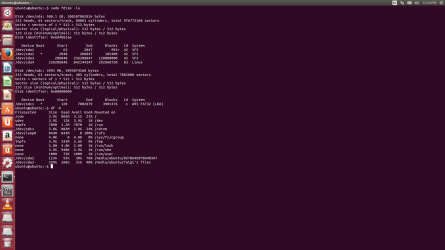
The picture contains some information I managed to pull from Ubuntu about the system.
What options do I have other than wiping the entire hard drive?
Due to that now whenever I try to boot up Windows 7, I get a BSOD right at the icon thinggy ( those 4 lights ).
BSOD Error message -> 0x7b
I do have a USB flash with windows 7 on it, and I tried to use it in order to repair or reinstall. When trying to repair, it sais that It can't find any instalation of Windows.When trying to install it finds no drives ( like partitions ) where to install it.
I have tried using the command prompt and I have found out that If i write : diskpart and then list volume. It only shows the USB Flash and no other partitions.
At this moment I'm running this PC with Ubuntu, I can access my old Windows files and move them around. Also the ubuntu instalation doesn't see any Windows instalation out there. I can only chose between Wipe everything and install Ubuntu or something else.
As far as I remember my partitions look like :
sda1 - 1MB I have no clue what this is but I guess it is due to EasyBCD or something
sda2 - 104 MB - the one Windows always makes
sda3 - 131072MB - Classic C drive ( the place where Windows is installed )
sda4 - D: drive, where I keep my files.
The picture contains some information I managed to pull from Ubuntu about the system.
What options do I have other than wiping the entire hard drive?
Attachments
Last edited:
My Computer
- Computer type
- PC/Desktop
- OS
- Windows 7 Ultimate x64
