
Windows 7 bootloader get nuked when booting windows XP (dualboot)

QWERTYAndreas

New member
Local time
1:19 AM
Messages
6
Hello!

I have an OQO 01+, and im dualbooting it with windows 7 and windows XP. When i boot windows 7 everything is fine, and everything is working. I can also boot windows XP.

But when i boot windows XP, and shut the computer down, then i cant boot until i use a recovering CD to repair the bootloader. It simply says "Press Ctrl+Alt+Delete to restart".

It happens after installing drivers on windows 7. Then the problem appears. Before i installed the driver, there was no problem.

So does anyone have an idea, why windows XP destroy the windows 7 bootloader?

Cheers!

Andreas
 

My Computer My Computer

Computer Manufacturer/Model Number
Thinkpad W500
OS
Windows 7 professional 32 bit
CPU
T9400
Memory
4 GB DDR3
Graphics Card(s)
ATi FireGL V5700
Monitor(s) Displays
Lenovo Thinkvision l2230x
How exactly was the Dual Boot constructed? Which OS first? EasyBCD adding XP or Win?

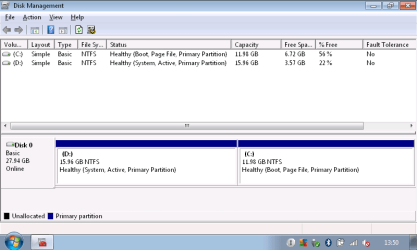
Please also post back a screenshot of your maximized Win7 Disk Mgmt drive map with listings showing all columns, using Snipping Tool in Start Menu.

How are you repairing the bootloader exactly?
 
And which drivers did you install? (Just in case this matters...)
 

My Computer My Computer

Computer type
PC/Desktop
Computer Manufacturer/Model Number
Custom-built
OS
Windows 7 Professional SP1 32-bit
CPU
Intel Core 2 Duo E6600 2.4GHz
Motherboard
Asus PL5D2
Memory
4GB DDR2-667 (4x1GB in dual-channel config)
Graphics Card(s)
nVidia GeForce 9800 GT
Sound Card
Creative X-Fi XtremeMusic
Monitor(s) Displays
Acer P236H
Screen Resolution
1920x1200 (DVI)
Hard Drives
OCZ SSD Vertex Plus 60GB SATA (Firmware 3.55), 64MB cache
Hitachi HD321KJ SATA, 320GB, 7200rpm, 16MB cache
PSU
Antec TruePower 2.0
Case
Cooler Master Centurion
Cooling
Too many fans
Keyboard
Standard
Mouse
Microsoft wireless optical mouse
Internet Speed
AT&T U-verse (18mbit/sec)
Antivirus
Microsoft Security Essentials
Browser
Firefox
Other Info
Other devices:
Compaq CQ-60 laptop
Google Nexus 7 (2012) tablet
Nvidia SHIELD tablet (US/LTE)
Hardkernel ODROID-XU single-board computer (Samsung Exynos 5420)
The dual boot is constructed as follows:

XP was on, from start. Then Windows 7 was installed. No edit with easyBCD and so on. Just plain install.

I repair the bootloader, by booting a recovery cd and use the following commands in CMD:

bootrec.exe /fixmbr
bootsect.exe /nt60 all /force
(source: Recovering the Vista Bootloader from the DVD - EasyBCD - NeoSmart Technologies Wiki)

The drivers i installed was audiodrivers, wacom driver and a driverpack from OQO (Downloads « OQO forum, drivers, repair service & support, hardware, and accessories | OQOasis). They are for XP, and i have just intalled them plain. Works nicley.

I wonder if it is because XP, in XP use the C: drive, and gives windows 7 the D: driver. And windows 7 in windows 7 use the C: drive, and gives windows XP the D: drive?

/Andreas
 

My Computer My Computer

Computer Manufacturer/Model Number
Thinkpad W500
OS
Windows 7 professional 32 bit
CPU
T9400
Memory
4 GB DDR3
Graphics Card(s)
ATi FireGL V5700
Monitor(s) Displays
Lenovo Thinkvision l2230x
I'm sorry, but you're contradicting yourself - in your first post, you said that you installed new drivers in Windows 7, not XP. Which is it?

What exactly did you install from the OQO website? There's an awful lot of downloads there, so you need to be more specific.

To answer your question about the drive letters, no, that's not it. It's normal (and desirable) for each Windows installation to see itself as C: whenever it's running. Each Windows "keeps its own records" of drive letter assignments, and these are not global (i.e. above the level of each Windows installation).

What I'm wondering right now is this: If XP was already installed, and you then installed 7, what prompted the need to "repair the bootloader"? During installation, 7 should have set up a dualboot with XP automatically - there wouldn't have been any need to fix anything afterward.

I'm just trying to understand the exact issue here, but these points need to be clarified before we can move on.
 

My Computer My Computer

Computer type
PC/Desktop
Computer Manufacturer/Model Number
Custom-built
OS
Windows 7 Professional SP1 32-bit
CPU
Intel Core 2 Duo E6600 2.4GHz
Motherboard
Asus PL5D2
Memory
4GB DDR2-667 (4x1GB in dual-channel config)
Graphics Card(s)
nVidia GeForce 9800 GT
Sound Card
Creative X-Fi XtremeMusic
Monitor(s) Displays
Acer P236H
Screen Resolution
1920x1200 (DVI)
Hard Drives
OCZ SSD Vertex Plus 60GB SATA (Firmware 3.55), 64MB cache
Hitachi HD321KJ SATA, 320GB, 7200rpm, 16MB cache
PSU
Antec TruePower 2.0
Case
Cooler Master Centurion
Cooling
Too many fans
Keyboard
Standard
Mouse
Microsoft wireless optical mouse
Internet Speed
AT&T U-verse (18mbit/sec)
Antivirus
Microsoft Security Essentials
Browser
Firefox
Other Info
Other devices:
Compaq CQ-60 laptop
Google Nexus 7 (2012) tablet
Nvidia SHIELD tablet (US/LTE)
Hardkernel ODROID-XU single-board computer (Samsung Exynos 5420)

My Computer My Computer

Computer Manufacturer/Model Number
HP Pavilion Elite 495UK
OS
Windows 7 Ultimate SP1 64-Bit
CPU
Intel Core i7 870 @ 2.93GHz
Motherboard
MSI 2A9C (CPU1)
Memory
8Gb Dual-Channel DDR3 @ 664MHz
Graphics Card(s)
nVidia GeForce GTX 460 1024MB dedicated RAM
Sound Card
Realtek HD Audio
Monitor(s) Displays
HP2310i
Screen Resolution
1920 x 1080
Hard Drives
1x1954GB Hitachi HDS22020ALA 330 (RAID), 1x1954GB Hitachi External for backup and storage
PSU
460W
Case
HP Elite
Cooling
Air cooled
Keyboard
Logitech K750 solar-powered keyboard
Mouse
Logitech Wireless M180 mouse
Internet Speed
2Mb
Other Info
Pure Avanti Flow Internet Radio with iPod Dock, 64Gb iPod, HP USB Speakers, Sony MDR-V500 Headphones, Sony Vaio F-Series Laptop
bootrec.exe /fixmbr ->fixes the win7 master boot record. this wasn't needed in this situation afaik
bootsect.exe /nt60 all /force -> put nt60 boot sector on ALL drives. Normally not a problem but only needed for vista and win7 installations.

bootsect.exe /nt52 X: /force
replace X with the winxp driveletter in recovery environment. this can be C but also D!!
 

My Computer My Computer

Computer type
Laptop
Computer Manufacturer/Model Number
ACER ASPIRE 5742G
OS
Microsoft Windows 7 Home Premium 64-bits 7601 Multiprocessor Free Service Pack 1
CPU
Intel(R) Core(TM) i3 CPU M 370 @ 2.40GHz
Motherboard
Acer Aspire 5742G
Memory
4,00 GB
Graphics Card(s)
ATI Mobility Radeon HD 5400 Series
Sound Card
(1) AMD High Definition Audio Device (2) Realtek High Defi
Screen Resolution
1366 x 768 x 32 bits (4294967296 colors) @ 60 Hz
Hard Drives
WDC WD5000BEVT-22ZAT0
I'm sorry, but you're contradicting yourself - in your first post, you said that you installed new drivers in Windows 7, not XP. Which is it?

I installed the driver for windows XP under windows 7

What exactly did you install from the OQO website? There's an awful lot of downloads there, so you need to be more specific.

I installed the following drivers:

The audio driver
The wacom driver
And the universal installer

What I'm wondering right now is this: If XP was already installed, and you then installed 7, what prompted the need to "repair the bootloader"? During installation, 7 should have set up a dualboot with XP automatically - there wouldn't have been any need to fix anything afterward.

The dualboot was setup automatically, and works as it should work. I can boot both windows XP and windows 7.
But when i bot windows XP, and power off, i get a message: "A disk error occured, press ctrl+alt+delete to restart"

Andreas
 

My Computer My Computer

Computer Manufacturer/Model Number
Thinkpad W500
OS
Windows 7 professional 32 bit
CPU
T9400
Memory
4 GB DDR3
Graphics Card(s)
ATi FireGL V5700
Monitor(s) Displays
Lenovo Thinkvision l2230x
Still waiting for the maximized Disk Management drive map and listings screenshot.

If Win7 was installed last then as stated there is no reason to repair the bootloader since it should configure a Dual Boot menu placing its boot files on XP partition.

The problems you are having with XP now may be the result of running unneeded and incorrect commands.

All necessary boot repair commands are automated in Win7 Startup Repair.
 
Where excaclty do i find the disk managment map?

Thanks for the replies.

Andreas
 

My Computer My Computer

Computer Manufacturer/Model Number
Thinkpad W500
OS
Windows 7 professional 32 bit
CPU
T9400
Memory
4 GB DDR3
Graphics Card(s)
ATi FireGL V5700
Monitor(s) Displays
Lenovo Thinkvision l2230x

My Computer My Computer

Computer Manufacturer/Model Number
HP Pavilion Elite 495UK
OS
Windows 7 Ultimate SP1 64-Bit
CPU
Intel Core i7 870 @ 2.93GHz
Motherboard
MSI 2A9C (CPU1)
Memory
8Gb Dual-Channel DDR3 @ 664MHz
Graphics Card(s)
nVidia GeForce GTX 460 1024MB dedicated RAM
Sound Card
Realtek HD Audio
Monitor(s) Displays
HP2310i
Screen Resolution
1920 x 1080
Hard Drives
1x1954GB Hitachi HDS22020ALA 330 (RAID), 1x1954GB Hitachi External for backup and storage
PSU
460W
Case
HP Elite
Cooling
Air cooled
Keyboard
Logitech K750 solar-powered keyboard
Mouse
Logitech Wireless M180 mouse
Internet Speed
2Mb
Other Info
Pure Avanti Flow Internet Radio with iPod Dock, 64Gb iPod, HP USB Speakers, Sony MDR-V500 Headphones, Sony Vaio F-Series Laptop
You cannot install drivers for one Windows under another. Not possible. :confused: You probably meant something else, but I'm not sure what...
I suspect that since you only experience booting problems after a session in XP, something is running inside of XP that's messing with the MBR/bootloader. We probably should concentrate on XP for that reason.

Can you think of anything you installed under XP that could be doing this? (Anyway, don't want to get in the way of getting the screenshot from Disk Management for now...)
 

My Computer My Computer

Computer type
PC/Desktop
Computer Manufacturer/Model Number
Custom-built
OS
Windows 7 Professional SP1 32-bit
CPU
Intel Core 2 Duo E6600 2.4GHz
Motherboard
Asus PL5D2
Memory
4GB DDR2-667 (4x1GB in dual-channel config)
Graphics Card(s)
nVidia GeForce 9800 GT
Sound Card
Creative X-Fi XtremeMusic
Monitor(s) Displays
Acer P236H
Screen Resolution
1920x1200 (DVI)
Hard Drives
OCZ SSD Vertex Plus 60GB SATA (Firmware 3.55), 64MB cache
Hitachi HD321KJ SATA, 320GB, 7200rpm, 16MB cache
PSU
Antec TruePower 2.0
Case
Cooler Master Centurion
Cooling
Too many fans
Keyboard
Standard
Mouse
Microsoft wireless optical mouse
Internet Speed
AT&T U-verse (18mbit/sec)
Antivirus
Microsoft Security Essentials
Browser
Firefox
Other Info
Other devices:
Compaq CQ-60 laptop
Google Nexus 7 (2012) tablet
Nvidia SHIELD tablet (US/LTE)
Hardkernel ODROID-XU single-board computer (Samsung Exynos 5420)
Here is the picture.

Corazon: I did install drivers for windows XP under windows 7. And it worked. It is possibly, but not recommended.

I have not installed anything under XP, i didnt have before i installed windows 7. BUT: i can boot windows XP normally if i dont install the drivers at windows 7.. (ive only tried twice so far - theres a limit on how much i wanted to repair the computer with at sluggish bootCD...)
 

Attachments

  • Untitled.png
    Untitled.png
    12.6 KB · Views: 18

My Computer My Computer

Computer Manufacturer/Model Number
Thinkpad W500
OS
Windows 7 professional 32 bit
CPU
T9400
Memory
4 GB DDR3
Graphics Card(s)
ATi FireGL V5700
Monitor(s) Displays
Lenovo Thinkvision l2230x
If you installed XP drivers under 7 manually, i.e. by copying system files and adding registry entries, then I can see how you would've done it. Is that what you meant?

Your Disk Management screenshot doesn't show anything out of the ordinary - it's the expected result of a 7-after-XP installation (where the XP partition holds the boot files needed for the Windows 7 boot manager to run).

BUT: i can boot windows XP normally if i dont install the drivers at windows 7..
I don't understand this statement, please explain. You're trying to install certain drivers under Windows 7 but they cause XP not to boot?
 

My Computer My Computer

Computer type
PC/Desktop
Computer Manufacturer/Model Number
Custom-built
OS
Windows 7 Professional SP1 32-bit
CPU
Intel Core 2 Duo E6600 2.4GHz
Motherboard
Asus PL5D2
Memory
4GB DDR2-667 (4x1GB in dual-channel config)
Graphics Card(s)
nVidia GeForce 9800 GT
Sound Card
Creative X-Fi XtremeMusic
Monitor(s) Displays
Acer P236H
Screen Resolution
1920x1200 (DVI)
Hard Drives
OCZ SSD Vertex Plus 60GB SATA (Firmware 3.55), 64MB cache
Hitachi HD321KJ SATA, 320GB, 7200rpm, 16MB cache
PSU
Antec TruePower 2.0
Case
Cooler Master Centurion
Cooling
Too many fans
Keyboard
Standard
Mouse
Microsoft wireless optical mouse
Internet Speed
AT&T U-verse (18mbit/sec)
Antivirus
Microsoft Security Essentials
Browser
Firefox
Other Info
Other devices:
Compaq CQ-60 laptop
Google Nexus 7 (2012) tablet
Nvidia SHIELD tablet (US/LTE)
Hardkernel ODROID-XU single-board computer (Samsung Exynos 5420)
The System boot files are on XP as can be expected when Win7 is installed last (correctly) and configures a Dual Boot.

Something likely corrupted XP so that it shuts down incorrectly I would troubleshoot this by moving the System boot files to Win7 so that it starts on its own (without relying on the boot files on XP partition as it is now) then using EasyBCD add XP from Win7 which works better. This will refresh the bootloader and possibly solve the shutdown problem.

To do this, mark Win7 partition Active in XP DiskMgmt or using Diskpart: Partition - Mark as Active.

Next boot the Win7 DVD Repair console or Repair CD to Startup Repair - Run 3 Separate Times until Win7 starts on its own.

Then install EasyBCD 2.02 to Win7 to Add XP, accept offered boot files, Save, Reboot to Dual Boot menu. EasyBCD 2.0.2 - NeoSmart Technologies

Hopefully this solves the issue. If not you may need XP Repair install or reinstall.
 
I have marked the partition as active from windows 7. But it did not seem to work. I will try to see the XP DiskMgmt tomorrow - and see if it has any difference.

Andreas
 

My Computer My Computer

Computer Manufacturer/Model Number
Thinkpad W500
OS
Windows 7 professional 32 bit
CPU
T9400
Memory
4 GB DDR3
Graphics Card(s)
ATi FireGL V5700
Monitor(s) Displays
Lenovo Thinkvision l2230x
You cannot mark Win7 partition Active from Win7, which is why I said to mark it Active from XP or use Diskpart steps given from the DVD/Repair CD Command Line: DISKPART At PC Startup
 
Back
Top