
Windows 7 BSOD - STOP: 0x0000003B

JoeB88

New member
Local time
9:12 AM
Messages
10
Randomly throughout my day I will experience three or less BSOD. This has been going on for months and I have no idea how to fix it. I've updated every single driver and downloaded all Windows updates I can find. The BSOD message begins with:

STOP: 0x0000003B

The only change I have ever made to this desktop is I added some extra RAM.

I have attached the log collector file. Thanks in advance to anyone who reads this!
 

My Computer

Computer type
PC/Desktop
Computer Manufacturer/Model Number
Dell
OS
Microsoft Windows 7 Ultimate 64-bit 7600 Multiprocessor Free
CPU
Intel(R) Core(TM) i7-4770 CPU @ 3.40GHz
Motherboard
Dell Inc. 0KWVT8
Memory
16.00 GB
Graphics Card(s)
AMD Radeon HD 7570
Sound Card
(1) AMD High Definition Audio Device (2) Bluetooth Audio D
Screen Resolution
1920 x 1080 x 32 bits (4294967296 colors) @ 60 Hz
Hard Drives
(1) ATA ST1000DM003-1CH1 SCSI Disk Device (2) CF/MD Card (3) MS/Pro/Duo Card (4) SD/mini-MMC/RS Card (5) SM/xD Card (6) WD My Passport 0741 USB Device
Hi JoeB88.

You are using the display driver AMD 14.6 RC2, which you are not supposed to.

Uninstall your installed version of the display driver.

Then clean up any possible leftover.

Then install a WHQL version only.

Let us know the result.
____________________________________________
Code:
fffff880`05893738  fffff880`0f47d736Unable to load image \SystemRoot\system32\DRIVERS\atikmdag.sys, Win32 error 0n2
*** WARNING: Unable to verify timestamp for atikmdag.sys
*** ERROR: Module load completed but symbols could not be loaded for atikmdag.sys
 atikmdag+0x27736
-----------------------------------------------------------------------
fffff880`05893678  fffff880`04fa66ebUnable to load image \SystemRoot\system32\DRIVERS\atikmpag.sys, Win32 error 0n2
*** WARNING: Unable to verify timestamp for atikmpag.sys
*** ERROR: Module load completed but symbols could not be loaded for atikmpag.sys
 atikmpag+0x376eb
-----------------------------------------------------------------------
fffff880`0f456000 fffff880`103ff000   atikmdag T (no symbols)           
    Loaded symbol image file: atikmdag.sys
    Image path: \SystemRoot\system32\DRIVERS\atikmdag.sys
    Image name: atikmdag.sys
    Timestamp:        Wed Jul 09 21:04:34 2014 (53BD610A)
    CheckSum:         00F46306
    ImageSize:        00FA9000
    Translations:     0000.04b0 0000.04e4 0409.04b0 0409.04e4
 

My Computer

Computer type
PC/Desktop
Computer Manufacturer/Model Number
Self Assembled
OS
Microsoft Windows 10 Pro Insider Preview 64-bit
CPU
Intel(R) Core(TM) i3-4130 CPU @ 3.40GHz
Motherboard
Gigabyte Technology Co., Ltd. B85M-D3H
Memory
Corsair Vengence 4GB x2 (8.00GB Dual-Channel DDR3 @ 798MHz)
Graphics Card(s)
2047MB GeForce GTS 450 (ZOTAC International)
Sound Card
Onboard (Realtek High Definition Audio)
Monitor(s) Displays
LG Flatron E2040T
Screen Resolution
1600x900
Hard Drives
Western Digital 1 TB
Seagate 500 GB
PSU
Corsair VS550
Case
Cooler Master K380
Cooling
Cooler Master Seidon 120V Plus
Keyboard
Logitech MK260r
Mouse
Logitech MK260r
Internet Speed
PMPL Broadband
Antivirus
Windows Defender + MBAM
Browser
Firefox
Other Info
Dell Studio 15" Laptop
I tried this last week and when I cleaned up the leftovers, my PC couldn't even recognize that I had a video card. Installing the new drivers didn't help at all either. After a ton of headache I had to resort to a system restore. I've already gotten two blue screens today and I've attached the minidump files for them.
 

My Computer

Computer type
PC/Desktop
Computer Manufacturer/Model Number
Dell
OS
Microsoft Windows 7 Ultimate 64-bit 7600 Multiprocessor Free
CPU
Intel(R) Core(TM) i7-4770 CPU @ 3.40GHz
Motherboard
Dell Inc. 0KWVT8
Memory
16.00 GB
Graphics Card(s)
AMD Radeon HD 7570
Sound Card
(1) AMD High Definition Audio Device (2) Bluetooth Audio D
Screen Resolution
1920 x 1080 x 32 bits (4294967296 colors) @ 60 Hz
Hard Drives
(1) ATA ST1000DM003-1CH1 SCSI Disk Device (2) CF/MD Card (3) MS/Pro/Duo Card (4) SD/mini-MMC/RS Card (5) SM/xD Card (6) WD My Passport 0741 USB Device
You have got a very old display driver.
Code:
    Image name: atikmpag.sys
[COLOR=Red]    Timestamp:        Thu Dec 20 01:02:55 2012[/COLOR] (50D21667)
And that is failing there.
Code:
fffff880`0c998088  fffff880`04f02d1dUnable to load image \SystemRoot\system32\DRIVERS\atikmpag.sys, Win32 error 0n2
[COLOR=Red]*** WARNING: Unable to verify timestamp for atikmpag.sys
*** ERROR: Module load completed but symbols could not be loaded for atikmpag.sys[/COLOR]
 atikmpag+0x3bd1d
You can install an RC but cannot install a WHQL? Strange enough.

Try AMD Driver Autodetect
 

My Computer

Computer type
PC/Desktop
Computer Manufacturer/Model Number
Self Assembled
OS
Microsoft Windows 10 Pro Insider Preview 64-bit
CPU
Intel(R) Core(TM) i3-4130 CPU @ 3.40GHz
Motherboard
Gigabyte Technology Co., Ltd. B85M-D3H
Memory
Corsair Vengence 4GB x2 (8.00GB Dual-Channel DDR3 @ 798MHz)
Graphics Card(s)
2047MB GeForce GTS 450 (ZOTAC International)
Sound Card
Onboard (Realtek High Definition Audio)
Monitor(s) Displays
LG Flatron E2040T
Screen Resolution
1600x900
Hard Drives
Western Digital 1 TB
Seagate 500 GB
PSU
Corsair VS550
Case
Cooler Master K380
Cooling
Cooler Master Seidon 120V Plus
Keyboard
Logitech MK260r
Mouse
Logitech MK260r
Internet Speed
PMPL Broadband
Antivirus
Windows Defender + MBAM
Browser
Firefox
Other Info
Dell Studio 15" Laptop
The Autodetect forces me to install 14-4 but 14-4 only seems to update an HDMI audio driver. My PC (which I got brand new last year) came with a driver from 2012. My PC BSOD's with this driver. Autodetect updates to 14-4, and I still get BSOD's.
 

My Computer

Computer type
PC/Desktop
Computer Manufacturer/Model Number
Dell
OS
Microsoft Windows 7 Ultimate 64-bit 7600 Multiprocessor Free
CPU
Intel(R) Core(TM) i7-4770 CPU @ 3.40GHz
Motherboard
Dell Inc. 0KWVT8
Memory
16.00 GB
Graphics Card(s)
AMD Radeon HD 7570
Sound Card
(1) AMD High Definition Audio Device (2) Bluetooth Audio D
Screen Resolution
1920 x 1080 x 32 bits (4294967296 colors) @ 60 Hz
Hard Drives
(1) ATA ST1000DM003-1CH1 SCSI Disk Device (2) CF/MD Card (3) MS/Pro/Duo Card (4) SD/mini-MMC/RS Card (5) SM/xD Card (6) WD My Passport 0741 USB Device

My Computer

Computer type
PC/Desktop
Computer Manufacturer/Model Number
Self Assembled
OS
Microsoft Windows 10 Pro Insider Preview 64-bit
CPU
Intel(R) Core(TM) i3-4130 CPU @ 3.40GHz
Motherboard
Gigabyte Technology Co., Ltd. B85M-D3H
Memory
Corsair Vengence 4GB x2 (8.00GB Dual-Channel DDR3 @ 798MHz)
Graphics Card(s)
2047MB GeForce GTS 450 (ZOTAC International)
Sound Card
Onboard (Realtek High Definition Audio)
Monitor(s) Displays
LG Flatron E2040T
Screen Resolution
1600x900
Hard Drives
Western Digital 1 TB
Seagate 500 GB
PSU
Corsair VS550
Case
Cooler Master K380
Cooling
Cooler Master Seidon 120V Plus
Keyboard
Logitech MK260r
Mouse
Logitech MK260r
Internet Speed
PMPL Broadband
Antivirus
Windows Defender + MBAM
Browser
Firefox
Other Info
Dell Studio 15" Laptop
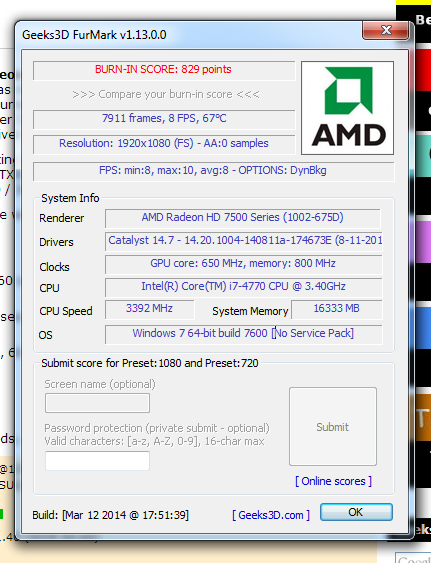
I ran it with the 14.7 drivers installed. I can uninstall all my drivers but 14.4 doesn't install any display drivers for me, so my only option are the old ones from 2012 or the 14.7 BETA ones.

Here's a screenshot of the results:

yGq6g2G.jpg
 

My Computer

Computer type
PC/Desktop
Computer Manufacturer/Model Number
Dell
OS
Microsoft Windows 7 Ultimate 64-bit 7600 Multiprocessor Free
CPU
Intel(R) Core(TM) i7-4770 CPU @ 3.40GHz
Motherboard
Dell Inc. 0KWVT8
Memory
16.00 GB
Graphics Card(s)
AMD Radeon HD 7570
Sound Card
(1) AMD High Definition Audio Device (2) Bluetooth Audio D
Screen Resolution
1920 x 1080 x 32 bits (4294967296 colors) @ 60 Hz
Hard Drives
(1) ATA ST1000DM003-1CH1 SCSI Disk Device (2) CF/MD Card (3) MS/Pro/Duo Card (4) SD/mini-MMC/RS Card (5) SM/xD Card (6) WD My Passport 0741 USB Device
I have asked for more help in your thread. I wonder why you cannot install 14.4 WHQL.
 

My Computer

Computer type
PC/Desktop
Computer Manufacturer/Model Number
Self Assembled
OS
Microsoft Windows 10 Pro Insider Preview 64-bit
CPU
Intel(R) Core(TM) i3-4130 CPU @ 3.40GHz
Motherboard
Gigabyte Technology Co., Ltd. B85M-D3H
Memory
Corsair Vengence 4GB x2 (8.00GB Dual-Channel DDR3 @ 798MHz)
Graphics Card(s)
2047MB GeForce GTS 450 (ZOTAC International)
Sound Card
Onboard (Realtek High Definition Audio)
Monitor(s) Displays
LG Flatron E2040T
Screen Resolution
1600x900
Hard Drives
Western Digital 1 TB
Seagate 500 GB
PSU
Corsair VS550
Case
Cooler Master K380
Cooling
Cooler Master Seidon 120V Plus
Keyboard
Logitech MK260r
Mouse
Logitech MK260r
Internet Speed
PMPL Broadband
Antivirus
Windows Defender + MBAM
Browser
Firefox
Other Info
Dell Studio 15" Laptop

My Computer

Computer type
PC/Desktop
Computer Manufacturer/Model Number
Home made Desktop
OS
Windows 10 Pro. 64/ version 1709 Windows 7 Pro/64
CPU
Intel i7-6800K @ 4.3
Motherboard
ASUS X-99 Deluxe II
Memory
Corsair Platinum 16 gig @2400
Graphics Card(s)
EVGA GTX 1070 OC
Monitor(s) Displays
Asus 27" LED LCD/VE278Q
Screen Resolution
1920-1080 or 1280-720 HDMI
Hard Drives
INTEL SSD 730-240 Gb Sata 3.0/
PSU
EVGA Platium 1200W
Case
Phanteks Luxe Tempered Glass 8 fans/ one radiator
Cooling
XSPC/ Water Cooled CPU
Keyboard
Das 4 Professional
Mouse
Logitech M705/MX Anywhere 2-S
Internet Speed
100 mbits
Antivirus
Microsoft Security Essentials/ Malwarebytes Premium 3.0/ SAS
Browser
I.E. 11 default/Firefox/ ISP Time Warner Cable/Spectrum
Other Info
LG BluRay Burner/
Sound system-KLipsch-THX/
Icy Dock ssd Hot Swap bays.
It installs, it just doesn't do anything. I uninstall all the AMD stuff and use the driver cleaner like you said, then restart. Then I download and install the WHQL version but nothing changes. Under 'Display Adapters' in my device manager all that is listed is 'Standard VGA Graphics Adapter'. However if I download the 2012 drivers or the new BETA ones, it recognizes my graphics card and the drivers then work.
 

My Computer

Computer type
PC/Desktop
Computer Manufacturer/Model Number
Dell
OS
Microsoft Windows 7 Ultimate 64-bit 7600 Multiprocessor Free
CPU
Intel(R) Core(TM) i7-4770 CPU @ 3.40GHz
Motherboard
Dell Inc. 0KWVT8
Memory
16.00 GB
Graphics Card(s)
AMD Radeon HD 7570
Sound Card
(1) AMD High Definition Audio Device (2) Bluetooth Audio D
Screen Resolution
1920 x 1080 x 32 bits (4294967296 colors) @ 60 Hz
Hard Drives
(1) ATA ST1000DM003-1CH1 SCSI Disk Device (2) CF/MD Card (3) MS/Pro/Duo Card (4) SD/mini-MMC/RS Card (5) SM/xD Card (6) WD My Passport 0741 USB Device
I did the system specs but I have no clue what my PSU is. This is a stock desktop from Dell - XPS8700. I use AVG.
 

My Computer

Computer type
PC/Desktop
Computer Manufacturer/Model Number
Dell
OS
Microsoft Windows 7 Ultimate 64-bit 7600 Multiprocessor Free
CPU
Intel(R) Core(TM) i7-4770 CPU @ 3.40GHz
Motherboard
Dell Inc. 0KWVT8
Memory
16.00 GB
Graphics Card(s)
AMD Radeon HD 7570
Sound Card
(1) AMD High Definition Audio Device (2) Bluetooth Audio D
Screen Resolution
1920 x 1080 x 32 bits (4294967296 colors) @ 60 Hz
Hard Drives
(1) ATA ST1000DM003-1CH1 SCSI Disk Device (2) CF/MD Card (3) MS/Pro/Duo Card (4) SD/mini-MMC/RS Card (5) SM/xD Card (6) WD My Passport 0741 USB Device
When you restart, does Windows install it's own graphics driver and then ask you to restart again in order to complete the installation?
 

My Computer

Computer type
PC/Desktop
Computer Manufacturer/Model Number
Home Built - Jan 2013
OS
Windows 7 64 Bit Home Premium SP1
CPU
i7-3820
Motherboard
Asus P9X79-PRO - Bios 4608
Memory
GSkill F3-14900CL9Q - 16GB
Graphics Card(s)
EVGA GeForce GTX660 - Driver 352.86
Sound Card
On board Realtek ALC898
Monitor(s) Displays
Acer S271HL
Screen Resolution
1920 x 1080
Hard Drives
#1- Samsung 840 Pro Series
#2- Western Digital WD1002FAEX Sata3 Black
#3- Western Digital WD1002FAEX Sata3 Black
PSU
Corsair CMPSU-850TX-V2 - 850 watt (by Seasonic)
Case
Corsair Obsidian 550D
Cooling
Standard 3 120mm case fans, Cooler Master Hyper 212 EVO
Keyboard
MS KC-0405
Mouse
Intellimouse 5-button
Internet Speed
56 Mbits/Sec (on a good day)
Antivirus
Avast & Malwarebytes
Browser
Firefox
Other Info
Asus DVD - DRW-24B1ST 24X
Nope, nothing installs nor do I get asked to install anything. After I remove all AMD stuff and clean my drivers, Windows doesn't recognize I have a graphics card at all, even after restart. I have to insert my Drivers CD that came with the Dell to extract and install the old drivers again (BSOD's happen with these drivers).

Either that or I have to install the latest BETA drivers. Installing the current WHQL package (14.4) doesn't do anything. It's as if there are no display drivers in that package.
 

My Computer

Computer type
PC/Desktop
Computer Manufacturer/Model Number
Dell
OS
Microsoft Windows 7 Ultimate 64-bit 7600 Multiprocessor Free
CPU
Intel(R) Core(TM) i7-4770 CPU @ 3.40GHz
Motherboard
Dell Inc. 0KWVT8
Memory
16.00 GB
Graphics Card(s)
AMD Radeon HD 7570
Sound Card
(1) AMD High Definition Audio Device (2) Bluetooth Audio D
Screen Resolution
1920 x 1080 x 32 bits (4294967296 colors) @ 60 Hz
Hard Drives
(1) ATA ST1000DM003-1CH1 SCSI Disk Device (2) CF/MD Card (3) MS/Pro/Duo Card (4) SD/mini-MMC/RS Card (5) SM/xD Card (6) WD My Passport 0741 USB Device
Please excuse me if I'm being dense, but if the drivers are uninstalled and Windows doesn't recognize that you have a graphics card - and doesn't install it's own driver, how are you getting any video at all? Do you get 640 x 480 graphics as if you were in Safe Mode?
 

My Computer

Computer type
PC/Desktop
Computer Manufacturer/Model Number
Home Built - Jan 2013
OS
Windows 7 64 Bit Home Premium SP1
CPU
i7-3820
Motherboard
Asus P9X79-PRO - Bios 4608
Memory
GSkill F3-14900CL9Q - 16GB
Graphics Card(s)
EVGA GeForce GTX660 - Driver 352.86
Sound Card
On board Realtek ALC898
Monitor(s) Displays
Acer S271HL
Screen Resolution
1920 x 1080
Hard Drives
#1- Samsung 840 Pro Series
#2- Western Digital WD1002FAEX Sata3 Black
#3- Western Digital WD1002FAEX Sata3 Black
PSU
Corsair CMPSU-850TX-V2 - 850 watt (by Seasonic)
Case
Corsair Obsidian 550D
Cooling
Standard 3 120mm case fans, Cooler Master Hyper 212 EVO
Keyboard
MS KC-0405
Mouse
Intellimouse 5-button
Internet Speed
56 Mbits/Sec (on a good day)
Antivirus
Avast & Malwarebytes
Browser
Firefox
Other Info
Asus DVD - DRW-24B1ST 24X
Yeah, the screen resolution gets small and everything is ugly and pixelated.
 

My Computer

Computer type
PC/Desktop
Computer Manufacturer/Model Number
Dell
OS
Microsoft Windows 7 Ultimate 64-bit 7600 Multiprocessor Free
CPU
Intel(R) Core(TM) i7-4770 CPU @ 3.40GHz
Motherboard
Dell Inc. 0KWVT8
Memory
16.00 GB
Graphics Card(s)
AMD Radeon HD 7570
Sound Card
(1) AMD High Definition Audio Device (2) Bluetooth Audio D
Screen Resolution
1920 x 1080 x 32 bits (4294967296 colors) @ 60 Hz
Hard Drives
(1) ATA ST1000DM003-1CH1 SCSI Disk Device (2) CF/MD Card (3) MS/Pro/Duo Card (4) SD/mini-MMC/RS Card (5) SM/xD Card (6) WD My Passport 0741 USB Device
Do you have an actual video card?
Your specs just say Standard VGA Graphics Adapter.
 

My Computer

Computer type
PC/Desktop
Computer Manufacturer/Model Number
Home Built - Jan 2013
OS
Windows 7 64 Bit Home Premium SP1
CPU
i7-3820
Motherboard
Asus P9X79-PRO - Bios 4608
Memory
GSkill F3-14900CL9Q - 16GB
Graphics Card(s)
EVGA GeForce GTX660 - Driver 352.86
Sound Card
On board Realtek ALC898
Monitor(s) Displays
Acer S271HL
Screen Resolution
1920 x 1080
Hard Drives
#1- Samsung 840 Pro Series
#2- Western Digital WD1002FAEX Sata3 Black
#3- Western Digital WD1002FAEX Sata3 Black
PSU
Corsair CMPSU-850TX-V2 - 850 watt (by Seasonic)
Case
Corsair Obsidian 550D
Cooling
Standard 3 120mm case fans, Cooler Master Hyper 212 EVO
Keyboard
MS KC-0405
Mouse
Intellimouse 5-button
Internet Speed
56 Mbits/Sec (on a good day)
Antivirus
Avast & Malwarebytes
Browser
Firefox
Other Info
Asus DVD - DRW-24B1ST 24X
Yes I do. AMD Radeon HD 7570. As I said, my PC doesn't recognize I have a card when I installed the current WHQL package (after uninstalling drivers). I have to either install the stock 2012 drivers or the latest BETA drivers from AMD for my card to be recognized.

I have updated my specs for you.
 

My Computer

Computer type
PC/Desktop
Computer Manufacturer/Model Number
Dell
OS
Microsoft Windows 7 Ultimate 64-bit 7600 Multiprocessor Free
CPU
Intel(R) Core(TM) i7-4770 CPU @ 3.40GHz
Motherboard
Dell Inc. 0KWVT8
Memory
16.00 GB
Graphics Card(s)
AMD Radeon HD 7570
Sound Card
(1) AMD High Definition Audio Device (2) Bluetooth Audio D
Screen Resolution
1920 x 1080 x 32 bits (4294967296 colors) @ 60 Hz
Hard Drives
(1) ATA ST1000DM003-1CH1 SCSI Disk Device (2) CF/MD Card (3) MS/Pro/Duo Card (4) SD/mini-MMC/RS Card (5) SM/xD Card (6) WD My Passport 0741 USB Device
From my post 9.

Use this tutorial by Brink. Make sure you fill in the power supply and security programs also.

Still need this information.
 

My Computer

Computer type
PC/Desktop
Computer Manufacturer/Model Number
Home made Desktop
OS
Windows 10 Pro. 64/ version 1709 Windows 7 Pro/64
CPU
Intel i7-6800K @ 4.3
Motherboard
ASUS X-99 Deluxe II
Memory
Corsair Platinum 16 gig @2400
Graphics Card(s)
EVGA GTX 1070 OC
Monitor(s) Displays
Asus 27" LED LCD/VE278Q
Screen Resolution
1920-1080 or 1280-720 HDMI
Hard Drives
INTEL SSD 730-240 Gb Sata 3.0/
PSU
EVGA Platium 1200W
Case
Phanteks Luxe Tempered Glass 8 fans/ one radiator
Cooling
XSPC/ Water Cooled CPU
Keyboard
Das 4 Professional
Mouse
Logitech M705/MX Anywhere 2-S
Internet Speed
100 mbits
Antivirus
Microsoft Security Essentials/ Malwarebytes Premium 3.0/ SAS
Browser
I.E. 11 default/Firefox/ ISP Time Warner Cable/Spectrum
Other Info
LG BluRay Burner/
Sound system-KLipsch-THX/
Icy Dock ssd Hot Swap bays.
I did... it's in my profile under System Specs. It didn't tell me what my PSU was. All I know is it's a Dell XPS8700 and I use AVG for my security software.
 

My Computer

Computer type
PC/Desktop
Computer Manufacturer/Model Number
Dell
OS
Microsoft Windows 7 Ultimate 64-bit 7600 Multiprocessor Free
CPU
Intel(R) Core(TM) i7-4770 CPU @ 3.40GHz
Motherboard
Dell Inc. 0KWVT8
Memory
16.00 GB
Graphics Card(s)
AMD Radeon HD 7570
Sound Card
(1) AMD High Definition Audio Device (2) Bluetooth Audio D
Screen Resolution
1920 x 1080 x 32 bits (4294967296 colors) @ 60 Hz
Hard Drives
(1) ATA ST1000DM003-1CH1 SCSI Disk Device (2) CF/MD Card (3) MS/Pro/Duo Card (4) SD/mini-MMC/RS Card (5) SM/xD Card (6) WD My Passport 0741 USB Device
The Intel 4770 has integrated graphics.
Do you know if you have graphics without a video card?

You could try uninstalling all drivers (and clean up), and then uninstalling the video card from Device Manager and from the PC physically. Restart into integrated graphics and perform a driver cleanup. This program works well to remove stubborn graphics driver remnants: Guru3D - Driver Sweeper . Then try installing the card (physically) and starting up to see if Windows recognizes it and installs the generic graphics driver.

If it does not recognize the card on a clean setup then you could bne looking at a defective video card.

EDIT: sometimes just reseating the card can solve weird problems. Check the slot and card for dust, crud, or corrosion.
 

My Computer

Computer type
PC/Desktop
Computer Manufacturer/Model Number
Home Built - Jan 2013
OS
Windows 7 64 Bit Home Premium SP1
CPU
i7-3820
Motherboard
Asus P9X79-PRO - Bios 4608
Memory
GSkill F3-14900CL9Q - 16GB
Graphics Card(s)
EVGA GeForce GTX660 - Driver 352.86
Sound Card
On board Realtek ALC898
Monitor(s) Displays
Acer S271HL
Screen Resolution
1920 x 1080
Hard Drives
#1- Samsung 840 Pro Series
#2- Western Digital WD1002FAEX Sata3 Black
#3- Western Digital WD1002FAEX Sata3 Black
PSU
Corsair CMPSU-850TX-V2 - 850 watt (by Seasonic)
Case
Corsair Obsidian 550D
Cooling
Standard 3 120mm case fans, Cooler Master Hyper 212 EVO
Keyboard
MS KC-0405
Mouse
Intellimouse 5-button
Internet Speed
56 Mbits/Sec (on a good day)
Antivirus
Avast & Malwarebytes
Browser
Firefox
Other Info
Asus DVD - DRW-24B1ST 24X
Back
Top