Solved Windows 7 bugs list. Microsoft please read!

  • Thread starter Thread starter The Blessed One
  • Start date Start date
T

The Blessed One

Guest
I have had Windows 7 32-bit RTM (clean install) for many weeks now. In terms of bugs, I have found a few and will decribe them below. If you have any confirmed bugs, please post your experience below too, there is a small chance Microsoft may be aware of this thread! :)

Operating System: Windows 7 32-bit RTM (Official)

Bug 1: Sometimes Windows Media Player fails to open after waking laptop from sleep. All other times it works fine. I can see the Windows Media Player process in task manager running but the window just doesn't appear and my files don't play. This applies to any media file being opened (music/video./etc...). Interestingly logging off and back in doesn't fix the problem. I have to do a system restart to make it work like normal.

Bug 2: Windows Live Messenger suddenly pops up when you are minimising other application. For example: I was signed in to WLM (latest version 14.0.8089.726) and had all WLM windows shut (it was still running in taskbar). I also had Firefox 3.5.2 open. I minimised Firefox then for some reason, WLM came up as if I clicked it, of course I didn't! And no I didn't receive a new IM or something which caused a window to pop up. This is a bug. It only happens with WLM popping up, so I the bug is with WLM and not Win7.

To reproduce: Already described in the bugs above.

Note: I got so annoyed with these that I reinstalled Windows 7 32-bit RTM 3 times! And I am still having these bugs! Sometimes the bugs occur after computer has been woken from sleep (my Dell M1530). I repeat, I did clean installs of Windows 7 32-bit all 3 times I reinstalled.

Guys it would be better if we reported the bugs in a formal kind of format like the example below. Thanks :)

Example:

Operating system: Windows 7 32-bit RTM (official)

Bug: Windows explorer crashes after I press ctrl + 14

To reproduce:
Press ctrl +14

Any notes: 1. Have to have Aero turned on. 2. Only happens sometimes.
 
Last edited:
For the problems with WMP12 that's a quick fix! Before it will simply play any form of media you have to go through the setup and make that the default media player for the initial run. Later when adding another player and made default WMP will still play media. The rest is what codecs are still needed after you perform the initial setup.

Once you pass the "made wmplayer the default media player" screen it will perform a system scan for all media files which includes the wav files found in the Windows>media folder for assigning sounds to various functions.

Recognise that little startup sound when first booting into Windows? Once WMP is setup you will then start hearing that unless unchecking the play startup sound box found in the Control Panel>Sound>sounds tab there. Once all that is done you should able to go into the media sub folder in the Windows directory and double click on any wav file to hear that or see any audio or video file start WMP when double clicked on.
 

My Computers

System One System Two

  • Computer type
    PC/Desktop
    Computer Manufacturer/Model Number
    Custom builds = 2
    OS
    W7 Ultimate x64/W10 Pro x64/W11 Pro Triple Boot - Main PC W7 Remote PC Micro ATX W7 Pro x64/W11 Pro
    CPU
    AMD Phenom II X4 975 Deneb 3.6ghz - 965 2nd remote pc
    Motherboard
    Gigabyte GA-790XTA-UD4-Gigabyte GA-880GM-D2H remote pc
    Memory
    Kingston Hyper X DDR3 1600 1.5v 16gb - Hyper X Fury 8gb 2nd
    Graphics Card(s)
    MSI HD Radeon 5750 1gb - MSI HD Radeon 6450 on mini tower
    Sound Card
    Creative Labs X-Fi Xtreme Audio P - Realtek onooard 2nd case
    Monitor(s) Displays
    ASUS VW199T-P 19" HP 2082a Main-HP 2082a 20" remote pc
    Screen Resolution
    Asus 1440x900 - HP 1600x900
    Hard Drives
    WD Black 1TB HD per OS W7, W10, and pending W11 presently on 500gb OS Drive - Pending Triple 1TB HDs for Spanned Storage/backup volume
    Single 2TB external USB enclosure, single 1TB System 7 Host/Boot drive, Pending 8TB external HD for system image b
    PSU
    Corsair 750TX - primary / Corsair CX600 - second
    Case
    Antec 900-2 - SSD compatible / NZXT Vulcan mini tower
    Cooling
    Zalman CNPS9900A
    Keyboard
    AZIO L70 Backlit Letters Gaming - ONN Cordless/USB
    Mouse
    MSI DS200 Programmable, Logitech Cordless
    Internet Speed
    30mbps upgrade - primary hard wired - mini tower usb WiFi
    Antivirus
    GFI VIPRE Internet Security 2014 on W7 2016 beta on W10,
    Browser
    Cyberfox, WaterFox 64bit FF variants, FireFox x64, Pale Moon
    Other Info
    Accomdata fan cooled usb 2.0 PIDE/Sata II, III external enclosure.
    Sambient usb/eSata PATA/Sata II, III external enclosure.
  • Computer type
    PC/Desktop
    System Manufacturer/Model Number
    CUSTOM ASSEMBLY
    OS
    W7 Pro x64/W11 Pro
    CPU
    AMD Deneb 3.6ghz - 965
    Motherboard
    Gigabyte GA-880GM-D2H remote pc
    Memory
    Kingston Hyper X Fury 8gb
    Graphics Card(s)
    MSI HD Radeon 6450 DVI Output
    Sound Card
    Realtek onooard Creative or Other separate PENDING
    Monitor(s) Displays
    VIZIO 32" LCD TV Separate LCD Pending
    Screen Resolution
    1600x1080
    Hard Drives
    WD 500GB OS Host/Boot WD Green 1TB Storage/Backup
    PSU
    Corsair 600W - THERMALTAKE 600W spare case
    Case
    NZXT Vulcan mini tower
    Cooling
    Twin 120mm Top Fans - 240mm Side Cover
    Keyboard
    ONN Cordless/USB Logitech Cordless
    Mouse
    ONN USB/Cordless - Logitech Cordless
    Internet Speed
    DSL 5G
    Browser
    MS Edge, FireFox, WaterFox x64, FireFox Nightly
    Other Info
    OS Testing-Remote Access to Main TeamViewer
@ Night Hawk

Thx for reply but I already know that. I am quite an experienced user (having used nlite to customize Windows XP installations and vlite for Vista). The OP are confirmed bugs reported by me. :)
 
The single annoyance I've had deals with WLMessenger where you have to sit back and wait for that to finish loading when simply going to look at the inbox on the WLM account. I may not want messenger to open and have unchecked the automatic logon when connected and other items for auto login when Windows starts but still see the WLM icon each time unless leaving messenger running.

You may have the RTM while I'm still running the 64bit RC here but WLM still needs some work for the obvious reasons there since that is just out of one beta stage. For the WMP problem that sounds like something never went on fully despite the repeat clean installs of 7 likely from the iso seeing an incomplete burn to disk or a simple need to recreate the usb key you used.
 

My Computers

System One System Two

  • Computer type
    PC/Desktop
    Computer Manufacturer/Model Number
    Custom builds = 2
    OS
    W7 Ultimate x64/W10 Pro x64/W11 Pro Triple Boot - Main PC W7 Remote PC Micro ATX W7 Pro x64/W11 Pro
    CPU
    AMD Phenom II X4 975 Deneb 3.6ghz - 965 2nd remote pc
    Motherboard
    Gigabyte GA-790XTA-UD4-Gigabyte GA-880GM-D2H remote pc
    Memory
    Kingston Hyper X DDR3 1600 1.5v 16gb - Hyper X Fury 8gb 2nd
    Graphics Card(s)
    MSI HD Radeon 5750 1gb - MSI HD Radeon 6450 on mini tower
    Sound Card
    Creative Labs X-Fi Xtreme Audio P - Realtek onooard 2nd case
    Monitor(s) Displays
    ASUS VW199T-P 19" HP 2082a Main-HP 2082a 20" remote pc
    Screen Resolution
    Asus 1440x900 - HP 1600x900
    Hard Drives
    WD Black 1TB HD per OS W7, W10, and pending W11 presently on 500gb OS Drive - Pending Triple 1TB HDs for Spanned Storage/backup volume
    Single 2TB external USB enclosure, single 1TB System 7 Host/Boot drive, Pending 8TB external HD for system image b
    PSU
    Corsair 750TX - primary / Corsair CX600 - second
    Case
    Antec 900-2 - SSD compatible / NZXT Vulcan mini tower
    Cooling
    Zalman CNPS9900A
    Keyboard
    AZIO L70 Backlit Letters Gaming - ONN Cordless/USB
    Mouse
    MSI DS200 Programmable, Logitech Cordless
    Internet Speed
    30mbps upgrade - primary hard wired - mini tower usb WiFi
    Antivirus
    GFI VIPRE Internet Security 2014 on W7 2016 beta on W10,
    Browser
    Cyberfox, WaterFox 64bit FF variants, FireFox x64, Pale Moon
    Other Info
    Accomdata fan cooled usb 2.0 PIDE/Sata II, III external enclosure.
    Sambient usb/eSata PATA/Sata II, III external enclosure.
  • Computer type
    PC/Desktop
    System Manufacturer/Model Number
    CUSTOM ASSEMBLY
    OS
    W7 Pro x64/W11 Pro
    CPU
    AMD Deneb 3.6ghz - 965
    Motherboard
    Gigabyte GA-880GM-D2H remote pc
    Memory
    Kingston Hyper X Fury 8gb
    Graphics Card(s)
    MSI HD Radeon 6450 DVI Output
    Sound Card
    Realtek onooard Creative or Other separate PENDING
    Monitor(s) Displays
    VIZIO 32" LCD TV Separate LCD Pending
    Screen Resolution
    1600x1080
    Hard Drives
    WD 500GB OS Host/Boot WD Green 1TB Storage/Backup
    PSU
    Corsair 600W - THERMALTAKE 600W spare case
    Case
    NZXT Vulcan mini tower
    Cooling
    Twin 120mm Top Fans - 240mm Side Cover
    Keyboard
    ONN Cordless/USB Logitech Cordless
    Mouse
    ONN USB/Cordless - Logitech Cordless
    Internet Speed
    DSL 5G
    Browser
    MS Edge, FireFox, WaterFox x64, FireFox Nightly
    Other Info
    OS Testing-Remote Access to Main TeamViewer
The second of the two bugs here should be reported to the Live essentials team as WLM is not now part of windows 7 and also is still under development, so bugs can still be addressed
 

My Computers

System One System Two

  • Computer type
    PC/Desktop
    Computer Manufacturer/Model Number
    ChillBlast - Custom to my design
    OS
    Windows 11 Pro x64 [Latest Release and Release Preview]
    CPU
    Ryzen 9 5950X, 3.8 - 5.2 MHz
    Motherboard
    Asus Prime X570-Pro
    Memory
    64GB [2 x 32GB] DDR4 3200MHz
    Graphics Card(s)
    4GB NVIDIA GEFORCE GTX 1650 Ti
    Sound Card
    On-board SPDIF to 5.1 System + HDMI [5.1 system]
    Monitor(s) Displays
    32" UHD 32 Bit HDR Monitor + 43" UHD 4K 32Bit HDR TV
    Screen Resolution
    2 x 3840 x 2160 @60Hz
    Hard Drives
    1TB M2 SSD OS, 500GB Fast Access SSD, 2 x 8TB Data + Various Externals from 1TB to 4TB, 10TB NAS
    PSU
    NZXT C750 80 PLUS Gold 750W Modular PSU
    Case
    Workstation Case [Matt Black]
    Cooling
    NZXT Kraken X63 280mm CPU Cooler +2x Quiet Case fans
    Keyboard
    Logitech Wireless MX Keys & K400 + others
    Mouse
    Logitech Wireless MX Master 3S
    Internet Speed
    920 MB Down 50 MB Up
    Antivirus
    BitDefender Total Security Pro
    Browser
    Chrome (always run latest Non-Beta)
    Other Info
    Also run ...
    Laptop - Quad 8GB - Windows 10 Pro x64
    Nexus 7 Android tablet x2
    Samsung 10.2" tablet
    Blackview TAB 8 4G Android Tablet c/w Keyboard
    Wacom Intuos Pro Medium Pen Pad
    Wacom Intuos Pro Small Pen Pad
    Wacom Expresskeys Remote
    Loopdeck+ Graphics Controller
    Shuttle Pro v2 Control
  • Computer type
    Laptop
    System Manufacturer/Model Number
    Dell XPS 17 10750H
    OS
    Windows 11 Pro x64 Latest RP
    CPU
    Intel I7 10750H 5.0GHz
    Motherboard
    Dell XPS
    Memory
    32GB [2x16GB] DDR4 2933 MHz
    Graphics Card(s)
    nVidia GTX1650Ti 4 GB GDDR6
    Sound Card
    Stock [Realtek] 4 Speaker
    Monitor(s) Displays
    17" IPS UHD+ Infinity Edge Touchscreen
    Screen Resolution
    3840 x 2400
    Hard Drives
    2TB M2 NVMe, 4TB External + various 500GB & 1TB External NVMe (also have access to spinner HDD from
    PSU
    Stock
    Case
    Stock XPS Aluminium & Carbon Fibre
    Cooling
    Stock - Active Fan Control
    Keyboard
    Backlit + Various Logitech
    Mouse
    Stock Track Pad + Logitech MX Trackball
    Internet Speed
    72 MB Down 18MB Up
    Browser
    Chrome
    Other Info
    Also run ...
    Laptop - Quad 8GB - Windows 10 Pro x64
    Nexus 7 Android tablet x2
    10.2" tablet
    Sony Z3 Android Smartphone
    Wacom Intuos Pro Medium Pen Pad
    Wacom Intuos Pro Small Pen Pad
    Wacom Expresskeys Remote
    Loopdeck+ Graphics Controller
    Shuttle Pro v2 Control Pad
    10TB NAS
Fix the window open/close stutter issue....
 

My Computer

OS
windows 7 RTM x64
CPU
E8400@3800mhz
Memory
4gb
Graphics Card(s)
SLI 8800 GTS 512
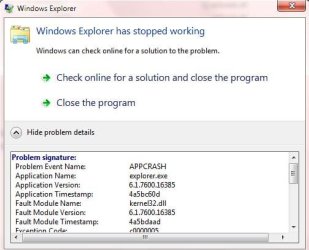
few times windows explorer closes automatically when try ng to open
 

My Computer

Computer Manufacturer/Model Number
Custom Build
OS
win 7 build 7600.16385 x64
CPU
AMD Athlon Dual core 7750 2.7GHz
Motherboard
Gigabyte GA78MA s2h
Memory
4GB 800Mhz
Graphics Card(s)
ATI HD 3200 IGP
Monitor(s) Displays
Acer 15 inch
Screen Resolution
1280x720
Hard Drives
Seagate 1 TB
Keyboard
Logitech
Mouse
Logitech
Internet Speed
Airtel DSL 2Mbps
I have had Windows 7 32-bit RTM (clean install) for many weeks now. In terms of bugs, I have found a few and will decribe them below. If you have any confirmed bugs, please post your experience below too, there is a small chance Microsoft may be aware of this thread! :)

Bug 1: Sometimes Windows Media Player fails to open. I can see the Windows Media Player process in task manager running but the window just doesn't appear and my files don't play. This applies to any media file being opened (music/video./etc...). This seems to happen after you have played a media and closed media player, then tried to open a media file again. Interestingly logging off and back in doesn't fix the problem. I have to do a system restart to make it work like normal.

Bug 2: Windows Live Messenger suddenly pops up when you are minimising other application. For example: I was signed in to WLM (latest version 14.0.8089.726) and had all WLM windows shut (it was still running in taskbar). I also had Firefox 3.5.2 open. I minimised Firefox then for some reason, WLM came up as if I clicked it, of course I didn't! And no I didn't receive a new IM or something which caused a window to pop up. This is a bug. It only happens with WLM popping up, so I the bug is with WLM and not Win7.

Note: I got so annoyed with these that I reinstalled Windows 7 32-bit RTM 3 times! And I am still having these bugs! Sometimes the bugs occur after computer has been woken from sleep (my Dell M1530). I repeat, I did clean installs of Windows 7 32-bit all 3 times I reinstalled.
never faced any of the above mentioned problems. :geek:
 

My Computer

Computer Manufacturer/Model Number
Samsung NP530U4B-S02IN
OS
Windows® 8 Pro (64-bit)
CPU
Intel® Core™ i5 Processor 2467M (1.60GHz, 3MB L3 Cache)
Motherboard
Samsung Electronics
Memory
6GB DDR3 System Memory at 1,333MHz (on BD 4GB + 2GB x 1)
Graphics Card(s)
AMD Radeon™ HD7550M 1GB DDR3 (Ext. Graphic)
Sound Card
Realtek High Definition Audio
Monitor(s) Displays
35.56cm (14.0) SuperBright 300nit HD LED Display
Screen Resolution
1366x768
Hard Drives
1TB S-ATA II Hard Drive (5400RPM) with ExpressCache 16GB SSD
Internet Speed
sucks
Antivirus
Microsoft Security Essentials
Browser
Google Chrome (Sync enabled)

My Computer

Computer Manufacturer/Model Number
Gateway GT5056
OS
XP_Pro, W7_7201, W7RC.vhd, SciLinux5.3, Fedora12, Fedora9_2x, OpenSolaris_09-06
CPU
AMD 64x2
Motherboard
Yes
Memory
1 gig
Graphics Card(s)
Dunno
Sound Card
Realtek something
Monitor(s) Displays
Samsung SyncMaster 940MW w/TV
Screen Resolution
1280x1024
Hard Drives
250 GB WD, USB Seagate Freedesk 1.5 T
Internet Speed
Cable modem
Other Info
1 + 1 = 10b,
7 + 7 = 16o,
a + b = 15h.
SP1? man that's too early.
 

My Computer

Computer Manufacturer/Model Number
Samsung NP530U4B-S02IN
OS
Windows® 8 Pro (64-bit)
CPU
Intel® Core™ i5 Processor 2467M (1.60GHz, 3MB L3 Cache)
Motherboard
Samsung Electronics
Memory
6GB DDR3 System Memory at 1,333MHz (on BD 4GB + 2GB x 1)
Graphics Card(s)
AMD Radeon™ HD7550M 1GB DDR3 (Ext. Graphic)
Sound Card
Realtek High Definition Audio
Monitor(s) Displays
35.56cm (14.0) SuperBright 300nit HD LED Display
Screen Resolution
1366x768
Hard Drives
1TB S-ATA II Hard Drive (5400RPM) with ExpressCache 16GB SSD
Internet Speed
sucks
Antivirus
Microsoft Security Essentials
Browser
Google Chrome (Sync enabled)

My Computer

Computer Manufacturer/Model Number
Gateway GT5056
OS
XP_Pro, W7_7201, W7RC.vhd, SciLinux5.3, Fedora12, Fedora9_2x, OpenSolaris_09-06
CPU
AMD 64x2
Motherboard
Yes
Memory
1 gig
Graphics Card(s)
Dunno
Sound Card
Realtek something
Monitor(s) Displays
Samsung SyncMaster 940MW w/TV
Screen Resolution
1280x1024
Hard Drives
250 GB WD, USB Seagate Freedesk 1.5 T
Internet Speed
Cable modem
Other Info
1 + 1 = 10b,
7 + 7 = 16o,
a + b = 15h.
IF you want to crash your explorer then goto \windows\system32\ and right click any exe file and windows explorer crashes (Atleast for me)

Screenshot posted
 

Attachments

  • Capture.JPG
    Capture.JPG
    35.3 KB · Views: 41

My Computer

Computer type
Laptop
Computer Manufacturer/Model Number
Sony Vaio VPCEH25EN
OS
Windows 8.1u1 x64
CPU
i3
Memory
DDR3 6GB
Graphics Card(s)
Nvidia 410
Screen Resolution
1366*768
Hard Drives
Toshiba 1TB
Internet Speed
Dial Up 56kbps

My Computer

Computer Manufacturer/Model Number
Samsung NP530U4B-S02IN
OS
Windows® 8 Pro (64-bit)
CPU
Intel® Core™ i5 Processor 2467M (1.60GHz, 3MB L3 Cache)
Motherboard
Samsung Electronics
Memory
6GB DDR3 System Memory at 1,333MHz (on BD 4GB + 2GB x 1)
Graphics Card(s)
AMD Radeon™ HD7550M 1GB DDR3 (Ext. Graphic)
Sound Card
Realtek High Definition Audio
Monitor(s) Displays
35.56cm (14.0) SuperBright 300nit HD LED Display
Screen Resolution
1366x768
Hard Drives
1TB S-ATA II Hard Drive (5400RPM) with ExpressCache 16GB SSD
Internet Speed
sucks
Antivirus
Microsoft Security Essentials
Browser
Google Chrome (Sync enabled)
Explorer Crashes

few times windows explorer closes automatically when try ng to open

Me too - random but occurs fairly frequently. Am runing RC 7260. Other than that, it runs real good and fast.
 

My Computer

OS
Windows 7 beta
ONE GIANT BUG...DRM. DRM fails to upgrade, even after following the steps by Microsoft Tech. With Zune Pass or WMP 12, you can not download/ buy online music. I hear its a coding problem with Visual Studio, no luck there either.
Here's a suggestion...KILL WMP altogether and use the Zune Software after all it does work on all other MS OS's.
 

My Computer

Computer Manufacturer/Model Number
Custom Built
OS
Win 7
CPU
AMD Phenom II 955
Motherboard
MSI 790FX-GD70 Winki Edition
Memory
6GB Kingston
Graphics Card(s)
Crossfire 4870 1GB memory/ Liquid Cooled
Sound Card
Creative Fatality Pro Series
Monitor(s) Displays
Samsung 32" LCD
Hard Drives
2 Seagates, 160GB, 500GB
PSU
Antec Quatro 850
Case
Thermaltake Armor LCS
Cooling
Liquid Cooled with Synthetic Glycol as coolant
Keyboard
Logitech G15 2nd edition
Mouse
Logitech G9
Internet Speed
Satellite
Guys it would be better if we reported the bugs in a formal kind of format like the example below. Maybe you can edit your posts to make it look like this? Thanks :)

Example:

Operating system: Windows 7 32-bit RTM (official)

Bug: Windows explorer crashes after I press ctrl + 14

To reproduce:
Press ctrl +14

Any notes: 1. Have to have Aero turned on. 2. Only happens sometimes.
 
It would probably be better if you have specific bugs that they are reported to the correct team at Microsoft. This site although visited at times by Microsoft employees -Is in no way a part of or affiliated to Microsoft.

@ Paarkhi
IF you want to crash your explorer then goto \windows\system32\ and right click any exe file and windows explorer crashes (At least for me)
This is not an issue I have heard of before but I would check any additional entries you have added to the context menu as one of these could be causing the issue
 

My Computers

System One System Two

  • Computer type
    PC/Desktop
    Computer Manufacturer/Model Number
    ChillBlast - Custom to my design
    OS
    Windows 11 Pro x64 [Latest Release and Release Preview]
    CPU
    Ryzen 9 5950X, 3.8 - 5.2 MHz
    Motherboard
    Asus Prime X570-Pro
    Memory
    64GB [2 x 32GB] DDR4 3200MHz
    Graphics Card(s)
    4GB NVIDIA GEFORCE GTX 1650 Ti
    Sound Card
    On-board SPDIF to 5.1 System + HDMI [5.1 system]
    Monitor(s) Displays
    32" UHD 32 Bit HDR Monitor + 43" UHD 4K 32Bit HDR TV
    Screen Resolution
    2 x 3840 x 2160 @60Hz
    Hard Drives
    1TB M2 SSD OS, 500GB Fast Access SSD, 2 x 8TB Data + Various Externals from 1TB to 4TB, 10TB NAS
    PSU
    NZXT C750 80 PLUS Gold 750W Modular PSU
    Case
    Workstation Case [Matt Black]
    Cooling
    NZXT Kraken X63 280mm CPU Cooler +2x Quiet Case fans
    Keyboard
    Logitech Wireless MX Keys & K400 + others
    Mouse
    Logitech Wireless MX Master 3S
    Internet Speed
    920 MB Down 50 MB Up
    Antivirus
    BitDefender Total Security Pro
    Browser
    Chrome (always run latest Non-Beta)
    Other Info
    Also run ...
    Laptop - Quad 8GB - Windows 10 Pro x64
    Nexus 7 Android tablet x2
    Samsung 10.2" tablet
    Blackview TAB 8 4G Android Tablet c/w Keyboard
    Wacom Intuos Pro Medium Pen Pad
    Wacom Intuos Pro Small Pen Pad
    Wacom Expresskeys Remote
    Loopdeck+ Graphics Controller
    Shuttle Pro v2 Control
  • Computer type
    Laptop
    System Manufacturer/Model Number
    Dell XPS 17 10750H
    OS
    Windows 11 Pro x64 Latest RP
    CPU
    Intel I7 10750H 5.0GHz
    Motherboard
    Dell XPS
    Memory
    32GB [2x16GB] DDR4 2933 MHz
    Graphics Card(s)
    nVidia GTX1650Ti 4 GB GDDR6
    Sound Card
    Stock [Realtek] 4 Speaker
    Monitor(s) Displays
    17" IPS UHD+ Infinity Edge Touchscreen
    Screen Resolution
    3840 x 2400
    Hard Drives
    2TB M2 NVMe, 4TB External + various 500GB & 1TB External NVMe (also have access to spinner HDD from
    PSU
    Stock
    Case
    Stock XPS Aluminium & Carbon Fibre
    Cooling
    Stock - Active Fan Control
    Keyboard
    Backlit + Various Logitech
    Mouse
    Stock Track Pad + Logitech MX Trackball
    Internet Speed
    72 MB Down 18MB Up
    Browser
    Chrome
    Other Info
    Also run ...
    Laptop - Quad 8GB - Windows 10 Pro x64
    Nexus 7 Android tablet x2
    10.2" tablet
    Sony Z3 Android Smartphone
    Wacom Intuos Pro Medium Pen Pad
    Wacom Intuos Pro Small Pen Pad
    Wacom Expresskeys Remote
    Loopdeck+ Graphics Controller
    Shuttle Pro v2 Control Pad
    10TB NAS
This in reply to my own bug reported in the OP:

Operating System: Windows 7 32-bit RTM (Official)

Bug 1: Sometimes Windows Media Player fails to open. I can see the Windows Media Player process in task manager running but the window just doesn't appear and my files don't play. This applies to any media file being opened (music/video./etc...). This seems to happen after you have played a media and closed media player, then tried to open a media file again. Interestingly logging off and back in doesn't fix the problem. I have to do a system restart to make it work like normal.
I get this message about 2 minutes after attempting to open a mp3 file:
 

Attachments

  • nq3ejb.jpg
    nq3ejb.jpg
    6.6 KB · Views: 10
I am running RTM and have a Billion 7404VGPX ADSL/router. If the modem has not made the adsl connection before windows loads, the networks connects but not the internet. I have found no way to establish the connection, have tried ipconfig /release & renew, unplugging & replugging the ethernet cable and running the troubleshooter none of these work and I must reboot. Once rebooted and windows establishes the internet connection all is good and after unplugging the cable and replugging, and putting the system to sleep and back out, the system finds the internet connection. It is only an issue if the internet has not connected prior to booting up.[FONT=&quot][/FONT]
 

My Computer

OS
Win7/XP
CPU
Intel Pentium 4 530, 3000 MHz (15 x 200)
Motherboard
Asus P5GD1 Pro
Memory
2GB
Graphics Card(s)
NVIDIA GeForce 7300 SE/7200 GS (512 MB)
Monitor(s) Displays
BenQ FP222W 22"
Screen Resolution
1680 x 1050
Hard Drives
SAMSUNG HD753LJ (750 GB, 7200 RPM, SATA-II)
Operating system: Windows 7 64-bit RC (Build 7100)

Bug: Windows freezes when using the Smudge tool in Adobe Photoshop CS4 Extended, and when using the Protractor tool in Sketchup 7 (non-Pro).

To reproduce:
Do as stated in "Bug" above.

Any notes: 1. Both worked for a few times, but now it freezes up every time.
 

My Computer

Computer Manufacturer/Model Number
Custom
OS
Windows 7 RC Build 7100
CPU
AMD Athlon X2 6000+ 3,02 GHz
Motherboard
MSI MS-7280 (K9A Platinum)
Memory
4 GB DDR2 PC3200 (I think)
Graphics Card(s)
ASUS blabla ATI HD2600XT
Sound Card
Onboard
Monitor(s) Displays
1x HP Pavilion mx70 + 1x HP w2207h
Screen Resolution
1280x1024+1680x1050
Hard Drives
1x 320 GB IDE
1x 500 GB S-ATA
PSU
Corsair 520W
Case
Antec P182B Gun metal black
Cooling
All stock
Keyboard
Logitech G15 v1
Mouse
Ikari Laser
Internet Speed
8/1 ADSL
Back
Top