Windows 7 build 7077 bugs

colinw

New member
Member
Local time
7:30 AM
Messages
48
My first post on here, have been reading plenty though :)

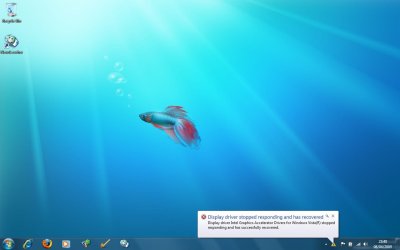
I installed build 7077 hoping to be rid of the intel graphics adaptor crash when waking up from a blank screen, build 7068 also suffered with this, and now this new build also does it.

And also my newsleecher no longer runs now, has worked fine on all the other builds.

I get this error "an internal exception occured"

Just hope this does'nt become the RC build, as things are breaking that were fine in builds 7000 and 7057.
 

My Computer

OS
windows 7
Wish I could help but on a AMD setup .Dont think this will be the RC build so can only hope things pan out down the line :(
 

My Computer

OS
windows 7077
CPU
AMD Athlon 64X2 dual core processor 5000+ 2600 Mhz
Motherboard
FOXCONN A6VMX
Memory
4 gig 8000 Mhz
Graphics Card(s)
N-Vidia Geforce 8400 GS
Sound Card
C-Media
Screen Resolution
1440 X 900 75 hertz
Hard Drives
c: 465.66 GB

I:372.61 GB external usb drive
Cooling
fans
Mouse
Microsoft wireless laser mouse
Internet Speed
8meg
When Installing did you run in compability mode for vista or xp. sp3 or sp1, for the intel grpaics adapter drivers.
 

My Computer

Computer Manufacturer/Model Number
Acer Aspire 8730-6951
OS
Windwos 7 Build 7077, Windows Vista build 6001
CPU
Intel Centrino 2 "Inside"
Memory
4 Gigabyte DDR2
Graphics Card(s)
Nividia GeForce 9600M GT 1GB
Screen Resolution
1680*945
Hard Drives
320 GB HDD
Hi WindowsSeven

No just using the built in intel graphics drivers that come with windows 7

ta
 

My Computer

OS
windows 7
try using the other drivers that you canfind on intel.com
 

My Computer

Computer Manufacturer/Model Number
Acer Aspire 8730-6951
OS
Windwos 7 Build 7077, Windows Vista build 6001
CPU
Intel Centrino 2 "Inside"
Memory
4 Gigabyte DDR2
Graphics Card(s)
Nividia GeForce 9600M GT 1GB
Screen Resolution
1680*945
Hard Drives
320 GB HDD
Hi, ok i installed the vista intel drivers for the 945 chipset, but now it becomes very sluggish when i wake up the display, then i have to wait a while to get the taskbar back. I installed them in vista sp1 compatablitiy mode.

I may go back to build 7057, this all worked perfect.

Thanks anyway..
 

My Computer

OS
windows 7
Strange, i'm using the Intel 945 Chipset & i don't have any issue at all. Wake-up is almost instant :confused:
 

My Computer

Computer Manufacturer/Model Number
Compaq Desktop
OS
Windows 7 Ultimate x64
CPU
AMD Sempron Dual Core
Memory
3GB
Graphics Card(s)
NVIDIA GeForce 6150SE nForce 430
Screen Resolution
1024x768
Hard Drives
150GB Sata
And also my newsleecher no longer runs now, has worked fine on all the other builds.

It sounds like you are using a beta version of NL. If so try 3.9. This works fine.
Seems like NL changed the security system from 3.95b onwards and this is not compatible with 7077 yet.
If you aren't using a beta then sorry, i cant help.

Dave.
 

My Computer

OS
windows 7 HP 64bit
CPU
AMD Athlon 64 X2 Dual Core 5600+ 2.80GHz
Motherboard
Asus M2N-SLI Deluxe
Memory
4GB
Graphics Card(s)
Asus ATI Radeon EAH2600XT HTDP Silent 256MB GDDR3 HDTV/Dual
Sound Card
M-Audio 24/96
Monitor(s) Displays
DELL 23" widescreen monitor
Screen Resolution
1920x 1080
Hard Drives
3 x Samsung F1 Spinpoint
Case
Antec Quiet Mini Tower Case
Keyboard
Latest slim Apple keyboard
Internet Speed
5MB/s (50mb/s virgin broadband)

My Computer

Computer Manufacturer/Model Number
Advent Roma Laptop
OS
Windows 7 Enterprise SP1 x64 Windows 8 Enterprise RTM x64
CPU
Mobile DualCore Intel Pentium T4400, 2200 MHz (11 x 200)
Motherboard
Advent Roma (Intel Cantiga GL40)
Memory
4028 MB (DDR2-667 DDR2 SDRAM)
Graphics Card(s)
Mobile Intel(R) GMA 4500M
Sound Card
Realtek ALC662 @ Intel 82801IB ICH9 - High Definition Audio
Monitor(s) Displays
Generic PnP Monitor [NoDB]
Screen Resolution
1366x768
Hard Drives
TOSHIBA MK5065GSX ATA Device (500 GB, 5400 RPM, SATA-II)
Mouse
Mikomi 7 Button Laser Mouse w/DPi Switch
Internet Speed
Slow!!
Hi fliplip, yeh thats what's strange, i have always been using newsleecher 3.95 beta 3 that is pre-installed on my d: drive complete with all my settings in there as well. And this has worked fine on all windows 7 builds except for 7077. I will use 3.9 final then if that works, thanks.

As to this graphics adaptor issue i have a screen shot of the error. My laptop does need special graphics drivers because when i change my screen brightness i usually get a graphical bar in the top left hand corner indicating the brightness level, it's an oldish gateway laptop. So obviously in windows 7 this is all garbled up.

But as i said earlier i only seem to have this error on 7068 and 7077

I post my error on the next post, i'm at work at the mo and have to get it off my own laptop.

Thanks anyway..
 

My Computer

OS
windows 7
Hi fliplip, yeh thats what's strange, i have always been using newsleecher 3.95 beta 3 that is pre-installed on my d: drive complete with all my settings in there as well. And this has worked fine on all windows 7 builds except for 7077. I will use 3.9 final then if that works, thanks.

Ive been using the v4 beta on 7068 without any issues. I nearly had a heart attack when it wouldn't start under 7077.
3.9 isnt bad but i do like the new features of v4. Hope someone sorts it out soon.

Dave.
 

My Computer

OS
windows 7 HP 64bit
CPU
AMD Athlon 64 X2 Dual Core 5600+ 2.80GHz
Motherboard
Asus M2N-SLI Deluxe
Memory
4GB
Graphics Card(s)
Asus ATI Radeon EAH2600XT HTDP Silent 256MB GDDR3 HDTV/Dual
Sound Card
M-Audio 24/96
Monitor(s) Displays
DELL 23" widescreen monitor
Screen Resolution
1920x 1080
Hard Drives
3 x Samsung F1 Spinpoint
Case
Antec Quiet Mini Tower Case
Keyboard
Latest slim Apple keyboard
Internet Speed
5MB/s (50mb/s virgin broadband)
Is this just occurring on my system or is 7077 still not remembering the size and position of explorer windows? Vista (and previous Windows versions) always (well almost at least) remembered the size and position of each explorer folder when I opened it directly (e.g. with a shortcut). W7 always opens new windows near the previously opened one, which is terribly annoying for me...

Regards!
 

My Computer

OS
Win7
Wutsigu, it's been that way since Win7 7000 for me. It's super annoying and totally destroys my workflow. :(


For the intel graphics, remove all intel graphic drivers from your computer. By right clicking the display adapter in Device Manager and selecting uninstall should work okay. If there's a checkbox to "delete driver file" or something like it, select it. Then reboot. Then reboot again just to be sure. Next, install the latest driver from Intel.com for your display driver using normal settings. Do not set it to compatibility mode for Vista. You only use compatibility when something doesn't work right under your current OS, not to tell it which OS the program is designed for. Using compatibility mode needlessly can sometimes lead to lost features or bugs.
 

My Computer

Computer Manufacturer/Model Number
Custom
OS
Windows 7
CPU
Pentium D 2.66
Motherboard
Asus P5ND2-SLi
Memory
4 gigs DDR2
Graphics Card(s)
BFG nVidia 8600 GT OC
Sound Card
nForce 4 (realtek)
Monitor(s) Displays
Samsung 204B
Screen Resolution
1600x1200
Hard Drives
Western Digital Raptor 150
Western Digital 320 (both SATA)
PSU
BFG 600 watt
Cooling
fan
Keyboard
MS Natural
Mouse
MS Sidewinder
Internet Speed
10 mb
Hi FreakyFerret,

ok i can give this a go but i have to install it in compatability mode as on the intel site there are only vista drivers and they refuse to install unless i select compatability mode ?

There are no specific intel graphics drivers for windows 7

Cheers
 

My Computer

OS
windows 7
Hi FreakyFerret,

ok i can give this a go but i have to install it in compatability mode as on the intel site there are only vista drivers and they refuse to install unless i select compatability mode ?

There are no specific intel graphics drivers for windows 7

Cheers

Have you tried the XP ones?
Im only saying this when ever i run the compatibility wizard it seem to offer me XP rather than Vista.
Also my M-audio card needed XP drivers and wouldnt work with Vista ones.

Just an idea.

Dave.
 

My Computer

OS
windows 7 HP 64bit
CPU
AMD Athlon 64 X2 Dual Core 5600+ 2.80GHz
Motherboard
Asus M2N-SLI Deluxe
Memory
4GB
Graphics Card(s)
Asus ATI Radeon EAH2600XT HTDP Silent 256MB GDDR3 HDTV/Dual
Sound Card
M-Audio 24/96
Monitor(s) Displays
DELL 23" widescreen monitor
Screen Resolution
1920x 1080
Hard Drives
3 x Samsung F1 Spinpoint
Case
Antec Quiet Mini Tower Case
Keyboard
Latest slim Apple keyboard
Internet Speed
5MB/s (50mb/s virgin broadband)
hi again,

well i just tried my gateway xp drivers, but after a restart it says it could'nt install those properly anyway. So i tried my gateway vista drivers, they came up with windows 7 not supported, then i got another screen saying do you want me to install these for best settings, so i let it do it, but these are having the same issues as the built in ones, plus the benchmark values were a lot lower.

hopefully attached is my error.

thanks
 

Attachments

  • Intel Graphics Error in Windows 7.jpg
    Intel Graphics Error in Windows 7.jpg
    43.1 KB · Views: 106

My Computer

OS
windows 7
ok i think it's ok now, i uninstalled all my display drivers, then when i installed the latest intel vista drivers it came up again with windows 7 not supported then gave me the option to install using recommended settings. So now it's working ok at the moment. I will test it several times though.

Just need to setup newleecher again.

Thanks for all the input on this. :)
 

My Computer

OS
windows 7
oh damm, still not right, oh well i'll wait for the next build and hope it sorts itself out :(
 

My Computer

OS
windows 7
Vista and Win7 share the same driver base model thingamabob. You should be able to use Vista drivers for Win7 with no issue. XP drivers are built on an entirely different architecture, so you almost always want to avoid using those.

You can try to manually install them as well. Do not uninstall the drivers you have in place before doing this.

Uncompress the file you download from Intel.com to another folder. (Usually, when you run the install executable, it puts a copy of the uncompressed files somewhere on the harddrive. Clean out your temp folders. Run the executable. Check temp folders for a new folder listing all the drivers. Copy (don't move) this folder to somewhere else, like the desktop.)

Go to device manager. Right click the video adapter. Select Update Driver. When it gives options for what you want to do, select the bottom choice (manual or such). After that, continue selecting the bottom choice of the two options that continue popping up. Eventually, you'll get a dialog box that has a "Have Disk" button. Click that button, point to the folder you copied to the desktop.

At this point, it should automatically find the *.inf file that has the settings for your device. Select the one that best matches your device and follow through on the wizard.

Reboot and you should have things okay after this.
 

My Computer

Computer Manufacturer/Model Number
Custom
OS
Windows 7
CPU
Pentium D 2.66
Motherboard
Asus P5ND2-SLi
Memory
4 gigs DDR2
Graphics Card(s)
BFG nVidia 8600 GT OC
Sound Card
nForce 4 (realtek)
Monitor(s) Displays
Samsung 204B
Screen Resolution
1600x1200
Hard Drives
Western Digital Raptor 150
Western Digital 320 (both SATA)
PSU
BFG 600 watt
Cooling
fan
Keyboard
MS Natural
Mouse
MS Sidewinder
Internet Speed
10 mb
Where's the option for home basic, home premium, professional and ultimate version of build 7077 during installation?
 

My Computer

Computer Manufacturer/Model Number
Acer Aspire 4530 RM-74
OS
Windows 7 RC Build 7100 x64
CPU
AMD Turion X2 64
Memory
4 GB KINGSTONE DDR2
Graphics Card(s)
nVIDIA GEFORCE 9100M G
Sound Card
ALC 888S
Screen Resolution
1280 x 800
Hard Drives
Hitachi HTS543225L9A SCSI Disk Device
Back
Top