Solved Windows 7 Cannot complete installation.

NeoArod

New member
Local time
12:37 PM
Messages
32
I own a Dell Studio 1558 Laptop, my keyboard broke so contacted them and they sent over a tech to replace my keyboard, ram, and mobo. After this i was getting a lot of BSOD while runing the laptop for a good amount of time, then i would have to leave it off for a while and it would boot up again, other wise I would get BSOD.

So I decided to backup my entire HDD and do a clean install of Windows 7 x64 Home Premium. After 6 days of attempting to install windows I still haven't succeeded. Since I recieve the message "Windows setup could not configure windows to run on this computer"

After reading a lot in the internetz I've already tried:

- Completely wiped out HDD, using Windows software, other computer, and ubuntu.
- I cannot remove my video card since its a laptop.
- My bios is set to AHCI (this is default). And swtiching it as well to ATA.
- Switching the name manually of the partitions.
-Installing it in another partition that inst C drive.
- Installing it with out a partition.
- Connecting a ethernet cable/without conecting ethernet cable.
- Loading intel drivers in the installation screen.

While pressing shift + f10 at the completing installation screen and executing explorer.exe, it crashes while performing Personalized Settings: Windows Desktop Update.

Dell Studio 1558
CPU: i5 m520 @2.40Ghz
HDD: 500 GB
RAM 4gb DDR3
Video: ATI HD 4500

I dont know what else to do. I've already contacted Dell on the matter abut I am still l'm awaiting response. So I dont know what else to do.
 

My Computer

Computer Manufacturer/Model Number
Dell Studio 1558
OS
Windows 7 Home Premiun x64
CPU
i5
Memory
4 GM ddr 3 Ram
Graphics Card(s)
AIT HD 4500/5000
Make sure you have latest BIOS update. If so, reset the CMOS: Clear CMOS - 3 Ways To Clear the CMOS - Reset BIOS

Set SATA controller to AHCI first to try install, then IDE mode if this fails.

Remove all but 2gb of RAM to try install.

Wipe the HD using Diskpart Clean All command from the booted Win7 DVD: http://www.sevenforums.com/tutorials/91339-ssd-hdd-optimize-windows-reinstallation.html

After wiping HD, close Command Box and click Install Now, use Custom>Drive Options to create partition(s), format before installing to first OS partition - ignore the 100mb boot partition created by Win which places the Repair console on F8 Boot Tools.

If this fails, go back to Diskpart tutorial and use Step 2.2 to repartition and mark Active.

Unplug all other HD's and peripherals.
 
Have you run the Dell quick diagnostic tool in the F12 Boot Menu?
 

My Computer

OS
ME/XP/Vista/Win7
Make sure you have latest BIOS update. If so, reset the CMOS: Clear CMOS - 3 Ways To Clear the CMOS - Reset BIOS

Set SATA controller to AHCI first to try install, then IDE mode if this fails.

Remove all but 2gb of RAM to try install.

Wipe the HD using Diskpart Clean All command from the booted Win7 DVD: http://www.sevenforums.com/tutorials/91339-ssd-hdd-optimize-windows-reinstallation.html

After wiping HD, close Command Box and click Install Now, use Custom>Drive Options to create partition(s), format before installing to first OS partition - ignore the 100mb boot partition created by Win which places the Repair console on F8 Boot Tools.

If this fails, go back to Diskpart tutorial and use Step 2.2 to repartition and mark Active.

Unplug all other HD's and peripherals.

I already tried all of these, before posting here. And theres nothing else I can unplug on a laptop.
 

My Computer

Computer Manufacturer/Model Number
Dell Studio 1558
OS
Windows 7 Home Premiun x64
CPU
i5
Memory
4 GM ddr 3 Ram
Graphics Card(s)
AIT HD 4500/5000
Have you run the Dell quick diagnostic tool in the F12 Boot Menu?

I didd this the 1st day I started working on this issue and there where no errors detected.
 

My Computer

Computer Manufacturer/Model Number
Dell Studio 1558
OS
Windows 7 Home Premiun x64
CPU
i5
Memory
4 GM ddr 3 Ram
Graphics Card(s)
AIT HD 4500/5000
At exactly what point does the installation fail, using the tutorial here as a timeline? http://www.sevenforums.com/tutorials/1649-clean-install-windows-7-a.html

What is the verbatim exact failure error message?

Try entering Device Manager via Safe Mode to uninstall any driver in error: http://www.sevenforums.com/tutorials/15856-device-manager-access-during-windows-7-installation.html

As a last resort when all else fails, I move the HD to another machine to install, then SysPrep the HD before moving it back to problem machine. SysPrep removes all drivers and prepares HD to start up on new hardware. http://www.sevenforums.com/tutorial...lation-transfer-new-computer.html#post1161038

You can also SysPrep another Win7 installation of the same version on another machine, save a backup image, then boot Win7 DVD Repair console or Repair CD to reimage to the problem machine. http://www.sevenforums.com/tutorials/663-backup-complete-computer-create-image-backup.html
http://www.sevenforums.com/tutorials/675-system-image-recovery.html
 
At exactly what point does the installation fail, using the tutorial here as a timeline? http://www.sevenforums.com/tutorials/1649-clean-install-windows-7-a.html

What is the verbatim exact failure error message?

Try entering Device Manager via Safe Mode to uninstall any driver in error: http://www.sevenforums.com/tutorials/15856-device-manager-access-during-windows-7-installation.html

As a last resort when all else fails, I move the HD to another machine to install, then SysPrep the HD before moving it back to problem machine. SysPrep removes all drivers and prepares HD to start up on new hardware. http://www.sevenforums.com/tutorial...lation-transfer-new-computer.html#post1161038

You can also SysPrep another Win7 installation of the same version on another machine, save a backup image, then boot Win7 DVD Repair console or Repair CD to reimage to the problem machine. http://www.sevenforums.com/tutorials/663-backup-complete-computer-create-image-backup.html
http://www.sevenforums.com/tutorials/675-system-image-recovery.html

Sorry It took me a while to post again trying to try all of these.

1st of all yes I have performed the Dell System Test and everything is ok with the system.

The error i receive when the instalation fails is "windows setup could not configure windows in this hardware"

Now what I have noticed by pressing shift + F10 is that it fails while performing Windows Desktop Update, exactly after it changes the screen resolution to my systems native resolution, at that moment I recieve the error message.

I tried installing windows in another machine and then switching it to the laptop, and it runs the set up till about 66% and then i recive the same error when the screen resolution changes and the computer shuts off.

I know its not the system bc i was able to run Ubuntu 10.10 fne fr an entire day, only problem is that I work with Adobe CS, and UDK and those do not run on Ubuntu, so Im out of ideas.
 

My Computer

Computer Manufacturer/Model Number
Dell Studio 1558
OS
Windows 7 Home Premiun x64
CPU
i5
Memory
4 GM ddr 3 Ram
Graphics Card(s)
AIT HD 4500/5000
It's pretty clear it is the video card/chip, now we need to apply that information:

Can you reinstall your video card?

Even better would be to default in BIOS to onboard video chip if you have it.

As a last resort, borrow or buy a new video card to do the install.
 
It's pretty clear it is the video card/chip, now we need to apply that information:

Can you reinstall your video card?

Even better would be to default in BIOS to onboard video chip if you have it.

As a last resort, borrow or buy a new video card to do the install.

Would love to do that but its a laptop. So i guess I better geta hold of Dell so they can replace the mobo.

I still think its odd that I can run Ubuntu 10.10 and install the ATI drives just fine, and the laptop works fine as well (for basic functions that is)
 

My Computer

Computer Manufacturer/Model Number
Dell Studio 1558
OS
Windows 7 Home Premiun x64
CPU
i5
Memory
4 GM ddr 3 Ram
Graphics Card(s)
AIT HD 4500/5000
Were you able to enter Device Manager following the tutorial I posted to uninstall the Display driver, try completing install?
 
Hello NeoArod, welcome to Seven Forums!


If you are saying that Linux will install and run from the lappy but Windows 7 will not, then you may have a bad Windows installation disk/download, if the Windows 7 install disk is one you burned yourself it may be a bad burn and needs to be done again, if so this would be the first thing to try.

Use the free ISO burner at the link below to burn another at a speed of no more than 4x and select to let the program to verify the disk before it finishes.


ImgBurn Free ISO Burning Software
 

My Computer

Computer Manufacturer/Model Number
* BFK Customs *
OS
W 7 64-bit Ultimate
CPU
Intel Q9550 Yorkfield
Motherboard
ASUS P5Q Pro
Memory
8GB Dominator 8500C5D
Graphics Card(s)
ATI : XFX 5870
Sound Card
Realtek HD Audio 7-1
Monitor(s) Displays
1x 47" LCD HDMI & 3x 26" LCD HDMI
Screen Resolution
1920x1080P & 1920x1200
Hard Drives
1x 80GB Intel X25-M G2 SSD : 1x 500GB & 1x 640GB WD Caviar Black(s)
PSU
Corsair 620HX
Case
Cooler Master RC-690
Cooling
Tuniq Tower 120, 2x 140mm and 3x 120mm case fans
Keyboard
Microsoft 500
Mouse
Razer Diamondback 3G
Internet Speed
14 Mb/s
Other Info
1x Koutech 3Gb/s SATA HDD Hot Swap Rack
Were you able to enter Device Manager following the tutorial I posted to uninstall the Display driver, try completing install?

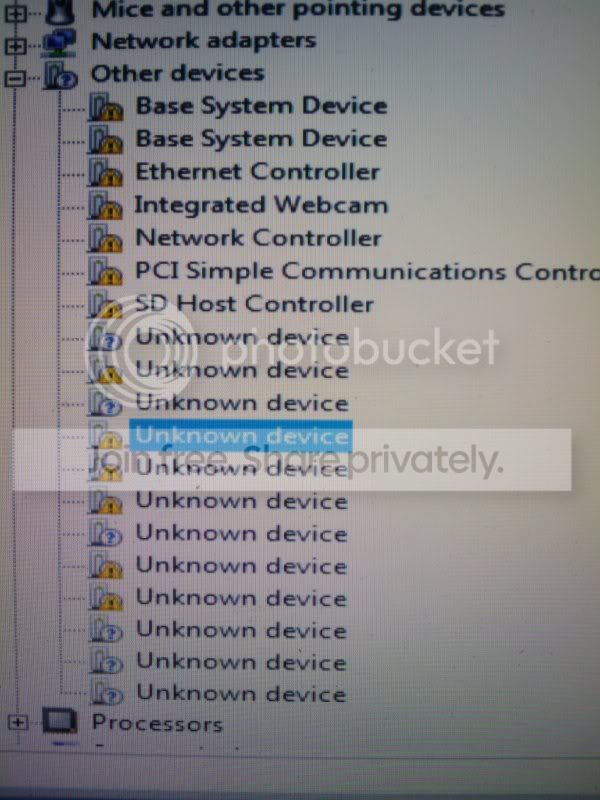
Sorry for the late response but it's been a very busy week. Yeah i tried it out and im seeing a lot of different devices that have warnings on them, im going one by one disabling them and i think eventually im going to disable all of them.

Heres what im looking at right now.

2011-03-02160407.jpg
 

My Computer

Computer Manufacturer/Model Number
Dell Studio 1558
OS
Windows 7 Home Premiun x64
CPU
i5
Memory
4 GM ddr 3 Ram
Graphics Card(s)
AIT HD 4500/5000

My Computer

Computer Manufacturer/Model Number
Dell Studio 1558
OS
Windows 7 Home Premiun x64
CPU
i5
Memory
4 GM ddr 3 Ram
Graphics Card(s)
AIT HD 4500/5000
OMG wow ok so i reformated the hole drive and did a fresh install, on the 1st reboot i tried doing the device manager option again isabled the Video Card and it worked and installed just fine im desktop screen right now. I kinda feel stupid i didnt try this a week ago XD, but thanks a lot, now im going to do some trial runs and see what happens. I want to make sure the video card inst bad so i can have dell replace the mobo.
 

My Computer

Computer Manufacturer/Model Number
Dell Studio 1558
OS
Windows 7 Home Premiun x64
CPU
i5
Memory
4 GM ddr 3 Ram
Graphics Card(s)
AIT HD 4500/5000
The fact that your video card was hanging the install doesn't necessarily mean it's bad, nor does it point at all to the mobo. This is just an anomaly seen in a tiny percent of installs.
 
Well that anomaly kicked my ass for 2 hole weeks
 

My Computer

Computer Manufacturer/Model Number
Dell Studio 1558
OS
Windows 7 Home Premiun x64
CPU
i5
Memory
4 GM ddr 3 Ram
Graphics Card(s)
AIT HD 4500/5000
We only were consulted a week ago, and the workaround given then to enter Device Manager during install apparently wasn't tried until now.

Glad it helped, though, and you're most welcome.
 
Back
Top