
Solved Windows 7 Caption Buttons and Window Borders

sandro480

New member
Local time
4:04 PM
Messages
2
Hello, i am looking for transparent Aero caption buttons. Something like this:
165731d1486586996t-windows-aero-white-shade-left-right-remove-minimizebutton-inactiveimage.png165732d1486586996t-windows-aero-white-shade-left-right-remove-minimizebuttonglyph.96dpiimage.png
But for the Close Button, Maximize Button, and Restore Button.


Also, if you happen to have the Taskbar (something like this, but with transparency and preferably without the text), Please reply to this thread with the image. Thank you
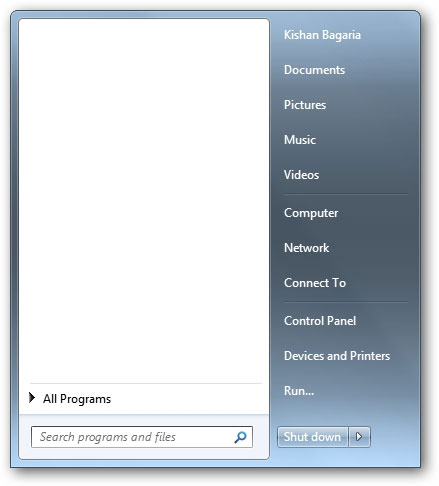
w7smupr.jpg
 

My Computers

System One System Two

  • OS
    Windows 7 64 bit
  • Computer type
    PC/Desktop
Kishan

Cant see anything in your screenshots for your 1st question, to small

But part 2 is your Start menu, this is an integeral part of your OS, and according to it YOU have removed all entries from it, they can be shown if you hit the all programs option in the lower left box

Do not believe you can make it transparrent as such, but you can make desktop shortcuts to them
 

My Computer

Computer type
PC/Desktop
Computer Manufacturer/Model Number
medionl/Aspire 6930G/acer x55a
OS
W7 home premium 32bit/W7HP 64bit/w10 tp insider ring
CPU
E5300 dual core
Motherboard
medion MS7366
Memory
3gb
Graphics Card(s)
Nvidia Geforce 7100 Nforce 630i
Monitor(s) Displays
avixc
Internet Speed
n (isp resticted to 72)
Antivirus
mse/pands
Browser
palemoon
Other Info
Belkin Fd7050 n USB using Railink RT2870 drivers, more upto date
Kishan

Cant see anything in your screenshots for your 1st question, to small

But part 2 is your Start menu, this is an integeral part of your OS, and according to it YOU have removed all entries from it, they can be shown if you hit the all programs option in the lower left box

Do not believe you can make it transparrent as such, but you can make desktop shortcuts to them
Yes, i meant Start Menu, my mistake. By transparent i meant without the white background.
 

My Computers

System One System Two

  • OS
    Windows 7 64 bit
  • Computer type
    PC/Desktop
Back
Top