
Windows 7: Change Boot Drive

hknight

New member
Local time
11:01 PM
Messages
2
I recently purchased a new computer with Windows 7 Home Premium 64 Bit pre-installed. The manufacture did not provide me with the operating system on disk. The computer has two hard drives. I wanted the OS installed on the smaller hard drive but they installed it on the larger hard drive.

I used Norton/Symantec Ghost to mirror the OS from the larger drive to the smaller drive. Please look at the attached image. I want to change Drive C: to Drive T: and I want to change Drive F: to drive C:. Also, I want to make Drive C: contain "Boot" and "Page File" and "Crash Dump" like Drive F: does.

Ultimately, I want my computer to boot from the smaller drive and I want the letter of that drive to be C:
 

Attachments
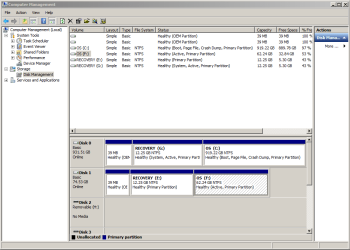
  • Capture.PNG
    Capture.PNG
    23.3 KB · Views: 127

My Computer

OS
Windows 7 Home Premium 64bit
Welcome to Windows Seven Forums.

I'm no expert, but I'm thinking on these lines:

1. Swap the leads for drive 0 and drive 1 on your motherboard, so that drive 1 will become drive 0 in disk management and drive 0 will become drive 1.

2. Format the old drive 0 (the new drive 1).

3. Change the drive lettering on the smaller, new drive 0 (the old drive 1) so that Windows is on the C drive.

4. Boot into your Windows DVD and carry out a Startup Repair to repair the master boot record. You may have to do this three times.

http://www.sevenforums.com/tutorials/681-startup-repair.html

If my advice is not correct, someone will soon be along to correct it.
 

My Computer

Computer Manufacturer/Model Number
HP Pavilion Elite 495UK
OS
Windows 7 Ultimate SP1 64-Bit
CPU
Intel Core i7 870 @ 2.93GHz
Motherboard
MSI 2A9C (CPU1)
Memory
8Gb Dual-Channel DDR3 @ 664MHz
Graphics Card(s)
nVidia GeForce GTX 460 1024MB dedicated RAM
Sound Card
Realtek HD Audio
Monitor(s) Displays
HP2310i
Screen Resolution
1920 x 1080
Hard Drives
1x1954GB Hitachi HDS22020ALA 330 (RAID), 1x1954GB Hitachi External for backup and storage
PSU
460W
Case
HP Elite
Cooling
Air cooled
Keyboard
Logitech K750 solar-powered keyboard
Mouse
Logitech Wireless M180 mouse
Internet Speed
2Mb
Other Info
Pure Avanti Flow Internet Radio with iPod Dock, 64Gb iPod, HP USB Speakers, Sony MDR-V500 Headphones, Sony Vaio F-Series Laptop
The current Drive C: is actually two drives in a hardware RAID. Should I move the SATA connection on the motherboard for both RAD disks?
 

My Computer

OS
Windows 7 Home Premium 64bit
The current Drive C: is actually two drives in a hardware RAID. Should I move the SATA connection on the motherboard for both RAD disks?

That I'm not sure of, but I'm sure someone better able to advise than me will be along shortly.
 

My Computer

Computer Manufacturer/Model Number
HP Pavilion Elite 495UK
OS
Windows 7 Ultimate SP1 64-Bit
CPU
Intel Core i7 870 @ 2.93GHz
Motherboard
MSI 2A9C (CPU1)
Memory
8Gb Dual-Channel DDR3 @ 664MHz
Graphics Card(s)
nVidia GeForce GTX 460 1024MB dedicated RAM
Sound Card
Realtek HD Audio
Monitor(s) Displays
HP2310i
Screen Resolution
1920 x 1080
Hard Drives
1x1954GB Hitachi HDS22020ALA 330 (RAID), 1x1954GB Hitachi External for backup and storage
PSU
460W
Case
HP Elite
Cooling
Air cooled
Keyboard
Logitech K750 solar-powered keyboard
Mouse
Logitech Wireless M180 mouse
Internet Speed
2Mb
Other Info
Pure Avanti Flow Internet Radio with iPod Dock, 64Gb iPod, HP USB Speakers, Sony MDR-V500 Headphones, Sony Vaio F-Series Laptop
So you have three HD?

Is 74gb HD a SSD?
 

My Computer

OS
ME/XP/Vista/Win7
1) Make your OEM manufacturer's Recovery Disks from the recovery app.

2) Delete all partitions on the 74gb HD & reformat.

3) Physically disconnect the 931 HD.

4) Reinstall the OS to the 74gb HD,using the OEM manufacturer's Recovery disks you have just made.

What version of Norton Ghost are you using?
 

My Computer

OS
ME/XP/Vista/Win7
In addition you can also clean reinstall to the smaller HD using any retail Win7 installer for your version, with the Product Key on the COA sticker. Here's how: Reinstalling Windows 7

You could also shrink and then clone or image C to the smaller HD choosing the same C drive letter, then once it's up and running delete C from the other HD. Set the target HD as first HD to boot in BIOS setup.

I am not familar with Norton Ghost, but if you have WD or Seagate HD's in the mix you can use Acronis's free premium cloning/imaging app which allow selective cloning or imaging. You can also use free Macrium Reflect or Paragon 11.
 

My Computer

Computer Manufacturer/Model Number
* BFK Customs *
OS
W 7 64-bit Ultimate
CPU
Intel Q9550 Yorkfield
Motherboard
ASUS P5Q Pro
Memory
8GB Dominator 8500C5D
Graphics Card(s)
ATI : XFX 5870
Sound Card
Realtek HD Audio 7-1
Monitor(s) Displays
1x 47" LCD HDMI & 3x 26" LCD HDMI
Screen Resolution
1920x1080P & 1920x1200
Hard Drives
1x 80GB Intel X25-M G2 SSD : 1x 500GB & 1x 640GB WD Caviar Black(s)
PSU
Corsair 620HX
Case
Cooler Master RC-690
Cooling
Tuniq Tower 120, 2x 140mm and 3x 120mm case fans
Keyboard
Microsoft 500
Mouse
Razer Diamondback 3G
Internet Speed
14 Mb/s
Other Info
1x Koutech 3Gb/s SATA HDD Hot Swap Rack
Back
Top