Windows 7 classic theme black taskbar?

Element7

Senior Member
Power User
Local time
3:17 AM
Messages
282
Location
inside your win32 folder
Hi, is it possible to change the windows 7 classic themes taskbar to black instead of grey? And does it really use that much less resources than windows 7 basic theme?
Thanks,
Element7
 

My Computer

Computer type
Laptop
Computer Manufacturer/Model Number
Acer V3-551G
OS
Windows 7 Ultimate 32bit
CPU
AMD Quad-Core A8-4500M with Turbo Core up to 2.80GHz
Memory
8 GB DDR 3
Graphics Card(s)
AMD Radeon HD 7640G + 7670M (2GB dedicated VRAM)
Sound Card
AMD HD Audio device / Realtek HD Audio
Monitor(s) Displays
15.6" HD LED
Screen Resolution
1366 x 768 (32bit)
Hard Drives
1 TB HDD
Antivirus
AVG 2013 free edition
Browser
Google Chrome
Other Info
WEI scores:

Base score= 5.9

-Processor 6.7
-Memory (RAM) 7.2
-Graphics 5.9
-Gaming Graphics 6.2
-Primary hard disk 5.9
Wow more than 100 views and no reply. Does no one know how to change the classic theme taskbar to black instead of grey?

And my second question: Does the windows 7 classic theme give more performance than the windows 7 basic theme?

Thanks
 

My Computer

Computer type
Laptop
Computer Manufacturer/Model Number
Acer V3-551G
OS
Windows 7 Ultimate 32bit
CPU
AMD Quad-Core A8-4500M with Turbo Core up to 2.80GHz
Memory
8 GB DDR 3
Graphics Card(s)
AMD Radeon HD 7640G + 7670M (2GB dedicated VRAM)
Sound Card
AMD HD Audio device / Realtek HD Audio
Monitor(s) Displays
15.6" HD LED
Screen Resolution
1366 x 768 (32bit)
Hard Drives
1 TB HDD
Antivirus
AVG 2013 free edition
Browser
Google Chrome
Other Info
WEI scores:

Base score= 5.9

-Processor 6.7
-Memory (RAM) 7.2
-Graphics 5.9
-Gaming Graphics 6.2
-Primary hard disk 5.9
That's probably because you specified a classic theme and I doubt that anyone is playing with it.
What's wrong with using a W7 theme ??
 

My Computer

Computer Manufacturer/Model Number
HP d4996t (upgraded)
OS
XP MCE .... XP Pro 64 .... W7 U x64
CPU
E6750, 2.67GHz C2D
Memory
4GB, PC2 6400
Graphics Card(s)
GeForce 9400GT
Monitor(s) Displays
Twin Samsung 2443BWT
Screen Resolution
1920x1200
Hard Drives
Many .. 3 Installed
PSU
460W
Internet Speed
Cable
Windows classic is a not a bad theme tbh. And yes you can change the colours in the classic theme.

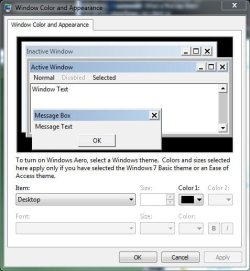
Go to Control Panel\Appearance and Personalization\Personalization\Window Color and Appearance and click on advanced appearance settings.

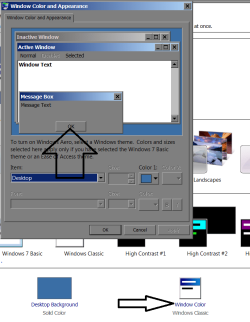
In this screen you can change the colours for classic theme:

advdcolours.JPG
 

My Computer

Computer Manufacturer/Model Number
self built
OS
Windows 7 Professional 64-bit
CPU
Intel E8400 3GHz
Motherboard
Intel DX48BT2
Memory
Kingston PC3-10700H 4Gb
Graphics Card(s)
XFX Radeon HD 5850 BlackEd.
Sound Card
Asus Xonar DG
Monitor(s) Displays
2x Samsung SM-T220HD 22"
Screen Resolution
1680x1050 on two monitors
Hard Drives
OCZ Vertex 2 120gb 3.5" (OS)
Seagate Momentus XT 500gb
Samsung F3 1Tb (games)
2x Samsung F1 1Tb
PSU
Thermaltake ToughPower 850w
Case
Thermaltake Armor
Cooling
Scythe Mugen II
Keyboard
Microsoft Comfort Curve USB
Mouse
Razer Diamondback 3G
Internet Speed
8128/443
I took the screenshot at the wrong time. Desktop should say 3D Items - click the arrowed item.

Change the color to your liking.

does it really use that much less resources than windows 7 basic

The question is poorly formed. If I was running your system, I would use the Classic theme.
 

Attachments

  • Capture.PNG
    Capture.PNG
    28.5 KB · Views: 855
Yes switching windows 7 to classic mode uses less performance then Windows 7 aero and Windows Aero basic.
 

My Computer

OS
Windows XP
Graphics Card(s)
ATI HD 4350
Yes switching windows 7 to classic mode uses less performance then Windows 7 aero and Windows Aero basic.
I thought Aero was processed in the GPU - reducing demands on the CPU where a proper video card is in use.
 
I think it is.
 

My Computer

Computer Manufacturer/Model Number
self built
OS
Windows 7 Professional 64-bit
CPU
Intel E8400 3GHz
Motherboard
Intel DX48BT2
Memory
Kingston PC3-10700H 4Gb
Graphics Card(s)
XFX Radeon HD 5850 BlackEd.
Sound Card
Asus Xonar DG
Monitor(s) Displays
2x Samsung SM-T220HD 22"
Screen Resolution
1680x1050 on two monitors
Hard Drives
OCZ Vertex 2 120gb 3.5" (OS)
Seagate Momentus XT 500gb
Samsung F3 1Tb (games)
2x Samsung F1 1Tb
PSU
Thermaltake ToughPower 850w
Case
Thermaltake Armor
Cooling
Scythe Mugen II
Keyboard
Microsoft Comfort Curve USB
Mouse
Razer Diamondback 3G
Internet Speed
8128/443
Seems like I am begging questions today - if Aero is processed in the GPU, what handles the Aero Peek and Snap features?

I will Google around TechNet.
 
Back
Top