Windows 7 Compatibility

Lordbob75

Computer Voodooist
Hey guys, just logged into the Windows 7 forums. I just downloaded the Beta today (After an hour with tech support only to find out the i had to download it from IE, though it never says that ANYWHERE).

My first question being, does Windows 7 have the ability to run applications made for Vista? I know that the downloads availible now will not have a 7 option, just xp or Vista, so if i choose the Vista version, can 7 run it? The same for the Hardware.

I have no idea if anyone has asked this yet, but i searched for it and found nothing. Sorry if this is a repeat post.

~Lordbob
 

My Computer

Computer Manufacturer/Model Number
Hera
OS
Windows 7 Ultimate x64, Mint 9
CPU
Intel i5-2500k
Motherboard
ASUS P8P67 Pro
Memory
2x 4Gb Corsair VENGEANCE DDR3-1600
Graphics Card(s)
NVidia GeForce N260GTX Twin Frozr
Sound Card
Realtek HD OnBoard Audio
Monitor(s) Displays
ASUS 24" Monitor
Screen Resolution
1920x1080
Hard Drives
G.SKILL Phoenix Series 60GB SATA II MLC Internal Solid State Drive (SSD)
SAMSUNG Spinpoint F3R 1TB 7200 RPM 32MB Cache SATA II
PSU
Cooler Master Real Power Pro 750W
Case
Cooler Master Haf 932
Cooling
Fans
Keyboard
Razer Tarantula
Mouse
Razer Lachesis
Internet Speed
not fast enough
Welcome to the Se7en Forums :party:

So far every Vista application I've tested works with Windows 7 Beta.


Hey guys, just logged into the Windows 7 forums. I just downloaded the Beta today (After an hour with tech support only to find out the i had to download it from IE, though it never says that ANYWHERE).

My first question being, does Windows 7 have the ability to run applications made for Vista? I know that the downloads availible now will not have a 7 option, just xp or Vista, so if i choose the Vista version, can 7 run it? The same for the Hardware.

I have no idea if anyone has asked this yet, but i searched for it and found nothing. Sorry if this is a repeat post.

~Lordbob
 

My Computer

Computer Manufacturer/Model Number
Dell XPS 420
OS
Windows 7 RC
CPU
Intel Q6600 Quad Core
Motherboard
Dell Proprietary
Memory
4 GB DDR 800
Graphics Card(s)
Nvidia 8800GT
Sound Card
Integrated - Sigmatel HD Audio
Monitor(s) Displays
Dual Dell 22" Wide Screen
Screen Resolution
3360x1050
Hard Drives
320 GB internal
2.5 TB external
PSU
Big Enough
Case
Dell XPS 420
Cooling
Air
Keyboard
Dell USB
Mouse
Wireless MS mouse
Internet Speed
DSL 3MB Down
Other Info
WEI 5.9 (Windows 7 RC), Not too bad for an off the shelf PC :)
well, I've tried to run a few apps which have not worked.
I have not been abble to get a single virtual dvd drive to work. Poweriso came closest though, it will mount iso's, but no other images. I want to mount an mds/mdf...

also, each time I start firefox, I can only do so if I disable add-ons. Not that I've installed any, but still.
Chrome by google also does not work.
 

My Computer

OS
Win7 x64 NL
CPU
Intel Core 2 Duo E8400 3,0 GHz
Motherboard
Asus P5K Pro
Memory
4Gb Kingston Dual Channel Kit
Graphics Card(s)
ATI 4770
Sound Card
integrated
Monitor(s) Displays
samsung syncmaster 226cw
Screen Resolution
1680x1050
Hard Drives
Intel X25 2nd gen 80 GB
2X samsung 750 GB F1
2X WD 500 GB
Internet Speed
50 mbit fibre to the home
My experience is that even programs that didn't work with Vista now work with Win7. gl!
 

My Computer

OS
Windows 7
Every program I've tried for Vista works, except some very rare drivers (If some drivers for Vista don't work for you, windows update may do the job, if not, you are very, VERY unlucky)

Also, every game I've tried runs too, even those old Windows XP ones, like SNES emulators, Warcraft, Starcraft, etc etc.

Most XP apps runs for me, I didn't expected that, so I'm very, very glad.

Vista was the bridge between XP and 7. The one that take all the damage and did the way for this: today we will have a great compatibility for Windows 7. People WILL BE happy, IMHO.
 

My Computer

Computer Manufacturer/Model Number
HP 530
OS
Windows 7 - 7000
CPU
Intel Core 2 Duo T5200
Motherboard
Mobile Intel 945GME Express Chipset
Memory
2 GB DDR2 SDRAM
Graphics Card(s)
Intel Graphics Media Accelerator 950, up to 224-MB shared s
Sound Card
Conexant CX20549
Monitor(s) Displays
15.4-inch WXGA BrightView
Screen Resolution
1280 x 800
Hard Drives
120-GB 5400 rpm SMART SATA
Other Info
It's a notebook, in case you didn't noticed.
well, I've tried to run a few apps which have not worked.
I have not been abble to get a single virtual dvd drive to work. Poweriso came closest though, it will mount iso's, but no other images. I want to mount an mds/mdf...

also, each time I start firefox, I can only do so if I disable add-ons. Not that I've installed any, but still.
Chrome by google also does not work.

Weird, Firefox works outstanding here, however, I remember having issues when mounting ISO's.

---> Don't ever, never, use Magic ISO with Win 7 <---

xD
 

My Computer

Computer Manufacturer/Model Number
HP 530
OS
Windows 7 - 7000
CPU
Intel Core 2 Duo T5200
Motherboard
Mobile Intel 945GME Express Chipset
Memory
2 GB DDR2 SDRAM
Graphics Card(s)
Intel Graphics Media Accelerator 950, up to 224-MB shared s
Sound Card
Conexant CX20549
Monitor(s) Displays
15.4-inch WXGA BrightView
Screen Resolution
1280 x 800
Hard Drives
120-GB 5400 rpm SMART SATA
Other Info
It's a notebook, in case you didn't noticed.
For virtual drives, use Virtual CloneDrive. It does not use SPTD, which is what does not work in Windows 7 yet.

Other than that, pretty much everything I've tried that worked for Vista, works on 7. Though sometimes I have to enable compatibility mode (right-click, properties, compatibility tab) for either Windows XP mode or Vista mode.
 

My Computer

Computer Manufacturer/Model Number
Dell 8400
OS
Windows 7 Beta 1 b7000
CPU
Intel Pentium 4
Memory
4GB
Graphics Card(s)
ATI Radeon HD3450
Sound Card
Creative SoundBlaster Audigy 2
Monitor(s) Displays
Acer AL2016W
Screen Resolution
1680x1050
Hard Drives
1x500GB
1x100GB
Case
Dell 8400
Cooling
Standard
Keyboard
Dell Multimedia Keyboard
Mouse
Logitech MediaPlay
Internet Speed
Comcastic!
For virtual drives, use Virtual CloneDrive. It does not use SPTD, which is what does not work in Windows 7 yet.

Other than that, pretty much everything I've tried that worked for Vista, works on 7. Though sometimes I have to enable compatibility mode (right-click, properties, compatibility tab) for either Windows XP mode or Vista mode.

Reallyyyyyyyy? OMG if that's true, you're a genious.

A lot of people it's having problems there.
 

My Computer

Computer Manufacturer/Model Number
HP 530
OS
Windows 7 - 7000
CPU
Intel Core 2 Duo T5200
Motherboard
Mobile Intel 945GME Express Chipset
Memory
2 GB DDR2 SDRAM
Graphics Card(s)
Intel Graphics Media Accelerator 950, up to 224-MB shared s
Sound Card
Conexant CX20549
Monitor(s) Displays
15.4-inch WXGA BrightView
Screen Resolution
1280 x 800
Hard Drives
120-GB 5400 rpm SMART SATA
Other Info
It's a notebook, in case you didn't noticed.
thanks for the tip with virtul clone drive....but that still doesn't open mds/mdf files. Opens pretty much everything else though, so I'm set for most things....

And I did figure out my firefox problem.....pinned the wrong shortcut to the superbar.... doy, stupid me....
 

My Computer

OS
Win7 x64 NL
CPU
Intel Core 2 Duo E8400 3,0 GHz
Motherboard
Asus P5K Pro
Memory
4Gb Kingston Dual Channel Kit
Graphics Card(s)
ATI 4770
Sound Card
integrated
Monitor(s) Displays
samsung syncmaster 226cw
Screen Resolution
1680x1050
Hard Drives
Intel X25 2nd gen 80 GB
2X samsung 750 GB F1
2X WD 500 GB
Internet Speed
50 mbit fibre to the home
Virtual Drives will not work on Windows 7 Beta

I have tried a couple of Virtual drives software - UltraISO, Rocket Division Starburn, Magic ISO, Alcohol 120 - they will not work, but they will not harm the system. As for virtual clone????? - that tiny piece of software will kill your windows 7 beta - it will not shutdown. So for the time being lay-off your hand on virtual drives (Remember it's still beta version)

Take heed of this news:

May 23rd, 2008 by Long Zheng
Jump to comments
harddisk.jpg
Out of what little we know of the next version of Windows, this feature might just be the most interesting yet. A team at Microsoft is hiring developers to work on adding native support in Windows 7 for Virtual Hard Disks (VHD) - Microsoft’s semi-proprietary specification for single-file virtual machine hard disks. Their job posting reads,
Do you want to join the team that is bringing virtualization into the mainstream? In Windows 7, our team will be responsible for creating, mounting, performing I/O on, and dismounting VHDs (virtual hard disks) natively. Imagine being able to mount a VHD on any Windows machine, do some offline servicing and then boot from that same VHD. Or perhaps, taking an existing VHD you currently use within Virtual Server and boost performance by booting natively from it.
Do you want to have the opportunity to work on a great Core OS team at the heart of Windows? If you have big ideas and want to implement them, if you love writing code, if you love delving into operating system internals, if you want to work on high visibility projects with direct consumer and customer impact and still work in a very technical environment, then you will feel right at home in this team.
Virtualization technology has been a great success with Virtual Server and Hyper-V. With native OS support on the horizon it will become an even greater hit. Our team is making this a reality in Windows 7. Consider the simplicity of backup using a VHD, or the portability of a virtual disk backed by a single file. These are a few reasons why this technology is poised to be one of the greatest features in Windows 7–come help us achieve this goal.
Whilst “one of the great features in Windows 7″ might be a bit much, this is right up there with the new multi-line Calculator. No seriously, this has rather interesting implications for IT administrators and even home users.
For example, having an VHD dedicated to gaming with optimized system configurations is entirely feasible then. A dynamic VHD would mean it would only take up as much room as it needs, you could move the file on many system and have the same experience, but best of all, you can still enjoy the maximum native performance at the same time being able to load it as a virtual machine to maintain and configure without rebooting.
Considering how much we don’t know about Windows 7, this is extremely promising.
Update: A few people I’ve talked to have expressed their concern this may not make it to RTM and I think it’s a valid point at any time feature may be cut so I’ll just add that note for everyone else.
Update 2: Apparently the technology already exists in Windows 7 today, as indicated somewhat below...
 

My Computer

OS
Windows XP / Windows 7
As for virtual clone????? - that tiny piece of software will kill your windows 7 beta - it will not shutdown. So for the time being lay-off your hand on virtual drives (Remember it's still beta version)
I have not had any issues running Virtual CloneDrive. I'd suggest you just make sure everything is unmounted or the program is closed before you shut down, as that might be what's causing the computer to hang.
 

My Computer

Computer Manufacturer/Model Number
Dell 8400
OS
Windows 7 Beta 1 b7000
CPU
Intel Pentium 4
Memory
4GB
Graphics Card(s)
ATI Radeon HD3450
Sound Card
Creative SoundBlaster Audigy 2
Monitor(s) Displays
Acer AL2016W
Screen Resolution
1680x1050
Hard Drives
1x500GB
1x100GB
Case
Dell 8400
Cooling
Standard
Keyboard
Dell Multimedia Keyboard
Mouse
Logitech MediaPlay
Internet Speed
Comcastic!
I have not had any issues running Virtual CloneDrive. I'd suggest you just make sure everything is unmounted or the program is closed before you shut down, as that might be what's causing the computer to hang.

The closest I've had to confirming that is a hang on the initial required restart during installation. After that, Slysoft Virtual Clone Drive has worked flawlessly for me...
 

My Computer

Computer type
PC/Desktop
Computer Manufacturer/Model Number
Virtual Machine
OS
Windows 7 Professional 32-bit SP1
CPU
AMD A4/A6
Motherboard
Intel Corporation 440BX Desktop Reference Platform
Memory
3.00GB EDO
Graphics Card(s)
VMware SVGA 3D
Sound Card
High Definition Audio Device
Monitor(s) Displays
Generic Non-PnP Monitor on VMware SVGA 3D
Screen Resolution
1440x900
Hard Drives
1 x 60GB VMware Virtual SATA Hard Drive ATA Device
Antivirus
Kaspersky Total Security
Slysoft Virtual Clone Drive has worked flawlessly for me...
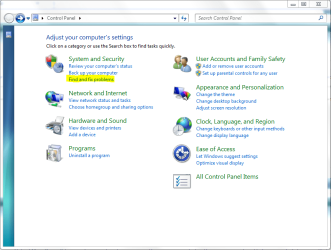
Likewise here. Lhyksus, I'd also suggest running Windows 7's troubleshooting resources. You can find them in the control panel under System and Security. It might not be CloneDrive that is causing the problem, and the troubleshooters can help you narrow it down.
 

Attachments

  • Capture.PNG
    Capture.PNG
    144.1 KB · Views: 36

My Computer

Computer Manufacturer/Model Number
Dell 8400
OS
Windows 7 Beta 1 b7000
CPU
Intel Pentium 4
Memory
4GB
Graphics Card(s)
ATI Radeon HD3450
Sound Card
Creative SoundBlaster Audigy 2
Monitor(s) Displays
Acer AL2016W
Screen Resolution
1680x1050
Hard Drives
1x500GB
1x100GB
Case
Dell 8400
Cooling
Standard
Keyboard
Dell Multimedia Keyboard
Mouse
Logitech MediaPlay
Internet Speed
Comcastic!
Thanks guys. Anyway I've got Gizmo running already. Seems to be working fine with windows7. I did not force the issue with virtual clone....got scared with it I guess.
 

My Computer

OS
Windows XP / Windows 7
PowerIso with Windows 7

I have tried a couple of Virtual drives software - UltraISO, Rocket Division Starburn, Magic ISO, Alcohol 120 - they will not work, but they will not harm the system. As for virtual clone????? - that tiny piece of software will kill your windows 7 beta - it will not shutdown. So for the time being lay-off your hand on virtual drives (Remember it's still beta version)

Take heed of this news:

May 23rd, 2008 by Long Zheng
Jump to comments
harddisk.jpg
Out of what little we know of the next version of Windows, this feature might just be the most interesting yet. A team at Microsoft is hiring developers to work on adding native support in Windows 7 for Virtual Hard Disks (VHD) - Microsoft’s semi-proprietary specification for single-file virtual machine hard disks. Their job posting reads,
Do you want to join the team that is bringing virtualization into the mainstream? In Windows 7, our team will be responsible for creating, mounting, performing I/O on, and dismounting VHDs (virtual hard disks) natively. Imagine being able to mount a VHD on any Windows machine, do some offline servicing and then boot from that same VHD. Or perhaps, taking an existing VHD you currently use within Virtual Server and boost performance by booting natively from it.
Do you want to have the opportunity to work on a great Core OS team at the heart of Windows? If you have big ideas and want to implement them, if you love writing code, if you love delving into operating system internals, if you want to work on high visibility projects with direct consumer and customer impact and still work in a very technical environment, then you will feel right at home in this team.
Virtualization technology has been a great success with Virtual Server and Hyper-V. With native OS support on the horizon it will become an even greater hit. Our team is making this a reality in Windows 7. Consider the simplicity of backup using a VHD, or the portability of a virtual disk backed by a single file. These are a few reasons why this technology is poised to be one of the greatest features in Windows 7–come help us achieve this goal.
Whilst “one of the great features in Windows 7″ might be a bit much, this is right up there with the new multi-line Calculator. No seriously, this has rather interesting implications for IT administrators and even home users.
For example, having an VHD dedicated to gaming with optimized system configurations is entirely feasible then. A dynamic VHD would mean it would only take up as much room as it needs, you could move the file on many system and have the same experience, but best of all, you can still enjoy the maximum native performance at the same time being able to load it as a virtual machine to maintain and configure without rebooting.
Considering how much we don’t know about Windows 7, this is extremely promising.
Update: A few people I’ve talked to have expressed their concern this may not make it to RTM and I think it’s a valid point at any time feature may be cut so I’ll just add that note for everyone else.
Update 2: Apparently the technology already exists in Windows 7 today, as indicated somewhat below...
But PowerIso normaly works on Windows 7. You can try it !
 

My Computer

OS
Windows7
Back
Top