Windows 7 Custom Explorer Background using Windows Style Builder 1.5

angelgz

New member
Local time
9:29 AM
Messages
9
Hi everyone!

I have an existing custom Win7 Theme and it works as is (with ExplorerFrame.dll replaced and Universal Theme Patch installed). It has a distinct Explorer background image for each type of Folder views in Windows 7 i.e. Small Icon, Content, Large Icons, Tiles, and Details. Two out of the six views do NOT have an image, while four of them do. See some examples here:

http://www.animesurreal.com/ex01.jpg

http://www.animesurreal.com/ex02.jpg
http://www.animesurreal.com/ex03.jpg

However, I want to add two background images to the above two types of views which does not have one. I use Windows Style Builder and managed to find the location of these images in the .msstyle file. Here's is what's weird: If I add an image larger than 200x200 pixels, Windows Style Builder will say "Error Testing MsStyles File!". Yet if I shrink the image to less than 200x200 pixels, everything works. Is there an area where I must adjust the maximum image size allowed?

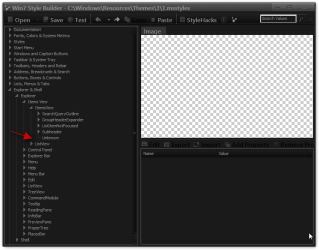
Here's the location of the item I am trying to edit in Style Builder. I've already imported the image but no matter what the style will NOT test or work at all with the image size I want.

http://www.animesurreal.com/ex04.jpg
http://www.animesurreal.com/ex05.jpg

Any help would be GREATLY appreciated. This error is driving me insane and I've tried every method I can find on this forum and no luck. And I know for a fact this can be done because I have another theme with 6 distinct images. Maybe I am not using the right software? Thanks again for any suggestions!

Thanks!!
Ryan
 

My Computer

OS
win 764
I will even offer to PAY someone to teach me this. However, you must teach not do it for me. I want to be able to do this in the future. I will gladly pay a "tuition" if that's what you want. Thanks!
 

My Computer

OS
win 764
Welcome to the Seven Forums
Are you using the 1.6.0 XMLs? I have 1.5
About Vista Style Builder.png

And I do not have that location :confused:
Win7 Style Builder - CWindowsResourcesThemes11.msstyles.png

I did not think you could do that with WSB

Jerry
 

My Computer

Computer type
Laptop
Computer Manufacturer/Model Number
Sager NP9170
OS
Win 7 Pro x64 / Win 10 Pro
CPU
Intel(R) Core(TM) i7-3630QM CPU @ 2.40GHz
Motherboard
CLEVO P170EM
Memory
12 GB
Graphics Card(s)
(1) Intel(R) HD Graphics 4000 (2) NVIDIA GeForce GTX 675M
Sound Card
(1) Realtek High Definition Audio (2) Intel(R) Display Aud
Monitor(s) Displays
17.3
Screen Resolution
1920x1080
Hard Drives
(1) Samsung 860 EVO 500GB(OS) (1) Samsung 860 EVO 500GB(Data)
Keyboard
Backlite
Antivirus
MSE, Malwarebytes Pro
Browser
Firefox
Other Info
DESKTOP: Custom-built.
OS: Win 10 Pro x64.
CASE: Rosewill R5.
CPU: Intel I5 4670K CPU @ 3.40GHz.
CPU COOLER: Cool Master Hyper 212 EVO.
MOTHERBOARD: Asus Z87-A.
MEMORY: Kingston HyperX 2x4 GB.
GPU: Nvidia Geforce 650 TI.
PSU: Corsair TX750.
DRIVES: (1) Samsung 840 120 GB SSD (2) Western Digital blue 500 GB 7200 RPM.
I have no idea how the original author did it. I am also using 1.5. When I opened the msstyle file, this location is already there. Apparently there must be a reference to this section for it to work properly but I don't know where the reference could be or which software he used.

UPDATE: I partially got it to work. It seems that there is a HARD 700KB limit on the total size of all 6 images. I shrink all other images and then I can add more or remove one add another. However I am pretty sure this limit can be controlled by user because I have another theme with all six images going way over 700KB.

Thanks,
Ryan
 
Last edited:

My Computer

OS
win 764
I have no idea how the original author did it. I am also using 1.5. When I opened the msstyle file, this location is already there. Apparently there must be a reference to this section for it to work properly but I don't know where the reference could be or which software he used.

UPDATE: I partially got it to work. It seems that there is a HARD 700KB limit on the total size of all 6 images. I shrink all other images and then I can add more or remove one add another. However I am pretty sure this limit can be controlled by user because I have another theme with all six images going way over 700KB.

Thanks,
Ryan
Cool would you post a link to those themes I would like to look at them.
Jerry
 

My Computer

Computer type
Laptop
Computer Manufacturer/Model Number
Sager NP9170
OS
Win 7 Pro x64 / Win 10 Pro
CPU
Intel(R) Core(TM) i7-3630QM CPU @ 2.40GHz
Motherboard
CLEVO P170EM
Memory
12 GB
Graphics Card(s)
(1) Intel(R) HD Graphics 4000 (2) NVIDIA GeForce GTX 675M
Sound Card
(1) Realtek High Definition Audio (2) Intel(R) Display Aud
Monitor(s) Displays
17.3
Screen Resolution
1920x1080
Hard Drives
(1) Samsung 860 EVO 500GB(OS) (1) Samsung 860 EVO 500GB(Data)
Keyboard
Backlite
Antivirus
MSE, Malwarebytes Pro
Browser
Firefox
Other Info
DESKTOP: Custom-built.
OS: Win 10 Pro x64.
CASE: Rosewill R5.
CPU: Intel I5 4670K CPU @ 3.40GHz.
CPU COOLER: Cool Master Hyper 212 EVO.
MOTHERBOARD: Asus Z87-A.
MEMORY: Kingston HyperX 2x4 GB.
GPU: Nvidia Geforce 650 TI.
PSU: Corsair TX750.
DRIVES: (1) Samsung 840 120 GB SSD (2) Western Digital blue 500 GB 7200 RPM.
Be my guest. Till this day I do not understand how these Chinese people can make such themes which I have no seen on any American theme sites. Upon further research, I found that they patch 4 additional files:

ExplorerFrame.dll (in both the system32 and sysWOW 64 folder)
Explorer.exe
Shell32.dll

Unfortunately the original site is written in Chinese and requires registration so I ported theme to my site here:

http://www.animesurreal.com/Aria_Theme.7z

Note that the ExplorerFrame.DLL must be patched for the explorer background to work. I have a feeling that the ExplorerFrame.DLL file has a reference to that <6> item that you do not have. Please kindly let me know if you are able to figure this out.

Thanks,
Ryan
 

My Computer

OS
win 764
Cool would you post a link to those themes I would like to look at them.
Jerry

Guess what dude, I found it. The reference to that field <6> in Itemsview is in the ExplorerFrame.dll file. HOWEVER, I am still at a jab to understand why I cannot add or replace the existing images in that msstyle file. :cry:
 

My Computer

OS
win 764
What did you find in the ExplorerFrame.dll?
I opened it up in Windows Style Builder without installing the ExplorerFrame.dll and get the <6> now. I know it's very confusing to me also.
Jerry
 

My Computer

Computer type
Laptop
Computer Manufacturer/Model Number
Sager NP9170
OS
Win 7 Pro x64 / Win 10 Pro
CPU
Intel(R) Core(TM) i7-3630QM CPU @ 2.40GHz
Motherboard
CLEVO P170EM
Memory
12 GB
Graphics Card(s)
(1) Intel(R) HD Graphics 4000 (2) NVIDIA GeForce GTX 675M
Sound Card
(1) Realtek High Definition Audio (2) Intel(R) Display Aud
Monitor(s) Displays
17.3
Screen Resolution
1920x1080
Hard Drives
(1) Samsung 860 EVO 500GB(OS) (1) Samsung 860 EVO 500GB(Data)
Keyboard
Backlite
Antivirus
MSE, Malwarebytes Pro
Browser
Firefox
Other Info
DESKTOP: Custom-built.
OS: Win 10 Pro x64.
CASE: Rosewill R5.
CPU: Intel I5 4670K CPU @ 3.40GHz.
CPU COOLER: Cool Master Hyper 212 EVO.
MOTHERBOARD: Asus Z87-A.
MEMORY: Kingston HyperX 2x4 GB.
GPU: Nvidia Geforce 650 TI.
PSU: Corsair TX750.
DRIVES: (1) Samsung 840 120 GB SSD (2) Western Digital blue 500 GB 7200 RPM.
You realize that under <6>, sub-paths 2 and 6 does not have an actual image but only a 31x25 white square. Try adding your own pictures -- you'll fail to test if the file is too big. I had success only with files smaller than 100kb in size.

The ExplorerFrame.DLL has a reference in it that says something like:

</UIViewHeader>
<element id="atom(UICollectionHost)" layout="filllayout()" background="themeable(dtb(ItemsView, 6, 1), argb(0,0,0,0))" padding="rect(4rp,0,0,0)"/>
</LineScroller>

There are six of those references pointing to the each of the six sub-paths of the msstyle file under <6>.

I am very sure that the size restriction does NOT come from the ExplorerFrame.DLL file because the same file can be used with a different theme with bigger explorer background images in it.
 

My Computer

OS
win 764
What did you find in the ExplorerFrame.dll?
I opened it up in Windows Style Builder without installing the ExplorerFrame.dll and get the <6> now. I know it's very confusing to me also.
Jerry

Here's the other one I am talking about that has an entirely different set of images under <6>, using the same ExplorerFrame.DLL.

http://www.animesurreal.com/Aria_Dark.7z
 

My Computer

OS
win 764
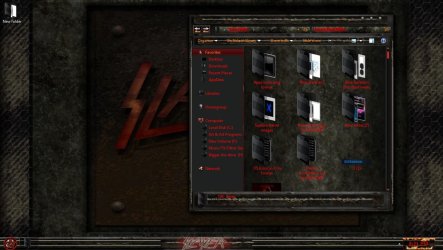
hello there angelgz a guy name mr u and myself were the first to actually get the explorer images to work in the explorer windows. the reason you can't get images in every single folder is that explorer will only take so much before you start to get an error with the msstyle itself. The larger image per folder the faster you will run out of room to put any images in any of the other folders. I have actually stopped doing really large images and doing repeating patterns so i can get an image in every single folder look. So if you want images in all the folders you will have to resize all the other images to give you the proper space to do the other folders I hope this helps you. See in this image here i used a stone look for this theme and i found it to smooth and not jumpy like using images like on that theme there
 

Attachments

  • Untitled.jpg
    Untitled.jpg
    297.2 KB · Views: 82

My Computer

Computer Manufacturer/Model Number
Alienware Aurora
OS
windows 7 rtm
CPU
amd 64 fx51
Motherboard
asus sk8n
Memory
3gb
Monitor(s) Displays
32inch element
Hard Drives
120gb
1tb
1tb
1.5tb
hello there angelgz a guy name mr u and myself were the first to actually get the explorer images to work in the explorer windows. the reason you can't get images in every single folder is that explorer will only take so much before you start to get an error with the msstyle itself. The larger image per folder the faster you will run out of room to put any images in any of the other folders. I have actually stopped doing really large images and doing repeating patterns so i can get an image in every single folder look. So if you want images in all the folders you will have to resize all the other images to give you the proper space to do the other folders I hope this helps you. See in this image here i used a stone look for this theme and i found it to smooth and not jumpy like using images like on that theme there

Mr. nofx1994,

This is really great information and thank you for replying. I did suspect that the size is an issue. On the first theme I posted, going over 670KB in total image size will certainly give me an error. However, the 2nd theme I posted has a total image size of 910KB and yet works perfectly fine. That's why I am confused because it seems that this limit is arbitrary.

Thanks,
Ryan


My Computer

OS
win 764
you are welcome for the information but on the two themes did you do the same amount of images per theme like did you do images for all the folders or did you only do images for certain folder looks.
 

My Computer

Computer Manufacturer/Model Number
Alienware Aurora
OS
windows 7 rtm
CPU
amd 64 fx51
Motherboard
asus sk8n
Memory
3gb
Monitor(s) Displays
32inch element
Hard Drives
120gb
1tb
1tb
1.5tb
you are welcome for the information but on the two themes did you do the same amount of images per theme like did you do images for all the folders or did you only do images for certain folder looks.

The first theme has four image for 4 out of 6 views under explorer totaling 670KB. The 2nd theme has an image for all 6 views totaling 910KB. When I try to add 2 more images to the first, it won't let me at all. Note that I didn't make these themes, only trying to modify them to the way I want.
 

My Computer

OS
win 764
Back
Top