Windows 7 delays before the password insert BOX appears on startup. This happened after i cleaned the registry for skype and then reinstalled skype. How can i fix it?
Ive experienced the same issue before and honestly its nothing to get excited about i dont believe. Because windows is finishing flushing out the registry entries that were marked for deletion. As for getting rid of the problem; well there really is no set way per say; to get rid of that as its just the way windows operates I believe(someone correct me here if wrong please)
Also have a pretty bad speaker setup which is a klipsch promedia 5.1 surround speaker setup with huge subwoofer and lg blu ray player/writer. Also a hp officejet pro 8600 plus wireless all in one and a logitech s7500 webcam.
Windows 7 delays before the password insert BOX appears on startup. This happened after i cleaned the registry for skype and then reinstalled skype. How can i fix it?
How long is the actual delay?. Can you give some idea of the time involved, is it minutes or really only 20 or 30 seconds.
You could check your Startup, click on Start Button then all Programs & scroll down to Startup, left click & see what is loaded during Computer start up.
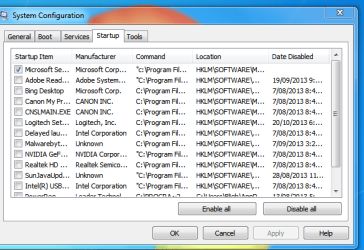
Also type sysconfig in the search slot after clicking on the Start Button, This will open a small window, select the Start up tab & it will show a list of programs that load during computer start. If Skype is loading at this time I would untick it. Actually you really only need your anti-virus program to load during start up
Attached is screen shot of System Configuration.
Last edited:
My Computer
At a glance
Windows 7 Home Premium 64 bit sp1Intel i5 3570 3.4Ghz Ivy Bridge SKT 1155 quad...G-Skill Rip Jaws 16Gb (8x2) DDR3 -1600 PC3 12...Gigabyte NVIDIA GT610 1Gb DDR3 810/1200 PCI-E...
Have you checked the "Start up" in System Configuration that I mentioned in Post#3. Untick everything except your anti virus program.
Starting Skype when your computer starts will slow it down quite a lot.
My Computer
At a glance
Windows 7 Home Premium 64 bit sp1Intel i5 3570 3.4Ghz Ivy Bridge SKT 1155 quad...G-Skill Rip Jaws 16Gb (8x2) DDR3 -1600 PC3 12...Gigabyte NVIDIA GT610 1Gb DDR3 810/1200 PCI-E...
Have you checked the "Start up" in System Configuration that I mentioned in Post#3. Untick everything except your anti virus program.
Starting Skype when your computer starts will slow it down quite a lot.