Solved Windows 7 Dell Laptop: Problem with wireless adapter or access point

vickins

New member
Local time
12:43 PM
Messages
3
Hello, I'm having a problems connecting to my wireless internet. At first it was working, then since the electric went out for a few secs. Most of the time this problem pops up when i try to connect. My Desktop PC still connects with no problems. Recently if I restart the laptop it can 'sometimes' connect. Its getting a bit annoying on having to restart my router every time i turn on my laptop and i don't like the idea of keeping it on all the whole time.
I have a Dell Studio 1555 Laptop, with Windows 7 Home Premium 64 Bit, I also have Itunes and Norton anti virus 360.

****
When I tried to troubleshoot, it gave me these details:
Windows Network Diagnostics Publisher details
Issues found
Problem with wireless adapter or access point
Investigate router or access point issues Failed
Reset the wireless adapter Completed
****

Description . . . . . . . . . . : Dell Wireless 1397 WLAN Mini-Card

Please give me any details of how to solve this problem.
 

My Computer My Computer

Computer type
Laptop
Computer Manufacturer/Model Number
Dell Studio 1555
OS
Windows 7 Home Premium 64bit
Memory
4 gb
Antivirus
Norton 360
Browser
Google Chrome
Welcome to Seven Forums,

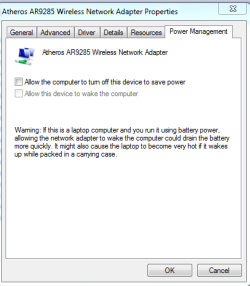
You may try to disable the Power Management mode of your Wi-Fi adapter from Device Manager, see attached image.
If that didn't help, I'd download your Wi-Fi's latest driver from the Manufacturer's site.
 

Attachments

  • Power Management-wireless.PNG
    Power Management-wireless.PNG
    10.6 KB · Views: 34

My Computer My Computer

Computer Manufacturer/Model Number
Lenovo Desktop/Samsung Laptop
OS
Win7 & Win8 64bit
CPU
Intel i5
Internet Speed
Charter-20 Mbps
Antivirus
Avast
Browser
FF, IE9 and Chrome
Hello, I'm having a problems connecting to my wireless internet. At first it was working, then since the electric went out for a few secs. Most of the time this problem pops up when i try to connect. My Desktop PC still connects with no problems. Recently if I restart the laptop it can 'sometimes' connect. Its getting a bit annoying on having to restart my router every time i turn on my laptop and i don't like the idea of keeping it on all the whole time.
I have a Dell Studio 1555 Laptop, with Windows 7 Home Premium 64 Bit, I also have Itunes and Norton anti virus 360.

****
When I tried to troubleshoot, it gave me these details:
Windows Network Diagnostics Publisher details
Issues found
Problem with wireless adapter or access point
Investigate router or access point issues Failed
Reset the wireless adapter Completed
****

Description . . . . . . . . . . : Dell Wireless 1397 WLAN Mini-Card

Please give me any details of how to solve this problem.

Hi vickins,

Welcome to Seven forums.

In addition to what 2xg suggested you could also check this link below:

http://dell.to/10oaHss

NOTE: Steps suggested are for Vista but it would be similar for Windows 7 as well.

Also, let us know the model number for the wireless card installed on the system. Keep your wireless drivers updated:

Updating Dell Drivers

Keep us posted with the results so we can advise you further.
 

My Computer My Computer

Computer type
PC/Desktop
OS
Winndows 7 32 bit
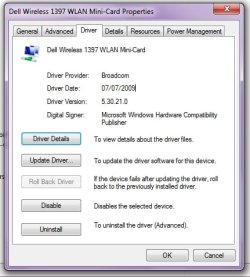
Hello, Thank you for the reply's. I did what 2XG suggested but sadly it hasn't solved it. I find it happens mostly when my other PC is turned on.... Most likely a coincidence. Also I have kept my driver updated. This is the info i have on my wireless card ...find attached image. Again thank you for the reply's. :)
 

Attachments

  • wireless card info.jpg
    wireless card info.jpg
    32.2 KB · Views: 25

My Computer My Computer

Computer type
Laptop
Computer Manufacturer/Model Number
Dell Studio 1555
OS
Windows 7 Home Premium 64bit
Memory
4 gb
Antivirus
Norton 360
Browser
Google Chrome
Hello, Thank you for the reply's. I did what 2XG suggested but sadly it hasn't solved it. I find it happens mostly when my other PC is turned on.... Most likely a coincidence. Also I have kept my driver updated. This is the info i have on my wireless card ...find attached image. Again thank you for the reply's. :)

Hi vickins,

Thanks for your reply. Please download the latest wireless card drivers from here:

1397 wireless driver

Then check the system and let us know. If the issue still persists then check the system under safe mode with networking and let us know how it operates there:

http://www.sevenforums.com/tutorials/69585-safe-mode.html

Keep us posted with the results so we can advise you further.
 

My Computer My Computer

Computer type
PC/Desktop
OS
Winndows 7 32 bit
Ive been checking my connection this week and every time it's been working!!! Thank you for the Help! :D
 

My Computer My Computer

Computer type
Laptop
Computer Manufacturer/Model Number
Dell Studio 1555
OS
Windows 7 Home Premium 64bit
Memory
4 gb
Antivirus
Norton 360
Browser
Google Chrome
Ive been checking my connection this week and every time it's been working!!! Thank you for the Help! :D

Hi vickins,

Its great to hear system is working fine now. Please mark the thread as solved so other users can also benefit from it.

If you have any further queries, please feel free to contact us.
 

My Computer My Computer

Computer type
PC/Desktop
OS
Winndows 7 32 bit
I have Dell Studio 1555 running Windows 7 Home Premium 32 Bit (Originally MS Vista was installed but I was given a free upgrade to Windows 7 32 Bit by Dell). Since last 3-4 days I am unable to connect to WiFi although it displays as available wifi network. My WiFi adapter/driver is Intel WiFi Link 5100 AGN (version 12.4.1.4 date 26/mar/2009. File name is netw5v32.sys) (as shown under Device Manager). I tried 'System Restore' on 2nd June 2015 (it had done a Windows Update on 31st May 2015) and now when I do System Restore it shows 'Undo System Restore' and does not complete the process by giving an error. I also tried 'Update Driver' but it says driver is latest.

Please somebody help me in resolving this.

Thanks in advance.
 

My Computer My Computer

Computer type
Laptop
Computer Manufacturer/Model Number
Dell / Studio 1555
OS
Windows 7 Home Premium 32 Bit
CPU
Intel Core2 Duo T6500 @ 2.10 GHz
Memory
4.0 GB
Graphics Card(s)
ATI Mobility Radeon HD 4500 Series
Hard Drives
500 GB. WDC WD5000BEVT-75ZAT0 ATA Device
Antivirus
Quick Heal Internet Security 16.00 32 Bit
Browser
Chrome Version 43.0.2357.81
You can try to load defaults in BIOS.

Ask about System Restore in "Backup and Restore" section.
 

My Computer My Computer

Computer type
PC/Desktop
Computer Manufacturer/Model Number
Custom Build
OS
Windows 7 Ultimate x64 SP1
CPU
AMD Phenom 2 1090T
Motherboard
Gigabyte GA-890FXA-UD5
Memory
2x8GB Kingston HyperX Fury Black 1600Mhz Unganged
Graphics Card(s)
MSI GTX 970 Gaming 4G
Sound Card
Realtek On-Board HD 7.1 Audio / Logitech G35
Monitor(s) Displays
3xAcer GD245HQ
Screen Resolution
1920x1080
Hard Drives
Samsung 850 Pro 512GB SSD - OS /
WD Caviar Black SATA 3 - 1 TBx2 - Dynamic RAID 0 /
WD Caviar Green SATA 2 - 640GBx2 - Dynamic RAID 0 /
WD Caviar Green SATA 2 - 640GB - Internal Backup /
Seagate Barracude SATA 3 - 3TB - External Backup/ Sync
PSU
HighPower 1000W
Case
Cooler Master HAF 932
Cooling
Noctua NH-D14
Keyboard
Logitech G19
Mouse
Logitech G500
Internet Speed
100/4 Mbit Cable (100GB quota)
Antivirus
ZoneAlarm Extreme Security / MBAM Pro / MBAE Free / SAS Free
Browser
IE 11 - Firefox - Chrome
Other Info
Logitech F710/ G27/ G940/ Z5500 // TrackIR 5 // Nvidia 3D Surround Vision
Hi,

Thanks for the reply. How do I load defaults in BIOS ?
 

My Computer My Computer

Computer type
Laptop
Computer Manufacturer/Model Number
Dell / Studio 1555
OS
Windows 7 Home Premium 32 Bit
CPU
Intel Core2 Duo T6500 @ 2.10 GHz
Memory
4.0 GB
Graphics Card(s)
ATI Mobility Radeon HD 4500 Series
Hard Drives
500 GB. WDC WD5000BEVT-75ZAT0 ATA Device
Antivirus
Quick Heal Internet Security 16.00 32 Bit
Browser
Chrome Version 43.0.2357.81
Back
Top