
Windows 7 Desktop problem: Annoying bar at the top..help

StrafeFC

New member
Local time
9:18 PM
Messages
2
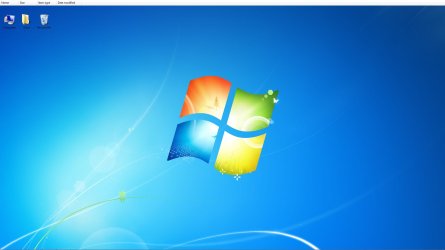
Hi I am new to the forums and couldn't find which forum topic to post this in so I posted it in here. I started my computer up that has Windows Professional SP1 x64 and noticed that not only are my icons rearranged horizontally but that I have this annoying bar at the top of the desktop which seems to remind me of a column header.

You can add options to it such as arrange by date modified etc just like when you right click on the desktop to arrange icons. It is definitely not my taskbar as that is on the bottom on autohide.

Everytime I hit refresh all the icons move down an icon space amount so they eventually end up on the bottom of the screen. Here is a screenshot of the annoying task bar that I can't seem to get rid of. I tried googling to no avail. Anyone got any suggestions any help would be appreciated.

I attached a picture below of the problem at the top of the desktop
 

Attachments
  • AnnoyingBar.jpg
    AnnoyingBar.jpg
    68.7 KB · Views: 54

My Computer My Computer

At a glance

Windows 7 Professional x64
OS
Windows 7 Professional x64
Hello StrafeFC, and welcome to Seven Forums.

That is an odd issue. If you have not already, you might see if restarting the computer may clear it if it was just some sort of glitch.

If no luck, then you could do a system restore using a restore point dated when you did not have this to hopefully fix it.

Hope this helps,
Shawn
 

My Computer My Computer

At a glance

64-bit Windows 11 Pro for WorkstationsIntel i7-8700K OC'd to 5 GHz64 GB (4x16GB) G.SKILL TridentZ RGB DDR4 3600...ASUS ROG-STRIX-GTX1080TI-O11G-GAMING
Computer type
PC/Desktop
Computer Manufacturer/Model Number
Self built custom
OS
64-bit Windows 11 Pro for Workstations
CPU
Intel i7-8700K OC'd to 5 GHz
Motherboard
ASUS ROG Maximus XI Formula Z390
Memory
64 GB (4x16GB) G.SKILL TridentZ RGB DDR4 3600 MHz
Graphics Card(s)
ASUS ROG-STRIX-GTX1080TI-O11G-GAMING
Sound Card
Integrated
Monitor(s) Displays
2 x Samsung Odyssey G7 27"
Screen Resolution
2560x1440
Hard Drives
1TB Samsung 990 PRO M.2,
4TB Samsung 990 PRO PRO M.2,
TerraMaster F8 SSD Plus NAS
PSU
Seasonic Prime Titanium 850W
Case
Thermaltake Core P3
Cooling
Corsair Hydro H115i
Keyboard
Logitech wireless K800
Mouse
Logitech MX Master 4
Internet Speed
2 Gb/s Download and 100 Mb/s Upload
Antivirus
Malwarebyte Anti-Malware Premium
Browser
Google Chrome
Other Info
Logitech Z625 speaker system,
Logitech BRIO 4K Pro webcam,
HP Color LaserJet Pro MFP M477fdn,
APC SMART-UPS RT 1000 XL - SURT1000XLI,
Galaxy S23 Plus phone
Thanks for the advice and the friendly welcome. It worked! though getting to that point was quite a journey. Once I finished system restore my computer rebooted and asked me if I wanted to repair it or start it up normally.

I didnt think I neede a repair so I chose start normally and lo and behold when I login I am treated to a black screen with only a mouse cursor.

Luckily task manager was still working after a ctrl-alt-delete and I was able to start a new process to open my web browser and google the error. It was suggested that I use windows repair, though that turned out not to work as I came back to the same black screen.

After a few minutes everything including the desktop loaded and a message came up saying restore point was successful. So now the desktop is restored and looking good even after reinstalling all the updates done over the last day or so.

Only problem now is that the action center thinks I don't have virus protection but I do. No biggie thanks for all the help.
 

My Computer My Computer

At a glance

Windows 7 Professional x64
OS
Windows 7 Professional x64
Reinstall your anti-virus software.
 

My Computer My Computer

At a glance

MS Windows 7 Ultimate SP1 64-bitAMD A10-4600M6.00 GB Dual-Channel DDR3 @ 798MHz (11-11-12-28)AMD Radeon HD 7660G
Computer Manufacturer/Model Number
Toshiba Satellite S875D-S7239 laptop
OS
MS Windows 7 Ultimate SP1 64-bit
CPU
AMD A10-4600M
Motherboard
AMD Pumori (Socket FT1)
Memory
6.00 GB Dual-Channel DDR3 @ 798MHz (11-11-12-28)
Graphics Card(s)
AMD Radeon HD 7660G
Sound Card
High Definition Audio Device
Monitor(s) Displays
Generic PnP Monitor (1600x900@60Hz)
Screen Resolution
1600x900@60Hz
Hard Drives
SSD 119GB Corsair CSSD-V128GB2 ATA Device
Keyboard
Standard PS/2 Keyboard
Mouse
HP Wireless Optical Mobile Mouse Model FHA-3410
Internet Speed
What the local pub, local coffee shop offers.
Other Info
Optical Drive:MATSHITA BD-CMB UJ160B ATA Device


Also have an Asus ha1002xp netbook with Win 7 Ultimate installed.
StrafeFC,

That's great news. If reinstalling your AV program doesn't get rid of the Action Center message, then you could use the steps in the tutorial below to turn off that specific message. That message should be listed as soon as you open the Action Center like the example one used in the tutorial.

http://www.sevenforums.com/tutorials/364-action-center-change-message-settings.html

Hope this helps,
Shawn
 

My Computer My Computer

At a glance

64-bit Windows 11 Pro for WorkstationsIntel i7-8700K OC'd to 5 GHz64 GB (4x16GB) G.SKILL TridentZ RGB DDR4 3600...ASUS ROG-STRIX-GTX1080TI-O11G-GAMING
Computer type
PC/Desktop
Computer Manufacturer/Model Number
Self built custom
OS
64-bit Windows 11 Pro for Workstations
CPU
Intel i7-8700K OC'd to 5 GHz
Motherboard
ASUS ROG Maximus XI Formula Z390
Memory
64 GB (4x16GB) G.SKILL TridentZ RGB DDR4 3600 MHz
Graphics Card(s)
ASUS ROG-STRIX-GTX1080TI-O11G-GAMING
Sound Card
Integrated
Monitor(s) Displays
2 x Samsung Odyssey G7 27"
Screen Resolution
2560x1440
Hard Drives
1TB Samsung 990 PRO M.2,
4TB Samsung 990 PRO PRO M.2,
TerraMaster F8 SSD Plus NAS
PSU
Seasonic Prime Titanium 850W
Case
Thermaltake Core P3
Cooling
Corsair Hydro H115i
Keyboard
Logitech wireless K800
Mouse
Logitech MX Master 4
Internet Speed
2 Gb/s Download and 100 Mb/s Upload
Antivirus
Malwarebyte Anti-Malware Premium
Browser
Google Chrome
Other Info
Logitech Z625 speaker system,
Logitech BRIO 4K Pro webcam,
HP Color LaserJet Pro MFP M477fdn,
APC SMART-UPS RT 1000 XL - SURT1000XLI,
Galaxy S23 Plus phone
Back
Top