Windows 7 display looks "strange"

boss123

New member
Local time
5:29 PM
Messages
2
Hi. I just got rid of a nasty virus and now my Windows 7 is looking real weird.

I took a print screen: http://img832.imageshack.us/img832/4889/unledtos.png

How do I get it to look like it did in its default setting? When it looks like this is there something wrong? Please help. Thanks in advance.
 

My Computer My Computer

OS
Windows 7 Ultimate x64
It seems Windows Aero was disabled, which makes the look of the UI revert to XP style.

You should be able to re-enable Aero by selecting an Aero theme under Control Panel -> Personalization.
 

My Computer My Computer

Computer type
PC/Desktop
Computer Manufacturer/Model Number
Custom-built
OS
Windows 7 Professional SP1 32-bit
CPU
Intel Core 2 Duo E6600 2.4GHz
Motherboard
Asus PL5D2
Memory
4GB DDR2-667 (4x1GB in dual-channel config)
Graphics Card(s)
nVidia GeForce 9800 GT
Sound Card
Creative X-Fi XtremeMusic
Monitor(s) Displays
Acer P236H
Screen Resolution
1920x1200 (DVI)
Hard Drives
OCZ SSD Vertex Plus 60GB SATA (Firmware 3.55), 64MB cache
Hitachi HD321KJ SATA, 320GB, 7200rpm, 16MB cache
PSU
Antec TruePower 2.0
Case
Cooler Master Centurion
Cooling
Too many fans
Keyboard
Standard
Mouse
Microsoft wireless optical mouse
Internet Speed
AT&T U-verse (18mbit/sec)
Antivirus
Microsoft Security Essentials
Browser
Firefox
Other Info
Other devices:
Compaq CQ-60 laptop
Google Nexus 7 (2012) tablet
Nvidia SHIELD tablet (US/LTE)
Hardkernel ODROID-XU single-board computer (Samsung Exynos 5420)
Thank you so much. Now how do I get my taskbar items to look like this?

Pic: http://res2.windows.microsoft.com/resbox/en/Windows%207/main/23392f14-d249-4b2e-a960-7682ccfe6dea_0.jpg

Like right now if I open a few firefox windows, it's spread all out across the taskbar. I want it like before where it just had the Firefox logo with all the windows showing in small boxes when I put the mouse over it.

Basically, is there a way to just restore everything back to default like how it looked when I first got the computer? Because I notice font sizes and everything changed as well.
 

My Computer My Computer

OS
Windows 7 Ultimate x64
try tuneup utility trail. it has a windows theme option, this can repair your theme files.
 

My Computer My Computer

OS
Windows 7 Home Premium 32bit
CPU
intel e5400 2.7ghz fsb 800mhz
Motherboard
asus p5kpl am/ps
Memory
2*1 gb 800mhz
Graphics Card(s)
not installed, using internal(g31 chipset)
Sound Card
realtek
Monitor(s) Displays
acer (1366*768)
Screen Resolution
1366*768
Hard Drives
seagate bracuda 250gb 7200rpm
PSU
450 watt
Case
foxin
Cooling
intel package with processor
Keyboard
microsoft ps/2
Mouse
microsoft usb
Internet Speed
mobile dail-up connection
Other Info
frontech headfone, creative 2.0 speaker,
Thank you so much. Now how do I get my taskbar items to look like this?

Pic: http://res2.windows.microsoft.com/r...in/23392f14-d249-4b2e-a960-7682ccfe6dea_0.jpg

Like right now if I open a few firefox windows, it's spread all out across the taskbar. I want it like before where it just had the Firefox logo with all the windows showing in small boxes when I put the mouse over it.

Basically, is there a way to just restore everything back to default like how it looked when I first got the computer? Because I notice font sizes and everything changed as well.

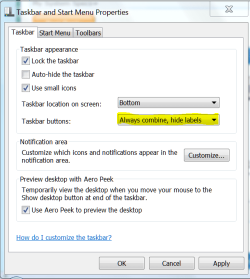
Hello Boss123, right click anywhere on a blank space of the taskbar then under the taskbar buttons area select the "always combine, hide labels" option from the drop down menu.

Capture.PNG

Capture 2.PNG
 

My Computer My Computer

Computer type
PC/Desktop
Computer Manufacturer/Model Number
My own abomination, I call it the Money Pit
OS
Windows 10 Pro x 2/Windows 11 Home
CPU
Intel i7 2600K @ 3.40 GHz
Motherboard
ASUS Sabertooth P67
Memory
Corsair Vengeance 16GB DDR3 1600MHz CL8 Dual Channel Kit
Graphics Card(s)
EVGA GeForce RTX 3080 XC3 ULTRA GAMING 10GB GDDR6X
Sound Card
Onboard Realtek or Nvidia High Definition Audio (HDMI)
Monitor(s) Displays
Samsung JS7000 50" SUHD TV or Samsung 27" FHD 60Hz 8ms GTG V
Screen Resolution
1920 x 1080
Hard Drives
1 x Samsung 870 EVO 250 GB SSD (Windows 10 Pro), 1 x Samsung 850 EVO 250 GB SSD (Windows 10 Pro)
PSU
Corsair AX860 - 860W Modular Power Supply
Case
Phanteks Enthoo Luxe Full Tower Case - Black
Cooling
CORSAIR Hydro Series H150i PRO RGB 360mm Liquid CPU Cooler
Keyboard
Logitech K830 Illuminated Living-Room Keyboard
Mouse
Logitech MX Anywhere 2S Wireless Mouse
Internet Speed
100 Mbps
Antivirus
ESET Internet Security
Browser
Latest Version Of Firefox & Microsoft Edge Chromium Stable
Other Info
LG Super Multi Blue Internal Blu-ray Disk Rewriter - BH10LS30
6x2 HDMI Switcher (6 inputs, 2 outputs) so I can send the output of my Cable Box, Roku, or any my 4 computers to either my TV or Monitor separately or simultaneously.
first right click on the taskbar then goto properties ,unmark "use small icons", and last part is- select the first option from "taskbar button"

now apply and ok

thats all
 

My Computer My Computer

OS
Windows 7 Home Premium 32bit
CPU
intel e5400 2.7ghz fsb 800mhz
Motherboard
asus p5kpl am/ps
Memory
2*1 gb 800mhz
Graphics Card(s)
not installed, using internal(g31 chipset)
Sound Card
realtek
Monitor(s) Displays
acer (1366*768)
Screen Resolution
1366*768
Hard Drives
seagate bracuda 250gb 7200rpm
PSU
450 watt
Case
foxin
Cooling
intel package with processor
Keyboard
microsoft ps/2
Mouse
microsoft usb
Internet Speed
mobile dail-up connection
Other Info
frontech headfone, creative 2.0 speaker,
Back
Top