Windows 7 does not shutdown lately

kmetek

Banned
Local time
7:59 PM
Messages
28

My Computer

Computer type
PC/Desktop
OS
WIN 7 ULT 64
CPU
I5 2500K
Motherboard
ASROCK Z68 E4G3
Memory
SAMSUNG 8GB
Graphics Card(s)
MSI HAWK GTX 460
Monitor(s) Displays
HP ZR24W
Screen Resolution
1900 X 1200
Hard Drives
INTEL SSD 320 120GB
PSU
CORSAIR TX2 650W M
Case
FRACTAL DESIGN DEFINE R4 BLACK
Keyboard
LOGITECH
Mouse
MX 518
Internet Speed
100 / 10
Antivirus
AVAST
Browser
FIREFOX

My Computer

Computer type
Laptop
Computer Manufacturer/Model Number
Acer 5733Z
OS
Windows 7 Professional 32bit
CPU
P6200 @ 2.13GHz
Memory
2043 MB
Graphics Card(s)
Intel HD graphics
Hard Drives
C: Total - 49899 MB; D: Total - 149999; E: Total - 149999 MB; F: Total - 123107 MB;
Antivirus
Microsoft Security Essentials, ESET NOD 32
Browser
Mozilla

My Computer

Computer type
PC/Desktop
Computer Manufacturer/Model Number
Custom Built
OS
Windows 7 Professional x64
CPU
Intel i5 quad processor
Motherboard
DP67BG
Memory
16 GB
Graphics Card(s)
Radeon HD 5770
Sound Card
Realtek High Definition Audio
Monitor(s) Displays
Samsung SyncMaster
Screen Resolution
1920X1080
Hard Drives
WD 2TB (SATA Internal)
WD 1TB (USB External)
PSU
Corsair GS800
Case
Tower (Generic)
Cooling
3 Internal Fans
Keyboard
MS Wireless
Mouse
MS Optical Wired
Internet Speed
54 mbps
Antivirus
Emsisoft
Browser
IE-Version 9, Palemoon-Version 24.2.0
i know with power off button but i have it on schedule to power off but it don't.....spinning logo "logging off" and nothing happens.....
 

My Computer

Computer type
PC/Desktop
OS
WIN 7 ULT 64
CPU
I5 2500K
Motherboard
ASROCK Z68 E4G3
Memory
SAMSUNG 8GB
Graphics Card(s)
MSI HAWK GTX 460
Monitor(s) Displays
HP ZR24W
Screen Resolution
1900 X 1200
Hard Drives
INTEL SSD 320 120GB
PSU
CORSAIR TX2 650W M
Case
FRACTAL DESIGN DEFINE R4 BLACK
Keyboard
LOGITECH
Mouse
MX 518
Internet Speed
100 / 10
Antivirus
AVAST
Browser
FIREFOX
it goes on and on and on saying "Shutting Down"
 

My Computer

Computer type
Laptop
Computer Manufacturer/Model Number
Acer 5733Z
OS
Windows 7 Professional 32bit
CPU
P6200 @ 2.13GHz
Memory
2043 MB
Graphics Card(s)
Intel HD graphics
Hard Drives
C: Total - 49899 MB; D: Total - 149999; E: Total - 149999 MB; F: Total - 123107 MB;
Antivirus
Microsoft Security Essentials, ESET NOD 32
Browser
Mozilla
i know with power off button but i have it on schedule to power off but it don't.....spinning logo "logging off" and nothing happens.....

The following steps provide the correct method for shutting down using Windows Task Scheduler;

1. Go to start menu and open Control Panel.
2. Click on Administrative Tools.
3. You will see many options. Click on Task Scheduler.
4. Click on Create Basic Task in the right-hand pane.
5. Write a suitable task name and description. For example, Name: Auto Shutdown. Description: Shutdown my computer automatically at 1:30 am.
6. Click next. Task Trigger screen will open.
7. Choose the number of times you want this task to take place.
For example: If you choose daily, your computer will shutdown daily at 1:30 am. Similarly, if you choose weekly or monthly, your computer will shutdown automatically at 1:30 am every week or month. Now, click next and choose the time and date for your computer to shutdown automatically and click next.
8. Choose Start a Program and then, click next.
9. Type C:\Windows\System32\Shutdown.exe in the Program/script and type /s in Add arguments and click next.
10. Review your information and click Finish. You're almost done!
11. After clicking Finish, the Task Scheduler window should open again. Now we'll just check our task. Keep scrolling down, till you find the Auto Shutdown Task. You're done! Your computer should Shutdown at the mentioned time and day.

Is the above method what you used? If not, how did you schedule the task?
 

My Computer

Computer type
PC/Desktop
Computer Manufacturer/Model Number
Custom Built
OS
Windows 7 Professional x64
CPU
Intel i5 quad processor
Motherboard
DP67BG
Memory
16 GB
Graphics Card(s)
Radeon HD 5770
Sound Card
Realtek High Definition Audio
Monitor(s) Displays
Samsung SyncMaster
Screen Resolution
1920X1080
Hard Drives
WD 2TB (SATA Internal)
WD 1TB (USB External)
PSU
Corsair GS800
Case
Tower (Generic)
Cooling
3 Internal Fans
Keyboard
MS Wireless
Mouse
MS Optical Wired
Internet Speed
54 mbps
Antivirus
Emsisoft
Browser
IE-Version 9, Palemoon-Version 24.2.0
it goes on and on and on saying "Shutting Down"

This may help;

Change what happens when you press the power button

You can choose what happens when you press the power button on your computer case (or the edge of your laptop). The computer can shut down, sleep, hibernate, or do nothing. You can apply the same setting to all of your power plans or you can apply different settings to individual power plans.

To apply the same setting to all power plans
1. Open Power Options by clicking the Start button , clicking Control Panel, clicking System and Security, and then clicking Power Options.
2. On the Select a power plan page, in the left pane, click Choose what the power buttons do.
3. On the Define power buttons and turn on password protection page, next to When I press the power button, choose what you want your computer to do when you press the power button.
(If you have a laptop, you can choose separate settings for when your laptop is running on battery and when it's plugged in.)
4. Click Save changes.

HTH
 

My Computer

Computer type
PC/Desktop
Computer Manufacturer/Model Number
Custom Built
OS
Windows 7 Professional x64
CPU
Intel i5 quad processor
Motherboard
DP67BG
Memory
16 GB
Graphics Card(s)
Radeon HD 5770
Sound Card
Realtek High Definition Audio
Monitor(s) Displays
Samsung SyncMaster
Screen Resolution
1920X1080
Hard Drives
WD 2TB (SATA Internal)
WD 1TB (USB External)
PSU
Corsair GS800
Case
Tower (Generic)
Cooling
3 Internal Fans
Keyboard
MS Wireless
Mouse
MS Optical Wired
Internet Speed
54 mbps
Antivirus
Emsisoft
Browser
IE-Version 9, Palemoon-Version 24.2.0
i already did everything with task scheduler, it kicks in every time punctual but the PC itself doesn't shuts down.....it must be something else :(
 

My Computer

Computer type
PC/Desktop
OS
WIN 7 ULT 64
CPU
I5 2500K
Motherboard
ASROCK Z68 E4G3
Memory
SAMSUNG 8GB
Graphics Card(s)
MSI HAWK GTX 460
Monitor(s) Displays
HP ZR24W
Screen Resolution
1900 X 1200
Hard Drives
INTEL SSD 320 120GB
PSU
CORSAIR TX2 650W M
Case
FRACTAL DESIGN DEFINE R4 BLACK
Keyboard
LOGITECH
Mouse
MX 518
Internet Speed
100 / 10
Antivirus
AVAST
Browser
FIREFOX
i already did everything with task scheduler, it kicks in every time punctual but the PC itself doesn't shuts down.....it must be something else :(

I have encountered a couple of issues where "Task Scheduler" has failed to run scheduled tasks. My solution was to use a free 3rd party program, System Scheduler. At this time, I have not had any problems with the program failing to run any scheduled task. If you want to try it, visit the following link;

Download System Scheduler for Windows, iDailyDiary, Autorota, Launchkey, Clipboards, Daily Diary

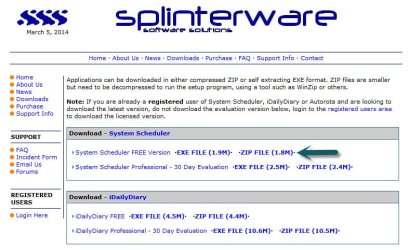
Be sure to download the "Free" version, see image;

System Scheduler.jpg
 

My Computer

Computer type
PC/Desktop
Computer Manufacturer/Model Number
Custom Built
OS
Windows 7 Professional x64
CPU
Intel i5 quad processor
Motherboard
DP67BG
Memory
16 GB
Graphics Card(s)
Radeon HD 5770
Sound Card
Realtek High Definition Audio
Monitor(s) Displays
Samsung SyncMaster
Screen Resolution
1920X1080
Hard Drives
WD 2TB (SATA Internal)
WD 1TB (USB External)
PSU
Corsair GS800
Case
Tower (Generic)
Cooling
3 Internal Fans
Keyboard
MS Wireless
Mouse
MS Optical Wired
Internet Speed
54 mbps
Antivirus
Emsisoft
Browser
IE-Version 9, Palemoon-Version 24.2.0
it's not that...even if i click regullary via shut down procesure on start button it just hangs on "logging of".
 

My Computer

Computer type
PC/Desktop
OS
WIN 7 ULT 64
CPU
I5 2500K
Motherboard
ASROCK Z68 E4G3
Memory
SAMSUNG 8GB
Graphics Card(s)
MSI HAWK GTX 460
Monitor(s) Displays
HP ZR24W
Screen Resolution
1900 X 1200
Hard Drives
INTEL SSD 320 120GB
PSU
CORSAIR TX2 650W M
Case
FRACTAL DESIGN DEFINE R4 BLACK
Keyboard
LOGITECH
Mouse
MX 518
Internet Speed
100 / 10
Antivirus
AVAST
Browser
FIREFOX

My Computer

Computer type
PC/Desktop
Computer Manufacturer/Model Number
Skylake Special #666
OS
Windows 10 Pro x64
CPU
Intel Core i7 6700K
Motherboard
Asus Sabertooth Z170 Mark 1
Memory
GSkill TridentZ RGB 16GB 3600 16-16-16-36
Graphics Card(s)
EVGA GTX 980 Ti SC x2
Sound Card
Realtek High Definition
Monitor(s) Displays
AOC G2460PG
Screen Resolution
1920 x 1080 144Hz
Hard Drives
Samsung 860 Pro 256GB, Seagate Barracuda 4TB x2
PSU
EVGA 1000 P2, EVGA White Custom Braided Cables
Case
Corsair Vengeance C70 Gunmetal Black
Cooling
Corsair H100i v2, Corsair ML120 x2, Thermal Grizzly Kryonaut
Keyboard
Logitech G910 Orion Spectrum
Mouse
Logitech G700s
Internet Speed
Verizon Fios Quantum Gateway 75/75
Antivirus
Windows Defender, Malwarebytes Free 3.8.3
Browser
Chrome
Other Info
Corsair SP120 x4, LG Blu-ray Drive, Durabrand HT-395 100 Watt Dolby Digital Amp, Corsair H2100 Wireless 7.1 Headset
pretty sure, it just hangs on "logging off" logo in the middle.....
sfc didn't found anything....it's pretty weird....system restore back to week or two?
 

My Computer

Computer type
PC/Desktop
OS
WIN 7 ULT 64
CPU
I5 2500K
Motherboard
ASROCK Z68 E4G3
Memory
SAMSUNG 8GB
Graphics Card(s)
MSI HAWK GTX 460
Monitor(s) Displays
HP ZR24W
Screen Resolution
1900 X 1200
Hard Drives
INTEL SSD 320 120GB
PSU
CORSAIR TX2 650W M
Case
FRACTAL DESIGN DEFINE R4 BLACK
Keyboard
LOGITECH
Mouse
MX 518
Internet Speed
100 / 10
Antivirus
AVAST
Browser
FIREFOX
update in safe mode with networking it starts and shut down normally....so what gives?
 

My Computer

Computer type
PC/Desktop
OS
WIN 7 ULT 64
CPU
I5 2500K
Motherboard
ASROCK Z68 E4G3
Memory
SAMSUNG 8GB
Graphics Card(s)
MSI HAWK GTX 460
Monitor(s) Displays
HP ZR24W
Screen Resolution
1900 X 1200
Hard Drives
INTEL SSD 320 120GB
PSU
CORSAIR TX2 650W M
Case
FRACTAL DESIGN DEFINE R4 BLACK
Keyboard
LOGITECH
Mouse
MX 518
Internet Speed
100 / 10
Antivirus
AVAST
Browser
FIREFOX
Have you run your antivirus recently? Do a full scan on whatever AV you have.

Back at 7:00AM PST
 

My Computer

Computer type
PC/Desktop
Computer Manufacturer/Model Number
Dell Vostro 400/Dell XPS 8700(Slightly Customized for me by Dell)/Toshiba Satellite T135
OS
Windows 7 Professional 32-bit/Windows 8 64-bit/Win7 Pro64-bit
CPU
Intel Core 2 Quad Q6600/Intel Core i7 4790/Intel Pentium
Memory
2GB/16GB/4GB
Graphics Card(s)
Intel G33/G31 Express(Vostro)/NVIDIA GeForce GTX 745(XPS)
Monitor(s) Displays
HP 2009m(Vostro)/ViewSonic VX2250wm-LED(XPS)
Screen Resolution
1600x900(Vostro)/1920x1080(XPS)
Hard Drives
Seagate ST3160815AS(Vostro)/Western Digital Blue(Satellite)
External:
Western Digital My Passport 0748
Samsung HM121HC
Keyboard
Dell L100)(Vostro)/Dell KB2133p(XPS)
Mouse
Dell M-UAV-DEL8(XPS)
Internet Speed
100 Mbit/s(Only when IPTV is plugged out)
Antivirus
Avast, Malwarebytes PRO
Browser
Internet Explorer 11
Other Info
Note: Names with slashes between two different parts mean that the left is my old desktop and the right is my old laptop and the middle is my new desktop.(Unless specified)
Ping is horrible for servers overseas in US and Europe.
New laptop:LG Gram(Not available in US) Processor:Intel Core i3 4th Gen Ultra Low Power RAM:4GB Hard Drive:SK Hynix OEM MSATA or M.2 Graphics:Intel HD
yes i did yesterday FULL SCAN and AVAST found 0.

msconfig

03.07.2014-08.07.png
 
Last edited:

My Computer

Computer type
PC/Desktop
OS
WIN 7 ULT 64
CPU
I5 2500K
Motherboard
ASROCK Z68 E4G3
Memory
SAMSUNG 8GB
Graphics Card(s)
MSI HAWK GTX 460
Monitor(s) Displays
HP ZR24W
Screen Resolution
1900 X 1200
Hard Drives
INTEL SSD 320 120GB
PSU
CORSAIR TX2 650W M
Case
FRACTAL DESIGN DEFINE R4 BLACK
Keyboard
LOGITECH
Mouse
MX 518
Internet Speed
100 / 10
Antivirus
AVAST
Browser
FIREFOX
I reccomend that you remove Advanced System Care and anything else made by IOBIT. it may be the problem.
 

My Computer

Computer type
PC/Desktop
Computer Manufacturer/Model Number
Dell Vostro 400/Dell XPS 8700(Slightly Customized for me by Dell)/Toshiba Satellite T135
OS
Windows 7 Professional 32-bit/Windows 8 64-bit/Win7 Pro64-bit
CPU
Intel Core 2 Quad Q6600/Intel Core i7 4790/Intel Pentium
Memory
2GB/16GB/4GB
Graphics Card(s)
Intel G33/G31 Express(Vostro)/NVIDIA GeForce GTX 745(XPS)
Monitor(s) Displays
HP 2009m(Vostro)/ViewSonic VX2250wm-LED(XPS)
Screen Resolution
1600x900(Vostro)/1920x1080(XPS)
Hard Drives
Seagate ST3160815AS(Vostro)/Western Digital Blue(Satellite)
External:
Western Digital My Passport 0748
Samsung HM121HC
Keyboard
Dell L100)(Vostro)/Dell KB2133p(XPS)
Mouse
Dell M-UAV-DEL8(XPS)
Internet Speed
100 Mbit/s(Only when IPTV is plugged out)
Antivirus
Avast, Malwarebytes PRO
Browser
Internet Explorer 11
Other Info
Note: Names with slashes between two different parts mean that the left is my old desktop and the right is my old laptop and the middle is my new desktop.(Unless specified)
Ping is horrible for servers overseas in US and Europe.
New laptop:LG Gram(Not available in US) Processor:Intel Core i3 4th Gen Ultra Low Power RAM:4GB Hard Drive:SK Hynix OEM MSATA or M.2 Graphics:Intel HD
ok i'll try that.
 

My Computer

Computer type
PC/Desktop
OS
WIN 7 ULT 64
CPU
I5 2500K
Motherboard
ASROCK Z68 E4G3
Memory
SAMSUNG 8GB
Graphics Card(s)
MSI HAWK GTX 460
Monitor(s) Displays
HP ZR24W
Screen Resolution
1900 X 1200
Hard Drives
INTEL SSD 320 120GB
PSU
CORSAIR TX2 650W M
Case
FRACTAL DESIGN DEFINE R4 BLACK
Keyboard
LOGITECH
Mouse
MX 518
Internet Speed
100 / 10
Antivirus
AVAST
Browser
FIREFOX
that fixed it....advanced system care was the problem.
 

My Computer

Computer type
PC/Desktop
OS
WIN 7 ULT 64
CPU
I5 2500K
Motherboard
ASROCK Z68 E4G3
Memory
SAMSUNG 8GB
Graphics Card(s)
MSI HAWK GTX 460
Monitor(s) Displays
HP ZR24W
Screen Resolution
1900 X 1200
Hard Drives
INTEL SSD 320 120GB
PSU
CORSAIR TX2 650W M
Case
FRACTAL DESIGN DEFINE R4 BLACK
Keyboard
LOGITECH
Mouse
MX 518
Internet Speed
100 / 10
Antivirus
AVAST
Browser
FIREFOX
From now on, avoid anything made by IOBIT.
 

My Computer

Computer type
PC/Desktop
Computer Manufacturer/Model Number
Dell Vostro 400/Dell XPS 8700(Slightly Customized for me by Dell)/Toshiba Satellite T135
OS
Windows 7 Professional 32-bit/Windows 8 64-bit/Win7 Pro64-bit
CPU
Intel Core 2 Quad Q6600/Intel Core i7 4790/Intel Pentium
Memory
2GB/16GB/4GB
Graphics Card(s)
Intel G33/G31 Express(Vostro)/NVIDIA GeForce GTX 745(XPS)
Monitor(s) Displays
HP 2009m(Vostro)/ViewSonic VX2250wm-LED(XPS)
Screen Resolution
1600x900(Vostro)/1920x1080(XPS)
Hard Drives
Seagate ST3160815AS(Vostro)/Western Digital Blue(Satellite)
External:
Western Digital My Passport 0748
Samsung HM121HC
Keyboard
Dell L100)(Vostro)/Dell KB2133p(XPS)
Mouse
Dell M-UAV-DEL8(XPS)
Internet Speed
100 Mbit/s(Only when IPTV is plugged out)
Antivirus
Avast, Malwarebytes PRO
Browser
Internet Explorer 11
Other Info
Note: Names with slashes between two different parts mean that the left is my old desktop and the right is my old laptop and the middle is my new desktop.(Unless specified)
Ping is horrible for servers overseas in US and Europe.
New laptop:LG Gram(Not available in US) Processor:Intel Core i3 4th Gen Ultra Low Power RAM:4GB Hard Drive:SK Hynix OEM MSATA or M.2 Graphics:Intel HD
didn't know that hehe....
 

My Computer

Computer type
PC/Desktop
OS
WIN 7 ULT 64
CPU
I5 2500K
Motherboard
ASROCK Z68 E4G3
Memory
SAMSUNG 8GB
Graphics Card(s)
MSI HAWK GTX 460
Monitor(s) Displays
HP ZR24W
Screen Resolution
1900 X 1200
Hard Drives
INTEL SSD 320 120GB
PSU
CORSAIR TX2 650W M
Case
FRACTAL DESIGN DEFINE R4 BLACK
Keyboard
LOGITECH
Mouse
MX 518
Internet Speed
100 / 10
Antivirus
AVAST
Browser
FIREFOX
Back
Top