starsplash
New member
- Local time
- 1:47 AM
- Messages
- 14
Hello.
1. Problem
So this thing happened after I was chilling on my laptop on battery. Windows didn't warn me that I was low on battery, so it went to sleep for a few seconds, then booted up without me touching anything (thought I had time plug it in quickly) and then boom - it shut down. Laptop plugged in, I was ready to boot the laptop up. I was ready that it'd tell me that "last shutdown wasn't done properly, blablabla" - I was familiar with this, so I had two options:
- "Launch Startup Repair (recommended)"
- "Start Windows normally"
First I tried to "start normally" - as you may think already, it didn't "start normally", it booted to the ASUS' recovery wizard (to make things clear, Startup Repair also boots to ASUS' recovery wizard), which looks like this. So these three options from the last picture:
Recover Windows to first partition only
This option deletes only the first partition and allows you to keep other partitions, and to create a new system partition as drive "C".
Recover Windows to entire HD
This option deletes all partitions from your hard disk drive and creates a new system partition as drive "C".
Recover Windows to entire HD with two partitions
This option deletes all partitions from your hard drive and creates two new partitions "C" (60%) and "D" (40%).
My thought is to keep the files and get Windows bootable again, so none of these options are for me.
2. Investigating
Well, first off I plugged a live Linux USB (which I have for critical situations) to the computer to verify if my files are still there - and they were.
Then I thought I'd create a Windows 7 installation USB and use system repair. For the installation image I had an untouched Windows 7 Home Premium x64 SP1 (X17-58997.iso). To create the USB installation I used Universal USB Installer.
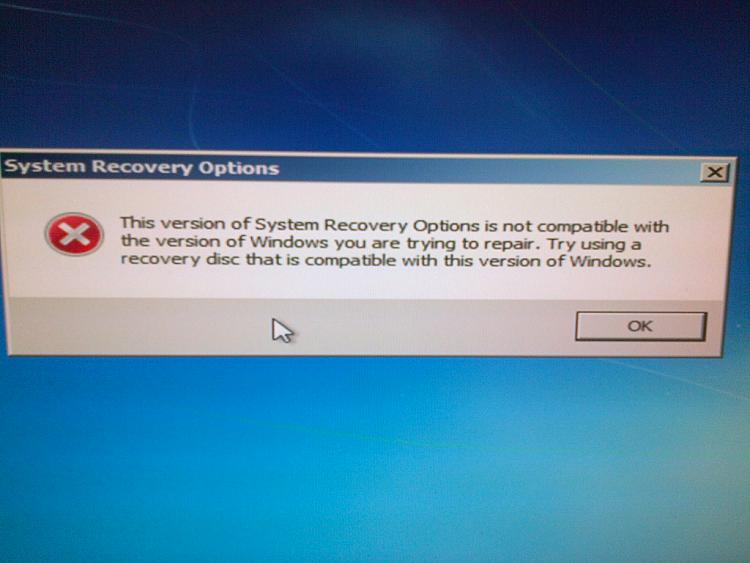
Changed the boot order in BIOS and booted to here. There I thought I'd choose "Repair your computer". And then boom, this error: "This version of system recovery is not compatible with the version of Windows you are trying to repair. Try using a recovery disc that is compatible with this version of Windows."
Ok, so what does it mean by "this version"? I do have Win7 Home Premium x64 installed. Is the iso (X17-58997.iso) wrong? Under the laptop on the sticker it says "X16-96072", but by googling "X16-96072.iso" I couldn't find any links that are alive.
Many suggestions around the web suggested to use Microsoft's Software Recovery page. So I entered the asked product key from the sticker on the bottom of the laptop. And the website responded: "The product key you entered appears to be for software that was pre-installed on a device. Please contact the device manufacturer for software recovery options." The second time I tried it told me: "We encountered a problem with the product key you provided. Please visit the Microsoft Support Contact Us page for assistance.". So that did not help.
So what else do I have... I've got a 25GB recovery partition. And I also found that I've got six ASUS recovery disks that I burned three years ago when I got the laptop. I'm not sure what these disks are for - probably when something should happen with the recovery partition.
Another thing people suggested around the web was to check the MBR - fix it, repair it, etc. Someone said to use the utilities included on the Hiren's BootCD.
(since it's a bit late and I'm tired, I haven't investigated this MBR option much. I wanted to create the topic before I go to sleep so I could see what replies I have had when I wake up)
I'm not sure if I missed anything. If I did, I'll edit the post as soon as possible.
I'm very grateful to any of you who's willing to help me, give me some suggestions.
starsplash
1. Problem
So this thing happened after I was chilling on my laptop on battery. Windows didn't warn me that I was low on battery, so it went to sleep for a few seconds, then booted up without me touching anything (thought I had time plug it in quickly) and then boom - it shut down. Laptop plugged in, I was ready to boot the laptop up. I was ready that it'd tell me that "last shutdown wasn't done properly, blablabla" - I was familiar with this, so I had two options:
- "Launch Startup Repair (recommended)"
- "Start Windows normally"
First I tried to "start normally" - as you may think already, it didn't "start normally", it booted to the ASUS' recovery wizard (to make things clear, Startup Repair also boots to ASUS' recovery wizard), which looks like this. So these three options from the last picture:
Recover Windows to first partition only
This option deletes only the first partition and allows you to keep other partitions, and to create a new system partition as drive "C".
Recover Windows to entire HD
This option deletes all partitions from your hard disk drive and creates a new system partition as drive "C".
Recover Windows to entire HD with two partitions
This option deletes all partitions from your hard drive and creates two new partitions "C" (60%) and "D" (40%).
My thought is to keep the files and get Windows bootable again, so none of these options are for me.
2. Investigating
Well, first off I plugged a live Linux USB (which I have for critical situations) to the computer to verify if my files are still there - and they were.
Then I thought I'd create a Windows 7 installation USB and use system repair. For the installation image I had an untouched Windows 7 Home Premium x64 SP1 (X17-58997.iso). To create the USB installation I used Universal USB Installer.
Changed the boot order in BIOS and booted to here. There I thought I'd choose "Repair your computer". And then boom, this error: "This version of system recovery is not compatible with the version of Windows you are trying to repair. Try using a recovery disc that is compatible with this version of Windows."
Ok, so what does it mean by "this version"? I do have Win7 Home Premium x64 installed. Is the iso (X17-58997.iso) wrong? Under the laptop on the sticker it says "X16-96072", but by googling "X16-96072.iso" I couldn't find any links that are alive.
Many suggestions around the web suggested to use Microsoft's Software Recovery page. So I entered the asked product key from the sticker on the bottom of the laptop. And the website responded: "The product key you entered appears to be for software that was pre-installed on a device. Please contact the device manufacturer for software recovery options." The second time I tried it told me: "We encountered a problem with the product key you provided. Please visit the Microsoft Support Contact Us page for assistance.". So that did not help.
So what else do I have... I've got a 25GB recovery partition. And I also found that I've got six ASUS recovery disks that I burned three years ago when I got the laptop. I'm not sure what these disks are for - probably when something should happen with the recovery partition.
Another thing people suggested around the web was to check the MBR - fix it, repair it, etc. Someone said to use the utilities included on the Hiren's BootCD.
(since it's a bit late and I'm tired, I haven't investigated this MBR option much. I wanted to create the topic before I go to sleep so I could see what replies I have had when I wake up)
I'm not sure if I missed anything. If I did, I'll edit the post as soon as possible.
I'm very grateful to any of you who's willing to help me, give me some suggestions.
starsplash
My Computer
At a glance
Windows 7 Pro 32bit
- Computer type
- PC/Desktop
- OS
- Windows 7 Pro 32bit