Windows 7 Doesn't Recognize My Graphics Card

capnsuave

New member
Local time
9:38 AM
Messages
5
Hi All!

I have a nvidia graphics card (Not sure what kind, It's part of the problem) and windows 7 does not recognize it. It branded my computer with "Standard VGA Graphics Adapter."

I was wondering if there is anyway to check my graphics card in this state or fix this problem without knowing what kind of driver to update

Thanks in advance!
 

My Computer

OS
Windows 7
Welcome to seven forums. We can try going to device manager>right click on display adpater>properties>details tab>drop down menu> hardware id(first in list) Copy and Paste the hardware id string. This should allow us to figure out your video card. Or try typing in the search box sys info click on system info>then components>display. however if it is'nt reconizing it I don't think it will show up, but might as well give it a try.Thanks. Fabe
 

My Computer

Computer Manufacturer/Model Number
Self Built
OS
Windows 7 ultimate 64 bit / XP Home sp3
CPU
intel Core 2 Duo E8400 3.0ghz
Motherboard
Asus P5ND bios 1401
Memory
8 gigs 1066 OCZ Fata1ty
Graphics Card(s)
EVGA GTX 580 Call of Duty Black Ops Edition
Sound Card
Creative Soundblaster Audigy 2zs
Monitor(s) Displays
Asus 24in LCD's 2MS X2
Screen Resolution
1920x1080p @60Hz
Hard Drives
WD Caviar 500 Black/ WD Caviar 200 Blue
PSU
OCZ 700W GameXtreme
Case
NZXT Apollo
Cooling
Corsair H50 CPU/120mm x3 /60mm x2 /Corsair Dominator Ram
Keyboard
Logitech Bluetooth Wireless MX5000
Mouse
Logitech Bluetooth Wireless MX1000
Internet Speed
Download 19.83 Upload 0.97
Other Info
Logitech Z2300 Speakers/ Bose Noise Cancelling Headphones/Avermedia PCI-e Hybrid TV Bravo/Epson NX415 all in one/ 4 Port Powered USB Hub/ LG 10x Bluray Burner /TSST Corp DVDRW External
Welcome to seven forums. We can try going to device manager>right click on display adpater>properties>details tab>drop down menu> hardware id(first in list) Copy and Paste the hardware id string. This should allow us to figure out your video card. Or try typing in the search box sys info click on system info>then components>display. however if it is'nt reconizing it I don't think it will show up, but might as well give it a try.Thanks. Fabe

Thanks for the reply!

PCI\VEN_10DE&DEV_0531&SUBSYS_30CF103C&REV_A2

That is the first one. I downloaded and installed the windows 7 version drivers of what i believe is my graphics card but i dont think it could find the hardware because it failed to install
 

My Computer

OS
Windows 7
Hi All!

I have a nvidia graphics card (Not sure what kind, It's part of the problem) and windows 7 does not recognize it. It branded my computer with "Standard VGA Graphics Adapter."

I was wondering if there is anyway to check my graphics card in this state or fix this problem without knowing what kind of driver to update

Thanks in advance!

If you know the model of the system, google it, and you'll find the GPU. After this, install drivers for it. Did you upgrade or clean install? If you upgraded, there should be a old.windows folder in C: and the drivers should be there.
 

My Computer

Computer Manufacturer/Model Number
Acer Veriton m261 (modded)
OS
Win 7 pro 64-bit, Ubuntu 9.10 64-bit
CPU
Intel Core 2 Duo 2.60 Ghz
Motherboard
Whatever came with the system
Memory
4 gb ddr2 667 Mhz
Graphics Card(s)
NVidia Geforce 9400 GS 1 gb ddr2 550 mhz GPU
Sound Card
Intergrated
Monitor(s) Displays
samsung SyncMaster 2494 24"
Screen Resolution
1080p
Hard Drives
80gb - IDE
750gb - SATA II
PSU
whatever came with the system
Case
whatever came with the system
Cooling
whatever came with the system
Keyboard
Apple Aluminium (Awesome)
Mouse
Some awesome Dell mouse, really good.
Internet Speed
100mbps
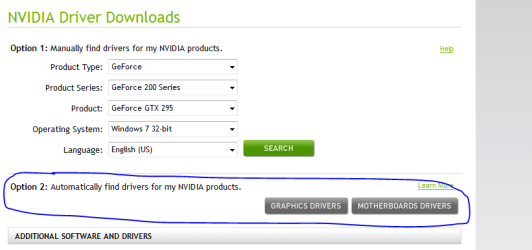
since its an nvidia card, you can go to nvidia and have the site scan your computer for the right drivers.
 

Attachments

  • nvidia.PNG
    nvidia.PNG
    12.7 KB · Views: 381

My Computer

Computer Manufacturer/Model Number
Rig 1
OS
Windows 7 Ultimate x64
CPU
AMD Phenom II X4 940 Black Edition @ 3.4GHz (AM2+)
Motherboard
Gigabyte GA-MA790X-UD4P (AM2+)
Memory
Corsair CM2X4096-8500C5 (4 X 2GB)
Graphics Card(s)
XFX Radeon HD 5770 / Diamond Radeon HD 5770 CrossFireX
Sound Card
Asus Xonar DS (PCI)
Monitor(s) Displays
Samsung SyncMaster 932bw+ (3)
Screen Resolution
4320x900
Hard Drives
OCZ Vertex 2 80 GB - Windows 7 System --
WD Caviar Black 1TB - Music, Movies, Vids, Pics --
WD Caviar Black 640GB - User Profiles & Games --
WD My Book 320GB external
PSU
Corsair CMPSU-750TX
Case
Cooler Master HAF 932
Cooling
Corsair Hydro Series H50
Keyboard
Logitech Desktop Wave
Mouse
Logitech LX8 Laser
Internet Speed
20 down / 2 up
Other Info
LG GGC-H20L Blu-Ray / HDDVD combo --
Hauppauge HVR-1250 --
Silverstone MFP-51 --
Logitech Webcam C600
Coolness - I tried looking for drivers provided and they only have vista and down. I found my windows.old file but the only things in it are from my program files before the upgrade. I don't see anything of importance

mpcrsc562 - It says it doesn't support windows 7


I originally did the upgrade because my computer is a HP Pavilion dv9700 with 3gb of ram and (what im almost positive is) a nVIDIA GeForce 6800 graphics card. It is decently new and has top notch stuff, no reason to be messing up so badly...Yet my games barely even ran. I believe that vista is not best for video games (In my personal opinion) So I thought the upgrade might help. Is there no hope until nVIDIA and HP come out with windows 7 drivers and abilities?

Thanks for all the replies and help!
 

My Computer

OS
Windows 7
I tried the scan again from the nVIDIA website and figured out that it doesnt support opera browsing. I tried it on internet explorer and it gave me this VVV

Product Current:

Standard VGA Graphics Adapter 16.38 The manufacturer of this system requires that you download the driver for your GPU from their support site.
 

My Computer

OS
Windows 7
It sounds like you're running into a common problem with notebooks with onboard graphics: the manufacturer (HP) may have given the graphics device a custom ID, so the generic nVidia installer isn't detecting the device.

It's possible to modify an .inf file in the installer to match the device ID of your graphics device. (I haven't done it, myself.)

Alternately, download drivers from HP for the device. If there are no Win7 drivers, Vista drivers will probably work. Once Win7 recognizes the device as something other than a generic VGA adapter, you may be able to install the nVidia drivers. (You may get something current through Windows Update.)

What's the exact model? "pavilion DV9700" doesn't define it well enough; there are many DV9700 models.
 

My Computer

Computer Manufacturer/Model Number
homegrown
OS
Windows 7 Pro X64 SP1
CPU
Intel Core I7-3930k
Motherboard
Asus P9X79 Pro
Memory
16 GB Gskill DDR3-2133
Graphics Card(s)
eVGA GTX680
Sound Card
Creative X-Fi Titanium
Monitor(s) Displays
As PA246Q
Screen Resolution
1920 X 1200
Hard Drives
Corsair Force GT, 120 GB
WDC 1.5TB Caviar Black
PSU
PCP&C Silencer 750 Crossfire
Case
Silverstone FT02
Cooling
Noctua NH-D14
Keyboard
cheap Logitech USB
Mouse
Microsoft Intellimouse Explorer (old optical) USB
Internet Speed
6Mb cable
Other Info
Pioneer BDR-205
Samsung SH-203B
Monsoon 5.1 speakers
Hey everyone! Thanks for the fantastic suggestions and replies. I decided to start over and reinstall the OS completely...and one of the windows updates waiting for me on my first login was the driver!! It was the strangest thing...
 

My Computer

OS
Windows 7
Hey everyone! Thanks for the fantastic suggestions and replies. I decided to start over and reinstall the OS completely...and one of the windows updates waiting for me on my first login was the driver!! It was the strangest thing...

Yeah, but i was just gonna add, the vista driver most likely would have worked. Good luck!
 

My Computer

Computer Manufacturer/Model Number
Acer Veriton m261 (modded)
OS
Win 7 pro 64-bit, Ubuntu 9.10 64-bit
CPU
Intel Core 2 Duo 2.60 Ghz
Motherboard
Whatever came with the system
Memory
4 gb ddr2 667 Mhz
Graphics Card(s)
NVidia Geforce 9400 GS 1 gb ddr2 550 mhz GPU
Sound Card
Intergrated
Monitor(s) Displays
samsung SyncMaster 2494 24"
Screen Resolution
1080p
Hard Drives
80gb - IDE
750gb - SATA II
PSU
whatever came with the system
Case
whatever came with the system
Cooling
whatever came with the system
Keyboard
Apple Aluminium (Awesome)
Mouse
Some awesome Dell mouse, really good.
Internet Speed
100mbps
It's possible to modify an .inf file in the installer to match the device ID of your graphics device.
Or download them from laptopvideo2go.com.
 

My Computer

Computer Manufacturer/Model Number
Sony Vaio FZ21Z
OS
Windows 7 Ultimate x64 ®™
CPU
Intel Core 2 Duo (2.2 GHz)
Motherboard
Sony (Intel Chipset)
Memory
2x 2GB Corsair (667 MHz)
Graphics Card(s)
NVIDIA 8600M GS (256MB)
Sound Card
Sigmatel
Monitor(s) Displays
15.4" TFT X-Black
Screen Resolution
1280x800
Hard Drives
Western Digital 300GB Scorpio Black (7200rpm)
Mouse
Logitech Anywhere MX
Internet Speed
Sky 5MB

My Computer

Computer Manufacturer/Model Number
self built
OS
Windows 7 Professional 64-bit
CPU
Intel E8400 3GHz
Motherboard
Intel DX48BT2
Memory
Kingston PC3-10700H 4Gb
Graphics Card(s)
XFX Radeon HD 5850 BlackEd.
Sound Card
Asus Xonar DG
Monitor(s) Displays
2x Samsung SM-T220HD 22"
Screen Resolution
1680x1050 on two monitors
Hard Drives
OCZ Vertex 2 120gb 3.5" (OS)
Seagate Momentus XT 500gb
Samsung F3 1Tb (games)
2x Samsung F1 1Tb
PSU
Thermaltake ToughPower 850w
Case
Thermaltake Armor
Cooling
Scythe Mugen II
Keyboard
Microsoft Comfort Curve USB
Mouse
Razer Diamondback 3G
Internet Speed
8128/443
Welcome to seven forums. We can try going to device manager>right click on display adpater>properties>details tab>drop down menu> hardware id(first in list) Copy and Paste the hardware id string. This should allow us to figure out your video card. Or try typing in the search box sys info click on system info>then components>display. however if it is'nt reconizing it I don't think it will show up, but might as well give it a try.Thanks. Fabe

I have the exact same problem man, my number thing is
PCI\VEN_10DE&DEV_025B&SUBSYS_013B10DE&REV_A3

Can you help me as well?

I checked my graphics card and the actual thing says its a NVidia Quadro 4. how ever my comp cannot detect it and i can't play any games at all :(
 

My Computer

OS
Windows Seven ultimate
Welcome to seven forums. We can try going to device manager>right click on display adpater>properties>details tab>drop down menu> hardware id(first in list) Copy and Paste the hardware id string. This should allow us to figure out your video card. Or try typing in the search box sys info click on system info>then components>display. however if it is'nt reconizing it I don't think it will show up, but might as well give it a try.Thanks. Fabe

I have the exact same problem man, my number thing is
PCI\VEN_10DE&DEV_025B&SUBSYS_013B10DE&REV_A3

Can you help me as well?

I checked my graphics card and the actual thing says its a NVidia Quadro 4. how ever my comp cannot detect it and i can't play any games at all :(


Has anyone been able to resolve this problem? I have the identical hardware id and have found out that it is infact the Nvidia Quadro 4 700. Problem is NVidia does not support it anymore so there is no compatible driver. Furthermore, the card is an old AGP configuration? So there is no way to get a new card that will fit into the motherboard that is Windows 7 friendly. Is this the case? I now have to buy an entire new computer? I thought I was going to be OK with just upgrading the OS. HELP!!! :confused:
 

My Computer

OS
Windows 7
Back
Top